
Sharp RP-TT70
Sharp RP-TT70 Vinyl Record Player Turntable User Manual
Model: RP-TT70
1. 제품 오버view
The Sharp RP-TT70 is a 12-inch vinyl record player turntable designed to deliver a rich audio experience with modern convenience. It features a classic wooden cabinet and comes with stereo bookshelf speakers. This belt-drive turntable supports multiple playback speeds and offers versatile connectivity options, including dual Bluetooth functionality.

Figure 1.1: Sharp RP-TT70 Turntable and Speakers. The turntable features a stylish wooden finish and a clear dust cover, flanked by two matching stereo bookshelf speakers.
2. 포함 사항
모든 품목이 들어 있는지 확인하려면 패키지 내용물을 확인하세요.
- Sharp RP-TT70 Turntable Unit
- 스테레오 북쉘프 스피커 (2개)
- 더스트 커버
- 전원 어댑터
- 사용 설명서 (본 문서)
3. 설정 지침
Follow these steps to set up your Sharp RP-TT70 turntable:
- 놓기: Place the turntable on a stable, level surface away from direct sunlight, heat sources, and excessive dust. Ensure adequate ventilation around the unit.
- 스피커 연결: Connect the included stereo bookshelf speakers to the "SPEAKER OUT" terminals on the rear of the turntable. Ensure correct polarity (positive to positive, negative to negative).
- 전원 연결: Connect the power adapter to the "POWER IN DC 12V" port on the rear of the turntable, then plug the adapter into a wall outlet.
- 먼지 커버: Carefully attach the dust cover to the hinges on the back of the turntable.

Figure 3.1: Rear Panel Connections. This image highlights the AUX-IN Jack, RCL (R&L) Speaker Out, Pitch (+)(-) Speed Calibration, and Power In DC 12V ports, crucial for proper setup.
4. 사용 설명서
4.1 LP 레코드 재생하기
- 전원 켜기: Turn the power knob to activate the turntable.
- 속도 선택: Adjust the speed selector to match the record's RPM (33 1/3, 45, or 78 RPM). For 45 RPM records, place the included 45 RPM adapter on the spindle.
- 장소 기록: 턴테이블 플래터 위에 LP 레코드를 조심스럽게 올려놓으세요.
- 리프트 톤암: 큐잉 레버를 사용하여 톤암을 부드럽게 들어 올리십시오.
- 스타일러스 위치 지정: 톤암을 레코드의 원하는 시작 홈 위로 이동시키세요.
- 하단 톤암: 큐잉 레버를 사용하여 톤암을 천천히 내리십시오. 스타일러스가 레코드에 닿으면 재생이 시작됩니다.
- 볼륨 조절: Adjust the volume using the volume knob on the turntable.
- 자동 정지 기능: The turntable features an auto-stop function that will automatically stop the platter rotation when the record reaches its end.
4.2 블루투스 연결
The Sharp RP-TT70 supports dual Bluetooth connectivity, allowing you to stream music in two ways:
- Streaming Vinyl to External Bluetooth Device:
- 턴테이블의 전원이 켜져 있는지 확인하세요.
- Activate Bluetooth pairing mode on your external Bluetooth speaker or headphones.
- The turntable will automatically search for and connect to nearby Bluetooth devices. The Bluetooth indicator light will illuminate when connected.
- Once connected, audio from your vinyl record will play through the external Bluetooth device.
- Streaming Music from Your Phone to Turntable Speakers:
- 턴테이블의 전원이 켜져 있는지 확인하세요.
- On your smartphone or other Bluetooth-enabled device, search for "Sharp RP-TT70" in the Bluetooth settings.
- Select the turntable to pair. The Bluetooth indicator light will illuminate when connected.
- Once connected, audio from your phone will play through the turntable's included stereo speakers.
4.3 Auxiliary Input (AUX-IN)
Connect external audio devices such as smartphones, tablets, or MP3 players using a 3.5mm audio cable (not included) to the AUX-IN jack on the rear of the turntable. Switch the input mode to AUX to play audio through the turntable's speakers.
4.4 헤드폰 잭
For private listening, connect headphones to the headphone jack located on the front panel of the turntable.
5. 유지관리
적절한 유지 관리는 턴테이블의 수명과 최적의 성능을 보장합니다.
- 먼지 커버: 턴테이블을 사용하지 않을 때는 먼지 덮개를 항상 닫아 플래터와 스타일러스에 먼지가 쌓이는 것을 방지하십시오.
- 스타일러스 청소하기: Gently clean the stylus regularly using a soft brush designed for turntable styli. Brush from back to front.
- 턴테이블 청소하기: 턴테이블과 스피커는 부드럽고 마른 천으로 닦아주세요. 연마성 세척제나 용제를 사용하지 마세요.
- Cartridge and Stylus Replacement: The RP-TT70 uses a changeable ceramic cartridge and stylus. If sound quality degrades or the stylus is damaged, replace it with a compatible Sharp replacement part.
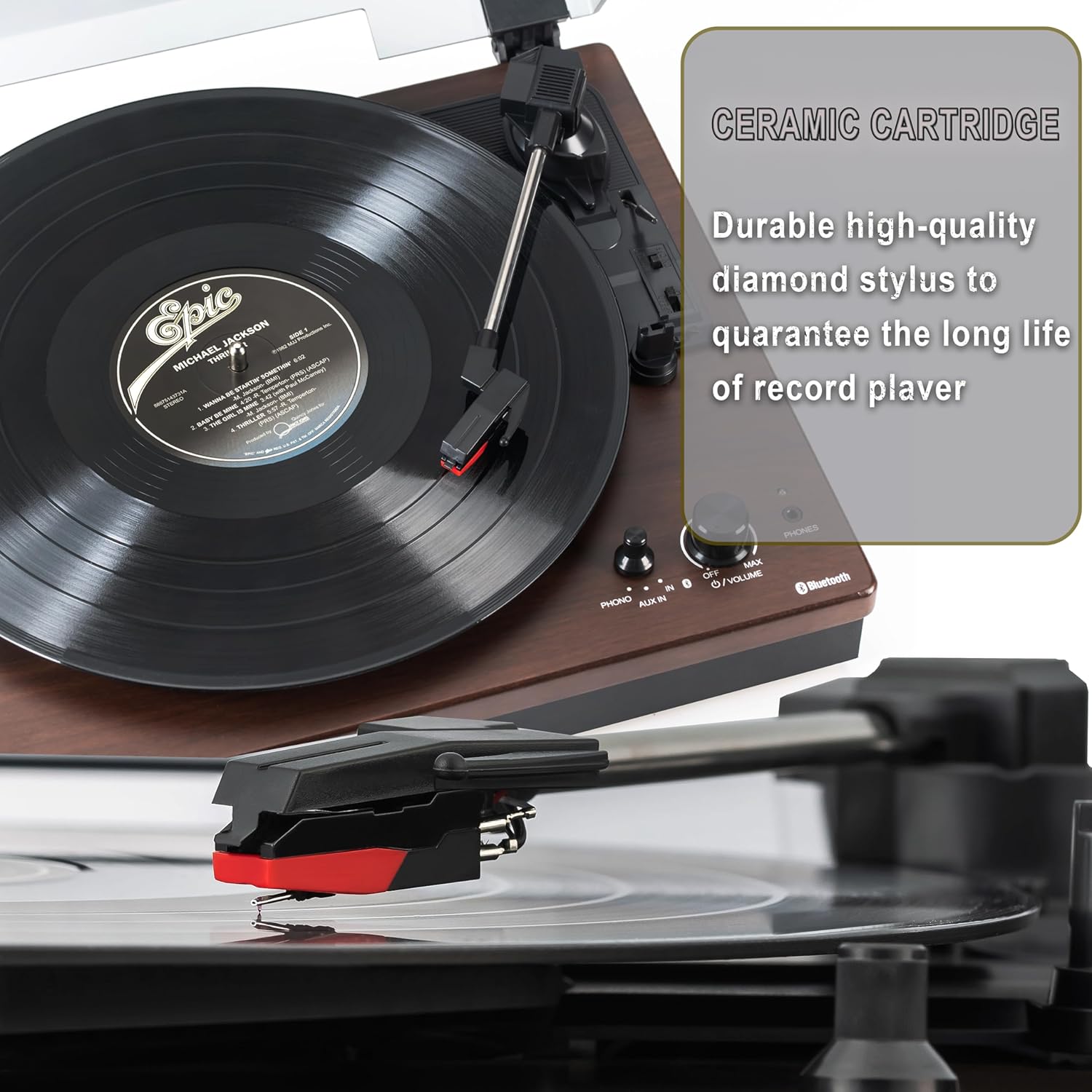
Figure 5.1: Ceramic Cartridge. The turntable is equipped with a durable high-quality diamond stylus designed for extended record playback life.
6. 문제 해결
If you encounter issues with your Sharp RP-TT70, refer to the following common problems and solutions:
| 문제 | 가능한 원인 | 해결책 |
|---|---|---|
| 전원이 없습니다 | 전원 어댑터가 연결되지 않았거나 콘센트가 활성화되지 않았습니다. | Ensure power adapter is securely plugged into the turntable and a working wall outlet. |
| 스피커에서 소리가 나지 않음 | Speakers not connected correctly; Volume too low; Incorrect input mode. | Check speaker cable connections and polarity. Increase volume. Ensure turntable is in PHONO or AUX mode as appropriate. |
| Poor Sound Quality / Skipping | Dirty or worn stylus; Dirty record; Turntable not level. | Clean the stylus and record. Ensure the turntable is on a stable, level surface. Consider replacing the stylus if worn. |
| 블루투스 페어링 문제 | Device too far; Bluetooth not enabled on external device; Interference. | Ensure devices are within range (approx. 30 ft). Confirm Bluetooth is enabled on the external device. Try restarting both devices. |
| 접시가 회전하지 않음 | Belt dislodged; Auto-stop engaged prematurely. | Check if the drive belt is properly seated around the platter and motor pulley. If auto-stop is causing issues, ensure the record is placed correctly. |
7. 사양
| 특징 | 세부 사항 |
|---|---|
| 모델 번호 | RP-TT70 |
| 상표 | 날카로운 |
| 제품 치수 | 16.8 x 13.5 x 2.8 인치 |
| 품목 무게 | 18.6파운드 |
| 연결 기술 | Bluetooth (Bi-directional) |
| 지원되는 속도 | 33 1/3, 45, 78 RPM |
| 포함된 구성 요소 | Turntable, Stereo Bookshelf Speakers |
| 재료 | 플라스틱, 목재 |
| 색상 | Black (with wooden finish) |
| 카트리지 타입 | Changeable Ceramic Cartridge and Stylus |
| 특징 | Belt-drive, Auto-return, Pitch control, Dust cover |
8. 보증 및 지원
For warranty information and technical support, please refer to the official Sharp web사이트를 방문하거나 고객 서비스에 직접 문의하세요. 보증 청구를 위해 구매 증빙 자료로 구매 영수증을 보관하세요.
Ask a question about this manual
Ask about setup, troubleshooting, compatibility, parts, safety, or missing instructions. Manuals+ will review the question and use this page’s manual context to help answer it.