
1. 제품 오버view
The Phanteks Eclipse G500A DRGB is a high-performance mid-tower chassis designed to accommodate modern PC components with excellent airflow and integrated D-RGB lighting. It features an Ultra-fine Performance Mesh on both the front and top panels, ensuring optimal cooling and dust filtration.

Figure 1: Phanteks Eclipse G500A DRGB Mid Tower Case, Matte White.
주요 특징:
- 높은 공기 흐름 설계: Ultra-fine Performance Mesh on front and top panels for superior cooling and dust filtration.
- 통합 D-RGB 조명: Built-in D-RGB lighting on the front and side, controllable via manual buttons or motherboard synchronization.
- 사전 설치된 팬: Includes three high-performance M25-140 D-RGB fans.
- 광범위한 냉각 지원: Supports up to 420mm radiators in the front and 360mm in the top.
- 넓은 실내: Accommodates full-length GPUs and offers vertical GPU mounting options (with optional bracket).
- 유연한 스토리지: Multiple HDD and SSD locations, including dedicated SSD brackets and stackable HDD bays.
- 최신 프런트 I/O: Features 10Gbps USB-C, 2x USB 3.0, Microphone/Headphone Combo, Power button, and D-RGB controls.
2. 설정 및 설치
This section provides general guidelines for installing components into your Phanteks Eclipse G500A DRGB chassis. Always refer to your component manuals for specific installation instructions.
2.1 섀시 준비
Before installing components, ensure the chassis is placed on a stable, flat surface. Remove the side panels by gently pulling them open (they are hinged) to access the interior.
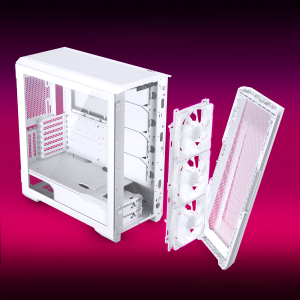
Figure 2: The removable front panel allows for easy installation of fans and radiators.
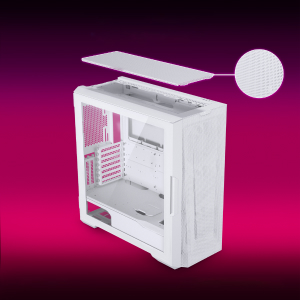
Figure 3: The removable top mesh panel facilitates fan and radiator installation.
2.2 마더 보드 설치
The G500A supports ATX, micro-ATX, mini-ITX, and E-ATX motherboards (up to 280mm wide). Install the necessary standoffs for your motherboard form factor, then secure the motherboard with screws.
2.3 전원 공급 장치(PSU) 설치
Install the PSU at the bottom rear of the chassis. The G500A supports PSUs up to 250mm in length (195mm if all 4 bottom HDD positions are used).
2.4 저장장치 설치
The case offers extensive storage options:
- 2.5인치 SSD: Up to 9 dedicated 2.5" drive bays are included.
- 3.5인치 HDD: Two stackable 3.5" HDD bays are included, expandable up to a total of 10 HDD bays.

Figure 4: Multiple storage options for 2.5" and 3.5" drives.
2.5 그래픽 카드(GPU) 설치
The G500A supports graphics cards up to 435mm in length. For vertical GPU mounting, an optional bracket (PH-VGPUKT4.0_03) or riser cable is required.
2.6 냉각 시스템 설치
이 섀시는 다양한 팬 및 라디에이터 구성 설정을 지원합니다.
- 팬 지원:
- Front: 3x 120mm or 3x 140mm (3x 140mm pre-installed)
- Top: 3x 120mm or 3x 140mm
- 후면: 1x 120mm 또는 1x 140mm
- 액체 냉각 라디에이터 지원:
- Front: Up to 360mm (120mm radiator) or 420mm (140mm radiator)
- Top: Up to 360mm (120mm radiator) or 280mm (140mm radiator)
- 후면 : 120mm
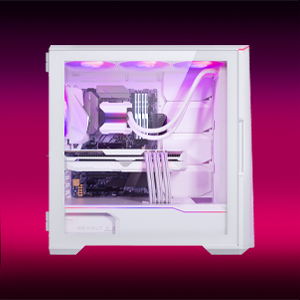
Figure 5: High-end cooling compatibility with various fan and radiator sizes.
2.7 케이블 관리
The G500A provides ample space and Velcro ties for efficient cable management, ensuring a clean interior and optimal airflow. Cover doors help to conceal cables on the backside of the motherboard tray.
2.8 설치 비디오
Video 1: Detailed PC Build Guide in the Phanteks Eclipse G500A (13:33).
Video 2: Another comprehensive PC assembly guide featuring the Phanteks Eclipse G500A (14:01).
3. 사용 설명서
3.1 전면 I/O 패널
전면 I/O 패널은 필수 포트와 컨트롤에 편리하게 접근할 수 있도록 해줍니다.
- 전원 버튼: 시스템의 전원을 켜거나 끕니다.
- USB 3.0 포트(x2): USB 3.0 장치를 연결하는 데 사용됩니다.
- USB-C Gen2 Port (x1): For high-speed USB-C connectivity.
- 마이크/헤드폰 콤보 잭: 오디오 입력 및 출력용.
- D-RGB Mode Button: Cycles through pre-programmed D-RGB lighting effects.
- D-RGB Color Button: Changes the color of the D-RGB lighting.

Figure 6: Front I/O panel with USB-C, USB 3.0, audio, and D-RGB controls.
3.2 D-RGB 조명 제어
The integrated D-RGB lighting can be controlled in two ways:
- 수동 제어: Use the D-RGB Mode and Color buttons on the front I/O panel to cycle through effects and colors without software.
- 메인보드 동기화: Connect the D-RGB controller to a compatible motherboard's D-RGB header to enable software control and synchronization with other D-RGB components.

Figure 7: Integrated D-RGB lighting with included M25-140 D-RGB fans.
4. 유지관리
정기적인 유지관리는 PC 구성 요소의 최적의 성능과 수명을 보장하는 데 도움이 됩니다.
- 먼지 필터링: The Ultra-fine Performance Mesh on the front and top panels acts as a dust filter. Periodically remove these panels and clean the mesh to maintain optimal airflow.
- 내부 청소 : Use compressed air to remove dust from inside the chassis, especially from fans, heatsinks, and other components. Ensure the system is powered off and unplugged before cleaning.
- 외부 청소: 부드러운 d로 외부 표면을 닦으십시오.amp 천으로 닦으세요. 연마성 세제나 용제는 사용하지 마세요.
5. 문제 해결
이 섹션에서는 PC 케이스 사용 시 발생할 수 있는 일반적인 문제에 대해 설명합니다.
5.1 전원 문제
- 시스템 전원이 켜지지 않음:
- Ensure all power cables (24-pin ATX, 8-pin CPU, GPU power) are securely connected to the motherboard and components.
- PSU 스위치가 'ON' 위치에 있는지 확인하세요.
- 전면 패널 전원 스위치 케이블이 마더보드의 F_PANEL 헤더에 올바르게 연결되어 있는지 확인하십시오.
5.2 D-RGB Lighting Issues
- D-RGB not lighting up or incorrect colors:
- Ensure the D-RGB cables from the fans and LED strips are correctly connected to the integrated D-RGB controller.
- If using motherboard synchronization, ensure the D-RGB controller is connected to the motherboard's D-RGB header and that the motherboard's lighting software is configured correctly.
- Verify the D-RGB controller is receiving power (e.g., via SATA power connector).
- Try cycling through modes and colors using the front I/O buttons to rule out software issues.
5.3 Fan Noise or Malfunction
- 과도한 팬 소음:
- 선풍기 날개에 먼지가 쌓였는지 확인하고 필요하면 청소하십시오.
- Ensure fans are securely mounted and not vibrating against the chassis.
- Verify fan speeds are controlled appropriately by the motherboard or fan controller.
- 팬이 회전하지 않음:
- Check fan power connections to the motherboard or fan hub.
- Ensure fan headers are enabled in the BIOS/UEFI settings.
6. 사양
Detailed technical specifications for the Phanteks Eclipse G500A DRGB Mid Tower Case.
| 특징 | 사양 |
|---|---|
| 모델명 | Eclipse G500A DRGB, White |
| 품목 모델 번호 | PH-EC500GA_DMW01A |
| 폼 팩터 | 미드 타워 |
| 치수(길이x너비x높이) | 19.69 x 9.45 x 20.28인치(500 x 240 x 515mm) |
| 품목 무게 | 23.2파운드 |
| 재료 | Steel Chassis, Tempered Glass |
| 마더보드 지원 | ATX, micro-ATX, mini-ITX, E-ATX (최대 너비 280mm) |
| 확장 슬롯 | 7 |
| 수직 GPU 지원 | Yes (with optional bracket PH-VGPUKT4.0_03 or riser cable) |
| 내부 3.5인치 드라이브 베이 | 10 (2x included, expandable) |
| 내부 2.5인치 드라이브 베이 | 9개 (9개 포함) |
| 전면 I/O | 2x USB 3.0, USB-C Gen2, Microphone/Headphone Combo, Power Button, D-RGB Mode, D-RGB Color |
| 사전 설치된 팬 | 3x M25-140 D-RGB (Front) |
| 최대 GPU 길이 | 435mm / 17.2인치 |
| 최대 CPU 쿨러 높이 | 185mm (XNUMXmm) |
| 최대 PSU 길이 | 195mm (if all 4 bottom HDD positions used) / 250mm (if 2 bottom HDD used) |
| 냉각 방식 | 선풍기, 물 |
7. 보증 및 지원
Phanteks products are manufactured with high-quality standards. For warranty information and technical support, please refer to the official Phanteks web사이트를 방문하거나 고객 서비스에 문의하세요.
연락처 정보:
- Web대지: www.phanteks.com
- Phanteks Taiwan Inc.: 신베이시 중허구 지안11로 150호 1층 235
- Importer EU (Axpertec Int B.V.): Sydneystraat 33, 3047 BP Rotterdam, The Netherlands
- Importer US (Axpertec Inc.): 20465 E Walnut Dr. N, City of Industry, California 91789, United States

Figure 8: Phanteks company and importer details, along with compliance markings (CE, UKCA, RoHS).