
1. 서론
This instruction manual provides detailed guidance for the safe and proper installation, operation, and maintenance of your FORGING MOUNT Corner TV Wall Mount, Model HY9441. This full-motion TV mount is designed to fit TVs and monitors ranging from 13 to 43 inches, supporting a maximum weight of 77 lbs (35 kg) and VESA patterns up to 200x200mm. Its long 25.6-inch extension arm allows for versatile viewing angles, including corner installations.

Figure 1: FORGING MOUNT Corner TV Wall Mount (Model HY9441)
2. 안전 정보
Please read and understand all instructions before installation and use. If you have any questions, contact customer service. Improper installation or use may result in property damage, serious injury, or death.
- 중량 용량: Do not exceed the maximum weight capacity of 77 lbs (35 kg). This mount is intended for use only with the maximum weights indicated. Use with products heavier than the maximum weights indicated may result in instability causing possible injury.
- 벽 유형: This mount is designed for installation on solid concrete walls, brick walls, and solid wood stud walls (12"/16" wood studs). DO NOT mount the product on plaster walls, cavity walls, drywall, or soft walls alone. Always ensure the mounting surface can safely support the combined weight of the equipment and all attached hardware.
- VESA 호환성: Ensure your TV's VESA mounting pattern (the distance between the four mounting holes on the back of the TV) is compatible with the mount (75x75mm, 100x100mm, 100x200mm, 200x100mm, 200x200mm).
- 전문가의 도움: 설치 과정이나 벽면 적합성에 대해 확신이 서지 않는다면 자격을 갖춘 전문가와 상담하십시오.
- 어린이들: 설치 과정 중에는 어린이가 설치 장소에 접근하지 못하도록 하십시오.
- 도구: Use appropriate tools and follow all safety precautions for tool usage.

그림 2: 설치 가능한 벽 유형
3. 패키지 내용
Verify that all components are present and undamaged before beginning installation. If any parts are missing or damaged, do not attempt to install. Contact customer service for assistance.
- 관절형 암이 있는 벽판 조립체
- TV Plate (VESA compatible)
- 설치 하드웨어 키트(TV와 벽 사이의 간격을 조절하는 다양한 나사, 와셔, 스페이서 포함)
- Concrete Anchors (if applicable)
- 레벨 게이지
- 케이블 타이
- 사용 설명서
4. 제품 특징
- Long Extension Arm: Equipped with a 25.6-inch long extension arm, allowing the TV to be pulled out from the wall for versatile viewing angles, including corner installations.
- 완전한 동작 기능: Offers swivel of ±90°, tilt of +5° to -10°, and level adjustment of ±3° for optimal view편안함을.
- 헤비 듀티 건설: Made with high-quality thickened alloy steel for stability and durability, supporting TVs up to 77 lbs.
- VESA 호환성: Supports VESA patterns 75x75mm, 100x100mm, 100x200mm, 200x100mm, and 200x200mm.
- 공간 절약형 디자인: Can be retracted to a minimum distance of 2.48 inches from the wall, allowing the TV to sit close to the wall when not extended.

Figure 3: Robust Construction of the Mount

Figure 4: Versatile Application in Different Environments
5. 설정 (설치 안내)
5.1 설치 전 체크리스트
- Ensure you have all necessary tools: drill, stud finder (for wood studs), level, tape measure, pencil, screwdriver, socket wrench.
- Confirm your TV's weight and VESA pattern are within the mount's specifications.
- Identify the type of wall you are mounting to (wood stud, concrete, or brick).
- Locate the center of your desired mounting position and mark it.
5.2 설치 단계
- TV 브래킷을 TV에 부착하세요: Carefully place your TV face down on a soft, clean surface. Attach the two vertical TV brackets to the back of your TV using the appropriate screws, washers, and spacers from the hardware kit. Ensure the brackets are centered and securely fastened to the TV's VESA holes.
- 벽면 플레이트 장착: Position the wall plate assembly on the wall at your desired height. Use a level to ensure it is perfectly horizontal. Mark the drilling locations through the holes on the wall plate. For wood studs, drill pilot holes into the center of the studs. For concrete/brick walls, drill holes and insert concrete anchors. Secure the wall plate to the wall using the provided lag bolts.
- Adjust Level (if needed): Before hanging the TV, ensure the wall plate is level. If minor adjustments are needed, some mounts allow for slight leveling adjustments on the wall plate itself.
- 벽걸이형 TV 거치대: With assistance, carefully lift the TV with the attached brackets and hook them onto the arms of the wall plate assembly. Ensure the TV is securely seated.
- TV를 안전하게 설치하세요: Tighten the security screws on the TV brackets to lock the TV onto the mount, preventing accidental dislodgement.

그림 5: 이상view of 4 Installation Steps
6. 운영 (조정)
Your FORGING MOUNT TV wall mount offers full motion capabilities for optimal viewing. Adjustments should be made carefully to avoid damage to the TV or mount.
- 받침: The mount allows for ±90° swivel. Gently push or pull the TV to the desired left or right angle. This is particularly useful for corner installations or viewing from different areas of a room.
- 경사: Adjust the vertical tilt from +5° (upward) to -10° (downward) to reduce glare or achieve a better viewing angle. Loosen the tilt adjustment screws on the TV plate, adjust the angle, and then re-tighten the screws securely.
- 수준: If your TV appears slightly unlevel after installation, you can adjust the level by ±3°. Loosen the leveling screws, rotate the TV slightly, and then re-tighten.
- 확장/수축: The articulating arms allow the TV to extend up to 25.6 inches from the wall and retract to a minimum of 2.48 inches. Gently pull or push the TV to extend or retract the arms.
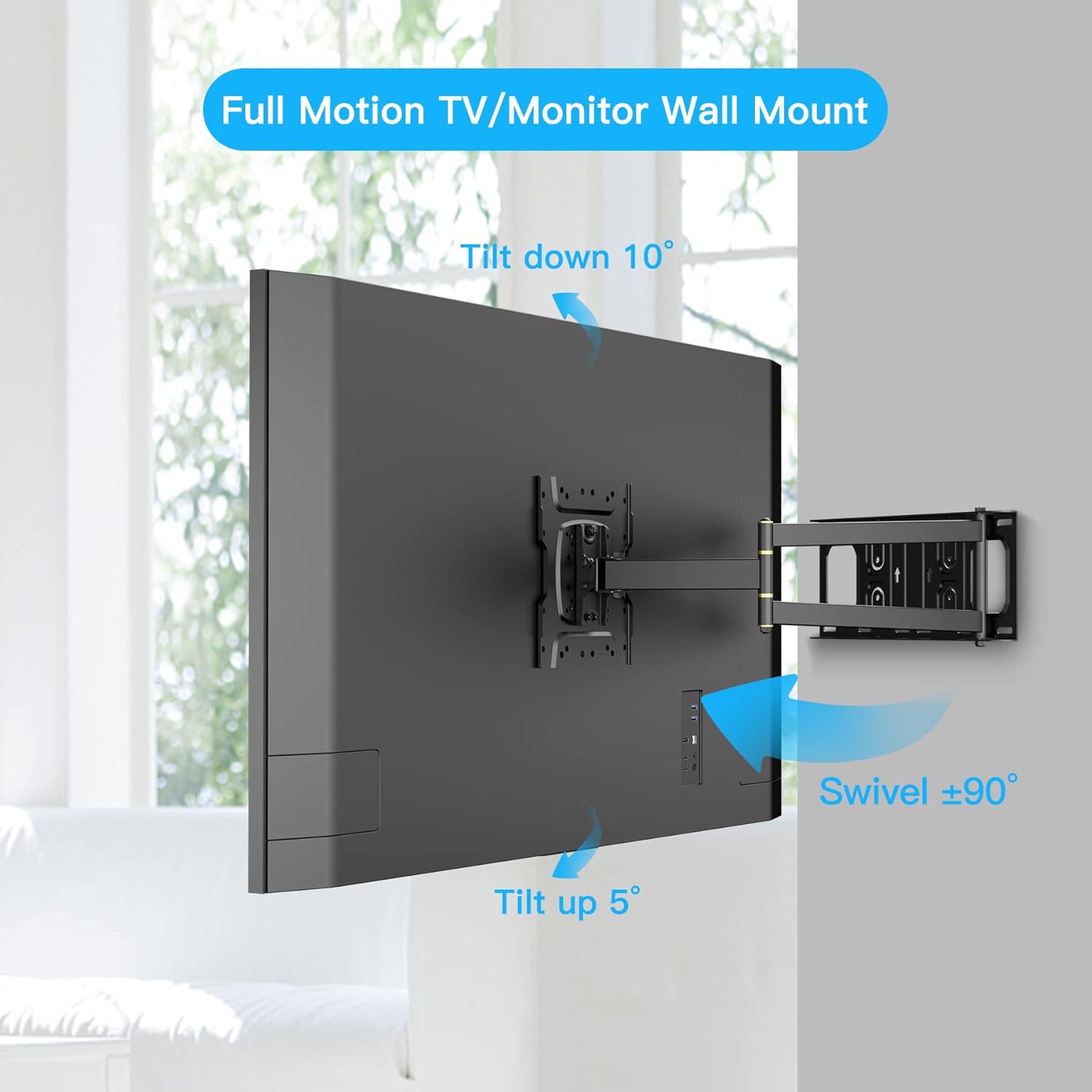
Figure 6: Swivel and Tilt Capabilities
Video 1: Demonstration of Corner TV Wall Mount Movement (Swivel, Tilt, Extension, Leveling)
7. 유지관리
정기적인 유지 관리는 TV 거치대의 수명 연장과 안전한 작동을 보장합니다.
- 청소: Dust the mount regularly with a soft, dry cloth. For stubborn dirt, use a slightly damp 천에 순한 세제를 묻혀 닦은 후 마른 천으로 물기를 제거하십시오. 연마성 세제나 용제는 사용하지 마십시오.
- 연결 확인: 모든 나사와 볼트가 단단히 조여져 있는지 주기적으로 확인하고, 필요한 경우 다시 조이십시오.
- 손상 여부 검사: Inspect the mount for any signs of wear, corrosion, or damage. If any damage is observed, discontinue use and contact customer service.
8. 문제 해결
일반적인 문제와 해결 방법은 아래 표를 참조하세요.
| 문제 | 가능한 원인 | 해결책 |
|---|---|---|
| TV가 수평이 아닙니다. | Wall plate not perfectly level during installation, or leveling screws need adjustment. | Loosen the leveling screws on the TV plate, adjust the TV to be level using a spirit level, then re-tighten the screws. |
| 산이 불안정하게 느껴집니다. | Mounting bolts not fully tightened, incorrect wall anchors used, or wall type is unsuitable. | Ensure all wall bolts are securely tightened. Verify that the correct anchors were used for your wall type. If unsure, consult a professional. Do not use if unstable. |
| 기울기/회전 조절에 어려움이 있습니다. | Adjustment screws are too tight, or joints need lubrication. | For tilt, loosen the tilt adjustment screws slightly, adjust, then re-tighten. For swivel, ensure no cables are snagged. Joints are pre-lubricated; if stiffness persists, contact support. |
| TV is too heavy for the mount. | TV weight exceeds the mount's maximum capacity. | Immediately remove the TV from the mount. This mount supports up to 77 lbs (35 kg). Do not use if your TV is heavier. |
9. 사양
| 모델 번호: | 하이9441 |
| 호환 가능한 TV 크기: | 13~43인치 |
| 최대 부하 용량 : | 77파운드(35kg) |
| VESA 호환성: | 75x75mm, 100x100mm, 100x200mm, 200x100mm, 200x200mm |
| 경사각: | +5° ~ -10° |
| 회전 각도: | ±90° |
| 레벨 조정 : | ±3° |
| Wall Distance (Retracted): | 2.48인치(63mm) |
| Wall Distance (Extended): | 25.6인치(650mm) |
| 재료: | 합금강 |
| 제품 크기: | 16 x 2.75 x 25.6 인치 |
| 품목 무게: | 5파운드 |

Figure 7: TV Compatibility and Load Capacity

Figure 8: Mount Dimensions
10. 보증 및 지원
FORGING MOUNT is committed to providing high-quality products and excellent customer service. For any questions, concerns, or assistance with your product, please contact our customer support team.
- 고객 서비스: Refer to the contact information provided with your product packaging or visit the official FORGING MOUNT web지원 사이트입니다.
- 보증: Information regarding product warranty can be found on the FORGING MOUNT web웹사이트를 방문하시거나 고객 서비스 센터에 직접 문의해 주십시오. 보증 청구를 위해 구매 증빙 자료를 보관해 주시기 바랍니다.