
소개
This manual provides detailed instructions for the safe and effective use of your MiLESEEY D5 70M-BT Laser Distance Meter. This device is designed for precise distance measurements up to 70 meters, featuring an electronic angle sensor, various measurement modes, and smartphone application connectivity for enhanced functionality.
안전 정보
기기를 작동하기 전에 모든 안전 지침을 읽고 숙지하십시오. 이 지침을 따르지 않을 경우 레이저 방사선 노출, 감전, 화재 또는 심각한 부상을 입을 수 있습니다.
- Laser Class II Product: This device emits Class II laser radiation. Do not stare into the laser beam. Avoid direct eye exposure.
- 레이저 유형: 635nm <1mW.
- 기기를 임의로 개조하거나 분해하지 마십시오. 수리는 반드시 공인 서비스 담당자만 수행해야 합니다.
- 기기를 어린이의 손이 닿지 않는 곳에 보관하세요.
- Do not operate the device in explosive atmospheres or near flammable liquids and gases.
- Use only specified batteries (2 x 1.5V AAA alkaline batteries).
패키지 내용
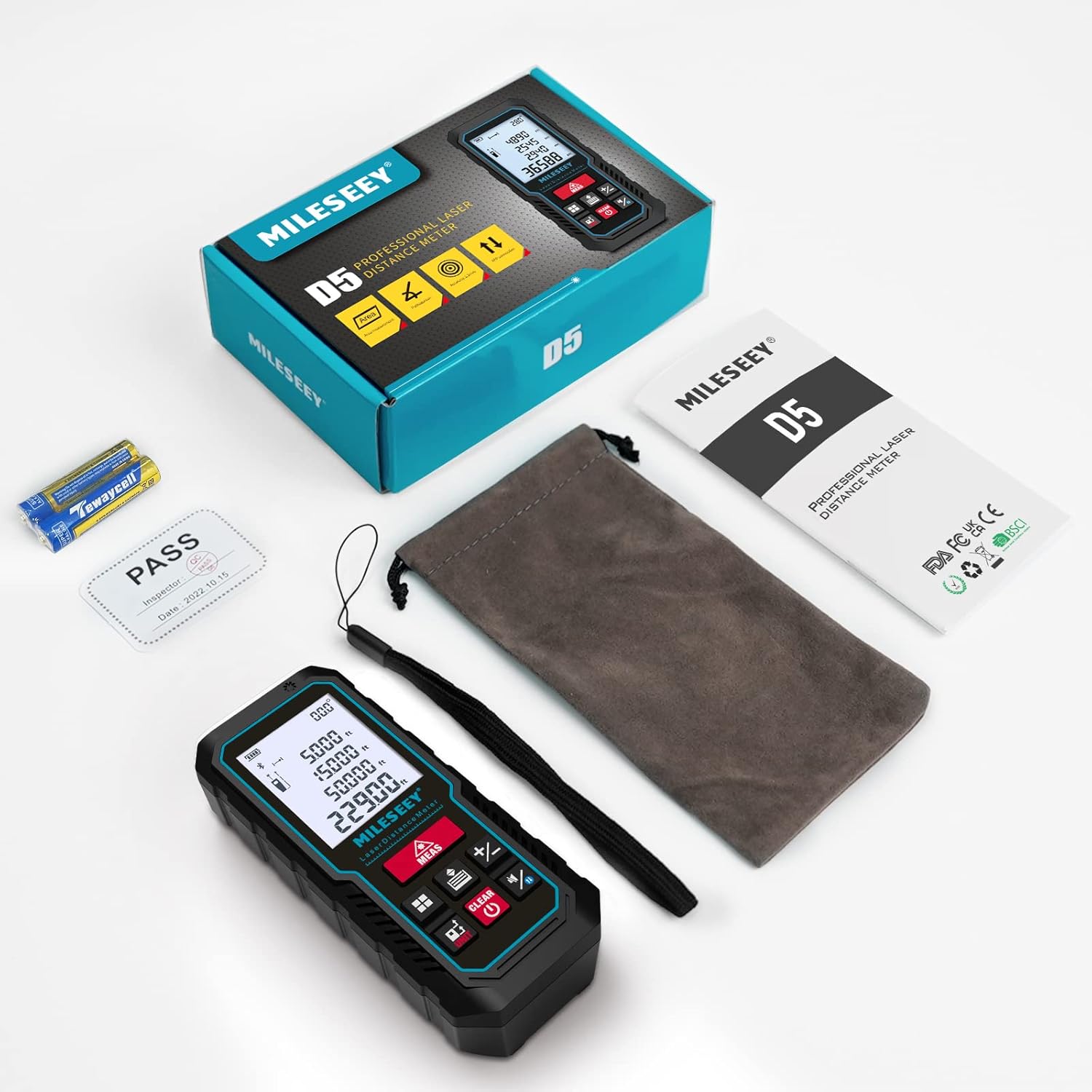
패키지에 모든 품목이 들어 있는지 확인하세요.
- 1 x MiLESEEY D5 Laser Distance Meter
- 2 x 1.5V AAA 배터리
- 1 x 사용자 설명서
- 1 x 휴대용 파우치
- 1 x 핸드 스트랩

제품 끝view
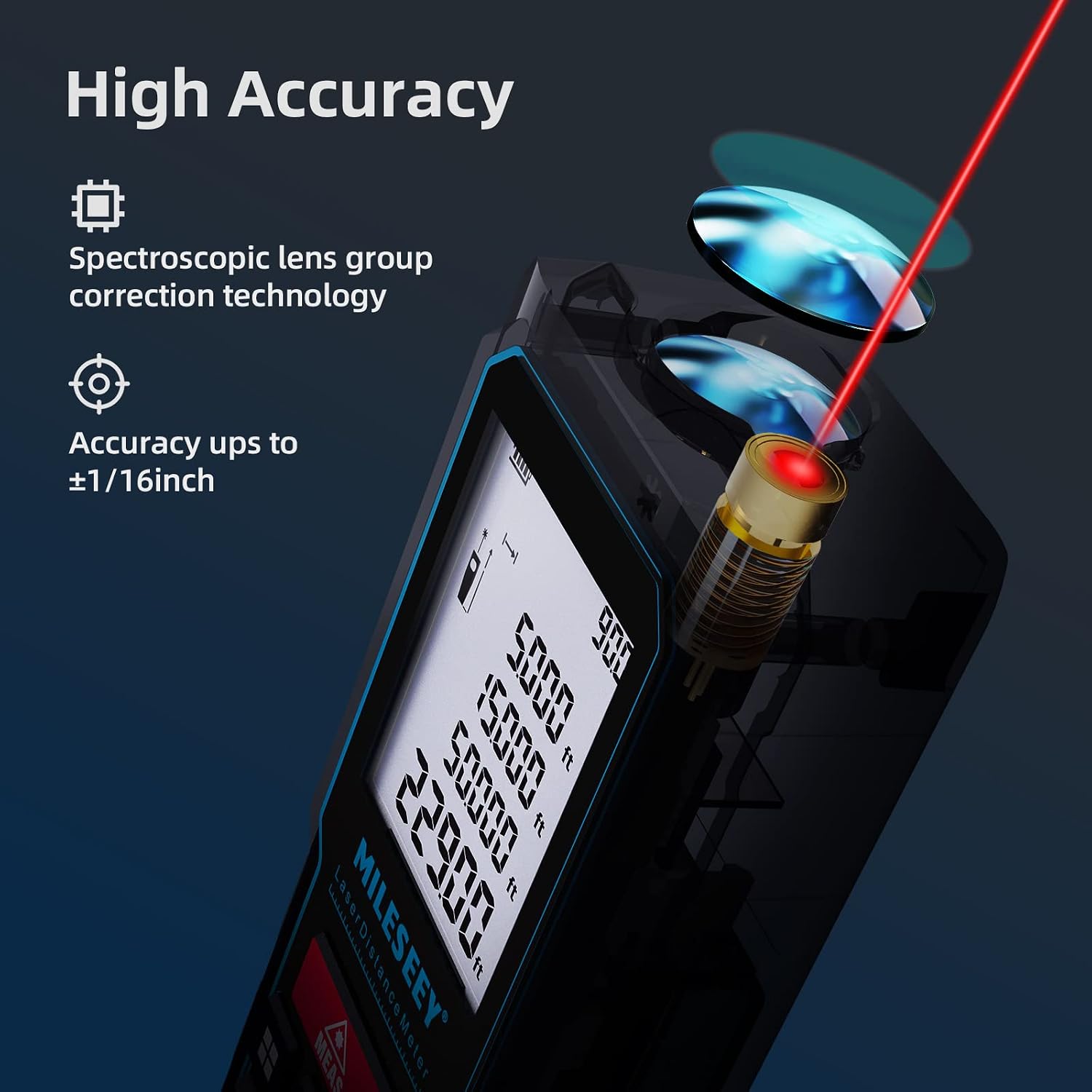
The MiLESEEY D5 70M-BT features a robust design with an easy-to-read LCD display and intuitive controls, offering high accuracy for various measurement tasks.
주요 구성 요소는 다음과 같습니다.
- 레이저 송신기/수신기: Located at the top for accurate measurements.
- LCD 디스플레이: 2-inch screen with backlight for clear visibility of measurements and settings.
- Measurement Button (MEAS): 측정을 시작합니다.
- 기능 버튼: For selecting measurement modes (distance, area, volume, Pythagorean, etc.).
- 단위 버튼(UNIT): 측정 단위를 변경합니다(m/ft/in/ft+in).
- 기준점 버튼: Switches between front and rear reference points for measurement.
- Clear/Off Button (CLEAR/OFF): 현재 측정값을 초기화하거나 장치의 전원을 끕니다.
설정
배터리 설치
The device requires two 1.5V AAA alkaline batteries. Ensure correct polarity when inserting the batteries.
- 장치 뒷면의 배터리 덮개를 엽니다.
- Insert two AAA batteries, matching the positive (+) and negative (-) terminals as indicated.
- 배터리 덮개를 단단히 닫으세요.
전원 켜기/끄기
- 전원을 켜려면 측정 단추.
- 전원을 끄려면 지우기/끄기 button for a few seconds, or the device will automatically shut off after 180 seconds of inactivity to conserve energy.
작동 지침
기본 거리 측정
For a single distance measurement:
- 레이저를 목표물에 조준하세요.
- 를 누르세요 측정 버튼을 한 번 누르세요. 0.5초 이내에 측정값이 화면에 표시됩니다.

단위 및 기준점 변경
The device supports multiple units and reference points.
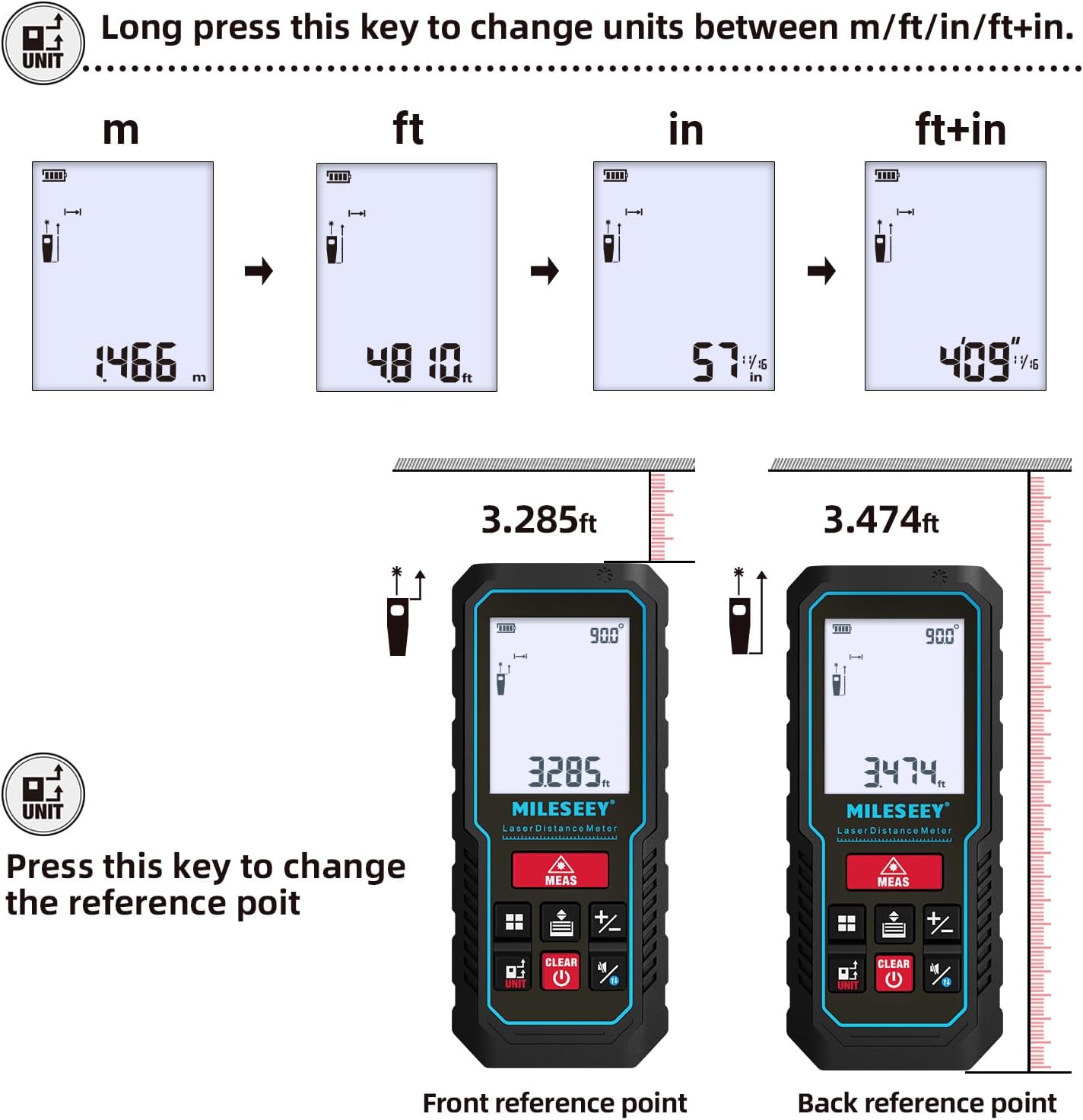
- 단위 변환 : 길게 누르세요 단위 button to cycle through units: meters (m), feet (ft), inches (in), and feet + inches (ft+in).
- 참조점: 를 누르세요 단위 button briefly to switch the measurement reference point between the front edge and the rear edge of the device.
측정 모드
The MiLESEEY D5 offers various measurement functions:
- 지속적인 측정: For tracking distances as you move the device.
- 면적 측정: 표면의 면적(길이 x 너비)을 계산합니다.
- 부피 측정: 공간의 부피(길이 x 너비 x 높이)를 계산합니다.
- Pythagorean Method (2-point and 3-point): Indirect measurement for heights or distances where direct measurement is not possible.
- 덧셈/뺄셈: Add or subtract measurements.
- 자동 레벨링: Automatically calculates horizontal distance.
- 자동 높이 조절: Automatically calculates vertical height.


Smartphone App Connectivity (Smart Life App)
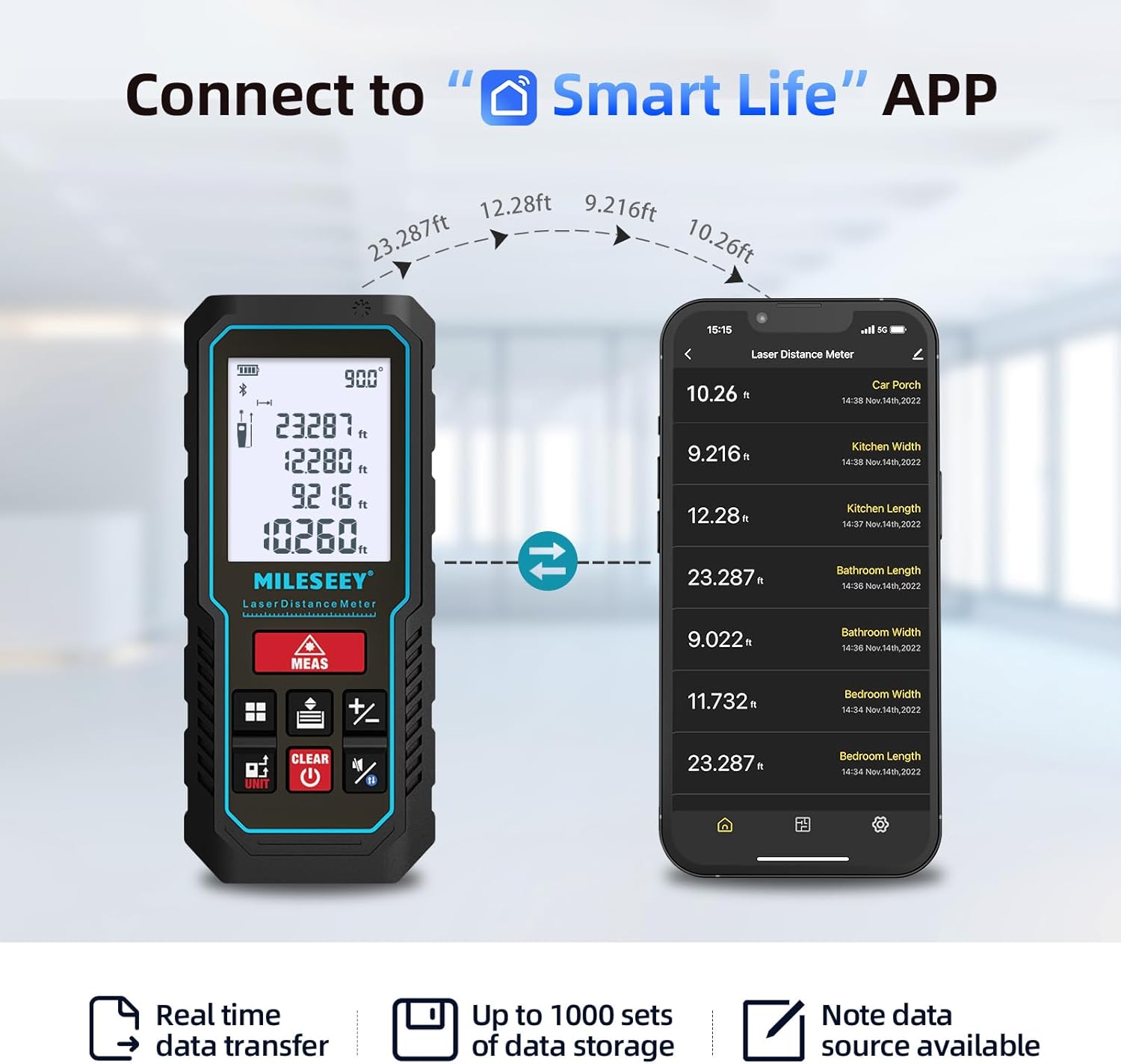
The MiLESEEY D5 70M-BT can connect wirelessly to your smartphone via the free "SMART LIFE" app, allowing for real-time data transfer, storage, and advanced functions.
- Download the "SMART LIFE" app from your device's app store (available on Google Play and Apple App Store).
- Enable Bluetooth on your smartphone and open the "SMART LIFE" app.
- Follow the in-app instructions to pair your MiLESEEY D5 device.
- Once connected, you can document measurements, create floor plans by drawing on photos or grids, and store up to 1000 sets of data.


Data Records and Mute Mode
- The device stores up to 30 data records, which can be recalled for review and calculation.
- A mute mode is available for quiet operation in sensitive environments.

유지
적절한 유지 관리는 기기의 수명과 정확성을 보장합니다.
- 청소: 부드러운 천으로 장치를 닦으십시오. damp 천. 연마성 세척제나 용매를 사용하지 마십시오.
- 저장: Store the device in its portable pouch in a cool, dry place when not in use. Remove batteries if storing for extended periods.
- 보호: The device has an IP54 rating, making it splash-resistant and dust-proof. Avoid submerging it in water. It also features 1-meter drop resistance.

문제 해결
If you encounter issues with your MiLESEEY D5, refer to the following common problems and solutions:
| 문제 | 가능한 원인 | 해결책 |
|---|---|---|
| 장치 전원이 켜지지 않음 | 배터리가 부족하거나 방전됨, 배터리가 잘못 설치됨. | Replace batteries with new 1.5V AAA alkaline batteries. Ensure correct polarity. |
| 부정확한 측정 | Obstruction in laser path; unstable measuring surface; extreme temperature changes; dirty lens. | Ensure a clear path for the laser. Measure on a stable surface. Allow device to acclimate to ambient temperature. Clean the lens with a soft cloth. |
| Cannot connect to Smart Life App | Bluetooth is off; app not installed; device not in pairing mode. | Ensure Bluetooth is enabled on your phone. Download and install the "SMART LIFE" app. Follow app instructions for pairing. |
| 화면에 "오류" 메시지가 표시됩니다. | Measurement out of range; strong light interference; target surface not reflective enough. | Ensure target is within 0.16m - 70m range. Avoid measuring in direct sunlight or strong light. Use a reflective target plate if necessary. |
명세서
| 특징 | 세부 사항 |
|---|---|
| 상표 | 마일시 |
| 모델 번호 | D5 (70M-BT) |
| 측정 범위 | 0.16m - 70m |
| 정확성 | ±2mm |
| 레이저 클래스 | 2학년 |
| 레이저 타입 | 635nm <1mW |
| 표시하다 | 백라이트가 있는 2인치 LCD |
| Electronic Angle Sensor | Yes, ±0.3° accuracy |
| 측정 기능 | Distance, Continuous, Area, Volume, Pythagorean (2/3-point), Addition/Subtraction, Auto Level, Auto Height |
| 단위 | m / 피트 / 인치 / 피트+인치 |
| 데이터 기록 | 30 (on device), up to 1000 (via app) |
| 연결성 | Bluetooth (Smart Life App) |
| 전원 공급 장치 | 1.5V AAA 알칼리 배터리 2개 |
| 자동 종료 | 180초 동안 활동이 없음 |
| IP 등급 | IP54 (Splash-resistant, Dust-proof) |
| 낙하 저항 | 1 미터 |
| 재료 | 아크릴로니트릴 부타디엔 스티렌(ABS) |
| 치수(길이 x 너비 x 높이) | 15.2L x 10.1W x 4.8Hcm |
| 품목 무게 | 220그램 |
보증 및 지원
MiLESEEY provides comprehensive support for its products.
- 보증: The device comes with a 12-month warranty.
- 환불 보장: 90일 환불 보증이 제공됩니다.
- 추가 지원: 2 years of assistance after registration and lifetime technical support from MILESEEY.
- For technical assistance or warranty claims, please contact MILESEEY customer service through their official channels or the retailer where the product was purchased.