
1. 서론
This manual provides detailed instructions for the installation, operation, and maintenance of your ASUS TUF Gaming GeForce RTX 4080 OC Edition Graphics Card. Please read this manual thoroughly before using the product to ensure proper functionality and to prevent damage.
2. 안전 정보
WARNING: Always disconnect the power supply from your computer before installing or removing any components. Failure to do so may result in personal injury or damage to your system.
- 전원 공급 장치(PSU)가 최소 와트 요구 사항을 충족하는지 확인하십시오.tage requirements for this graphics card.
- 민감한 구성 요소를 만지지 않도록 그래픽 카드의 가장자리를 잡으세요.
- 정전기 방지 손목 끈을 착용하거나 접지된 금속 물체를 자주 만져 정전기를 방전시키세요.
- 과열을 방지하기 위해 통풍이 잘 되는 컴퓨터 케이스에 그래픽 카드를 설치하십시오.
3. 패키지 내용
제품 패키지에 모든 품목이 들어 있는지 확인하세요.
- ASUS TUF-RTX4080-O16G-GAMING Graphics card
- Collection card; TUF Velcro Hook & Loop
- TUF Graphics card holder; Speedsetup Manual
- 어댑터 케이블
- 고맙습니다 카드
4. 제품 오버view
The ASUS TUF Gaming GeForce RTX 4080 OC Edition Graphics Card is designed for high-performance gaming and demanding applications. It features NVIDIA's Ada Lovelace architecture, offering significant improvements in performance and power efficiency.

앞쪽 view of the ASUS TUF Gaming GeForce RTX 4080 OC Edition Graphics Card, showcasing its triple Axial-tech fan design.
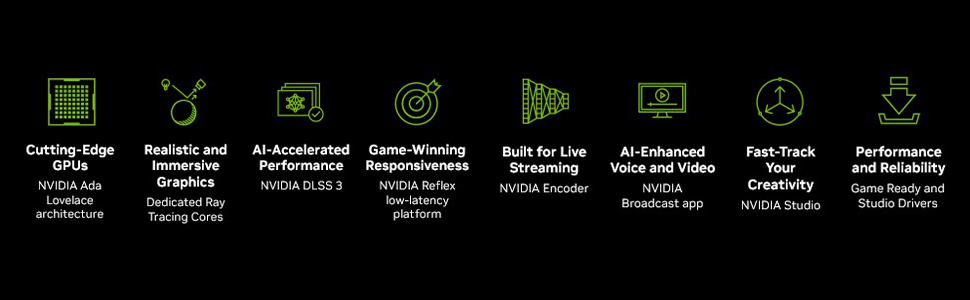
위에view of NVIDIA Ada Lovelace architecture features, including streaming multiprocessors, Tensor Cores, and RT Cores.
주요 특징:
- NVIDIA Ada Lovelace 스트리밍 멀티프로세서: 최대 2배 향상된 성능과 전력 효율.
- 4세대 텐서 코어: 최대 2배 향상된 AI 성능.
- 3세대 RT 코어: 최대 2배 향상된 레이 트레이싱 성능.
- Axial-tech fans: Scaled up for 23% more airflow.
- 이중 볼 베어링 팬: Last up to twice as long as conventional designs.
- Military-grade Capacitors: Rated for 20K hours at 105C, enhancing GPU power rail durability.
- Metal Exoskeleton: Adds structural rigidity and vents to increase heat dissipation.
- GPU Tweak III software: Provides intuitive performance tweaking, thermal controls, and system monitoring.

뒤쪽 view showing the display output interfaces, including DisplayPort and HDMI ports.
5. 설치
그래픽 카드를 설치하려면 다음 단계를 따르세요.
- 시스템 준비: 컴퓨터 전원을 끄고 전원 케이블을 분리하세요. 컴퓨터 케이스를 여세요.
- PCIe 슬롯 찾기: 메인보드에서 사용 가능한 PCI Express x16 슬롯을 찾으십시오.
- 슬롯 커버를 제거하세요: Remove the necessary expansion slot covers from your computer case. Note that this card is large (13.7"L x 5.9"W) and may require multiple slots.
- 그래픽 카드 설치: 그래픽 카드를 PCIe 슬롯에 조심스럽게 맞춘 후 단단히 고정될 때까지 아래로 꾹 눌러주세요.
- 카드를 안전하게 보호하세요: 그래픽 카드를 나사를 사용하여 케이스에 고정하십시오.
- 전원 연결: Connect the appropriate power cables from your power supply to the graphics card. Ensure all connections are secure.
- 사건 종결: 컴퓨터 케이스를 닫고 전원 케이블을 다시 연결하세요.
- 디스플레이 연결: 모니터를 그래픽 카드의 DisplayPort 또는 HDMI 출력 포트에 연결하십시오.
Video demonstrating the installation and features of the ASUS TUF Gaming RTX 4080 graphics card.
6. Software Installation & Configuration
After physical installation, install the necessary drivers and utility software:
- 드라이버 설치: Download the latest NVIDIA GeForce drivers from the official NVIDIA web사이트 (www.nvidia.com/drivers화면에 나타나는 안내에 따라 설치하십시오.
- ASUS GPU Tweak III: Install the ASUS GPU Tweak III software from the ASUS support web사이트 (www.asus.com/support/Download-Center/). This utility allows for performance tweaking, thermal control, and system monitoring.
7. 그래픽 카드 작동 방법
Your ASUS TUF Gaming GeForce RTX 4080 OC Edition is designed for optimal performance and cooling. Here are some operational aspects:
냉각 시스템:
The card features advanced cooling technologies to maintain stable temperatures during heavy loads.

Close-up of the Axial-tech fan, designed for increased airflow and reduced noise.

Illustration of optimized fan rotation for enhanced cooling efficiency.

View of the large heatsink, contributing to efficient heat dissipation.
RGB Lighting (Aura Sync):
The card features customizable ARGB lighting via ASUS Aura Sync. You can synchronize lighting effects with other Aura Sync compatible components in your system.

Example of customizable ARGB lighting on the graphics card.
AI Features and Technologies:
The NVIDIA GeForce RTX 4080 leverages AI for enhanced performance and new capabilities.
비디오 쇼asing NVIDIA's AI technologies, including generative AI and DLSS, and their applications in gaming and creative workflows.
8. 유지관리
정기적인 유지 관리는 그래픽 카드의 수명과 최적의 성능을 보장하는 데 도움이 됩니다.
- 먼지 제거: Periodically clean dust from the fans and heatsink using compressed air. Ensure the fans are not spinning during cleaning.
- 드라이버 업데이트 : Keep your graphics drivers updated to the latest version for performance improvements and bug fixes.
- 온도 모니터링: Use GPU Tweak III or other monitoring software to keep an eye on GPU temperatures, especially during intensive tasks.
9. 문제 해결
그래픽 카드에 문제가 발생하면 다음 문제 해결 단계를 시도해 보세요.
- 디스플레이 출력 없음:
- 모니터 케이블이 그래픽 카드와 모니터에 제대로 연결되어 있는지 확인하십시오.
- 그래픽 카드가 PCIe 슬롯에 완전히 장착되었는지 확인하십시오.
- Check that all power connectors are properly attached to the graphics card.
- 가능하다면 다른 디스플레이 케이블이나 모니터로 테스트해보세요.
- 시스템 불안정/충돌:
- 그래픽 드라이버가 최신 상태인지 확인하세요.
- GPU 온도를 모니터링하세요. 과열은 시스템 불안정을 초래할 수 있습니다.
- Verify your power supply unit (PSU) is sufficient for the graphics card's power requirements.
- 성과가 좋지 않음:
- 그래픽 드라이버가 최신 상태인지 확인하세요.
- 게임 내 설정을 확인하고, 필요한 경우 그래픽 품질을 낮추세요.
- 불필요한 백그라운드 애플리케이션을 닫습니다.
10. 사양
| 특징 | 사양 |
|---|---|
| 그래픽 코프로세서 | 엔비디아 지포스 RTX 4080 |
| 상표 | 아수스 |
| 그래픽 RAM 크기 | 16GB (XNUMX기가바이트) |
| GPU 클럭 속도 | 4000MHz |
| 비디오 출력 인터페이스 | 디스플레이포트, HDMI |
| 그래픽 RAM 유형 | GDDR6X |
| 호환 장치 | PC |
| 디스플레이 해상도 최대 | 7680x4320 |
| 그래픽 카드 인터페이스 | PCI 익스프레스 |
| 메모리 클럭 속도 | 4000MHz |
| 팬 수 | 3 |
| 품목 치수 L x W | 13.7인치 길이 x 5.9인치 너비 |
| 비디오 프로세서 | 엔비디아 |
| 모델명 | Gaming GeForce RTX 4080 16GB GDDR6X OC Edition Graphic Card |
| 품목 무게 | 4.2 파운드 |
11. 보증 및 지원
Your ASUS TUF Gaming GeForce RTX 4080 OC Edition Graphics Card comes with a 3-year warranty. For warranty claims, technical support, or further assistance, please visit the official ASUS support web사이트를 방문하거나 고객 서비스에 문의하세요.
ASUS 지원 Web대지: www.asus.com/support/