
소개
This manual provides detailed instructions for the installation, operation, and maintenance of your EZFIX Wired Security Camera System. This system includes 4 PCS 2MP/1080P HD outdoor security cameras, an 8-channel DVR with a 1TB hard drive, full-color night vision, IP66 waterproofing, motion alerts, and remote access features. Please read this manual thoroughly before use to ensure proper setup and functionality.
상자 안에 무엇이 들어있나요?
패키지에 모든 구성품이 들어 있는지 확인하세요.
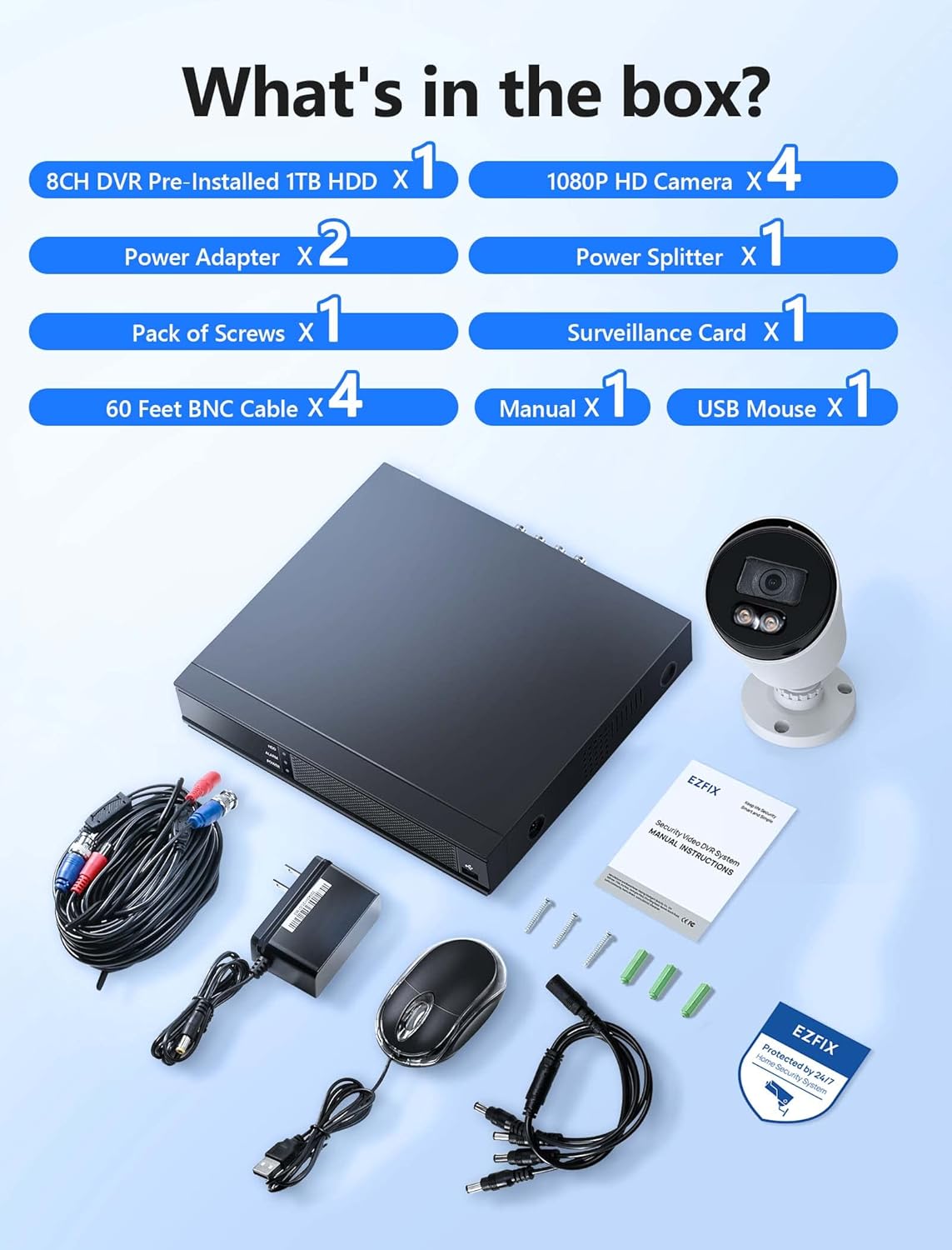
Image description: A clear layout of all items included in the EZFIX security camera system package. This includes the 8-channel DVR, four 1080P HD cameras, two power adapters, one power splitter, a pack of screws, a surveillance card, four 60-foot BNC cables, a user manual, and a USB mouse.
- 8CH DVR Pre-installed 1TB HDD x 1
- 1080P HD Camera x 4
- 전원 어댑터 x 2
- Power Splitter x 1
- 나사 1팩
- Surveillance Card x 1
- 60 Feet BNC Cable x 4
- 매뉴얼 x 1
- USB 마우스 x 1
명세서
| 상표 | 이지픽스 |
| 모델 번호 | EF-D08E4B2-1L |
| 연결 기술 | 열광한 |
| 채널 수 | 8 |
| 메모리 저장 용량 | 1테라바이트 |
| 색상 | 하얀색 |
| 제품 크기(L x W x H) | 14.76 x 11.61 x 11.82 인치 |
| 품목 무게 | 10.21파운드 |
| 제조업체 | Relong Intelligent Security Technology (Shenzhen) Co., Ltd. |
| 첫 번째 이용 가능 날짜 | 8년 2022월 XNUMX일 |
설정
시스템 연결도

Image description: A diagram illustrating the connection process for the EZFIX security system. The DVR is connected to a router via an Ethernet cable, and cameras are connected to the DVR. A monitor is shown connected to the DVR, displaying live feeds from multiple cameras.
설치 단계
카메라를 DVR에 연결하세요: 제공된 BNC 케이블을 사용하여 각 카메라를 DVR에 연결하십시오. 연결이 단단히 고정되었는지 확인하십시오.
Connect DVR to Power: Use the power adapter to connect the DVR to an electrical outlet.
카메라를 전원에 연결하세요: Use the power adapters and splitter to power the cameras. Ensure all cameras receive power.
DVR을 모니터에 연결하세요: Connect the DVR to a monitor using an HDMI or VGA cable (not included) to view the camera feeds and configure settings.
Connect DVR to Network (Optional for Remote Access): Connect the DVR to your router using an Ethernet cable for remote view능력을 갖추고 있습니다.
초기 설정 : Follow the on-screen prompts on the connected monitor to complete the initial DVR setup, including setting date/time, password, and recording preferences.
작동 지침
24/7 녹화

Image description: A monitor displaying a 4-way split screen of live camera feeds from different locations (warehouse, office, outdoor patio, open-plan office). Below the monitor is the DVR unit. Text indicates "24/7 Recording - No Monthly Fee -" and icons for HD, 1TB HDD, Record, and Playback.
The system is designed for continuous 24/7 recording to the pre-installed 1TB hard drive. This ensures that all activity is captured without interruption. You can configure recording schedules and modes (continuous, motion-triggered) through the DVR's interface.
풀 컬러 나이트 비전

Image description: A close-up of a white bullet-style security camera with two bright LED lights illuminated, positioned above a street scene at night. The street and houses are visible in full color, demonstrating the camera's full-color night vision capability.
The cameras feature full-color night vision, providing clear and detailed images even in low-light conditions. The integrated lights on the cameras activate automatically to illuminate the area, enabling color capture at night.
동작 감지 및 알림

Image description: A security camera mounted on a wall, shining a light beam onto a person attempting to break into a window at night. A smartphone screen displays a "Motion Alert" notification from the "Rview Pro" app, indicating detection from EZFIX. Icons for Email, Push notifications, Motion Detection, and Full-Color Night Vision are also shown.
The system supports motion detection. When motion is detected, the system can trigger alerts via email or push notifications to your mobile device. Configure motion detection zones and sensitivity settings in the DVR menu to minimize false alarms.
원격 접속

Image description: A hand holding a smartphone displaying a live feed from a security camera, showing a person in a mask carrying a box near a red door. Below the phone, icons for "Download App Store" and "Get it on Google Play" are visible, indicating mobile app availability for remote access.
Access your camera feeds remotely from anywhere using the dedicated mobile application (available on App Store and Google Play). Ensure your DVR is connected to the internet for this feature to function.
유지
정기 청소: 카메라 렌즈는 부드러운 천으로 주기적으로 청소하세요.amp 깨끗한 이미지 품질을 위해 천을 사용하십시오. 연마성 세척제는 사용하지 마십시오.
케이블 검사: Check all cables for wear, damage, or loose connections. Replace damaged cables promptly.
DVR 환기: Ensure the DVR unit has adequate ventilation to prevent overheating. Do not block air vents.
소프트웨어 업데이트: 제조사 확인해보세요 webDVR의 최적 성능과 보안을 보장하기 위해 정기적으로 해당 사이트의 펌웨어 업데이트를 확인하십시오.
데이터 백업: 중요한 음식을 정기적으로 백업하세요tag필요한 경우 DVR에서 외부 저장 장치로 데이터를 옮길 수 있습니다.
문제 해결
영상 표시 안 됨
전원 확인: Ensure the DVR and cameras are properly powered on.
케이블 연결: Verify all BNC and video output cables (HDMI/VGA) are securely connected.
모니터 입력: Confirm your monitor is set to the correct input source (HDMI/VGA).
녹음 없음
하드 드라이브 상태: Check the DVR's hard drive status in the system settings. Ensure it is detected and functioning correctly.
녹화 일정: Verify that the recording schedule is properly configured.
디스크 공간: Ensure there is sufficient space on the hard drive. The system typically overwrites older footag네, 하지만 설정을 확인해 보세요.
원격 접속이 작동하지 않습니다
네트워크 연결 : Confirm the DVR is connected to your router and has internet access.
앱 구성: Re-check the mobile app settings and ensure the DVR is correctly added and online.
라우터 설정: Ensure no firewall or router settings are blocking the DVR's access to the internet or the app's connection.
야간 시력이 좋지 않음
렌즈 청결도: Clean the camera lens to remove any dirt or obstructions.
장애물: Ensure there are no objects directly in front of the camera or its infrared/white light illuminators.
전원 공급 장치: Verify cameras are receiving adequate power, as insufficient power can affect night vision performance.
보증 및 지원
For technical assistance or warranty inquiries, please refer to the contact information provided in the included manual or visit the EZFIX official web대지.
The manufacturer provides a 12-month replacement warranty and lifetime technical support.

Image description: A graphic illustrating customer support commitments: "24 Hours Quick reply within 24 hours", "12 Months Replacement available within 12 month", and "Lifetime Lifetime service and technical support".