
Miofive Dash Cam Dual
Miofive 대시캠(전면/후면) 사용 설명서
Model: Dash Cam Dual
소개
The Miofive Dash Cam Front and Rear system provides comprehensive video recording for your vehicle, featuring 4K resolution for the front camera and 2K for the rear. Designed for reliability and ease of use, this dual dash camera system incorporates advanced features such as 5G WiFi connectivity, built-in GPS, motion detection, and G-sensor technology, all powered by a durable super capacitor. This manual provides detailed instructions for setup, operation, maintenance, and troubleshooting to ensure optimal performance of your device.
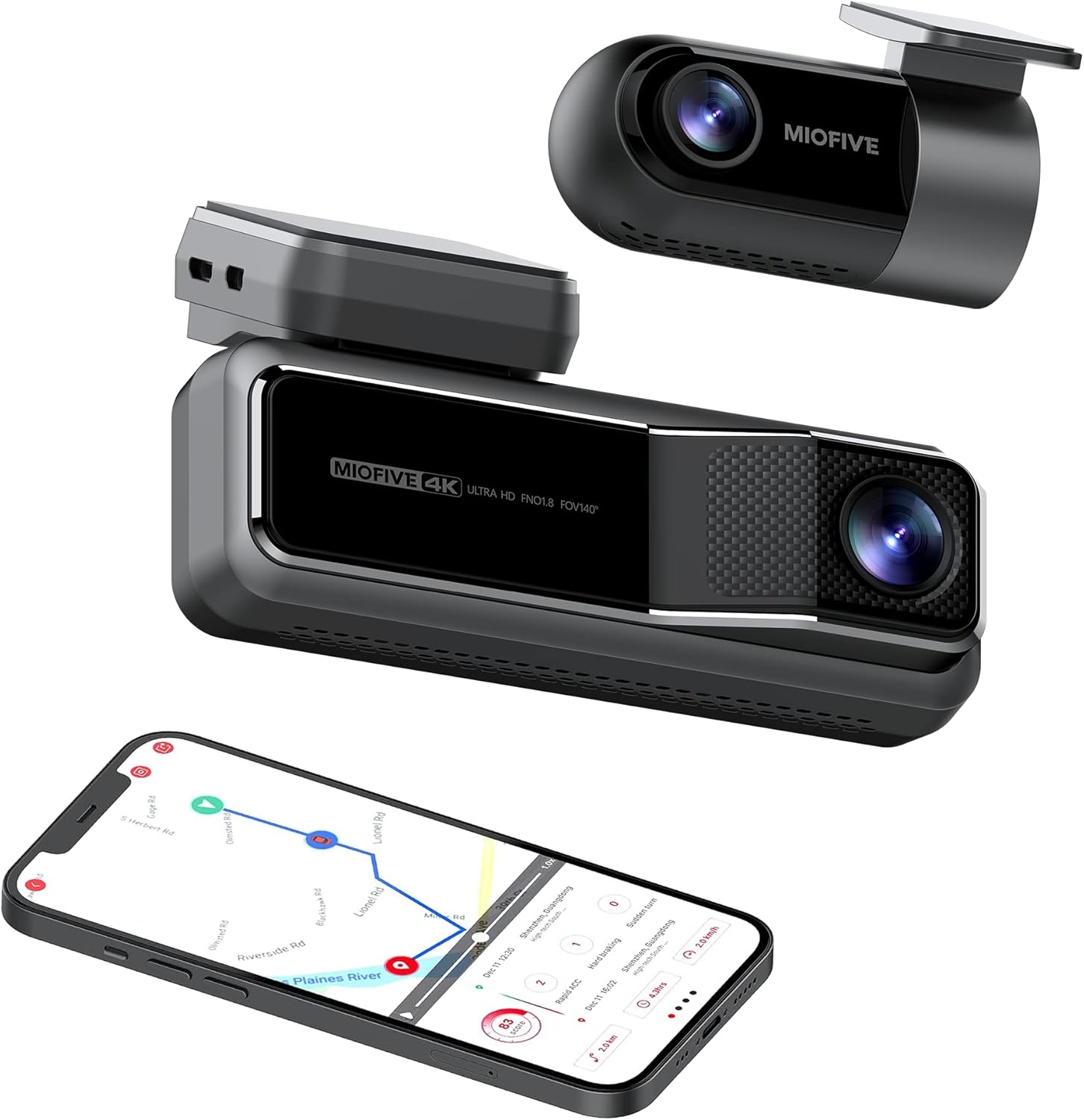
The Miofive Dash Cam system, featuring both front and rear cameras, along with its companion mobile application.
상자 안에 무엇이 들어있나요?
아래 나열된 모든 품목이 패키지에 포함되어 있는지 확인하세요.
- Miofive 4K Dash Cam x 1
- 차량용 충전기 x 1
- Crow Bar x 1
- 충전 케이블 x 1
- Static Sticker x 4
- 사용 설명서 x 1
- A Set of Backup Double-sided Adhesive Tapes x 1
- 데이터 케이블 x 1
- 리어캠 x 1
- Rear Cam Cable x 1

All components included in the Miofive Dash Cam Front and Rear package.
설정 및 설치
대시캠 장착
- 블랙박스를 장착할 앞 유리창 부분을 깨끗이 닦으세요. 먼지와 기름때가 없는지 확인하세요.
- Apply one of the static stickers to the cleaned area on the windshield. This helps protect your windshield and makes removal easier.
- Attach the main dash cam unit to the static sticker using the provided adhesive tape. Press firmly for 30 seconds to ensure a secure bond.
- Adjust the camera lens angle to ensure it captures the road ahead clearly, typically centered with the horizon.
전원 연결
- Connect the provided car charger to the dash cam's power input port.
- 차량용 충전기를 차량의 12V 전원 소켓(시가잭)에 꽂으세요.
- Route the power cable neatly along the edge of the windshield and dashboard using the crow bar to tuck it into crevices, ensuring it does not obstruct your view 또는 차량 제어 장치.
- For continuous parking monitoring, an optional hardwire kit (sold separately) is required to provide constant power to the dash cam. Refer to the hardwire kit's instructions for installation.
후방 카메라 연결
- Mount the rear camera on your rear windshield, typically at the top center, ensuring a clear view of the road behind. Use a static sticker and adhesive tape as with the front camera.
- Connect the rear camera cable to the rear camera and route it to the main dash cam unit.
- Plug the rear camera cable into the designated rear camera input port on the main dash cam.

Illustration of the Miofive Dash Cam Front and Rear installation process.
작동 지침
전원 켜기/끄기
The dash cam will automatically power on and begin recording when connected to your vehicle's power supply and the ignition is turned on. It will power off automatically when the vehicle's power is cut.
기본 녹음
Once powered on, the dash cam will automatically start loop recording. This means it continuously records video in segments, overwriting the oldest footage when the storage is full. Important footag덮어쓰기를 방지하기 위해 잠금 기능을 사용할 수 있습니다.
5G WiFi and App Control
The Miofive Dash Cam features built-in 5G WiFi for seamless connection to the Miofive mobile application. Download the Miofive app from your smartphone's app store. Once connected, you can:
- View 두 카메라에서 실시간으로 영상이 전송됩니다.
- 녹화된 foo 재생tag휴대폰에서 바로 확인하세요.
- Download important video clips to your device.
- Adjust camera settings and preferences.
- Receive real-time Over-The-Air (OTA) updates for bug fixes and software enhancements.


The Miofive App provides comprehensive control and access to your dash cam's features and recordings.
G-Sensor and Motion Detection
The built-in G-sensor automatically detects sudden impacts or collisions. When an event is detected, the dash cam will automatically lock the current video segment, preventing it from being overwritten by loop recording. This ensures critical evidence is preserved.

The G-sensor ensures automatic recording and locking of footag충격 중에.
주차 모니터
With the optional hardwire kit, the dash cam can monitor your vehicle even when parked. The 24-hour parking monitor and time-lapse recording features capture disturbances or continuous footage, providing security when you're away from your car.

The parking monitor feature provides continuous surveillance for your vehicle when parked.
나이트 비전
Equipped with the Sony Starvis IMX415 sensor and High Dynamic Range (HDR) technology, the Miofive Dash Cam delivers clear and bright video quality in low-light conditions, enhancing visibility during nighttime driving or in dimly lit environments.

Enhanced night vision capabilities for clear recordings in low light.
AI Algorithm and Go Assist
The intelligent AI algorithm monitors road conditions and provides helpful alerts. The Go Assist feature can notify you of sudden turns, braking, and accelerations, and prompt you to proceed when the vehicle ahead moves, improving driving awareness.

AI algorithm for smart driving assistance and alerts.
GPS 추적
Built-in GPS technology records your driving route, speed, and coordinates, providing detailed information for each journey. This data can be accessed and reviewed through the Miofive app.

Integrated GPS technology records essential driving data.
유지
Regular maintenance helps ensure the longevity and optimal performance of your Miofive Dash Cam:
- 렌즈 청소: Gently wipe the camera lenses with a soft, lint-free cloth to remove dust or smudges. Avoid using abrasive cleaners that could scratch the lens.
- 펌웨어 업데이트: Periodically check the Miofive app for available firmware updates. Keeping your dash cam's firmware up-to-date ensures you have the latest features and bug fixes.
- 연결 확인 중: Ensure all cables (power, rear camera) are securely connected to prevent intermittent power loss or recording issues.
- 스토리지 관리: While the dash cam uses loop recording, it's good practice to regularly review and back up any important footage. The built-in 128GB eMMC storage is designed for durability, but managing critical files is always recommended.
문제 해결
일반적인 문제 및 솔루션
- 대시캠이 켜지지 않음:
- Ensure the car charger is properly plugged into both the dash cam and the vehicle's 12V power outlet.
- 차량의 12V 전원 소켓이 제대로 작동하는지 확인하십시오 (예: 다른 기기를 연결해 보는 방식).
- If using a hardwire kit, verify its installation and power connection.
- App Connectivity Issues (WiFi):
- Ensure the dash cam's WiFi is enabled.
- Confirm your smartphone is connected to the dash cam's WiFi network (SSID and password usually found on the device or in the manual).
- 블랙박스와 스마트폰을 모두 재시작해 보세요.
- Missing or Corrupted Footage:
- 설정에서 반복 녹화 기능이 활성화되어 있는지 확인하십시오.
- Ensure the built-in 128GB eMMC storage is not full of locked files. Regularly back up and delete unnecessary locked files.
- Check if the G-sensor sensitivity is set appropriately; overly sensitive settings can lead to many locked files filling up storage quickly.
- 낮은 비디오 품질:
- 유지관리 섹션에 설명된 대로 카메라 렌즈를 청소하세요.
- 렌즈에서 보호 필름을 제거했는지 확인하세요.
- Check video resolution settings in the app; ensure it's set to 4K (front) and 2K (rear) for optimal quality.
- Verify that the dash cam is securely mounted and not vibrating excessively.
명세서
| 특징 | 세부 사항 |
|---|---|
| 상표 | 미오파이브 |
| 모델명 | Dash Cam Dual |
| 제품 치수 | 2.87 x 5.98 x 6.94 인치 |
| 품목 무게 | 1.81파운드 |
| 제조업체 | MIOFIVE Technology Limited Co., Ltd. |
| CPU | Novatek Processor |
| 이미지 센서 | 소니 스타비스 |
| 화면 | 2.2인치 IPS 디스플레이 |
| 카메라 FOV | 140° 수평 및 수직 View잉 앵글 |
| 구멍 | F1.8 |
| Image Resolution (Front) | 4K UHD (3840x2160) @30fps |
| Image Resolution (Rear) | 2K QHD (2560x1440) @30fps |
| 저장 | 128GB eMMC 내장 |
| G센서 | Built-in 6 Gyro sensor |
| 와이파이 | 2.4 / 5GHz |
| 전원 공급 장치 | 슈퍼 커패시터 |
| 전원 입력 | 5V / 2.4A |
| 작동 온도 | -10°C ~ 45°C(14°F ~ 113°F) |
| 연결 기술 | 와이파이 |
| 차량 서비스 유형 | 미니밴, 버스, 자동차, 트럭 |
| 장착 유형 | 윈드 실드 마운트 |
| 색상 | 검은색 |

Detailed specifications for the Miofive Dash Cam Dual.
보증 및 지원
Miofive is committed to providing excellent customer service and support for its products:
- 30일 환불 보장: 구매하신 상품에 만족하지 못하시는 경우, 30일 이내에 환불을 받으실 수 있습니다.
- 18개월 보증 범위: Your Miofive Dash Cam is covered by an 18-month warranty from the date of purchase, protecting against manufacturing defects.
- 연중무휴 24시간 전담 고객 지원: Assistance is available around the clock for any queries or issues you may encounter.
- 평생 기술 솔루션 지원: Miofive provides ongoing technical support for the lifetime of your product.
지원 관련 문의는 다음 연락처로 문의해 주십시오.
이메일: support@miofive.com

Miofive's commitment to customer satisfaction and product support.
Ask a question about this manual
Ask about setup, troubleshooting, compatibility, parts, safety, or missing instructions. Manuals+ will review the question and use this page’s manual context to help answer it.