
소개
This manual provides essential information for the safe and efficient operation of your E-Lektron Live Power Mixer ST-62P. Please read it thoroughly before using the device and keep it for future reference.
중요 안전 지침
- 전원 공급 장치: Connect the mixer only to a grounded AC outlet with the specified voltage (230 Volts). Ensure the power cable is not damaged or pinched.
- 통풍: 환기구를 막지 마십시오. 과열을 방지하기 위해 장치 주변에 충분한 공기 흐름을 확보하십시오.
- 수분: Do not expose the unit to rain, moisture, or liquids. Avoid placing liquid-filled objects on the mixer.
- 서비스: 이 제품을 직접 수리하려고 하지 마십시오. 모든 서비스는 자격을 갖춘 서비스 담당자에게 문의하십시오.
- 놓기: Place the mixer on a stable, flat surface. Avoid extreme temperatures, direct sunlight, and strong vibrations.
- 청소: 청소하기 전에 전원을 차단하십시오. 마른 부드러운 천을 사용하십시오. 액체 세척제나 스프레이형 세척제는 사용하지 마십시오.
제품 끝view
The E-Lektron ST-62P is a versatile live power mixer designed for various audio applications. It features multiple input channels, an integrated amplifier, a media player with Bluetooth, and built-in effects.
주요 특징:
- Live mixer with 4 microphone or instrument channels, 2 stereo channels, stereo media player channel, and stereo CD/TAPE input.
- 강력한 통합 기능을 갖추고 있습니다. amplifier, making the ST-62P central to any performance.
- Fully equipped with a media player, Bluetooth connectivity, channel monitoring, and echo/reverb effects.
- The versatile integrated media player supports playback from an SD card or USB stick, and streams music via Bluetooth from devices like mobile phones.
- The media player also includes a recording function.
- Integrated powerful amplifier with 2 x 250 W music power.
전면 패널 컨트롤:
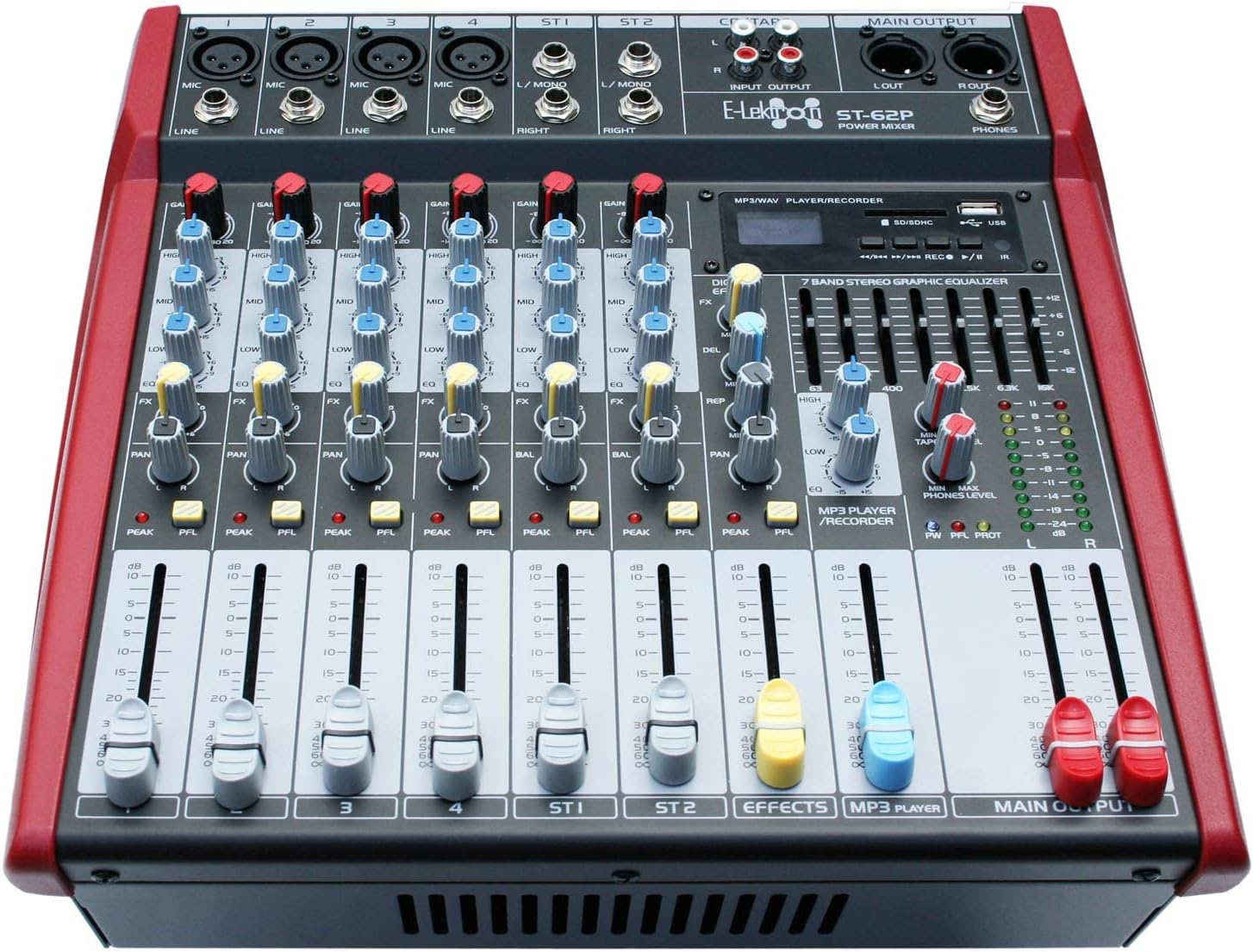
The front panel provides access to all mixing controls, including input gains, equalization, pan, effects sends, and channel faders. The integrated media player and 7-band stereo graphic equalizer are also located here.
설정
1. 풀기:
Carefully remove the mixer from its packaging. Verify that all included components are present: the ST-62P mixer, power cable, and user manual.
2. 전원 연결:
Connect the supplied power cable to the AC IN socket on the rear panel of the mixer and then to a suitable 230V AC grounded power outlet. Ensure the power switch is in the OFF position before connecting.
3. 입력 연결:
- 마이크/라인 입력(채널 1-4): Use XLR cables for microphones or 1/4-inch (6.35mm) jack cables for line-level instruments (e.g., keyboards, guitars with preamp에스).
- Stereo Inputs (ST1, ST2): Use 1/4-inch (6.35mm) jack cables for stereo line-level sources.
- CD/TAPE Input: Use RCA cables to connect external audio sources like CD players or tape decks.
4. 출력 연결:
- Speaker Outputs (AMP R OUT, AMP L OUT): Connect your passive speakers to these outputs using NL-2 Speaker plug cables. Ensure your speakers have a rated load impedance of 4 Ohms.
- 주 출력(좌/우): Use XLR cables to connect to external power amplifier 또는 녹음 장치.
- 전화 출력: Connect headphones to the 1/4-inch (6.35mm) jack for monitoring.

작동 지침
1. 전원 켜기/끄기:
After all connections are made, switch the main power button on the rear panel to the ON position. To power off, switch the button to OFF and then disconnect the power cable.
2. 채널 제어:
- 이득: Adjusts the input sensitivity for each channel. Set this to achieve a strong signal without clipping (PEAK LED should not light up consistently).
- EQ (고음, 중음, 저음): Three-band equalizer for tone shaping. Adjust HIGH for treble, MID for mid-range, and LOW for bass frequencies.
- FX : 내부 이펙트 프로세서로 전송되는 신호량을 조절합니다.
- 팬/발: Pans the mono signal left or right in the stereo field (PAN) or adjusts the balance of a stereo signal (BAL).
- PFL(프리페이더 리슨): Activates channel monitoring through headphones, independent of the channel fader.
- 채널 페이더: 각 채널의 출력 레벨을 메인 믹스에 맞춰 조정합니다.
3. Media Player Functions:
The integrated media player supports USB, SD card, and Bluetooth connectivity. It also has a recording function.
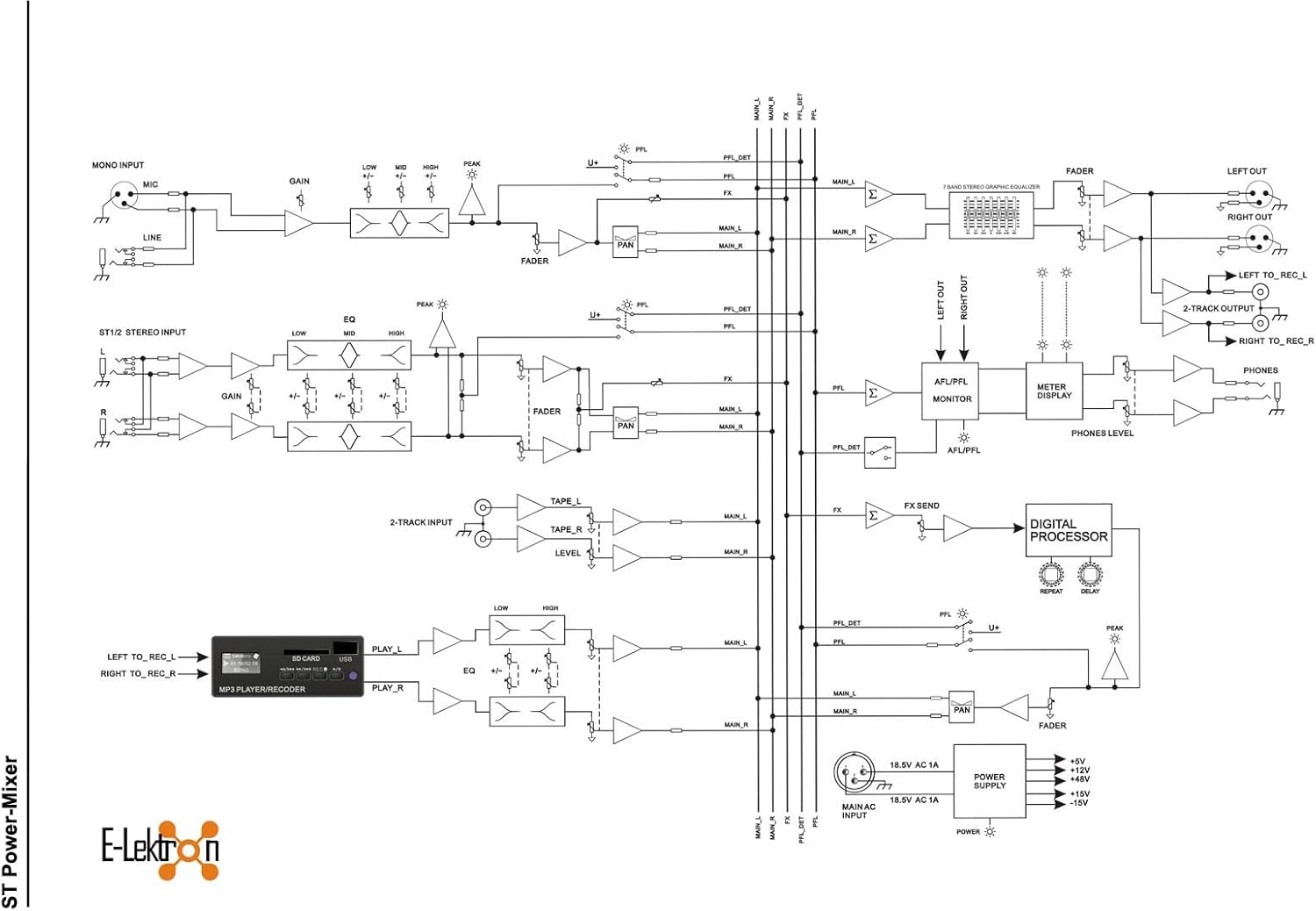
- USB/SD 재생: Insert a USB stick or SD card into the respective slot. Use the player controls (Play/Pause, Next, Previous) to navigate and play audio files.
- 블루투스: Activate Bluetooth on your mobile device and search for the mixer. Pair the devices to stream audio wirelessly.
- 녹음: The media player can record the main mix directly to a USB stick or SD card. Refer to the media player's specific controls for recording activation.
4. 효과 섹션:
The mixer includes built-in echo/reverb effects. Use the FX controls on each channel to send signal to the effects processor, and adjust the overall effect level with the dedicated FX RETURN fader.
5. 7-Band Stereo Graphic Equalizer:
Use the sliders on the 7-band graphic equalizer to fine-tune the overall frequency response of the main mix. Each slider corresponds to a specific frequency band, allowing you to boost or cut frequencies as needed.
6. Main Output:
The MAIN OUTPUT faders control the overall volume of the stereo mix. Adjust these to the desired listening level.
유지
청소:
Regularly clean the exterior of the mixer with a soft, dry, lint-free cloth. Do not use abrasive cleaners, solvents, or waxes. Ensure no dust accumulates in the ventilation grilles.
저장:
장기간 사용하지 않을 경우 믹서를 서늘하고 건조한 곳에 보관하고 직사광선과 극한 온도 변화를 피하십시오. 먼지가 쌓이지 않도록 덮개를 씌워 보관하십시오.
문제 해결
| 문제 | 가능한 원인 | 해결책 |
|---|---|---|
| 전원이 없습니다 | Power cable disconnected; Power switch off; Outlet fault | 전원 케이블 연결 상태를 확인하십시오. 전원 스위치가 켜져 있는지 확인하십시오. 다른 기기를 사용하여 콘센트를 테스트하십시오. |
| 사운드 출력이 없습니다 | Main faders down; Channel faders down; Speaker cables disconnected; Amplifier off/faulty | Raise MAIN OUTPUT faders; Raise individual channel faders; Check speaker connections; Verify external amplifier (if used) is on and working. |
| 왜곡된 소리 | GAIN too high; Input signal too strong; Speaker impedance mismatch | Reduce GAIN on input channels; Reduce input signal level from source; Ensure speakers are 4 Ohms. |
| 블루투스가 연결되지 않습니다 | Bluetooth not enabled on device; Mixer not in pairing mode; Interference | Ensure Bluetooth is active on your device; Check mixer's media player for Bluetooth mode; Move closer to the mixer or reduce other wireless devices. |
기술 사양
| 특징 | 사양 |
|---|---|
| 모델 번호 | ST-62P |
| 상표 | 일렉트론 |
| 제조업체 | E-Lektron |
| 제품 유형 이름 | 라이브 믹서 |
| 채널 수 | 6 |
| 제품 크기(L x W x H) | 32.2 x 32 x 15.3cm |
| 품목 무게 | 7.2 킬로그램 |
| 연결 기술 | 보조, 블루투스, USB |
| 전원 | 전기 케이블 |
| 권tage | 230 볼트 |
| 빈도 | 30000Hz |
| 오디오 입력 | XLR |
| 출력 커넥터 유형 | NL-2 Speaker plug, XLR |
| 포함된 구성 요소 | Power cable, User manual, Mixer |

보증 및 지원
E-Lektron provides a spare parts availability for 5 years from the date of purchase. For technical support or warranty claims, please contact your retailer or the E-Lektron customer service department. Keep your proof of purchase for warranty validation.


