
1. 서론
The Maxell Sync Up True Wireless Bluetooth Earbuds provide a high-fidelity audio experience with deep bass. Designed for a secure and comfortable fit, these earbuds offer up to 12 hours of playtime with the included charging case. Integrated controls allow for music management, call handling, and voice assistant activation without needing to access your phone. The built-in microphone ensures clear communication during calls.
2. 상자 안에 무엇이 들어있나요?
- Maxell Sync Up True Wireless Bluetooth Earbuds (Left and Right)
- 무선 충전 케이스
- 추가 이어팁 (다양한 사이즈)
- Case-to-USB Charging Cable

Image: Maxell Sync Up True Wireless Earbuds resting inside their charging case, which is open. The earbuds are black, and the case is also black with the Maxell logo visible.
3. 설정
3.1 이어버드와 케이스 충전
처음 사용하기 전에 이어버드와 충전 케이스를 완전히 충전하세요.
- 이어버드를 충전 케이스에 넣으세요. 이어버드가 각 슬롯에 제대로 꽂혔는지 확인하세요.
- Connect the provided USB charging cable to the charging port on the case and plug the other end into a USB power source (e.g., computer, wall adapter).
- The indicator lights on the charging case will illuminate to show charging status. Once fully charged, the lights may change color or turn off.
The charging case provides up to 12 hours of additional playtime for the earbuds.
3.2 블루투스 기기와 페어링
이어폰을 스마트폰이나 기타 블루투스 지원 기기에 연결하려면 다음 단계를 따르세요.
- 이어버드가 충전되어 있고 충전 케이스에 들어 있는지 확인하세요.
- 충전 케이스 뚜껑을 여세요. 이어버드의 LED 표시등이 깜빡이며 자동으로 페어링 모드로 전환됩니다.
- On your device, go to 블루투스 설정 블루투스를 활성화합니다.
- 검색 available devices and select "Maxell Sync Up" from the list.
- Once connected, the earbud LED lights will stop flashing or change to a solid color.
- 이어버드를 케이스에서 꺼내 범위 내에 놓으면 마지막으로 페어링된 기기에 자동으로 다시 연결됩니다.
3.3 이어버드 장착
For optimal sound quality and comfort, select the correct eartip size and ensure a secure fit.
- Try different eartip sizes provided to find the best seal for your ear canal.
- Insert the earbud into your ear and gently twist it forward or backward until it feels secure and comfortable. The wing tip design aids in a more secure fit.
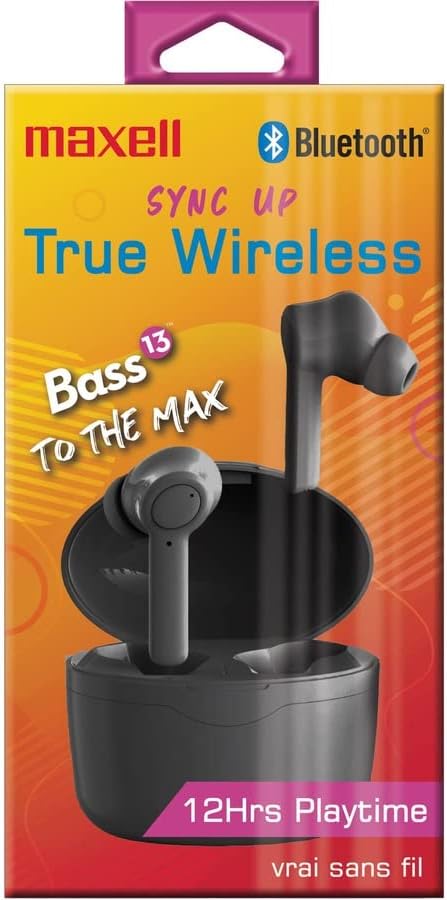
Image: The Maxell Sync Up True Wireless Earbuds shown in their retail packaging. The packaging highlights features like "True Wireless" and "12Hrs Playtime".
4. 사용 설명서
Each earbud features a multi-function button for control.
4.1 전원 켜기/끄기
- 전원 켜기: 충전 케이스 뚜껑을 열거나 각 이어버드의 다기능 버튼을 3초 동안 길게 누르세요.
- 전원 끄기 : 이어버드를 충전 케이스에 다시 넣고 뚜껑을 닫거나, 각 이어버드의 다기능 버튼을 5초간 길게 누르세요.
4.2 음악 제어
- 재생/일시 중지: 양쪽 이어버드의 다기능 버튼을 한 번 누르세요.
- 다음 트랙: 오른쪽 이어버드의 다기능 버튼을 두 번 누르세요.
- 이전 트랙 : 왼쪽 이어버드의 다기능 버튼을 두 번 누르세요.
4.3 통화 제어
- 전화 받기/종료: 양쪽 이어버드의 다기능 버튼을 한 번 누르세요.
- 전화 거부: 양쪽 이어버드의 다기능 버튼을 2초간 길게 누르세요.
4.4 음성 어시스턴트
- Voice Assistant 활성화 : 이어버드 중 하나의 다기능 버튼을 세 번 누르세요.
5. 유지관리
5.1 청소
- 부드럽고 마른 보푸라기 없는 천으로 이어버드와 충전 케이스를 정기적으로 청소하세요.
- 연마성 세척제, 알코올, 화학 용제는 사용하지 마세요.
- Gently remove eartips and clean any earwax or debris from the earbud nozzles using a small, soft brush or cotton swab. Ensure the nozzles are dry before reattaching eartips.
5.2 보관
- 사용하지 않을 때는 이어버드를 충전 케이스에 보관하여 보호하고 충전 상태를 유지하세요.
- 기기를 서늘하고 건조한 곳에 보관하고, 극한의 온도와 직사광선을 피하세요.
6. 문제 해결
6.1 이어버드가 페어링되지 않음
- 양쪽 이어버드가 모두 충전되어 있는지 확인하세요.
- 기기에서 Bluetooth가 활성화되어 있는지 확인하세요.
- 이어버드를 케이스에 다시 넣고 뚜껑을 닫은 후 몇 초간 기다렸다가 뚜껑을 열어 페어링 모드로 다시 진입하세요.
- Forget "Maxell Sync Up" from your device's Bluetooth list and try pairing again.
- 이어버드가 기기의 블루투스 범위 내 10미터 이내에 있는지 확인하십시오.
6.2 소리가 나지 않거나 간헐적인 오디오
- 기기와 이어버드의 볼륨 레벨을 확인하세요.
- 이어버드가 기기에 제대로 연결되었는지 확인하세요.
- 간섭을 피하려면 장치에 더 가까이 다가가세요.
- 다른 애플리케이션이나 소스에서 오디오를 재생해보세요.
6.3 충전 문제
- 충전 케이블이 케이스와 전원에 모두 단단히 연결되어 있는지 확인하세요.
- 다른 USB 포트나 전원 어댑터를 사용해 보세요.
- 이어버드의 충전 접점과 케이스 내부가 깨끗하고 이물질이 없는지 확인하세요.
7. 사양
| 상표 | 맥셀 |
| 모델 번호 | 199899 |
| 모델명 | Sync Up True Wireless Bluetooth Earbuds |
| 색상 | 검은색 |
| 귀 위치 | 귀에 |
| 폼 팩터 | 귀에 |
| 임피던스 | 16옴 |
| 내장 미디어 | 무선 충전 케이스 |
| 배터리 평균 수명(이어버드) | 6시간 |
| Battery Average Life (with Case) | 12시간 |
| 소음 제어 | 소리 차단 |
| 주파수 범위 | 20Hz - 20kHz |
| 추가 기능 | 마이크 포함 |
| 제어 방법 | 터치, 음성 |
| 연결 기술 | 무선 전화 |
| 무선 기술 | 블루투스 |
| 블루투스 버전 | 5.0 |
| 블루투스 범위 | 10 미터 |
| 방수 레벨 | 방수가 되지 않음 |
| 운반 케이스 소재 | 플라스틱 또는 알루미늄 |
| 품목 무게 | 1 파운드 |
8. 보증 및 지원
8.1 보증 정보
This product comes with a standard manufacturer's warranty. Please refer to the warranty card included in your product packaging or visit the official Maxell web자세한 보증 약관은 해당 사이트에서 확인하세요.
8.2 고객 지원
For technical assistance, troubleshooting, or general inquiries, please contact Maxell customer support. Contact information can typically be found on the Maxell official web사이트 또는 제품 설명서 내에서.
방문할 수 있습니다 아마존에서 맥셀 스토어를 만나보세요 더 많은 제품 정보를 보려면.


