1. 서론
Thank you for choosing the LENRUE A39PRO USB-C Computer Speaker. This speaker is designed to provide clear and powerful audio for your laptop or desktop computer with a simple plug-and-play Type-C connection. This manual provides detailed instructions for setup, operation, and maintenance to ensure optimal performance and longevity of your device.
2. 패키지 내용
패키지에 모든 품목이 들어 있는지 확인하세요.
- 1 x LENRUE A39PRO Computer Speaker
- 1 x 사용자 매뉴얼(이 문서)
3. 제품 오버view
The LENRUE A39PRO speaker features a sleek design with intuitive controls and vibrant lighting. Familiarize yourself with the components below.
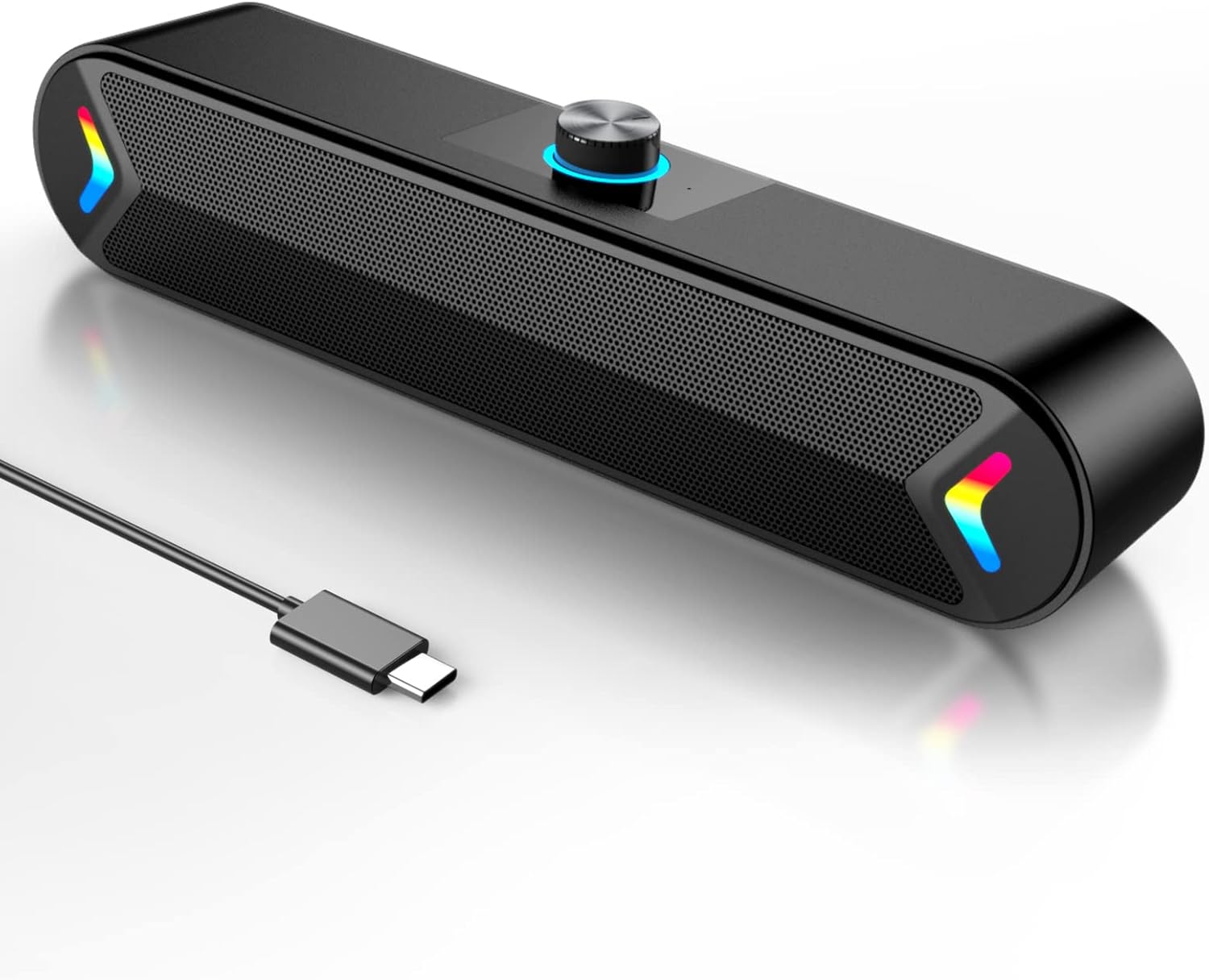
그림 3.1: 앞쪽 view of the LENRUE A39PRO speaker, showing the main grille and integrated USB-C cable.

그림 3.2: 상단 및 후면 view of the speaker, highlighting the volume knob and the power/light control button.
주요 구성 요소:
- 볼륨 노브: Located on the top, used for adjusting audio volume.
- 전원/조명 버튼: Located on the back, controls power and the colorful light feature.
- USB-C 케이블: Integrated cable for both power and audio input.
- 듀얼 5W 드라이버: Internal components providing clear stereo sound.
- Independent Bass Diaphragm: Enhances bass performance.
4. 설정 지침
The LENRUE A39PRO speaker is designed for simple plug-and-play operation. No additional drivers or software are required for most operating systems.
스피커 연결:
- Locate an available USB-C port on your laptop or desktop computer.
- Insert the integrated USB-C cable from the LENRUE A39PRO speaker firmly into the USB-C port on your computer.

그림 4.1: Illustrates connecting the speaker's USB-C cable to a laptop's Type-C port.
- The speaker will automatically power on and be recognized by your operating system. You may need to select the "LENRUE A39PRO" as the default audio output device in your computer's sound settings.

그림 4.2: The speaker in operation, connected to a laptop, demonstrating its plug-and-play functionality.
중요 참고 사항: Ensure your device has a Type-C interface for compatibility. The single USB-C cable transmits both audio and electrical power to the speaker.
5. 사용 설명서
볼륨 조절:
- 회전하다 볼륨 노브 on the top of the speaker clockwise to increase the volume.
- 회전하다 볼륨 노브 시계 반대 방향으로 돌리면 볼륨이 감소합니다.
Controlling the Colorful Light:
The speaker features a colorful light design that can be controlled via the button on the back.
- 를 누르세요 전원/조명 버튼 once to turn on the speaker and activate the colorful lights.
- 를 누르세요 전원/조명 버튼 a second time to turn off the colorful lights while keeping the speaker powered on.
- 를 누르세요 전원/조명 버튼 a third time to power off both the speaker and the lights.
6. 호환성
The LENRUE A39PRO speaker offers wide compatibility with various operating systems and devices that feature a USB-C port for audio and power.

그림 6.1: Visual representation of the speaker's compatibility with Windows, macOS, Chrome OS, Linux, and Unix systems.
지원되는 운영 체제:
- Windows PCs (Vista/7/8/10)
- macOS (MacBook Air, Mac mini)
- Google Chromebooks
- 리눅스
- 유닉스
호환 장치:
- Laptops with Type-C port
- Desktop Computers with Type-C port
7. 문제 해결
If you encounter issues with your LENRUE A39PRO speaker, please refer to the following common problems and solutions:
| 문제 | 가능한 원인 | 해결책 |
|---|---|---|
| 스피커에서 소리가 나지 않습니다. |
|
|
| Lights are off, but speaker is on. | Lights have been toggled off. | Press the Power/Light Button once to cycle through light modes and turn them back on. |
| 소리가 왜곡되거나 불분명합니다. |
|
|
| 컴퓨터에서 스피커를 인식하지 못했습니다. |
|
|
8. 사양
| 특징 | 세부 사항 |
|---|---|
| 모델명 | 에이쓰리프로 |
| 스피커 유형 | 컴퓨터 스피커 |
| 연결 기술 | USB(타입-C) |
| 전원 | 유선 전기 (USB-C를 통해) |
| 오디오 출력 모드 | 스테레오 재생 |
| 스피커 최대 출력 전력 | 10와트(2x5W) |
| 컨트롤러 유형 | 노브 컨트롤 |
| 제품 크기(D x W x H) | 2.17인치 깊이 x 12.6인치 너비 x 2.56인치 높이 |
| 품목 무게 | 1.3 파운드 |
| 색상 | Black-USBC |
| 특징 | One Cable with Type-C plug for charging and audio, Colorful light Design |
9. 유지관리
Proper care and maintenance will ensure the longevity and optimal performance of your speaker.
- 청소: Use a soft, dry cloth to wipe the surface of the speaker. Do not use liquid cleaners or abrasive materials, as they may damage the finish or internal components.
- 저장: 장시간 사용하지 않을 경우, 스피커를 직사광선과 극한의 온도를 피해 서늘하고 건조한 곳에 보관하세요.
- 손질: Avoid dropping the speaker or subjecting it to strong impacts, which can damage internal circuitry.
- 물 노출: The speaker is not waterproof. Avoid exposing it to water or other liquids.
10. 보증 및 지원
The LENRUE A39PRO speaker comes with a 한정 보증. For specific warranty terms, conditions, and support inquiries, please refer to the warranty information provided at the time of purchase or contact LENRUE customer support directly through their official channels.
For further assistance or technical support, please visit the official LENRUE web사이트 또는 고객 서비스 부서에 문의하십시오.