
1. 서론
This manual provides instructions for the installation, operation, and maintenance of the Golmar T590 VD (Serie 90) Intercom Telephone, model 19950590. This device is designed for use within Golmar intercom systems and is specifically compatible with the Golmar T-840B telephone system. It is not compatible with other brands or models outside the specified Golmar series.
The Golmar T590 VD is a 4-wire digital installation telephone, featuring a durable ABS plastic housing in white (RAL9003) and a detachable handset cable for ease of connection and maintenance.
2. 설정 및 설치
2.1 패키지 내용
- Golmar T590 VD Intercom Telephone
- Handset with detachable cable
- 장착 하드웨어(포함된 경우)
2.2 호환성
중요한: This telephone is exclusively designed for Golmar systems, specifically the T-840B telephone. It is not compatible with intercom systems from other manufacturers.
2.3 배선 지침
The Golmar T590 VD utilizes a 4-wire digital installation system. Refer to the main system's wiring diagram for the Golmar T-840B for precise connection points. Ensure all connections are secure and correctly polarized.
- Identify the 4-wire digital connection points on your Golmar T-840B system.
- Connect the corresponding wires from the T590 VD telephone to these points.
- Attach the detachable handset cable to the telephone unit.
- Mount the telephone securely to a wall or desired surface using appropriate hardware.
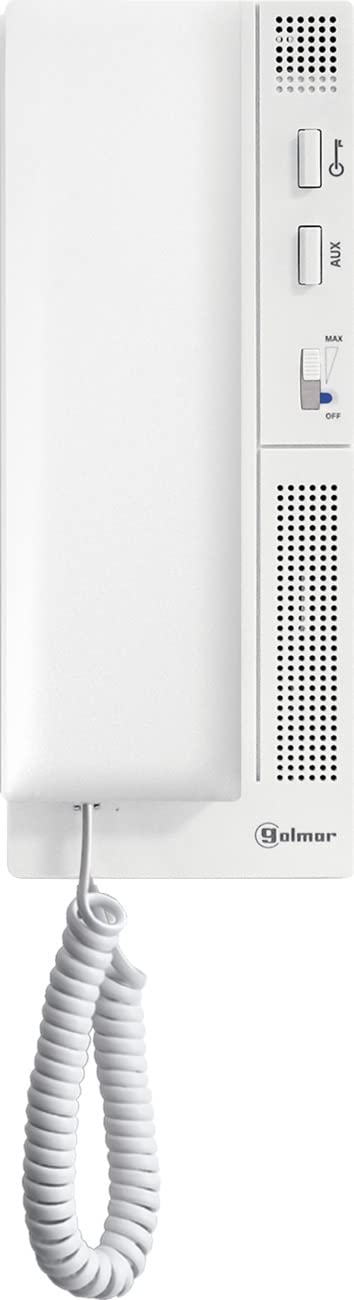
그림 1: 전면 view of the Golmar T590 VD Intercom Telephone. This image shows the white ABS plastic housing and the handset.
3. 사용 설명서
The Golmar T590 VD is a wired telephone designed for single-line operation within a compatible Golmar intercom system.
3.1 전화 걸기
- 핸드셋을 듭니다.
- Wait for a dial tone (if applicable to your system configuration).
- Use the keypad to dial the desired extension or external number.
- Speak into the handset and listen for a response.
- 통화를 종료하려면 수화기를 제자리에 놓으세요.
3.2 전화 받기
- 전화벨이 울리면 수화기를 들어 전화를 받으세요.
- Speak into the handset and listen for the caller.
- 통화를 종료하려면 수화기를 제자리에 놓으세요.
3.3 Caller Identification (Caller ID)
This telephone supports caller identification. If your Golmar system and service provider support Caller ID, the incoming caller's information will be displayed (if the telephone unit has a display, which is not specified but implied by "Ja" for Nummerherkenning/Identificatie van beller). Note: The T590 VD is a basic intercom phone, typically without a display. The Caller ID feature might refer to the system's capability rather than the phone itself displaying it. For this manual, we assume basic functionality.
4. 유지관리
The Golmar T590 VD telephone requires minimal maintenance to ensure long-lasting performance.
4.1 청소
- 부드러운 d를 사용하세요amp cloth to wipe the exterior of the telephone.
- Avoid using abrasive cleaners, solvents, or strong chemicals, as these can damage the ABS plastic housing.
- Ensure no liquid enters the internal components of the telephone.
4.2 케이블 관리
Periodically check the detachable handset cable and the main connection wires for any signs of wear or damage. If any cables are damaged, contact a qualified technician for replacement or repair.
5. 문제 해결
If you experience issues with your Golmar T590 VD telephone, refer to the following common troubleshooting steps:
| 문제 | 가능한 원인 | 해결책 |
|---|---|---|
| 통화 연결이 되지 않음 / 전화를 걸 수 없음 |
|
|
| 발신자의 목소리가 들리지 않습니다 / 발신자가 나의 목소리를 들을 수 없습니다 |
|
|
| No incoming calls |
|
|
If the problem persists after attempting these steps, please contact Golmar customer support or a qualified technician.
6. 사양
| 특징 | 세부 사항 |
|---|---|
| 상표 | 골마르 |
| 모델 | T590 VD (Serie 90) |
| 제조업체 참조 | 19950590 |
| 전화 유형 | 열광한 |
| 설치 유형 | 4-wire Digital |
| 호환 장치 | Golmar models, specifically T-840B |
| 재료 | 아크릴로니트릴 부타디엔 스티렌(ABS) |
| 색상 | 화이트(RAL9003) |
| 전원 | Corded Electric (powered by intercom system) |
| 다이얼러 유형 | 단일 키패드 |
| 응답 시스템 유형 | Digital (refers to the system it connects to) |
| 다중 라인 작업 | Supports one line |
| 발신자 식별 | Yes (system dependent) |
7. 보증 및 지원
7.1 보증 정보
This Golmar product comes with a full manufacturer's warranty. For specific details regarding the warranty period and coverage, please refer to the documentation provided with your purchase or contact Golmar customer service directly.
7.2 고객 지원
If you have any questions, require technical assistance, or need to report a problem with your Golmar T590 VD telephone, please contact Golmar customer support. Contact information can typically be found on the manufacturer's official web사이트 또는 제품 포장에 표시되어 있습니다.
When contacting support, please have your product model (T590 VD) and manufacturer reference number (19950590) available.