
1. 제품 오버view
The havit GK59 Gaming Microphone is designed for clear audio capture during gaming, streaming, and voice communication. It features a condenser microphone for high-quality sound and a versatile design for ease of use.

그림 1.1: 전면 view of the havit GK59 Gaming Microphone, showcasing its main body, stand, and control buttons.
주요 특징:
- 사용하기 쉽습니다: Simple plug-and-play functionality.
- Good Performance: Delivers clear and consistent audio.
- Good Quality: 내구성이 뛰어난 구조로 안정적인 사용이 가능합니다.
- 휴대성 있는 디자인: 소형이어서 운반이 편리합니다.
- 조정 가능한 스탠드: Allows for flexible positioning.
2. 설정 지침
2.1 패키지 내용
다음 품목이 패키지에 포함되어 있는지 확인하세요.
- havit GK59 Gaming Microphone
- USB 연결 케이블
- 사용 설명서 (본 문서)
2.2 마이크 연결
The GK59 microphone offers versatile connectivity options for various devices.
- USB 연결: Connect the provided USB cable to the USB-C port on the back of the microphone and the other end to an available USB port on your computer or gaming console. The microphone is plug-and-play and should be automatically recognized by most operating systems.
- 3.5mm 잭 연결: For devices supporting a 3.5mm auxiliary input, connect a 3.5mm audio cable (not included) to the 3.5mm jack on the back of the microphone and to your device's audio input.
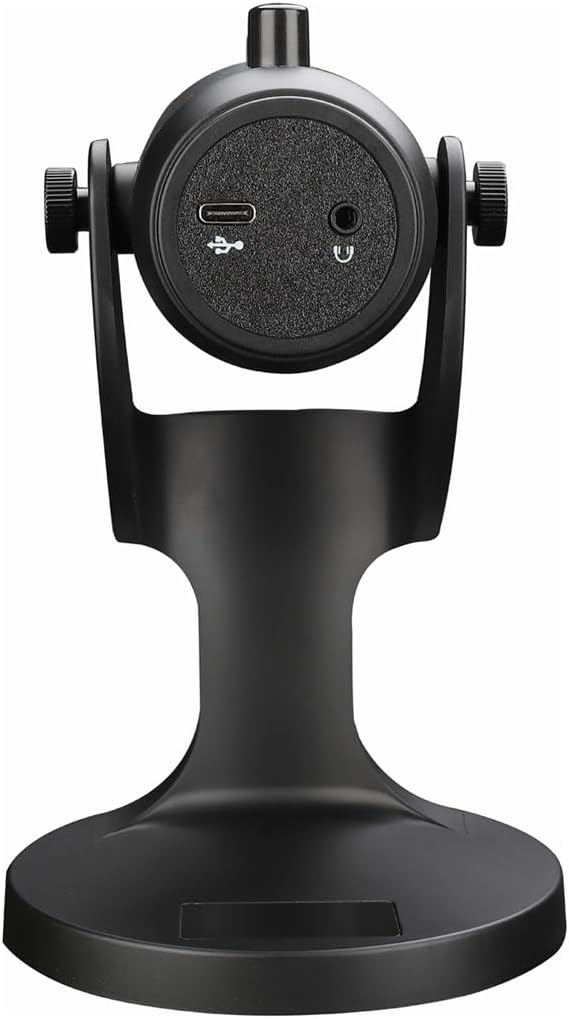
그림 2.1: 후면 view of the havit GK59 Gaming Microphone, highlighting the USB-C port for data and power, and the 3.5mm headphone jack for monitoring.
After connecting, ensure the microphone is selected as the default input device in your system's sound settings or your gaming/streaming software.
3. 사용 설명서
3.1 기본 컨트롤
The havit GK59 features intuitive controls located on the front of the microphone body:
- 음소거 버튼: Press to mute or unmute the microphone. An indicator light will typically show the mute status.
- 마이크 +/- 버튼: Adjust the microphone input sensitivity (gain). Press '+' to increase, '-' to decrease.
- VOL +/- 버튼: Adjust the headphone output volume for monitoring. Press '+' to increase, '-' to decrease.
- 에코 +/- 버튼: Adjust the echo effect level. Press '+' to increase, '-' to decrease.
그림 3.1: 상세 view of the microphone's control panel, including the mute button, microphone gain, volume, and echo adjustment buttons.
3.2 Adjusting Microphone Position
The microphone is equipped with an adjustable stand, allowing you to optimize its position for best sound capture and comfort.
- Gently hold the microphone body and the base of the stand.
- Tilt the microphone forward or backward to achieve the desired angle. The stand's design helps reduce vibration and abnormal sounds during use.
- 최적의 음성 선명도를 위해 마이크를 입에서 약 6~12인치(15~30cm) 떨어뜨려 놓으세요.

Figure 3.2: The havit GK59 microphone demonstrating its adjustable tilt feature on the stand, designed for anti-vibration.
4. 유지관리
4.1 청소
마이크의 성능과 외관을 유지하려면:
- Disconnect the microphone from its power source before cleaning.
- 부드럽고 마른 천으로 외부 표면을 닦으세요.
- 액체 세척제, 에어로졸 또는 용제를 사용하지 마십시오. 이러한 제품은 마감재나 내부 부품을 손상시킬 수 있습니다.
4.2 보관
사용하지 않을 때는 마이크를 직사광선과 극한 온도 변화를 피해 서늘하고 건조한 곳에 보관하십시오. 먼지와 습기로부터 보호하십시오.
5. 문제 해결
If you encounter issues with your havit GK59 Gaming Microphone, please refer to the following table for common problems and solutions:
| 문제 | 가능한 원인 | 해결책 |
|---|---|---|
| No sound input from microphone | 마이크가 제대로 연결되지 않았습니다 잘못된 입력 장치가 선택되었습니다. 마이크 음소거됨 | USB 케이블이 제대로 연결되어 있는지 확인하세요. Check system sound settings and select GK59 as input. 마이크의 음소거 버튼을 눌러 음소거를 해제하세요. |
| 낮은 마이크 볼륨 | 마이크 게인이 너무 낮습니다 System input volume too low | Press the 'MIC +' button on the microphone. Adjust input volume in your system's sound settings. |
| 왜곡되거나 불분명한 오디오 | Microphone gain too high 마이크가 입에 너무 가까웠습니다. 환경 소음 | Press the 'MIC -' button on the microphone. Adjust microphone position (6-12 inches from mouth). 주변 환경의 배경 소음을 줄이세요. |
| No headphone monitoring sound | 헤드폰이 연결되지 않았습니다 헤드폰 볼륨이 너무 낮습니다 | Ensure headphones are plugged into the 3.5mm jack. Press the 'VOL +' button on the microphone. |
6. 기술 사양
Below are the technical specifications for the havit GK59 Gaming Microphone:
| 특징 | 사양 |
|---|---|
| 상표 | Havit |
| 모델 번호 | GK59 |
| 연결 기술 | USB, 3.5 mm Jack (Auxiliary) |
| 추천 용도 | 노름 |
| 극성 패턴 | 단방향 |
| 마이크 폼 팩터 | Handheld (with desktop stand) |
| 품목 무게 | 429그램 |
| 임피던스 | 250옴 |
| 신호 대 잡음 비율 | 18데시벨 |
| 가청 소음 | 18데시벨 |
| 전원 | 유선 전기(USB를 통해) |
| 호환 장치 | Gaming Consoles, PCs |
| 품목 치수(LxWxH) | 5.59 x 4.92 x 9.06 인치 |
| 색상 | 검은색 |
7. 보증 및 지원
7.1 보증 정보
The havit GK59 Gaming Microphone comes with a standard manufacturer's warranty. Please refer to the warranty card included in your product packaging or visit the official havit web자세한 보증 약관은 해당 사이트에서 확인하세요.
7.2 고객 지원
For technical assistance, troubleshooting not covered in this manual, or warranty claims, please contact havit customer support through their official channels. You can find more information and contact details on the Amazon의 havit Store 아니면 그들의 공식 web대지.