
FILTA 85a29cbe-3f12-4058-8cbc-233936e4c5c7
Filta Smart Lock Instruction Manual
Model: 85a29cbe-3f12-4058-8cbc-233936e4c5c7
소개
The Filta Smart Lock offers advanced security and convenience for your home or business. This keyless entry deadbolt provides multiple intuitive unlocking options, including password, traditional key, and IC card capabilities. Designed for ease of use and robust security, it ensures reliable access control without the need for Wi-Fi or application connections, storing all data locally for enhanced privacy and stability.

Figure 1: Filta Smart Lock, a keyless entry deadbolt with a sleek black finish, installed on a white door.
무엇이 포함됩니까?
설치를 시작하기 전에 모든 구성 요소가 있는지 확인하세요.

Figure 2: All components of the Filta Smart Lock laid out, including the smart lock unit, interior assembly, deadbolt latch, strike plate, keys, and various screws.
- Exterior Smart Lock Unit with Keypad and Fingerprint Sensor
- Interior Assembly (Back Panel)
- 데드 볼트 래치
- 스트라이크 플레이트와 스트라이크 박스
- 장착 플레이트
- 설치용 나사(다양한 크기)
- 실물 키(2개)
- IC Cards (if applicable, not explicitly mentioned but implied by "IC card unlocking")
- 사용자 설명서 / 설치 템플릿
명세서
| 특징 | 세부 사항 |
|---|---|
| 상표 | FILTA |
| 모델 번호 | 85a29cbe-3f12-4058-8cbc-233936e4c5c7 |
| 잠금 유형 | 생체 인식, 키패드 |
| 재료 | 아연 |
| 색상 | 검은색 |
| 전원 | 4 AA 배터리(포함되지 않음) |
| 연결성 | No Wi-Fi or App connection required (local data storage) |
| 도어 두께 호환성 | 1 5/16" ~ 2" (33mm - 50mm) |
| 보어홀 직경 | 2 1/8인치(54mm) |
| 보어홀 백셋 | 2 3/8인치 또는 2 3/4인치 (60mm 또는 70mm) |
| 비바람에 견디는 등급 | IP54 (operates well from -22°F to 158°F) |
| 사용자 코드 용량 | 최대 250개의 사용자 코드 |
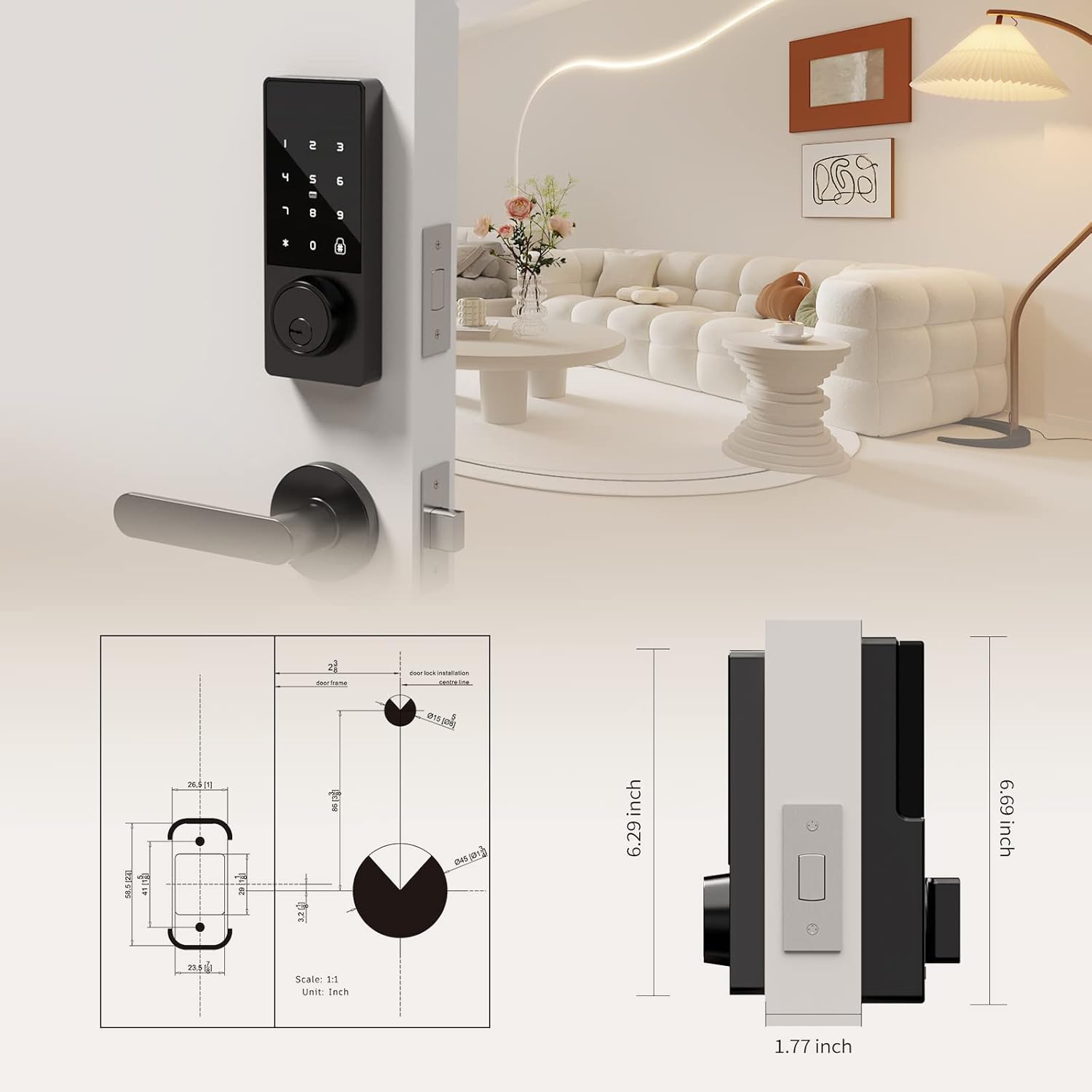
Figure 3: Detailed diagram illustrating the compatible door thickness, bore hole diameter, and backset measurements for proper installation.

Figure 4: Infographic highlighting the lock's durability, including keypad life test, face plate impact test, screw pull test, salt spray test, appearance pressure resistance, humidity resistance, and IP54 weatherproof rating.
설정 및 설치
Installation is straightforward and typically requires only a screwdriver. Ensure your door meets the specifications listed above.
설치 단계:
- 문 준비: Ensure the door's bore hole and backset measurements are compatible with the lock. The deadbolt latch is adjustable for both 2 3/8" (60mm) and 2 3/4" (70mm) backsets.
- 데드볼트 잠금장치를 설치하세요: Slide the deadbolt latch into the door edge. Secure it with the provided screws. Ensure the latch is centered and operates smoothly.
- 외부 장치를 설치하십시오: Slide the lock spindle and wire connector from the exterior unit through the deadbolt mechanism and the door hole.
- 장착 플레이트 설치: Thread the wire connector through the mounting plate. Secure the mounting plate to the door using the provided screws.
- Connect Wiring and Install Interior Unit: Connect the wire connector from the exterior unit to the wire connector port on the interior assembly. Carefully tuck excess wire into the door.
- Secure the Interior Unit: Align the interior unit with the mounting plate and secure it with the remaining screws.
- 배터리 설치: Open the battery compartment on the interior unit. Insert 4 AA alkaline batteries (not included), ensuring correct polarity. Secure the battery box cover.
- 잠금 테스트: Before closing the door, test the lock's functionality using a physical key and by entering a default or test code (refer to operating instructions for initial setup). Ensure the deadbolt extends and retracts smoothly.

Figure 5: Illustration of the simple installation process, highlighting that only a screwdriver is needed.
설치 비디오 가이드:
Video 1: A comprehensive guide demonstrating the installation process and function display of the Filta Smart Lock. This video covers checking components, adjusting the deadbolt, securing the bolt and mounting plate, connecting wires, installing the interior unit, and inserting batteries.
작동 지침
The Filta Smart Lock offers multiple ways to unlock your door.
1. Unlocking with Passcode:
- 키패드를 터치하여 활성화하세요.
- Enter your 6-10 digit user passcode.
- '#' 키를 눌러 확인하세요.
- 잠금이 해제됩니다.
엿보기 방지 기능: You can enter random digits before or after your actual passcode to prevent others from guessing your code. For example, XXX + Passcode + XXX + #.
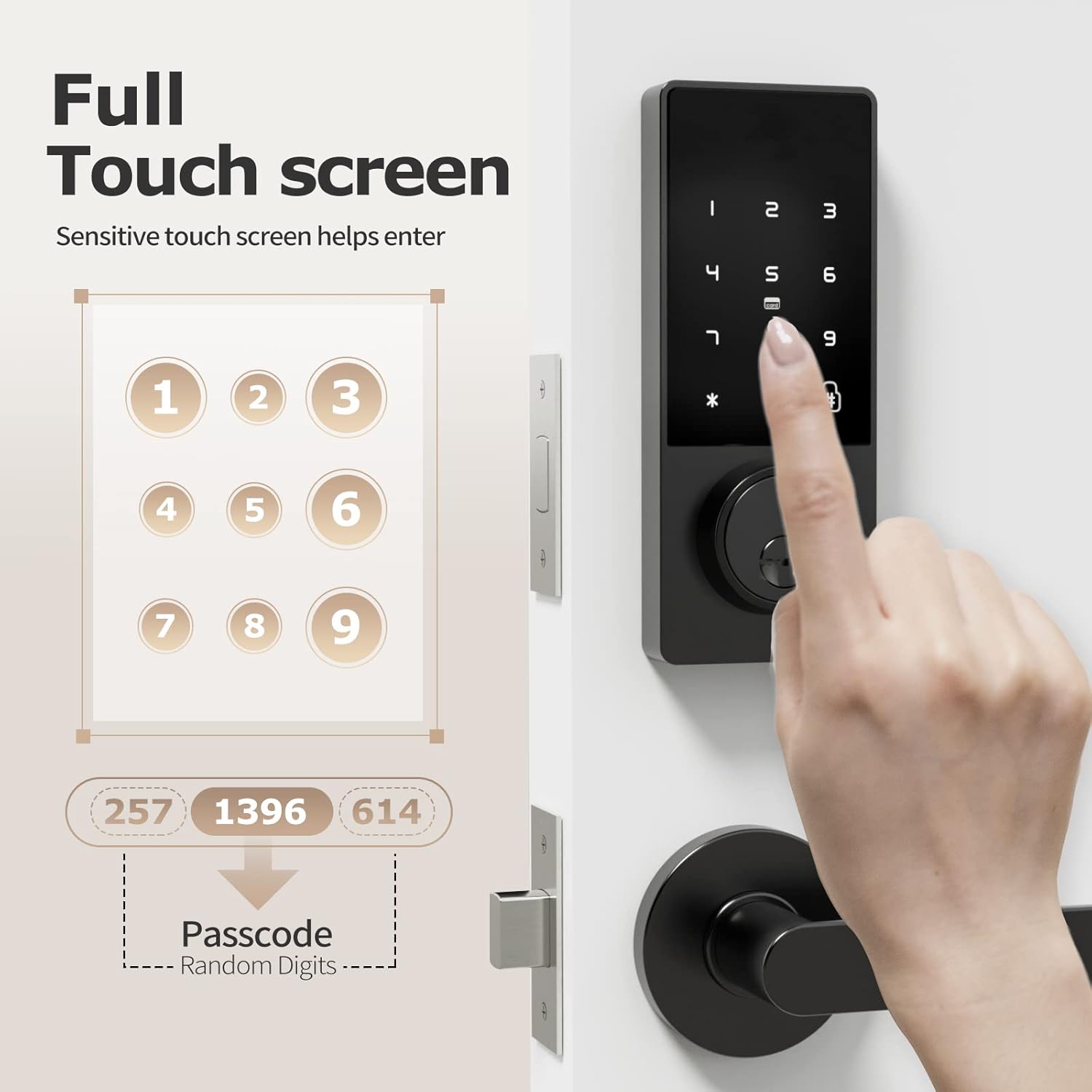
Figure 6: A hand interacting with the full touchscreen keypad, demonstrating the entry of a passcode with random digits for enhanced security.
2. Unlocking with IC Card:
- Present the registered IC card to the card reader area on the lock.
- 잠금장치가 자동으로 해제됩니다.

Figure 7: A hand holding an IC card near the smart lock, illustrating the NFC unlocking method.
3. Unlocking with Physical Key:
- Insert the physical key into the keyhole located at the bottom of the exterior unit.
- Turn the key to unlock the deadbolt.
4. Unlocking with Fingerprint (if applicable):
While the product title mentions "Biometric Door Locks," the feature bullets and images do not explicitly detail a fingerprint sensor or its operation. If your model includes a fingerprint sensor, please refer to the specific instructions provided with your product for fingerprint registration and usage.

Figure 8: A person interacting with the top part of the smart lock, which may contain a fingerprint sensor for quick and efficient unlocking.
Adding Fingerprints and Passwords:
Refer to the video guide (Video 1) for detailed instructions on how to add fingerprints and passwords to the lock. The video demonstrates pressing '2' then '#' to initiate the process for adding new credentials.
Changing Normally Open Mode:
Refer to the video guide (Video 1) for detailed instructions on how to change the normally open mode. The video demonstrates pressing '3' then '#' to adjust this setting.
언어 변경:
Refer to the video guide (Video 1) for detailed instructions on how to change the language settings. The video demonstrates pressing '4' then '#' to access language options.
유지
- 배터리 교체: The lock requires 4 AA batteries. Replace them when the low battery reminder activates. Use high-quality alkaline batteries for optimal performance and longevity.
- 청소: 부드럽고 마른 천으로 자물쇠 외부를 닦으십시오. 마감재나 전자 부품이 손상될 수 있으므로 연마성 세척제나 용제 사용을 피하십시오.
- 정기 점검: Periodically check all screws and connections to ensure they are secure. Ensure the deadbolt operates smoothly without obstruction.

Figure 9: The battery compartment of the smart lock, indicating the use of 4 AA alkaline batteries for approximately 6 months of battery life.
문제 해결
| 문제 | 해결책 |
|---|---|
| 잠금이 응답하지 않습니다. | Check battery levels and replace if necessary. Ensure the wire connector is securely plugged in. |
| 비밀번호가 작동하지 않습니다. | Ensure you are entering the correct passcode. Try re-registering the passcode. Check if the lock is in "normally open" mode. |
| Deadbolt not extending/retracting. | Check for obstructions in the door frame or strike plate. Ensure the deadbolt latch is properly aligned and installed. Verify the lock core is properly installed (refer to installation video). |
| IC card not recognized. | Ensure the IC card is properly registered. Try presenting the card directly to the reader area. |
| 배터리 부족 알림. | AA 배터리 4개를 모두 즉시 교체하십시오. |
보증 및 지원
FILTA offers a comprehensive guarantee for your peace of mind:
- 자유로운 교환: 구매 후 60일 이내.
- 제품 보증: 1 year product warranty from the date of purchase.
- 고객 지원: 평생 고객 지원.
For any questions, technical assistance, or warranty claims, please contact FILTA customer support through the retailer's platform or visit the official FILTA store on Amazon: FILTA Store.
Ask a question about this manual
Ask about setup, troubleshooting, compatibility, parts, safety, or missing instructions. Manuals+ will review the question and use this page’s manual context to help answer it.