
소개
This manual provides detailed instructions for the installation, operation, and maintenance of your Weiser SmartCode Touchpad Electronic Deadbolt. Designed for security and convenience, this lock features a 10-button touchpad, up to 50 user codes, and SmartKey re-key technology. Please read these instructions carefully before installation and use to ensure proper function and longevity of your product.

Image: Front and interior view of the Weiser SmartCode Touchpad Electronic Deadbolt in Satin Nickel finish.
포함된 구성 요소
설치를 시작하기 전에 패키지에 모든 구성 요소가 들어 있는지 확인하세요.

Image: All components included in the Weiser SmartCode lock package, laid out for inspection.
- 외부 데드볼트 조립
- 내부 데드볼트 조립
- 조정 가능한 래치
- 스트라이크 플레이트
- 칼라
- 장착 플레이트
- 설치 하드웨어(나사)
- 2개의 바이저 키
- 스마트키 도구
- 설치 가이드(본 설명서)
메모: 작동에는 AA 배터리 4개가 필요하며, 배터리는 포함되어 있지 않습니다.
설정 및 설치
The Weiser SmartCode deadbolt is designed for easy installation. For detailed, interactive 3D instructions with voice and video guidance, download the free BILT app on your smartphone or tablet. This lock is compatible with standard doors 1-3/8" to 1-3/4" thick and features an adjustable backset (2-3/8" or 2-3/4").

Image: A person installing the Weiser SmartCode deadbolt on a door, demonstrating the ease of setup.
일반 설치 단계:
- 문 준비: Ensure your door is properly prepped for a deadbolt. Check the backset measurement and adjust the latch if necessary.
- 래치를 설치하십시오: Insert the adjustable latch into the door edge and secure it with screws.
- 외부 어셈블리 설치: 외부 키패드 어셈블리를 문에 설치하고 케이블이 가로 구멍을 통과하는지 확인하십시오.
- 장착 플레이트 설치: Secure the interior mounting plate to the exterior assembly with screws.
- 케이블 연결: 외부 어셈블리의 케이블을 내부 어셈블리에 연결합니다.
- 내부 조립 설치: Mount the interior assembly onto the mounting plate and secure it.
- 배터리 삽입: Install 4 AA batteries into the battery pack.
- 도어 핸딩 프로세스 수행: Follow the instructions in the BILT app or included guide to calibrate the lock for your door's orientation.
작동 지침
The Weiser SmartCode deadbolt offers convenient keyless entry and secure locking mechanisms.
키리스 엔트리:
To unlock the door, simply enter your personalized 4-8 digit user code on the touchpad. The touchpad features bright LED illumination for visibility in low light conditions and provides tactile feedback. It also has fingerprint resistance to protect the privacy of your access codes.

Image: A hand entering a code on the illuminated keypad of the Weiser SmartCode deadbolt, demonstrating keyless entry.

Image: The Weiser SmartCode keypad illuminated at night, highlighting its easy low-light code entry feature.
문 잠그기:
The deadbolt features one-touch motorized locking. Simply press the "Lock" button on the keypad to secure your door. The lock also includes an auto-lock feature that can be enabled.

Image: A woman and her dog exiting a house, with the Weiser SmartCode lock on the door, illustrating the auto-lock function.
Managing User Codes:
The lock supports up to 50 unique user access codes and one master code. Refer to the full installation guide or the BILT app for instructions on how to program, add, or delete user codes and set the master code.

Image: The Weiser SmartCode keypad alongside images representing various users, indicating the ability to set multiple user access codes.
유지
배터리 교체:
The lock operates on 4 AA batteries. When the batteries are low, the lock will provide an audible alert and/or visual indicator. Replace all four batteries simultaneously with new, high-quality alkaline AA batteries. Expected battery life is approximately 12 months under normal usage conditions.
이미지: 폭발된 view of the Weiser SmartCode lock showing the battery compartment and four AA batteries, illustrating the 12-month battery life.
SmartKey Re-key Technology:
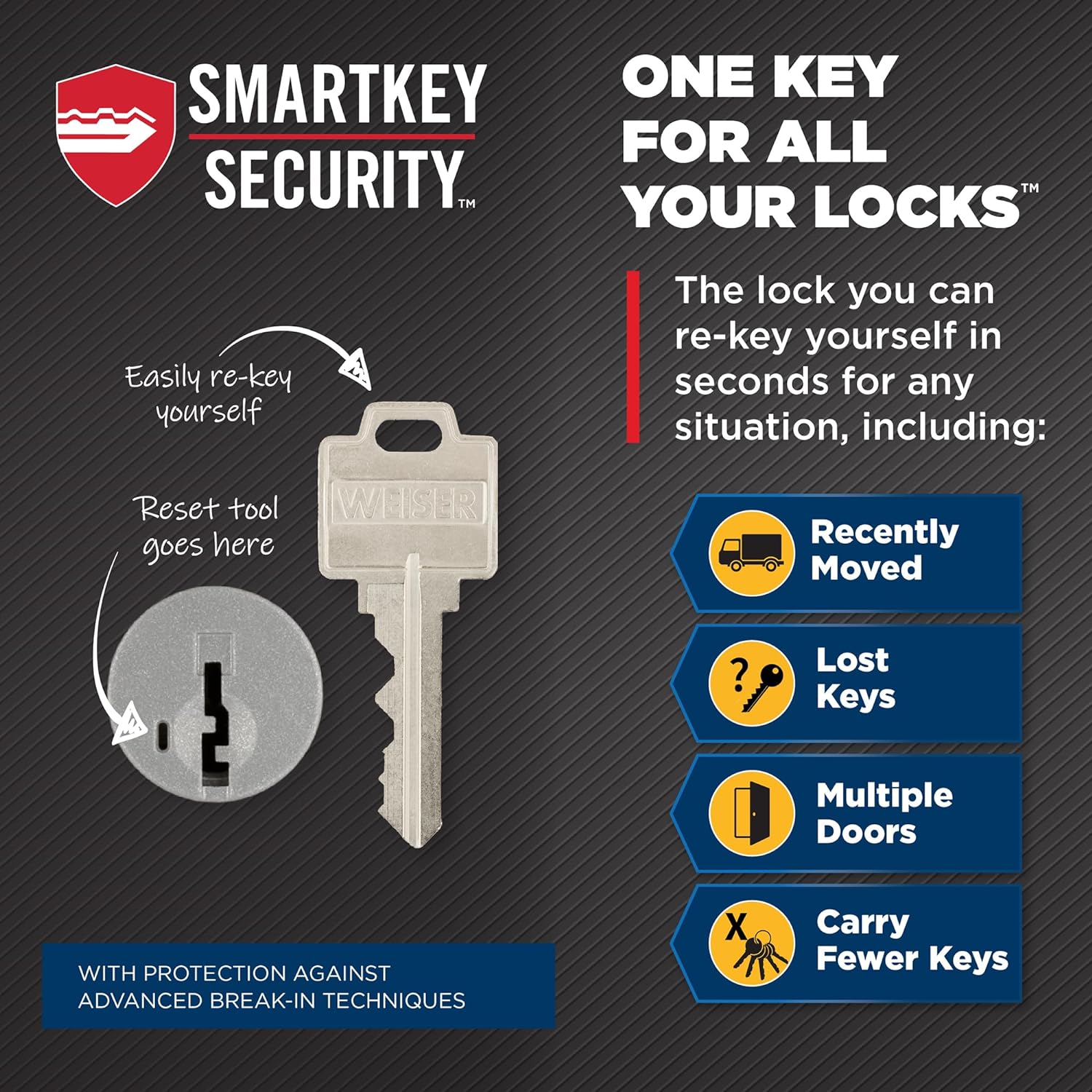
The SmartKey re-key technology allows you to re-key your lock in seconds, maintaining key control and protecting against lost, stolen, or unauthorized keys without removing the lock from your door. This is useful if you have recently moved, lost keys, have multiple doors with different keys, or wish to reduce the number of keys you carry.

Image: Diagram illustrating the SmartKey Security feature, showing where the reset tool is inserted to re-key the lock with a new key.
자물쇠의 키를 다시 설정하려면:
- 작동하는 키를 삽입하고 시계 방향으로 90도 돌리십시오.
- SmartKey 도구를 SmartKey 구멍에 완전히 단단히 삽입합니다.
- SmartKey 도구를 제거하세요.
- 기존 키를 제거하세요.
- 새 키를 삽입하고 시계 반대 방향으로 90도 돌리세요.
- Test the new key to ensure it operates correctly.
문제 해결
This section addresses common issues you might encounter with your Weiser SmartCode deadbolt. For more comprehensive troubleshooting, please refer to the full installation guide or the BILT app.
- 잠금이 응답하지 않습니다. Check battery levels and replace if necessary. Ensure the battery pack is correctly seated.
- 키패드에 불이 들어오지 않음: Verify batteries are installed correctly and have sufficient charge.
- 데드볼트가 완전히 확장/수축되지 않음: Check for any obstructions in the door frame or strike plate. Ensure the door handing process was completed correctly.
- 사용자 코드가 작동하지 않습니다. Confirm the code is entered correctly. Ensure the code has not been deleted or expired. Try reprogramming the code.
- Motor sounds loud: A slight motor sound is normal during operation. If it becomes excessively loud or grinding, re-check installation steps, particularly the door handing process and alignment.
명세서

Image: Technical drawing showing the dimensions of the Weiser SmartCode Touchpad Deadbolt and its adjustable latch backset.
| 모델 번호 | 9GED92700-003 |
| 상표 | 바이저 |
| 색상 | 새틴 니켈 |
| 재료 | 금속 |
| 잠금 유형 | Deadbolt, Electronic |
| 도어 두께 호환성 | 1-3/8" to 1-3/4" |
| 역수 | Adjustable (2-3/8" or 2-3/4") |
| 사용자 코드 | Up to 50 user codes, 1 master code |
| 전원 | 4 AA 배터리(포함되지 않음) |
| 특별 기능 | Anti-Bump, Auto-Lock, Back-Lit Keypad, One-Touch Lock, Weather Resistant |
| 인증 | ANSI 2등급 |
| 제품 크기(L x W x H) | 6.99 x 2.54 x 13.18cm |
| 품목 무게 | 454g |
보증 및 지원
The Weiser SmartCode deadbolt comes with a 1년 보증 on electrical components. For warranty claims or technical support, please contact Weiser customer service. Additional support and interactive installation guides are available through the BILT app.
For the latest information and support resources, visit the official Weiser web자세한 내용은 해당 사이트를 참조하거나 제품 포장에 제공된 연락처 정보를 참조하세요.