
1. 서론
This manual provides detailed instructions for the proper use and maintenance of your Obbug Bluetooth Headset, Model YYK-530. Please read this manual thoroughly before using the product to ensure optimal performance and longevity.
2. 패키지 내용
패키지에 모든 품목이 들어 있는지 확인하세요.
- 1 x Obbug Bluetooth Headset
- 1 x 충전 케이스
- 1 x USB 유형 C 충전 케이블
- 1 x Ear Hat (replacement ear tip)
- 1 x 사용자 설명서
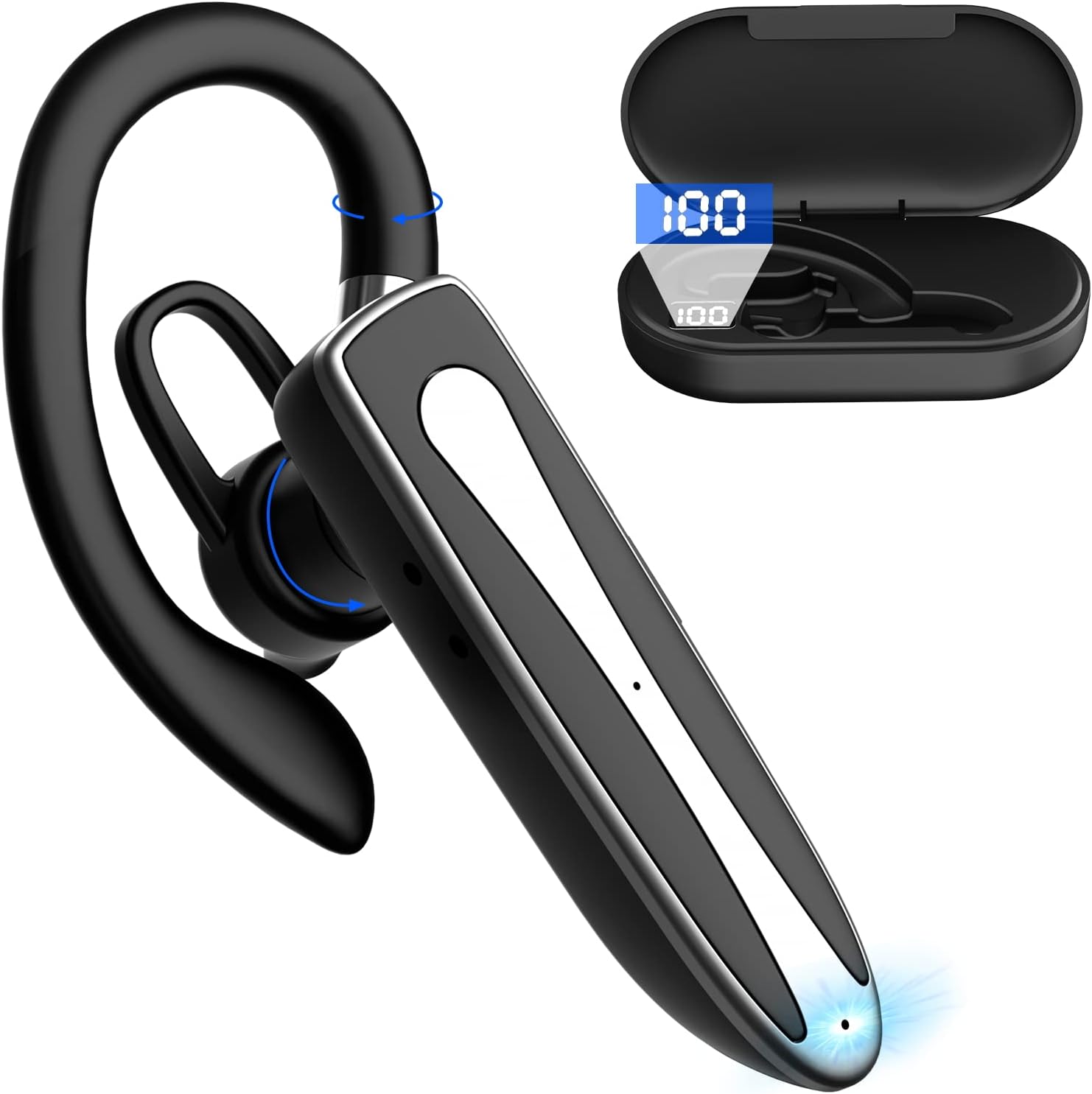
Image 2.1: Obbug Bluetooth Headset YYK-530 and its charging case.
3. 제품 특징
- 블루투스 5.1 기술: Provides stable connection and clear audio.
- 배터리 수명 연장: 충전 케이스로 최대 80시간 연속 사용 가능.
- 편안하고 조정 가능한 디자인: Flexible earhook and rotatable boom mic for left or right ear wear.
- CVC8.0 노이즈 감소: 배경 소음을 줄여 통화 음질을 향상시킵니다.
- 폭넓은 호환성: Connects with most Bluetooth-enabled devices including smartphones, tablets, and computers.
- 핸즈프리 통화: Integrated microphone for convenient communication.

Image 3.1: Illustration of CVC8.0 Noise Reduction for clear audio.
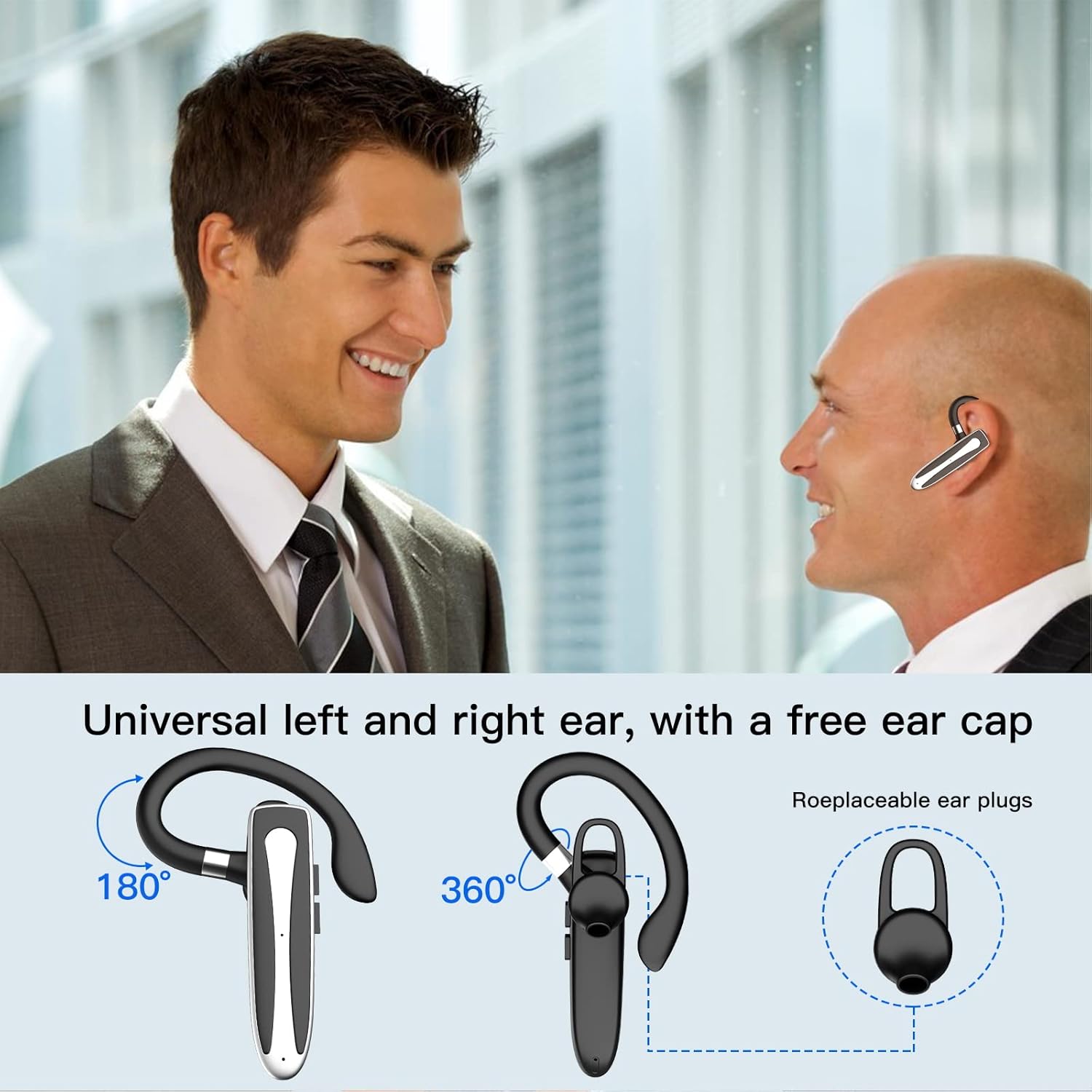
Image 3.2: Diagram illustrating the dual microphone noise reduction processing.
4. 설정
4.1 헤드셋 및 케이스 충전
처음 사용하기 전에 헤드셋과 충전 케이스를 완전히 충전하십시오.
- Place the headset into the charging case.
- USB Type-C 케이블을 케이스의 충전 포트와 전원(예: USB 벽면 어댑터, 컴퓨터 USB 포트)에 연결하세요.
- The charging indicator on the case will show charging status. A full charge typically takes 1.5 hours.

Image 4.1: The Type-C charging port on the charging case.

Image 4.2: Battery life and charging time information for the headset and case.
4.2 장치와의 페어링
이 헤드셋은 무선 연결을 위해 블루투스 5.1를 사용합니다.
- 전원 켜기: Take the headset out of the charging case, or press and hold the Multi-function Button until the indicator light flashes blue and red, indicating pairing mode.
- 블루투스 활성화: 기기(스마트폰, 태블릿 등)에서 Bluetooth 설정으로 가서 Bluetooth를 켜세요.
- 장치 선택: In the list of available devices, select "YYK-530".
- 연결 확인: Once connected, the headset indicator light will flash blue slowly, and your device will show "Connected".

Image 4.3: Illustration of optimal Bluetooth connection distance (within 10 meters).
4.3 두 기기에 동시에 연결하기
The headset supports connecting to two Bluetooth devices at the same time.
- Connect the headset to the first device (e.g., Phone A) as described in Section 4.2.
- Turn off Bluetooth on the first device. The headset will re-enter pairing mode.
- Connect the headset to the second device (e.g., Phone B) as described in Section 4.2.
- Turn on Bluetooth on the first device. The headset should automatically reconnect to both devices.
You can now answer calls or play music from either connected device.

Image 4.4: Step-by-step guide for connecting the headset to two devices.
4.4 헤드셋 착용
The headset is designed for comfortable wear on either the left or right ear.
- The earhook can rotate 360° vertically and 360° horizontally to fit your preferred angle.
- The retractable earhook can be adjusted to fit the shape of your ear.

Image 4.5: The headset's adjustable design for left or right ear wearing.
5. 사용 설명서
5.1 전원 켜기/끄기
- 전원 켜기: Take the headset out of the charging case, or press and hold the Multi-function Button for approximately 3 seconds until the indicator light flashes blue.
- 전원 끄기 : Place the headset back into the charging case, or press and hold the Multi-function Button for approximately 5 seconds until the indicator light flashes red and then turns off.
5.2 통화 관리
- 전화 받기/종료: 다기능 버튼을 한 번 누르세요.
- 전화 거부: 다기능 버튼을 약 2초 동안 길게 누르세요.
- 마지막 번호 재다이얼: 다기능 버튼을 두 번 누르세요.
5.3 음악 재생
- 재생/일시 중지: 다기능 버튼을 한 번 누르세요.
- 다음 트랙: 볼륨 높이기 버튼을 길게 누르세요.
- 이전 트랙 : 볼륨 낮추기 버튼을 길게 누릅니다.
5.4 볼륨 조절
- 볼륨 증가: 볼륨 높이기 버튼을 누르세요.
- 볼륨 감소: 볼륨 낮추기 버튼을 누르세요.
5.5 음성 지원 활성화
Activate your device's voice assistant (Siri, Google Assistant) directly from the headset.
- Voice Assistant 활성화 : 다기능 버튼을 세 번 누르세요.

Image 5.1: The headset supports activation of Siri and Google Assistant.
6. 유지관리
- Clean the headset and charging case regularly with a soft, dry cloth.
- 장치를 극한의 온도, 습도 또는 부식성 물질에 노출시키지 마십시오.
- 사용하지 않을 때는 헤드셋을 충전 케이스에 보관하여 보호하고 충전 상태를 유지하세요.
- 기기를 직접 분해하거나 수리하려고 하지 마세요. 도움이 필요하면 고객 서비스에 문의하세요.
7. 문제 해결
7.1 헤드셋 전원이 켜지지 않음
- Ensure the headset is fully charged. Place it in the charging case and connect the case to a power source.
- Press and hold the Multi-function Button for 3-5 seconds to power on.
7.2 기기와 페어링할 수 없습니다
- Ensure the headset is in pairing mode (indicator flashes blue and red).
- 기기의 Bluetooth를 껐다가 다시 켜세요.
- Ensure the headset is within 10 meters of your device and there are no significant obstacles.
- 기기의 Bluetooth 페어링 목록을 지우고 다시 페어링을 시도하세요.
7.3 소리가 나지 않거나 음질이 좋지 않음
- 헤드셋과 연결된 기기의 볼륨을 모두 조절하세요.
- 헤드셋이 장치에 제대로 연결되었는지 확인하세요.
- 블루투스 범위 내에 있는지 확인하려면 기기에 더 가까이 이동하세요.
- 다른 무선 장치로 인한 간섭이 있는지 확인하세요.
8. 사양
| 특징 | 사양 |
|---|---|
| 모델명 | YYK-530 |
| 상표 | 버그 |
| 연결 기술 | 무선(블루투스) |
| 블루투스 버전 | 5.1 |
| 블루투스 범위 | 최대 33피트(10미터) |
| 소음 제어 | Sound Isolation (CVC8.0 Noise Reduction) |
| 이어피스 모양 | 이어후크 |
| 배터리 수명(헤드셋) | 5시간(대략) |
| 배터리 수명(충전 케이스 포함) | Up to 80 Hours (approx.) |
| 충전 시간 | 1.5시간 |
| 충전 포트 | USB 타입-C |
| 방수 레벨 | 방수복 |
| 품목 무게 | 4.9온스(0.14킬로그램) |
| 주파수 범위 | 20Hz - 20,000Hz |
| 호환 장치 | Cellphones, Desktops, Laptops, Telephones |

Image 8.1: The headset is compatible with a wide range of Bluetooth-enabled devices.
9. 보증 및 고객 지원
The Obbug Bluetooth Headset comes with a 1-month replacement warranty.
For any questions, issues, or support needs, please contact our customer service. We offer 24-hour customer service to assist you.
자세한 연락처 정보는 구매 서류를 참조하십시오.