
LFF LWS125-EU
LFF 기상 관측소 사용자 설명서
상표: LFF | 모델: LWS125-EU
소개
The LFF Weather Station is a versatile device designed to provide accurate indoor and outdoor environmental data, timekeeping, and weather forecasting. Equipped with multiple wireless sensors, it allows you to monitor temperature and humidity in various locations simultaneously. This manual provides detailed instructions for setup, operation, maintenance, and troubleshooting to ensure optimal performance of your weather station.
상자 안에 무엇이 들어있나요?
- LFF Weather Station Main Display Unit
- 3 x 무선 실외 센서
- AC-AC Power Adapter
- 사용자 매뉴얼(PDF 온라인 제공)
제품 끝view
메인 디스플레이 유닛
The main unit features a large 7.5-inch full-color touch screen that displays all relevant information clearly. It includes sections for time, date, weather forecast, barometric pressure trend, and temperature/humidity readings from the indoor sensor and up to three outdoor sensors. Seven touch buttons on the front panel allow for easy operation and settings adjustments.

Figure 1: Main Display Unit highlighting its 7.5-inch color screen and various display sections.
무선 센서
The weather station comes with three wireless remote sensors designed for real-time monitoring of temperature and humidity in different outdoor or indoor locations. Each sensor has its own small display and transmits data wirelessly to the main unit up to a range of 330 feet (100 meters) in open areas. Ensure each sensor is set to a unique channel (1, 2, or 3) for proper communication.

Figure 2: Wireless sensors demonstrating their 330ft/100m transmission range for multi-location monitoring.
설정
Powering the Main Unit
- Connect the included AC-AC power adapter to the main unit and plug it into a standard wall outlet. The screen will remain on when using the adapter.
- (Optional) For battery backup, insert 2 x AAA batteries (not included) into the battery compartment. When operating on battery power only, the screen will automatically turn off after approximately 10 seconds to conserve energy.

Figure 3: Power supply options for the main weather station unit.
Installing Batteries in Wireless Sensors
- 각 무선 센서 뒷면의 배터리 칸을 엽니다.
- Insert 2 x AAA batteries (not included) into each sensor, observing the correct polarity (+/-).
- Set the channel switch inside each sensor's battery compartment to a unique channel (Channel 1, Channel 2, Channel 3). This is crucial for the main unit to distinguish between sensors.
- 배터리함을 단단히 닫으십시오.
Pairing Sensors with Main Unit
The main unit will automatically search for and connect to the wireless sensors once they are powered on and within range. Ensure the sensors are placed within 330 feet (100 meters) of the main unit, avoiding large metal objects or thick walls that may interfere with the signal. For best results, place the main unit and sensors close to each other during initial pairing, then move sensors to desired locations.
Initial Setup and Atomic Clock Synchronization
Upon first power-up or after a reset, the weather station will attempt to synchronize with the WWVB atomic clock signal. Select the correct time zone (AST, EST, CST, MST, PST, AKT, HST) according to your location. The atomic clock function ensures accurate timekeeping without manual adjustments.
Video: Official LFF weather station overview, demonstrating features like atomic clock synchronization and multi-sensor display.
작동 지침
디스플레이 밝기 조정
The main unit's display features 3 levels of adjustable brightness. Press the 'Light/Snooze' touch button on the front panel to cycle through bright, dim, and off settings. This allows you to customize the display's visibility based on ambient light conditions or personal preference.
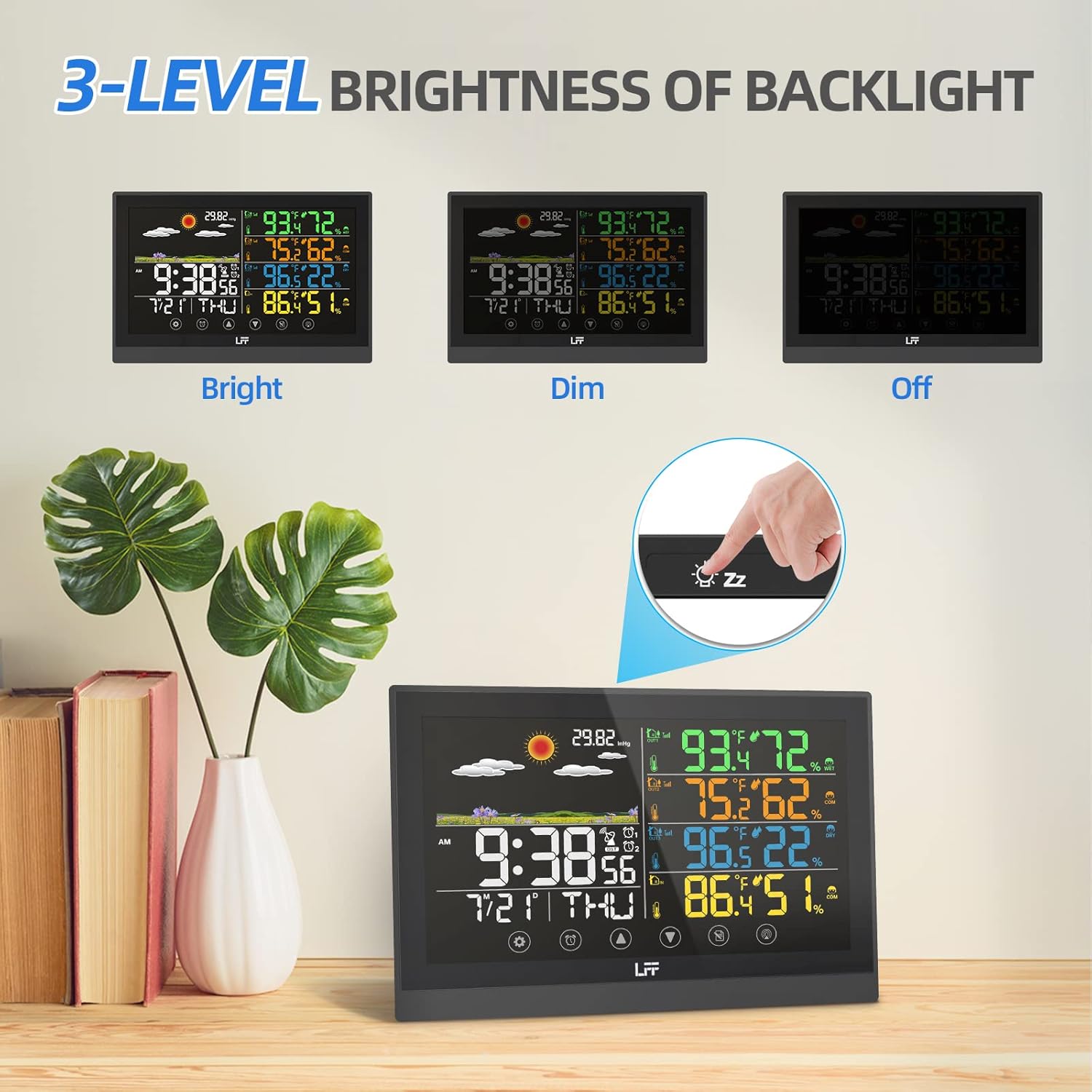
Figure 4: Demonstrates the three adjustable brightness levels of the weather station display.
알람 설정
The weather station supports two independent alarms with a snooze function. Use the 'Alarm' touch button to access and set alarm times. The snooze function provides a brief delay before the alarm sounds again, offering convenience for waking up.
Understanding Weather Forecast
The weather station predicts the weather for the next 6-12 hours based on barometric pressure fluctuations, not current weather conditions. The forecast is displayed using 6 intuitive weather icons: sunny, slightly cloudy, cloudy, rainy, heavy rainy, and snowy. This feature helps you prepare for upcoming weather changes.

Figure 5: Visual representation of the six weather forecast types.
View온도 및 습도
The main display shows real-time temperature and humidity for the indoor environment and each connected outdoor sensor. The comfort level icon indicates whether the indoor environment is too dry, comfortable, or too wet, helping you maintain optimal living conditions.
유지
배터리 교체
When the low battery indicator appears on the display for either the main unit or a specific sensor, it's time to replace the batteries. For the main unit, replace 2 x AAA batteries. For each wireless sensor, replace 2 x AAA batteries. Always use fresh batteries and dispose of old ones responsibly.
청소
To clean the weather station, use a soft, damp cloth. Avoid abrasive cleaners or solvents that may damage the display or casing. 청소하기 전에 기기의 전원이 꺼져 있는지 확인하십시오.
문제 해결
| 문제 | 가능한 원인 | 해결책 |
|---|---|---|
| 화면이 표시되지 않거나 기기가 켜지지 않습니다. | Power adapter not connected or faulty; batteries drained or incorrectly inserted. | Check power adapter connection; replace batteries, ensuring correct polarity. |
| 실외 센서가 연결되지 않거나 데이터가 표시되지 않습니다. | Sensor out of range; incorrect channel setting; sensor batteries drained. | Move sensor closer to main unit; ensure sensor channel matches main unit's setting; replace sensor batteries. |
| 잘못된 시간이 표시됩니다 | Atomic clock signal weak or not synchronized; incorrect time zone. | Ensure unit is in an open area for better signal reception; manually set time zone; allow time for automatic synchronization. |
| 부정확한 온도/습도 측정값 | Sensor exposed to direct sunlight or heat sources; sensor placed in an area with poor air circulation. | Relocate sensor to a shaded area away from direct heat/cold sources; ensure proper air circulation around the sensor. |
명세서
| 특징 | 세부 사항 |
|---|---|
| 제품 치수 | 7.48 x 0.59 x 5.12인치; 1.41파운드 |
| 품목 모델 번호 | LWS125-EU |
| 배터리(본체) | AAA 배터리 2개 필요(포함되지 않음) |
| Batteries (Wireless Sensor) | 2 AAA batteries required per sensor (not included) |
| 전원 | Corded Electric (5.0V AC, 0.15A AC-AC adaptor) |
| 디스플레이 유형 | 7.5" Full-Color Touch Screen |
| 무선 전송 범위 | 최대 330피트/100미터(개방된 공간 기준) |
| 특별 기능 | Weather forecast, Dual alarm, Atomic clock, Adjustable backlight |
| 재료 | 플라스틱 |
| 색상 | 검은색 |
보증 및 지원
For detailed warranty information and further support, please refer to the official user manual provided with your product. A digital version of the user manual is also available online for your convenience.
Ask a question about this manual
Ask about setup, troubleshooting, compatibility, parts, safety, or missing instructions. Manuals+ will review the question and use this page’s manual context to help answer it.