
OREiN OL36002
OREiN 스마트 보안등 사용 설명서
Model: OL36002
브랜드: OREiN
1. 서론
Thank you for choosing the OREiN Smart Security Light. This manual provides detailed instructions for the installation, setup, operation, and maintenance of your new smart floodlight. Designed for outdoor use, this light offers advanced features such as motion detection, app control, voice control, and customizable security modes to enhance your home's safety and convenience.
2. 제품 특징
- Customizable Security Modes: Choose from Motion Mode, Light Mode, and Security Mode to suit your specific needs.
- 음성 및 앱 제어: Control your light locally and remotely using the Aidot app, or via voice commands with Alexa and Google Assistant.
- 450° Widely Adjustable Lighting: Patented design with 3 active joints allows for flexible 450° adjustment, ensuring wide and precise illumination.
- 그룹 제어: Connect multiple OREiN smart floodlights to a single group for synchronized control via Wi-Fi and BLE Mesh technology.
- 여행 보안 모드: Deter intruders with intimidating flashing lights and receive push notifications on your phone when motion is detected while you're away.
- IP65 방수: Designed to withstand various weather conditions, ensuring reliable performance outdoors.
- 디머블 밝기: Adjust brightness from 1% to 100% to create the perfect ambiance or save energy.
- 슈퍼 브라이트 LED: Provides 1600 lumens of 5000K daylight white light with only 12W power consumption.
3. 패키지 내용
설치 전에 모든 구성품이 있는지 확인하십시오.
- OREiN Smart Security Light Unit
- 장착 브래킷
- 장착 나사 및 벽 앵커
- 연결단자
- Sealing Cushion
- 사용 설명서 (본 문서)
4. 설치 가이드
Follow these steps for proper installation. It is recommended to consult a qualified electrician if you are unsure about any electrical connections.
Step 1: Fix the Mounting Bracket

Securely attach the mounting bracket to your desired outdoor wall location using the provided screws and wall anchors. Ensure the bracket is level and firmly fixed.
Step 2: Thread the Wires

Carefully thread the electrical wires from your power source through the designated opening in the light's base. Ensure sufficient wire length for connection.
3단계: 전선 연결

Using the provided connection terminal, securely connect the live, neutral, and ground wires according to local electrical codes. Ensure all connections are tight and insulated.
Step 4: Screw the Connection Terminal

Once wires are connected, carefully position the connection terminal inside the light's housing and secure it with screws if applicable, ensuring no wires are pinched.
Step 5: Cover the Sealing Cushion
Place the sealing cushion over the wiring compartment to ensure IP65 waterproof protection. This step is crucial for outdoor durability.
Step 6: Secure the Light

Attach the main light unit to the mounting bracket and secure it firmly. Ensure all parts are properly aligned and tightened.
5. Smart Setup and App Control
The OREiN Smart Security Light is controlled via the Aidot app, offering advanced customization and remote access.
5.1 Download and Register Aidot App
Download the "Aidot" app from your device's App Store (iOS) or Google Play Store (Android).

After downloading, create an account and log in. Note: Your Wi-Fi network must be 2.4GHz for proper connection.
5.2 전원 켜기 및 연결
Once installed, power on the security light. The lights will flash, indicating they are ready for pairing.
Open your home Wi-Fi settings and ensure you are connected to a 2.4GHz network.
In the Aidot app, press the "+" button to add a new device. The app will search for nearby devices. Select your OREiN Smart Security Light from the list.
If the device is not found, press and hold the reset button on the light for 10 seconds to reset it, then turn it on again to reconnect.
Enter your Wi-Fi password when prompted to connect the light to your network. Once connected, you can assign the light to a specific room within the app for easier management.
Video: Detailed guide on how to use the Aidot App to control your OREiN Smart Security Light, including setup and connection steps.
5.3 음성 제어 통합
The OREiN Smart Security Light is compatible with Alexa and Google Assistant. Once connected to the Aidot app, you can link your Aidot account to your voice assistant for convenient voice control.
Example Command: "Alexa, turn on the security light."
Video: Demonstrates voice control features and integration with smart home assistants.
6. 작동 모드 및 설정
The Aidot app allows you to customize various settings and choose from three preset operating modes:
6.1 모션 모드
In Motion Mode, the light activates when motion is detected and automatically turns off after a set delay. You can adjust the brightness when motion is detected and set a 'Dim Light Mode' for low brightness when no person is detected, saving energy.

You can also enable 'Night Economy' for dimmable light after midnight to save energy and avoid harmful light effects on wildlife.
6.2 조명 모드
Light Mode allows the floodlight to function as a normal light, automatically turning on during a specified effective time. This is ideal for general illumination during evening hours.

6.3 Security Mode (Travel Period)
This mode is designed to deter intruders when you are away. When motion is detected, the light will flash intimidatingly, and you will receive a push notification on your phone. You can manually disarm the alarming light from the app.

Note: The light alarm function uses red and white light flashes as a deterrent and does not include an audible alarm.
6.4 밝기 조절
The light offers 1%-100% dimmable brightness, allowing you to adjust the intensity to your preference via the Aidot app.

6.5 그룹 제어
As a gateway, this smart security light can connect all OREiN smart floodlights into a single control group using Wi-Fi and BLE Mesh technology. This allows you to control multiple lights simultaneously from the Aidot app.

To add a light control group, navigate to the "My Home" section in the Aidot app, tap the "+" icon, and select "Add Outdoor Group". Choose the lights you wish to include in the group.
비디오: 끝view of OREiN Smart Security Light features, including group control and app functionalities.
7. 유지관리
The OREiN Smart Security Light is designed for durability with an IP65 waterproof rating, making it resistant to rain, snow, and heat. Regular maintenance will ensure optimal performance and longevity.
- 청소: 조명 기구를 주기적으로 부드러운 천으로 닦아주세요.amp 먼지와 이물질을 제거하는 천. 가혹한 화학 물질이나 연마성 세제를 사용하지 마십시오.
- 점검: Regularly check the mounting and wiring for any signs of wear, damage, or loose connections. Ensure the sealing cushion remains intact for waterproofing.
- 센서 영역: 동작 감지 센서 렌즈를 깨끗하게 유지하고 거미줄 등의 장애물이 없도록 하십시오.webs, leaves) to ensure accurate detection.

For information on recycling and cleaning light bulbs, please refer to general guidelines on bulb maintenance.
8. 문제 해결
If you encounter issues with your OREiN Smart Security Light, please refer to the following common solutions:
| 문제 | 가능한 원인 | 해결책 |
|---|---|---|
| Light not turning on/off or unresponsive to app. | No power, Wi-Fi disconnected, app glitch. | Check power supply. Ensure Wi-Fi is 2.4GHz and stable. Restart the light by pressing the reset button for 10 seconds. Reconnect via Aidot app. |
| Difficulty connecting to Wi-Fi. | Incorrect Wi-Fi band, weak signal, incorrect password. | Confirm your Wi-Fi is 2.4GHz. Move the light closer to the router. Double-check Wi-Fi password. Reset the light and try pairing again. |
| 모션 센서가 감지되지 않습니다. | Sensor obstructed, incorrect sensitivity settings. | Clear any obstructions from the sensor lens. Adjust motion sensitivity settings in the Aidot app. Ensure the sensor is oriented correctly. |
| Wiring connection is difficult. | Limited space in connection compartment. | Ensure you have sufficient wire length. Use rigid wires if possible. Take care when connecting in tight spaces. Consider professional installation if uncomfortable. |
9. 사양
| 기인하다 | 값 |
|---|---|
| 상표 | 오레인 |
| 모델 번호 | OL36002 |
| 치수(길이 x 너비 x 높이) | 18 x 15 x 10cm |
| 무게 | 662.24그램(1.46파운드) |
| 색상 | 검은색 |
| 재료 | 폴리카보네이트 |
| 마무리 유형 | 그린 |
| 전구의 수 | 1 (일체형 LED) |
| 권tage | 220 볼트 |
| 특별 기능 | 3 Work Modes, IP65 Waterproof, 450° Adjustment, App Control, Dual Arms |
| 설치 유형 | 벽걸이형 |
| 전구 유형 | 주도의 |
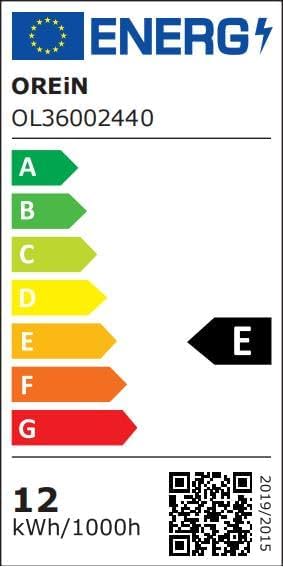
| 에너지 라벨 | E (Link to EPREL database) |
| 광속 | 1600루멘 |
| 힘 | 12 와트 |
| 색온도 | 5000 켈빈 |
| 방수 레벨 | 방수 (IP65) |
10. 보증 및 지원
OREiN provides a 24개월 보증 for this product. Our customer support team is available 연중무휴, 하루 7시간 질문이나 문제가 있으시면 언제든지 도와드리겠습니다.
For technical support, troubleshooting, or warranty claims, please contact us through the Aidot app or visit the OREiN official web연락처 정보 사이트.
We regularly update the app version to improve functionality. Please ensure your app is up-to-date for the best experience.
Ask a question about this manual
Ask about setup, troubleshooting, compatibility, parts, safety, or missing instructions. Manuals+ will review the question and use this page’s manual context to help answer it.