
1. 서론
Thank you for choosing the Awei T29 True Wireless Bluetooth Earbuds. This manual provides essential information for setting up, operating, maintaining, and troubleshooting your earbuds to ensure optimal performance and longevity. Please read this guide thoroughly before using the product.
2. 제품 오버view
The Awei T29 earbuds offer a seamless audio experience with advanced features. Key highlights include:
- 블루투스 버전 5.1: 안정적이고 효율적인 무선 연결을 위해.
- IPX6 방수 : Provides protection against strong jets of water, making them suitable for sports and outdoor activities.
- Integrated 300mAh Charging Case: Extends listening time and offers convenient portability.
- Battery Protection IC: 안전하고 안정적인 충전을 보장합니다.
- 터치 컨트롤: Intuitive control for music, calls, and voice assistant.
- Lightweight and Sweatproof Design: Comfortable for extended wear during various activities.
2.1 패키지 내용
- Awei T29 완전 무선 이어버드 (좌우 세트)
- 충전 케이스
- USB 충전 케이블
- 사용자 설명서
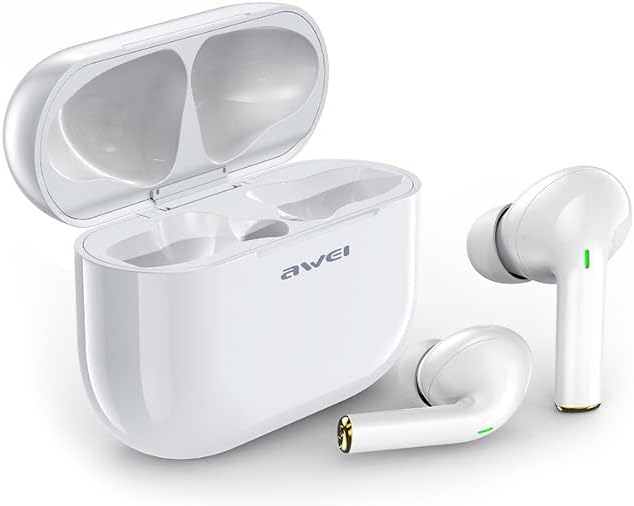
Image 1: Awei T29 True Wireless Earbuds with the charging case open, showing both earbuds.
3. 안전 정보
- 제품을 분해하거나 개조하지 마십시오.
- 극한의 온도와 습도를 피하세요.
- 이어폰을 떨어뜨리거나 강한 충격을 가하지 마십시오.
- Clean with a soft, dry cloth only. Do not use harsh chemicals.
- 현지 규정에 따라 배터리를 폐기하십시오.
4. 설정
4.1 이어버드와 케이스 충전
처음 사용하기 전에 충전 케이스와 이어버드를 완전히 충전하세요.
- Connect the USB charging cable to the charging port on the case and a 5V DC power source.
- The indicator light on the case will show charging status. A full charge for the case typically takes about 2 hours.
- Place the earbuds into the charging case. They will automatically begin charging. Earbud charging time is approximately 1.5 hours.
- Ensure the earbuds are properly seated in the case for charging to occur.

Image 2: Awei T29 True Wireless Earbuds securely placed inside the closed charging case.

이미지 3: 상단 view of the Awei T29 charging case, illustrating its compact design.
4.2 블루투스 기기와 페어링
Follow these steps to connect your earbuds to your smartphone or other Bluetooth-enabled device:
- 전원 켜기: 충전 케이스를 여세요. 이어버드가 자동으로 켜지고 페어링 모드로 진입합니다. 이어버드의 표시등이 깜빡일 수 있습니다.
- 블루투스 활성화: On your device (e.g., smartphone), go to the Bluetooth settings and ensure Bluetooth is turned on.
- 장치 선택: Look for "Awei T29" in the list of available Bluetooth devices and select it to connect.
- 확인: Once connected, the earbud indicator lights will typically stop flashing or change to a steady light, and you may hear an audible confirmation.
- 자동 재연결: 초기 페어링 후, 이어버드는 케이스에서 꺼내면 기기에서 블루투스가 활성화된 경우 마지막으로 페어링된 기기에 자동으로 연결됩니다.

Image 4: Awei T29 True Wireless Earbuds removed from their charging case, ready for pairing or use.
5. 사용 설명서
Awei T29 이어버드는 다양한 기능을 위한 직관적인 터치 컨트롤을 제공합니다.
5.1 전원 켜기/끄기
- 전원 켜기: 충전 케이스를 열거나 양쪽 이어버드의 터치 영역을 3초 동안 길게 누르세요.
- 전원 끄기 : 이어버드를 충전 케이스에 다시 넣고 뚜껑을 닫거나, 양쪽 이어버드의 터치 영역을 5초 동안 길게 누르세요.
5.2 음악 재생
- 재생/일시 중지: 양쪽 이어버드를 한 번 탭하세요.
- 다음 트랙: 오른쪽 이어버드를 두 번 탭하세요.
- 이전 트랙 : 왼쪽 이어버드를 두 번 탭하세요.
- 볼륨 업: 오른쪽 이어버드를 세 번 탭하세요.
- 볼륨 작게 : 왼쪽 이어버드를 세 번 탭하세요.
5.3 통화 관리
- 전화 받기/종료: 양쪽 이어버드를 한 번 탭하세요.
- 전화 거부: 한쪽 이어버드를 2초간 길게 누르세요.
5.4 음성 어시스턴트
- Voice Assistant 활성화 : 통화 중이 아닐 때, 이어버드 중 하나를 2초 동안 길게 누르세요.
6. 유지관리
Proper maintenance ensures the longevity and performance of your Awei T29 earbuds.
- 청소: Regularly clean the earbuds and charging case with a soft, dry, lint-free cloth. Do not use abrasive cleaners, solvents, or aerosols.
- 방수 기능: The earbuds are IPX6 water-resistant, meaning they can withstand strong water jets. However, they are not designed for swimming or submersion. Ensure the charging port is dry before charging.
- 저장: 사용하지 않을 때는 이어버드를 충전 케이스에 넣어 보호하고 충전 상태를 유지하세요. 직사광선을 피해 서늘하고 건조한 곳에 보관하십시오.
- 배터리 관리 : 배터리 수명을 유지하려면 이어버드와 충전 케이스를 자주 완전히 방전시키지 마세요. 계속 사용하지 않더라도 정기적으로 충전하세요.
7. 문제 해결
이어버드에 문제가 발생하면 다음 해결 방법을 시도해 보세요.
| 문제 | 가능한 해결책 |
|---|---|
| 이어버드가 기기와 페어링되지 않음 |
|
| 이어폰에서 소리가 나지 않음 |
|
| 한쪽 이어버드가 작동하지 않음 |
|
| 충전 케이스가 충전되지 않음 |
|
7.1 이어버드 재설정
If you experience persistent connection issues, a factory reset may help:
- Delete "Awei T29" from your device's Bluetooth paired list.
- 양쪽 이어버드를 충전 케이스에 다시 넣습니다.
- With the lid open, press and hold the reset button (if available, or the touch area on both earbuds simultaneously) for approximately 10-15 seconds until the indicator lights flash rapidly, then release.
- Close the case, then open it again to re-enter pairing mode.
- 4.2절의 페어링 과정을 반복하십시오.
8. 사양
| 특징 | 세부 사항 |
|---|---|
| 모델명 | T29 |
| 모델 번호 | 경외감000057 |
| 블루투스 버전 | 5.1 |
| 무선 기술 | 블루투스 |
| 전송 거리 | 최대 10미터(33피트) |
| 이어버드 배터리 용량 | 45mAh x 2 |
| 충전 케이스 배터리 용량 | 300mAh |
| 충전량tage | 직류 5V |
| 이어버드 충전 시간 | 약 1.5시간 |
| 케이스 충전 시간 | 약 2시간 |
| 음악 재생 시간 | 약 3.5시간 |
| 통화 시간 | 약 4시간 |
| 방수 등급 | IPX6 |
| 임피던스 | 32옴 |
| 재료 | 플라스틱(ABS) |
| 제어 유형 | 터치 컨트롤 |
| 드라이버 유형 | 동적 |
| 특별 기능 | Lightweight, Sweatproof |
| 호환 장치 | Smartphones, Tablets, Laptops, Desktop Computers, Smart Speakers |
| 무게 | 190 grams (total package weight) |
9. 보증 및 지원
9.1 제품 보증
The Awei T29 True Wireless Bluetooth Earbuds come with a 6개월 보증 구매일로부터. 본 보증은 정상적인 사용 중 발생한 제조상의 결함 및 오작동에 적용됩니다. 오용, 사고, 무단 개조 또는 정상적인 마모로 인한 손상은 보증되지 않습니다.
9.2 고객 지원
For technical support, warranty claims, or any questions regarding your Awei T29 earbuds, please contact your retailer or visit the official Awei web연락처 정보 사이트.


