
1. 서론
Thank you for choosing the cimetech K268 Wireless Numeric Keypad. This manual provides detailed instructions for setting up, operating, and maintaining your device. Please read this manual carefully before use to ensure optimal performance and longevity of your keypad.
The cimetech K268 is an 18-key wireless numeric keypad designed to enhance data entry efficiency for laptops and PCs. It features a 2.4G USB receiver for stable wireless connectivity and an ergonomic design for comfortable use.
2. 패키지 내용
- 1 x cimetech K268 Wireless Numeric Keypad (Black)
- 1 x 2.4G USB Receiver (stored in the battery compartment)
- 1 x 사용자 설명서

Image: The cimetech K268 Wireless Numeric Keypad shown with its accompanying 2.4G USB receiver.
3. 제품 오버view
The cimetech K268 numeric keypad is designed for comfort and efficiency. Key features include:
- 18키 레이아웃: Standard numeric keypad layout for efficient data entry.
- Ergonomic 15° Tilt: Provides a comfortable typing angle to reduce wrist strain.
- 미끄럼 방지 베이스: Four anti-slip pads on the base ensure stability during use.
- 초슬림형, 휴대성 우수: Compact dimensions make it easy to carry.
- Quiet Click Keys: Designed for a silent typing experience.

이미지: 사이드 프로file of the keypad illustrating its 15-degree ergonomic tilt for comfortable typing.
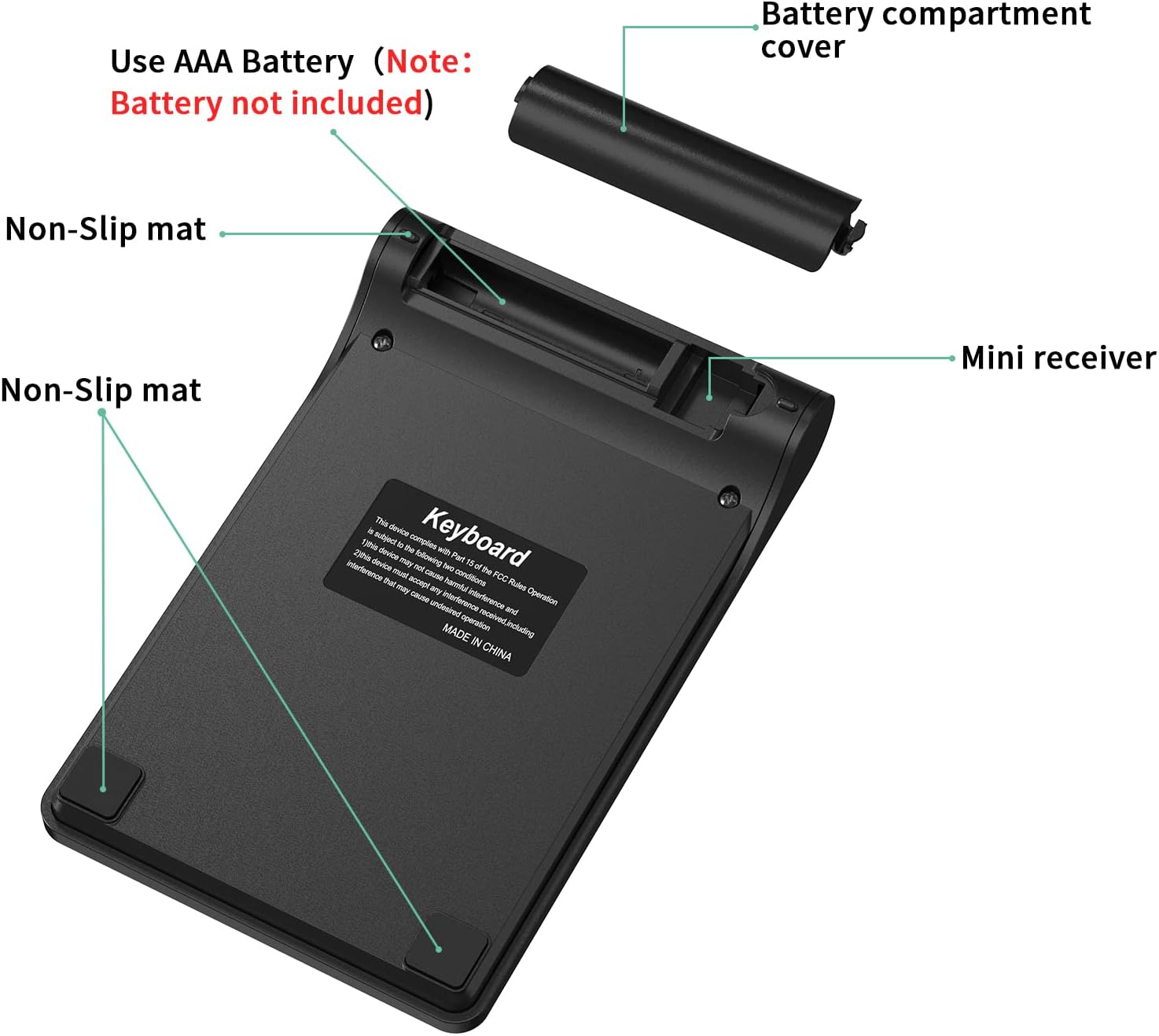
Image: The underside of the keypad, highlighting the battery compartment, the storage slot for the mini USB receiver, and the non-slip rubber feet.

Image: Diagram showing the dimensions of the cimetech K268 Wireless Numeric Keypad: 133mm (5.24in) length, 86mm (3.39in) width, and varying thickness from 9mm (0.39in) to 20mm (0.79in).
4. 설정 지침
Follow these steps to set up your cimetech K268 Wireless Numeric Keypad:
- 배터리 설치 : Open the battery compartment cover on the back of the keypad. Insert one AAA battery (not included), ensuring correct polarity. Close the battery cover.
- USB 수신기를 찾으세요: The 2.4G USB receiver is stored inside the battery compartment for convenience. Carefully remove it.
- 수신기 연결: Plug the 2.4G USB receiver into an available USB port on your computer (laptop or PC).
- 전원 켜기: The keypad does not have a separate power switch. Once the battery is installed and the receiver is plugged in, the keypad is ready for use. A green indicator light may flash briefly.
- 플러그 앤 플레이: No drivers are required. Your computer should automatically detect and install the necessary software.

Image: Visual guide for setting up the keypad, showing battery installation, USB receiver connection, indicator light, and immediate use.
5. 사용 설명서
Once set up, the cimetech K268 functions as a standard 18-key numeric keypad. It is ideal for:
- Data entry in spreadsheets (e.g., Microsoft Excel, Google Sheets).
- Financial calculations.
- Accounting tasks.
- Any application requiring frequent numerical input.
주요 기능:
- Num 잠금: Toggles the numeric keypad function. When Num Lock is active, the keys function as numbers. When inactive, some keys may perform navigation functions (Home, End, PgUp, PgDn).
- / , * , - , + : Standard arithmetic operators.
- 입력하다: Confirms input.
- 역행 키이: Deletes the previous character.
- 삭제(Del): Deletes the character at the cursor position.
- 삽입(Ins): 삽입 모드를 전환합니다.

Image: The numeric keypad being used in different professional environments, demonstrating its versatility for tasks in banking, accounting, and general business operations.
6. 호환성
The cimetech K268 Wireless Numeric Keypad offers wide compatibility with various operating systems:
- 윈도우: Fully compatible with Windows 7, 8, 10, 11, Vista, and XP.
- 리눅스: Compatible with most Linux distributions.
- 맥 OS : Partially compatible. Some specific key functions may not operate identically to a native macOS keypad.
- 기계적 인조 인간: Compatible with devices supporting USB input.

Image: The keypad displayed alongside icons representing Windows, Linux, and macOS, indicating its broad operating system compatibility.
7. 유지관리
키패드의 수명 연장과 최적의 성능을 보장하려면 다음 유지 관리 지침을 따르십시오.
- 청소: 부드럽고 마른 천으로 키패드를 닦으세요. 잘 지워지지 않는 얼룩은 약간 거친 천으로 닦아내세요.amp cloth can be used, but ensure no liquid enters the device. Avoid harsh chemicals or abrasive cleaners.
- 배터리 교체: Replace the AAA battery when the keypad's performance degrades or it stops responding. Always use a fresh, high-quality battery.
- 저장: When not in use for extended periods, remove the battery to prevent leakage. Store the keypad in a cool, dry place.
- 유출 방지 설계: While the keypad features a spill-resistant design, it is not waterproof. Avoid exposing it to excessive liquids. If spills occur, immediately disconnect the device, remove the battery, and allow it to dry completely before reuse.
8. 문제 해결
If you encounter issues with your cimetech K268 Wireless Numeric Keypad, refer to the following common solutions:
- 키패드가 응답하지 않습니다.
- Ensure the AAA battery is correctly installed and not depleted. Replace if necessary.
- Verify the 2.4G USB receiver is securely plugged into a working USB port on your computer. Try a different USB port.
- Move the keypad closer to the USB receiver to rule out interference or range issues.
- 컴퓨터를 다시 시작하세요.
- Keys typing incorrect characters or not working:
- Check if the "Num Lock" key is activated. Press it to toggle its state.
- Ensure there are no physical obstructions under the keys.
- 간헐적 연결:
- Reduce the distance between the keypad and the USB receiver.
- 수신기를 다른 무선 장치(예: Wi-Fi 라우터, 블루투스 장치) 근처에 두지 마십시오. 이러한 장치는 간섭을 일으킬 수 있습니다.
- 배터리 전원이 충분한지 확인하세요.
이러한 단계를 시도한 후에도 문제가 지속되면 고객 지원팀에 문의하세요.
9. 사양
| 특징 | 세부 사항 |
|---|---|
| 상표 | cimetech |
| 모델 | 케이268 |
| 색상 | 검은색 |
| 연결 기술 | 2.4G 무선(USB 수신기) |
| 키의 개수 | 18 |
| 호환 장치 | 노트북, PC |
| 운영 체제 호환성 | Windows 7/8/10/11/Vista/XP, Linux, macOS (partial), Android |
| 특별 기능 | Ergonomic 15° tilt, Spill-resistant design, Quiet click, Portable |
| 전원 | AAA 배터리 1개(포함되지 않음) |
| 제품 크기(L x W x H) | 13.3cm x 8.6cm x 1cm (약 5.24 x 3.39 x 0.39인치) |
10. 보증 및 지원
cimetech products are designed for reliability and performance. For warranty information and customer support, please refer to the documentation included with your purchase or visit the official cimetech web대지.
If you have any questions or require assistance, please contact our customer support team. Details can typically be found on the product packaging or the manufacturer's web대지.