
1. 서론
This manual provides detailed instructions for the installation, operation, and maintenance of your Fractal Design Define 7 Nano Black Solid Mini ITX PC Case. Please read this manual thoroughly before beginning assembly to ensure proper installation and to maximize the performance and longevity of your system.
The Define 7 Nano is a compact Mini ITX case designed for silent operation and flexible component support, offering a balance of size and functionality for small form factor builds.

그림 1: 전면 view of the Fractal Design Define 7 Nano Black Solid Mini ITX PC Case.
2. 안전 정보
설치 및 작동 시 다음 안전 예방 조치를 준수하세요.
- 구성 요소를 설치하거나 제거하기 전에 항상 벽면 콘센트에서 전원 공급 장치를 분리하세요.
- 정전기 방전(ESD)으로 인한 민감한 부품 손상을 방지하기 위해 정전기 방지 손목 스트랩을 착용하십시오.
- 물리적 손상을 방지하기 위해 구성품을 조심스럽게 다루십시오.
- 과열을 방지하려면 PC 케이스 주변의 적절한 환기를 확보하세요.
- 케이스를 액체나 과도한 습기로부터 멀리하십시오.
- 케이스 구조를 임의로 변경하지 마십시오. 보증이 무효화될 수 있으며 안전상의 위험을 초래할 수 있습니다.
3. 패키지 내용
패키지에 모든 구성 요소가 들어 있는지 확인하세요.
- Fractal Design Define 7 Nano PC Case
- Accessory Box (screws, zip ties, standoffs, cleaning cloth)
- 사용 설명서 (본 문서)
- Pre-installed fans (Dynamic X2 GP-12/GP-14, quantity may vary)

그림 2: 폭발 view showing the various removable components of the Define 7 Nano case.
4. 설정 및 구성 요소 설치
4.1. 준비
- 케이스를 풀어보세요: 케이스를 포장에서 조심스럽게 꺼내세요.
- 사이드 패널 제거: The side panels are secured with captive thumbscrews. Loosen the thumbscrews and slide the panels backward to remove them.
- Remove Top Panel (Optional): The top panel can be removed for easier access during installation or for enhanced airflow. Press the release button at the rear of the top panel and lift it off.
- Remove Front Panel (Optional): The front panel can be carefully pulled off from the bottom for access to front fan mounts and dust filters.
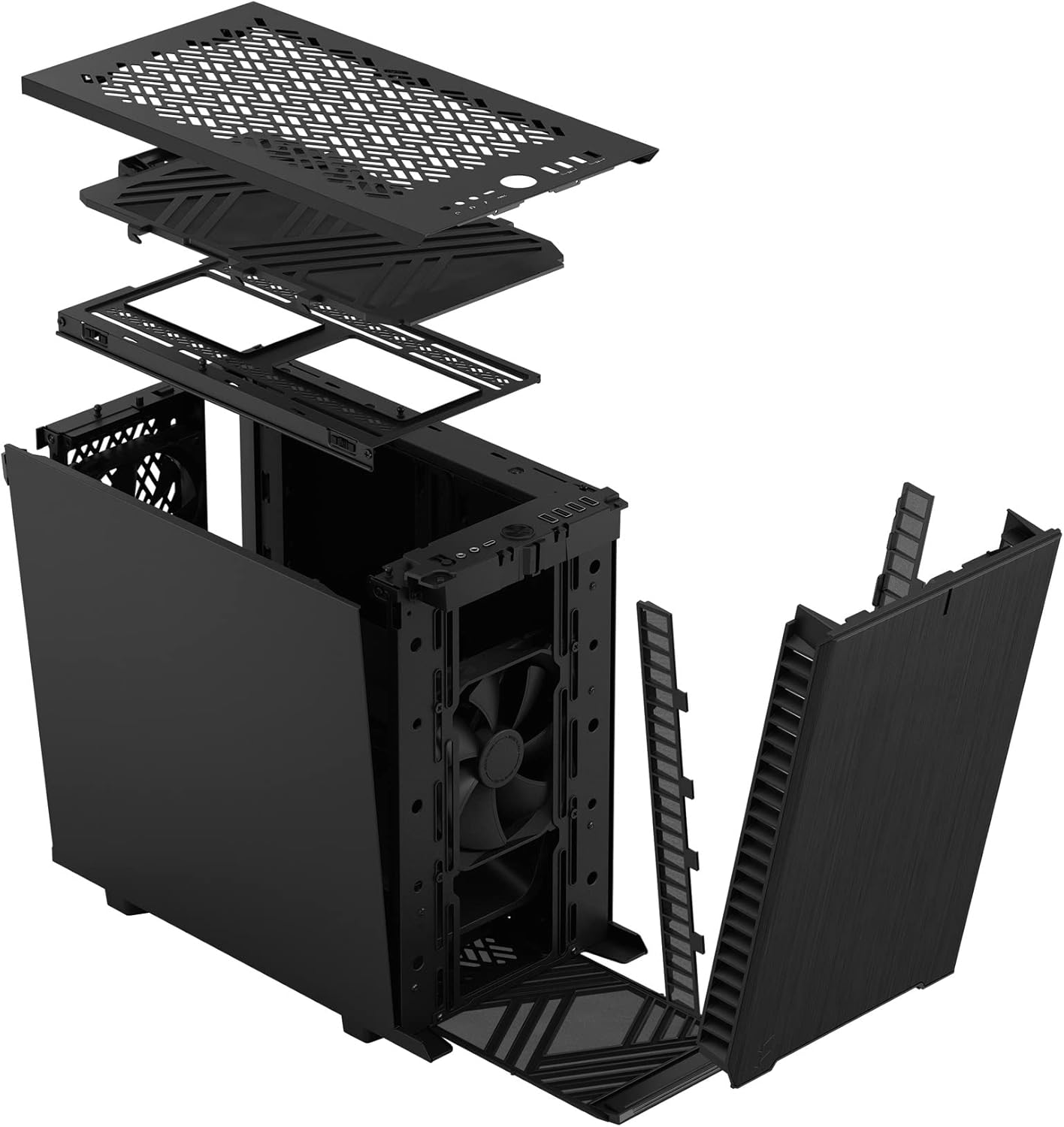
그림 3: 폭발 view illustrating the removal process for the front and top panels.
4.2. 마더보드 설치
The Define 7 Nano supports Mini ITX motherboards.
- I/O 쉴드를 설치하세요: If your motherboard requires an I/O shield, install it into the rear opening of the case before mounting the motherboard.
- 메인보드 위치: Align your Mini ITX motherboard with the pre-installed standoffs inside the case.
- 보안 마더보드: Use the provided screws from the accessory box to secure the motherboard to the standoffs.
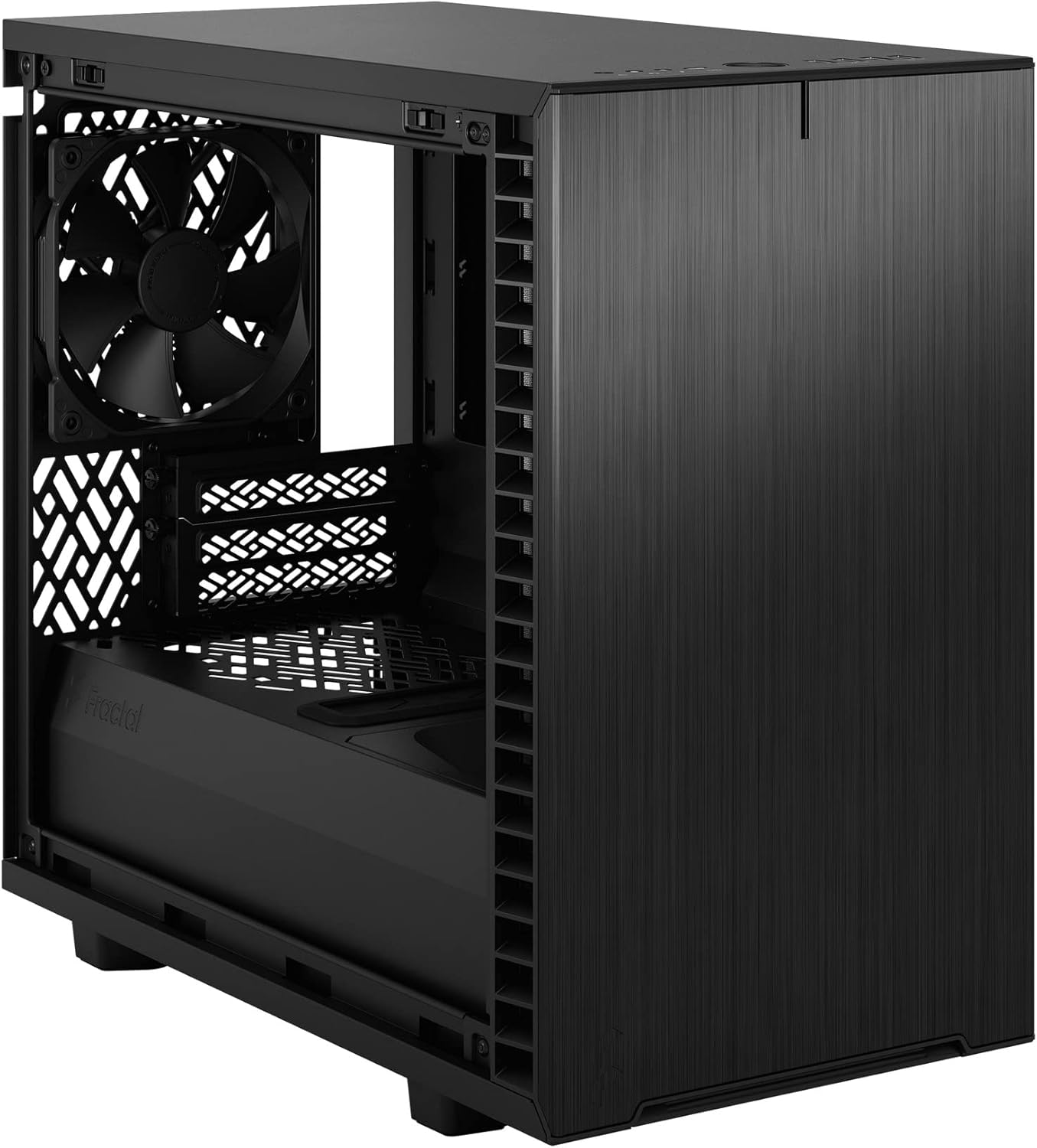
그림 4: 내부 view of the case, highlighting the motherboard mounting area and fan locations.
4.3. 전원 공급 장치(PSU) 설치
The Define 7 Nano supports ATX PSUs.
- 파워서플라이 브래킷 장착: Attach the PSU mounting bracket to your power supply using the screws provided with the PSU.
- Slide PSU into Case: Slide the PSU with the attached bracket into the rear of the case.
- 안전한 전원 공급 장치: Secure the PSU bracket to the case using the thumbscrews.
4.4. 저장 드라이브 설치
이 케이스는 2.5인치 SSD와 3.5인치 HDD를 지원합니다.
- 2.5인치 드라이브: Mount 2.5" drives to the dedicated SSD brackets located behind the motherboard tray or on the PSU shroud. Secure with screws.
- 3.5인치 드라이브: Install 3.5" drives into the drive cage located beneath the PSU shroud. Secure with screws.
4.5. 그래픽 카드(GPU) 설치
- PCIe 슬롯 커버를 제거하세요: 케이스 뒷면에서 필요한 PCIe 슬롯 커버를 제거합니다.
- GPU 삽입: Carefully insert your graphics card into the primary PCIe slot on the motherboard.
- 보안 GPU: Secure the graphics card to the case using the thumbscrews or standard screws.
4.6. 냉각 시스템 설치 (팬/라디에이터)
The Define 7 Nano offers flexible cooling options.
- 전면 팬: Up to two 120/140mm fans or a 240/280mm radiator can be installed at the front.
- 탑 팬: Up to two 120/140mm fans or a 240mm radiator can be installed at the top (requires removing the solid top panel and installing the ventilated top panel).
- 후면 팬: One 120mm fan can be installed at the rear.
- Bottom Fan: One 120mm fan can be installed at the bottom.
Ensure fans are oriented correctly for optimal airflow (intake or exhaust).
4.7. 케이블 관리
The case features routing channels and Velcro straps behind the motherboard tray for organized cable management.
- 케이블 경로: Pass power and data cables through the rubber grommets to the back of the motherboard tray.
- 보안 케이블: Use the pre-installed Velcro straps and included zip ties to bundle and secure cables.

그림 5: 후면 내부 view demonstrating the cable management system with Velcro straps.
4.8. 전면 패널 연결
Connect the front panel cables to the corresponding headers on your motherboard:
- Power Button (PWR SW)
- Reset Button (RESET SW)
- Power LED (PWR LED)
- HDD Activity LED (HDD LED)
- USB 3.0 헤더
- USB Type-C Header (if applicable)
- HD 오디오 헤더
메인보드 설명서를 참조하여 헤더의 정확한 위치를 확인하십시오.
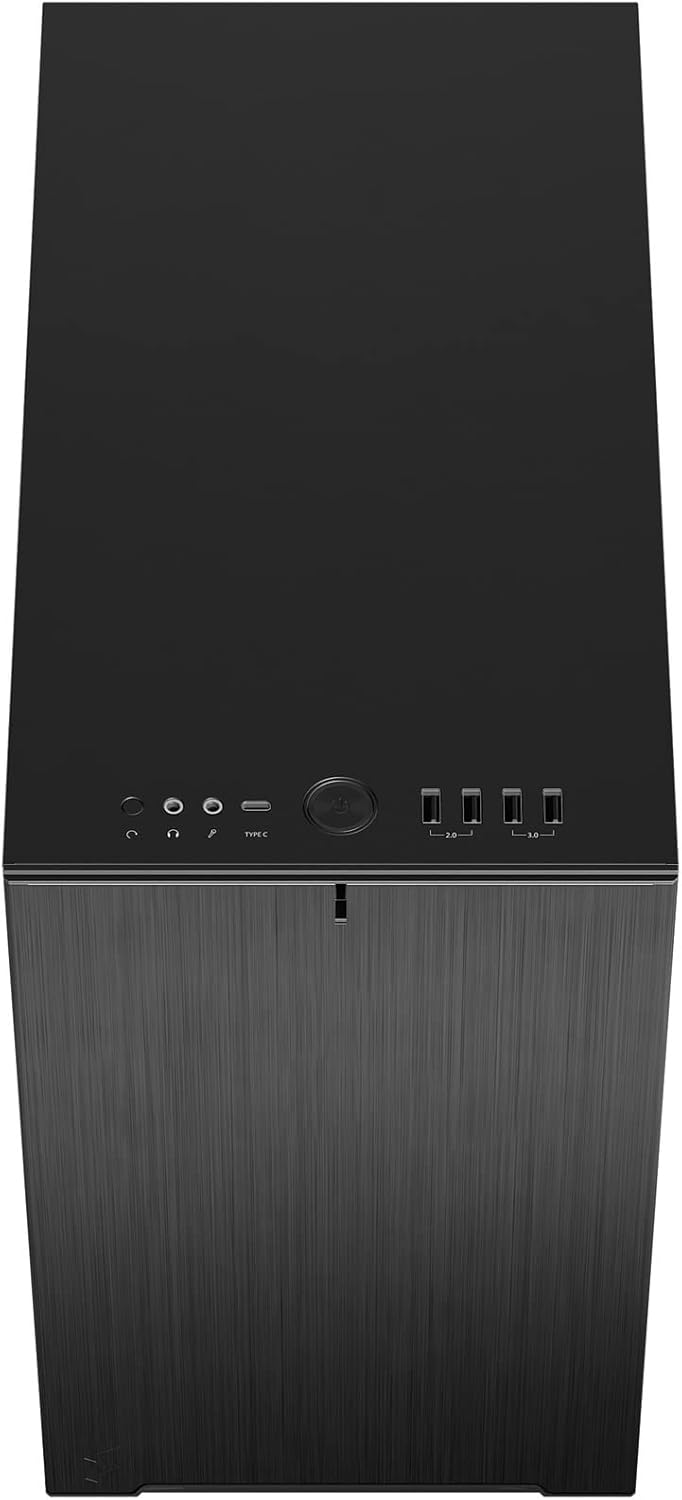
그림 6: 상단 전면 view displaying the front I/O panel with USB ports, audio jacks, and power button.
5. 사용 설명서
5.1. 전원 켜기 / 끄기
- 전원 켜기: 전면 I/O 패널에 있는 전원 버튼을 누르십시오.
- 전원 끄기 : Initiate a shutdown from your operating system. Alternatively, press and hold the power button for 5 seconds for a forced shutdown.
5.2. Using Front Panel Ports
전면 I/O 패널을 통해 다음과 같은 기능에 편리하게 접근할 수 있습니다.
- USB 3.0 포트: 호환 장치와의 고속 데이터 전송을 위해.
- USB 타입-C 포트: For modern devices requiring a Type-C connection.
- 오디오 잭: 헤드폰과 마이크를 연결합니다.
6. 유지관리
정기적인 유지관리는 PC 구성 요소의 최적의 성능과 수명을 보장하는 데 도움이 됩니다.
6.1. 먼지 필터 청소
The Define 7 Nano is equipped with easily removable dust filters to prevent dust buildup inside the case.
- 전면 필터: Can be accessed by removing the front panel.
- 상단 필터: Located beneath the ventilated top panel (if installed).
- 하단 필터: Slides out from the front of the case.
Clean filters regularly (e.g., monthly) by rinsing them with water and allowing them to dry completely, or by using a soft brush or compressed air.
6.2. 일반 청소
- 부드러운 d를 사용하세요amp cloth to wipe down the exterior surfaces of the case.
- 마감재를 손상시킬 수 있는 강한 화학 물질이나 연마재의 사용은 피하세요.
- For interior cleaning, use compressed air to remove dust from components. Ensure the system is powered off and unplugged.
7. 문제 해결
이 섹션에서는 일반적으로 발생할 수 있는 문제에 대해 설명합니다.
7.1. 전원 없음 / 시스템 시작 안 됨
- 전원 연결 확인: Ensure the PSU is properly connected to the wall outlet and the power switch on the PSU is in the 'ON' position. Verify all internal power cables (24-pin ATX, 8-pin CPU, PCIe, SATA) are securely connected.
- 전면 패널 헤더: Double-check that the power button header (PWR SW) is correctly connected to the motherboard.
- Motherboard/CPU: CPU와 RAM이 올바르게 장착되었는지 확인하세요.
7.2. 과도한 소음
- 팬 소음: Check if any fan cables are obstructing fan blades. Ensure fans are securely mounted. Consider adjusting fan speeds in your motherboard's BIOS/UEFI or operating system.
- 진동: Ensure all components (PSU, drives, GPU) are securely fastened to prevent rattling.
7.3. 과열
- 공기 흐름: Verify that fans are oriented correctly (intake/exhaust) and that there is adequate airflow.
- 먼지 필터: Clean dust filters regularly to prevent restricted airflow.
- 열전도 페이스트: Ensure CPU cooler has proper thermal paste application.
8. 사양
| 특징 | 사양 |
|---|---|
| 모델명 | Define 7 Nano |
| 모델 번호 | FD-C-DEF7N-01 |
| 케이스 유형 | 미니타워 |
| 마더보드 호환성 | 미니 ITX |
| 치수(길이 x 너비 x 높이) | 포장 크기: 약 18.74 x 11.38 x 17.91인치 |
| 무게 | 약 18.37파운드 |
| 재료 | 알류미늄 |
| 색상 | 검은 색 고체 |
| 전면 I / O 포트 | 5x USB 3.0, Audio In/Out, Power Button |
| 드라이브 베이 | 2.5" SSD, 3.5" HDD (specific quantities vary by configuration) |
| 냉각 방식 | 공기 |
| 사전 설치된 팬 | Dynamic X2 GP-12 (rear), Dynamic X2 GP-14 (front) |
9. 보증 및 지원
Fractal Design products are manufactured to the highest quality standards and come with a limited warranty. For detailed warranty information, please refer to the official Fractal Design web사이트에 접속하거나 제품에 포함된 보증 카드를 확인하세요.
For technical support, troubleshooting assistance, or to inquire about replacement parts, please visit the official Fractal Design support page:
www.fractal-design.com/support/
Please have your product model number (FD-C-DEF7N-01) and proof of purchase ready when contacting support.


