
1. 서론
This manual provides detailed instructions for the assembly, operation, and maintenance of your Pokitter Projector Floor Stand. Designed for versatility and stability, this stand is suitable for projectors, small cameras, webcams, microphones, and GoPro devices. Please read this manual thoroughly before use to ensure proper functionality and longevity of the product.

Figure 1.1: The Pokitter Projector Floor Stand, showcasin세련된 디자인과 안정적인 받침대가 특징입니다.
2. 제품 특징
- 높이 조절 : The stand offers a versatile height range from 4.1 inches to 40.2 inches, allowing for optimal positioning of your device.
- 360-Degree Swivel Ball Head: Equipped with a pivot ball head that allows for full 360-degree rotation, enabling precise angle adjustments for your mounted device.
- 통합 케이블 관리: Designed with internal channels to neatly route cables, maintaining a clean and organized setup.
- Stable Floor Base: Features a weighted, circular base for enhanced stability, preventing accidental tipping.
- 다중 장치 호환성: Ideal for use with projectors, small cameras, webcams, microphones, and GoPro devices.

Figure 2.1: Illustration of the stand's adjustable height capabilities, showing various height configurations.
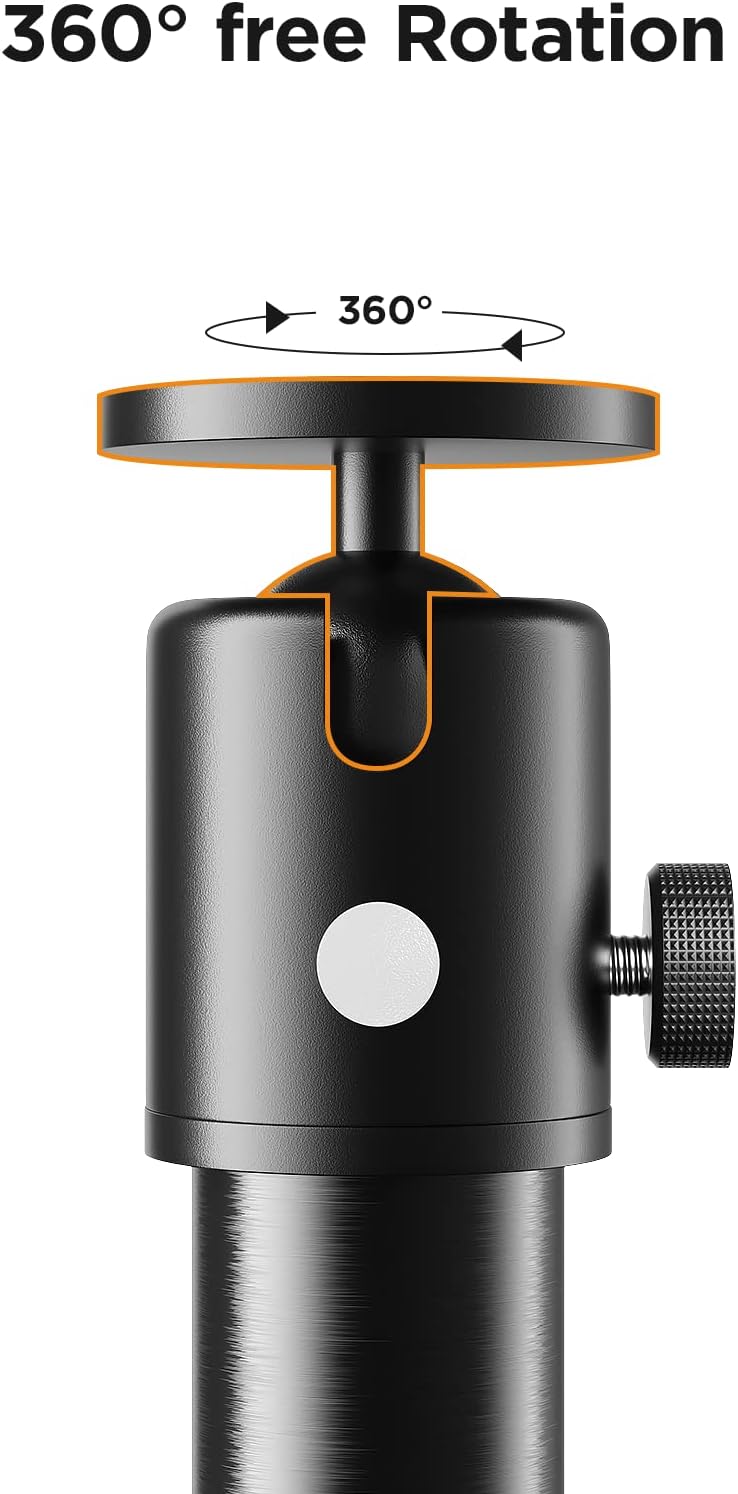
그림 2.2: 클로즈업 view of the 360-degree swivel ball head, demonstrating its rotational freedom.

Figure 2.3: The stand in use, highlighting the integrated cable management system and the stable circular base.
3. 설정 지침
Follow these steps to assemble your Pokitter Projector Floor Stand:
- 구성 요소 풀기: Carefully remove all parts from the packaging. Verify that all components shown in Figure 3.1 are present.
- 기둥 부분 조립: Screw the individual pole sections together clockwise until they are securely fastened. The number of sections used will determine the initial height.
- 베이스 부착: Screw the assembled pole onto the circular base, ensuring it is tightened firmly to provide stability.
- 볼 헤드 부착: Screw the 360-degree swivel ball head onto the top of the assembled pole.
- 마운트 장치: Attach your projector, camera, or other compatible device to the ball head's mounting screw. Ensure it is securely fastened.
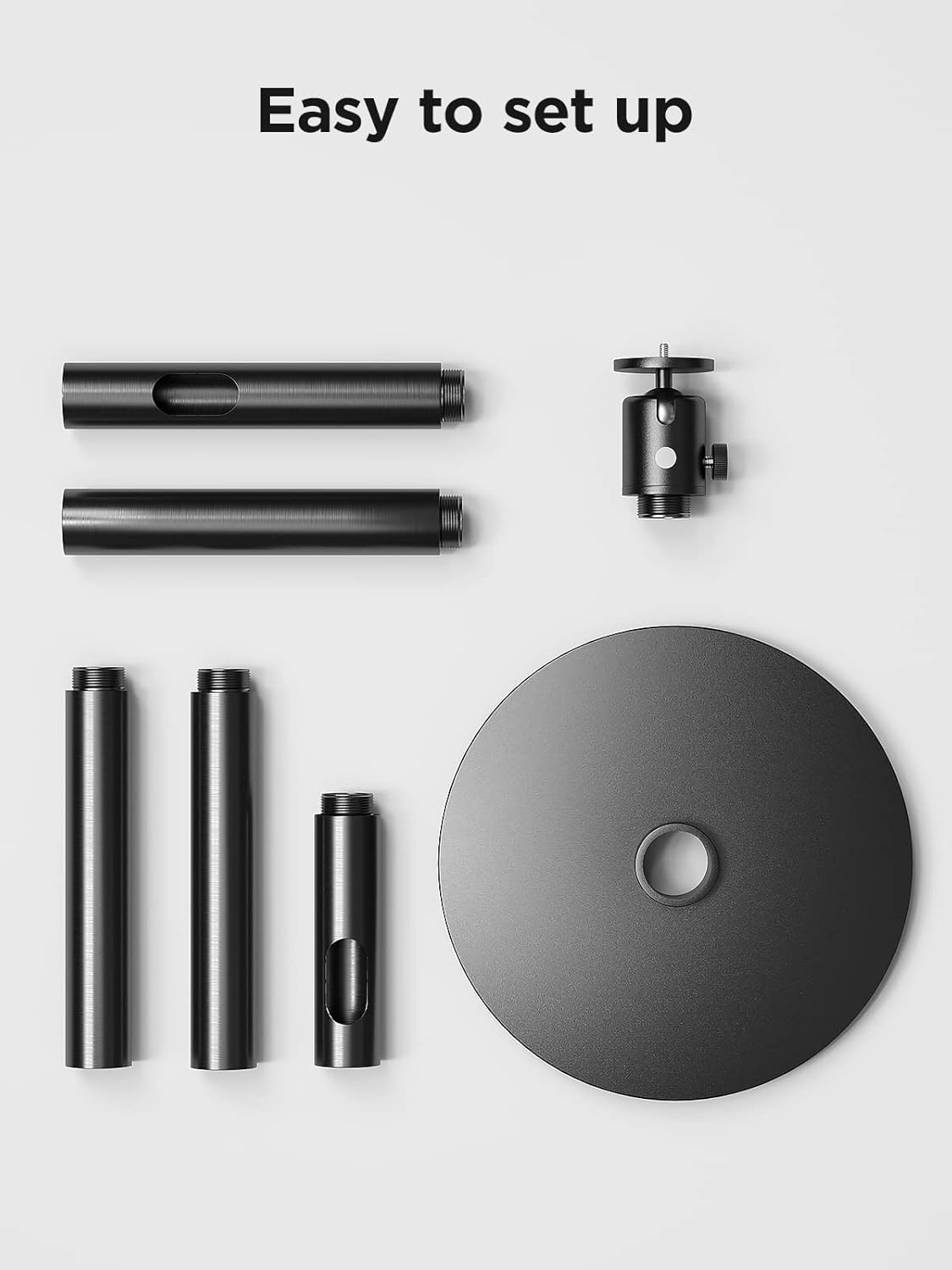
Figure 3.1: All components of the Pokitter Projector Floor Stand laid out for easy assembly.
4. 사용 설명서
- 높이 조절: To adjust the height, loosen the locking collars on the pole sections, extend or retract the sections to the desired height, and then tighten the collars securely.
- 조정 각도: Loosen the knob on the side of the ball head to adjust the angle of your mounted device. Once the desired angle is achieved, tighten the knob firmly to lock it in place. The ball head allows for full 360-degree rotation.
- 케이블 관리 : Route your device's power and data cables through the internal channels of the stand's pole for a tidy setup.

Figure 4.1: The Pokitter Projector Stand in a typical usage scenario, demonstrating its practical application.
5. 유지관리
- 청소: Wipe the stand with a soft, dry cloth to remove dust and dirt. Avoid using abrasive cleaners or solvents.
- 정기 점검: 모든 나사와 연결부를 주기적으로 점검하여 단단히 고정되어 있는지 확인하세요.
- 저장: When not in use for extended periods, store the stand in a cool, dry place, ideally in its original packaging or a protective cover.
6. 문제 해결
| 문제 | 가능한 원인 | 해결책 |
|---|---|---|
| 스탠드가 불안정하게 느껴집니다. | 연결이 느슨하거나 표면이 고르지 않습니다. | Ensure all pole sections and the base are tightly screwed. Place the stand on a flat, stable surface. |
| Device angle slips. | Ball head knob not tightened sufficiently. | Tighten the ball head adjustment knob firmly after setting the desired angle. Ensure the device weight does not exceed the stand's capacity. |
| 높이 조절이 어려움. | Locking collars are too tight or dirty. | Loosen locking collars sufficiently before adjusting. Clean any debris from the pole sections. |
7. 사양
| 특징 | 세부 사항 |
|---|---|
| 모델 번호 | 2 |
| 상표 | 포키터 |
| 높이 조절 범위 | 4.1인치에서 40.2인치까지 |
| 품목 무게 | 8.72파운드 |
| 재료 | Silicone (as per product specifications) |
| 머리 유형 | 360 Degree Swivel Pivot Ball Head |
8. 보증 및 지원
Pokitter stands behind the quality of its products. For specific warranty information, please refer to the documentation included with your purchase or visit the official Pokitter website. For technical support, troubleshooting assistance, or any inquiries regarding your product, please contact Pokitter customer service through their official channels.
자세한 정보와 연락처는 다음 웹사이트를 방문하시면 확인하실 수 있습니다. Pokitter Store on Amazon.