
1. 서론
This manual provides detailed instructions for the installation, operation, and maintenance of your Voktta 100A DC Power Meter. This device is designed to accurately measure DC voltage, current, power, and energy consumption in various applications, including RVs, solar systems, and battery monitoring. Please read this manual thoroughly before use to ensure proper function and safety.
2. 안전 정보
- Ensure all power is disconnected before installation or wiring to prevent electric shock.
- 이 장치는 직류 회로 전용입니다. 교류 전원에 연결하지 마십시오.
- Observe correct polarity (+/-) during wiring to avoid damage to the meter and connected equipment.
- Use appropriate wire gauges (30-12 AWG copper wires recommended) for connections to handle the expected current.
- 최대 볼륨을 초과하지 마십시오tage (100V DC) or current (100A) ratings.
- 기기를 습기, 먼지, 극한 온도에 두지 마세요.
- 계량기를 분해하거나 개조하지 마십시오. 모든 서비스는 자격을 갖춘 전문가에게 맡기십시오.
3. 제품 오버view
3.1 주요 특징
- 넓은 측정 범위: DC 권tage 6.5-100V, current 0-100A, power 0-10kW, energy 0-9999kWh.
- LCD 디스플레이: 볼륨을 동시에 표시합니다tag전류, 전력, 에너지.
- Power-off Data Storage: All parameters are automatically saved when power is lost.
- 에너지 재설정 기능: Accumulated energy data can be manually reset.
- Over-threshold Alarm: Backlight and power display flash if active power exceeds a set threshold.
- Manual Backlight Control: Backlight can be manually turned on or off.
3.2 제품 치수

그림 1: Voktta 100A DC Power Meter with labeled dimensions (89.6mm x 44.6mm x 24.4mm).
3.3 디스플레이 기능
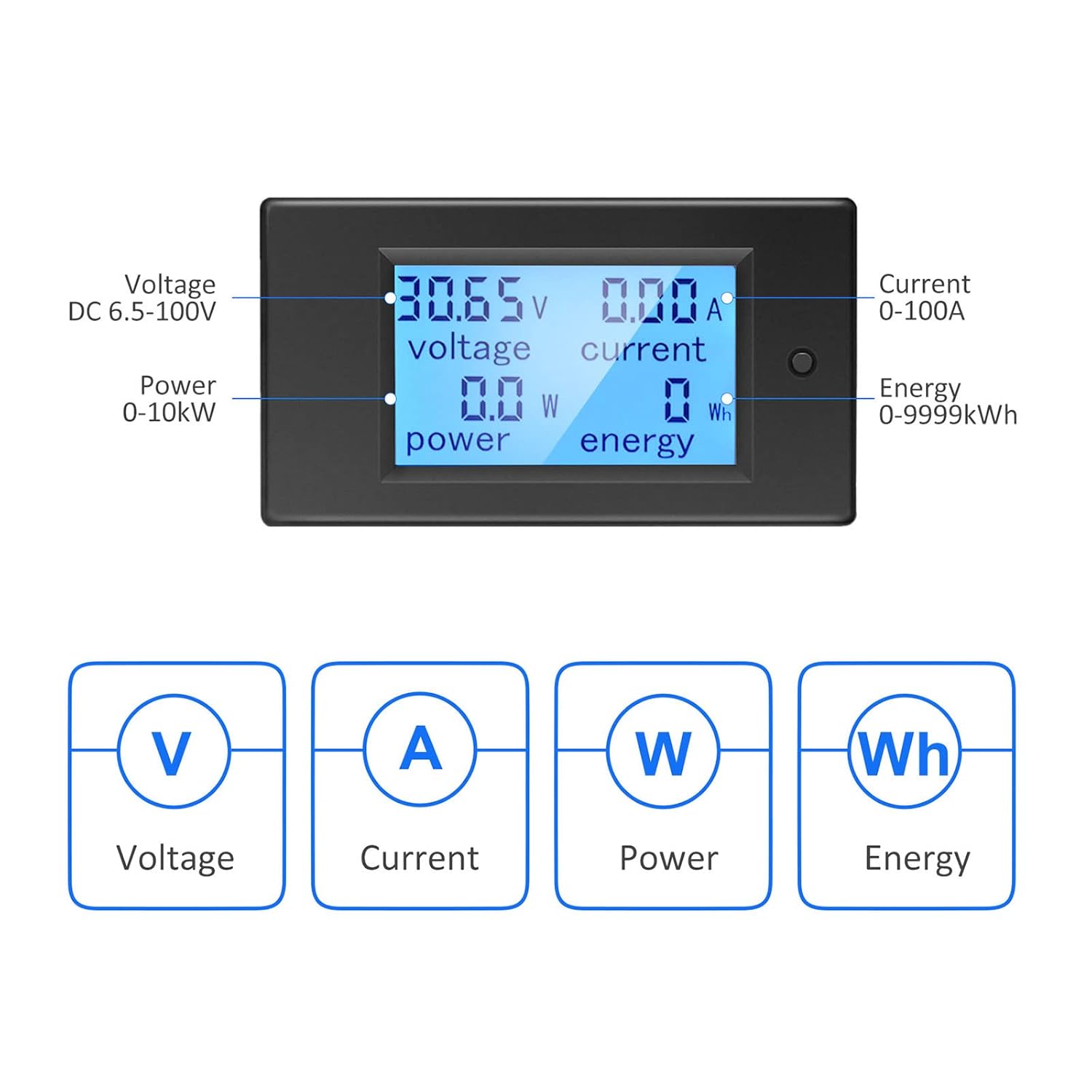
그림 2: LCD display showing Voltage (V), Current (A), Power (W), and Energy (Wh) measurements.
4. 사양
| 매개변수 | 값 |
|---|---|
| 모델 번호 | B0B87458J7 |
| 운영 볼륨tag및 범위 | 직류 6.5V - 100V |
| 현재 측정 범위 | 0 - 100A |
| 전력 측정 범위 | 0 - 10kW |
| 에너지 측정 범위 | 0 - 9999kWh |
| 측정 유형 | Voltmeter, Ammeter, Wattmeter, Energy Meter |
| 디스플레이 유형 | 백라이트가있는 LCD |
| 포함된 구성 요소 | 1*Digital Voltmeter Ammeter DC 100A, 1*100A/75mV Shunt |
| 규정 준수 사양 | 국제전기기술자협회(IEC) 61010-1 |
| 제품 크기(L x W x H) | 10 x 10 x 10 millimeters (approximate) |
| 무게 | 220그램(대략) |
| 원산지 | 중국 |
5. 설정 및 설치
5.1 Basic Wiring Instruction
The meter requires a 100A/75mV shunt for current measurement. The shunt must be installed in series with the load. The meter itself connects with four wires (not included) to the shunt and the power source.
- 1단계: Install the 100A/75mV shunt in series with the DC circuit, between the power source (e.g., battery) and the load. Ensure correct polarity.
- 2단계: Connect the meter to the shunt and the power source using four wires. The meter's small wires are for its own power supply and voltage measurement, while the shunt handles the main current. Recommended wire gauge for connections to the meter is 30-12 AWG copper wires.

그림 3: Basic wiring diagram for the Voktta DC Power Meter with shunt.
5.2 Solar System Wiring Instruction
This diagram illustrates wiring for a solar system where an inverter connects directly to the battery. The meter's four wires do not carry large current; they are for measurement and power. Any copper wire from 30 AWG to 12 AWG can be used for these connections.

그림 4: Solar system wiring diagram with the Voktta DC Power Meter.
You do not need to wire both meters if monitoring a solar system; just connect the voltmeter(s) to monitor the specific parameters you require.
6. 사용 설명서
- 전원 켜기: Once correctly wired, the meter will power on and display real-time voltage, current, power, and accumulated energy.
- 백라이트 제어: The backlight can be manually toggled on or off using the button on the front panel.
- Over-threshold Indication: If the active power exceeds a predefined threshold, the backlight and power display will flash to alert the user.
- 에너지 데이터 재설정: To reset the accumulated energy (kWh) data, press and hold the button on the front panel for approximately 5 seconds until the energy reading resets to zero.
- 전원 끄기 메모리: The meter automatically saves all settings and accumulated energy data when power is disconnected. This data will be restored upon power-up.
7. 유지관리
- 디스플레이와 c를 청소하세요asin부드럽고 마른 천으로 닦아주세요. 연마성 세제나 용제는 사용하지 마세요.
- 배선 연결부가 단단히 고정되어 있고 부식이 없는지 정기적으로 점검하십시오.
- 작동 환경이 지정된 온도 및 습도 범위 내에 있는지 확인하세요.
8. 문제 해결
- 디스플레이 없음:
- Check if the power supply to the meter is connected correctly and within the 6.5-100V DC range.
- 모든 배선 연결이 안전한지 확인하세요.
- 잘못된 판독:
- Ensure the shunt is correctly installed in series with the load and its connections are tight.
- Check for correct polarity of all connections.
- Verify that the current does not exceed the 100A rating of the shunt and meter.
- Backlight Flashing:
- This indicates that the active power has exceeded the set threshold. This is a normal warning function.
- Energy Data Not Resetting:
- Ensure you are pressing and holding the reset button for at least 5 seconds.
9. 지원
If you encounter any issues or have questions not covered in this manual, please do not hesitate to contact Voktta customer support. We are committed to providing assistance and will do our best to help you resolve any problems.