
1. 안전 정보
Please read and understand all safety instructions before installing or operating the UltraPoE CT-PDU10. Failure to follow these instructions may result in electric shock, fire, or serious injury.
- 실내에서만 사용 가능: This PDU is designed for indoor use in dry environments. Do not expose to moisture or extreme temperatures.
- 적절한 접지: Ensure the PDU is connected to a properly grounded outlet. Do not remove the grounding prong from the power cord.
- 과부하 보호: The PDU features an overload protector. Do not exceed the maximum load capacity of 15A / 1800 Joules. If the overload protector trips, disconnect some devices before resetting.
- 통풍: Ensure adequate ventilation around the PDU to prevent overheating.
- 유지: PDU를 열거나 수리하려고 시도하지 마십시오. 모든 수리는 자격을 갖춘 전문가에게 맡기십시오.
2. 제품 오버view
The UltraPoE CT-PDU10 is a 1U horizontal rack mount power distribution unit designed for efficient power management in network racks, data centers, and various professional setups. It provides 10 AC grounded outlets, each with an individual illuminated ON/OFF switch, and features robust overload protection.
주요 특징:
- 10x AC grounded outlets for comprehensive power distribution.
- Individual ON/OFF switches with LED indicators for each outlet, allowing precise control over connected devices.
- Built-in circuit breaker with reset switch for advanced overload protection (1800 Joules).
- Durable industrial-grade metal housing for reliability and longevity.
- Standard 1U 19-inch rack-mountable design.
- 6 ft (1.8m) power cord for flexible placement.
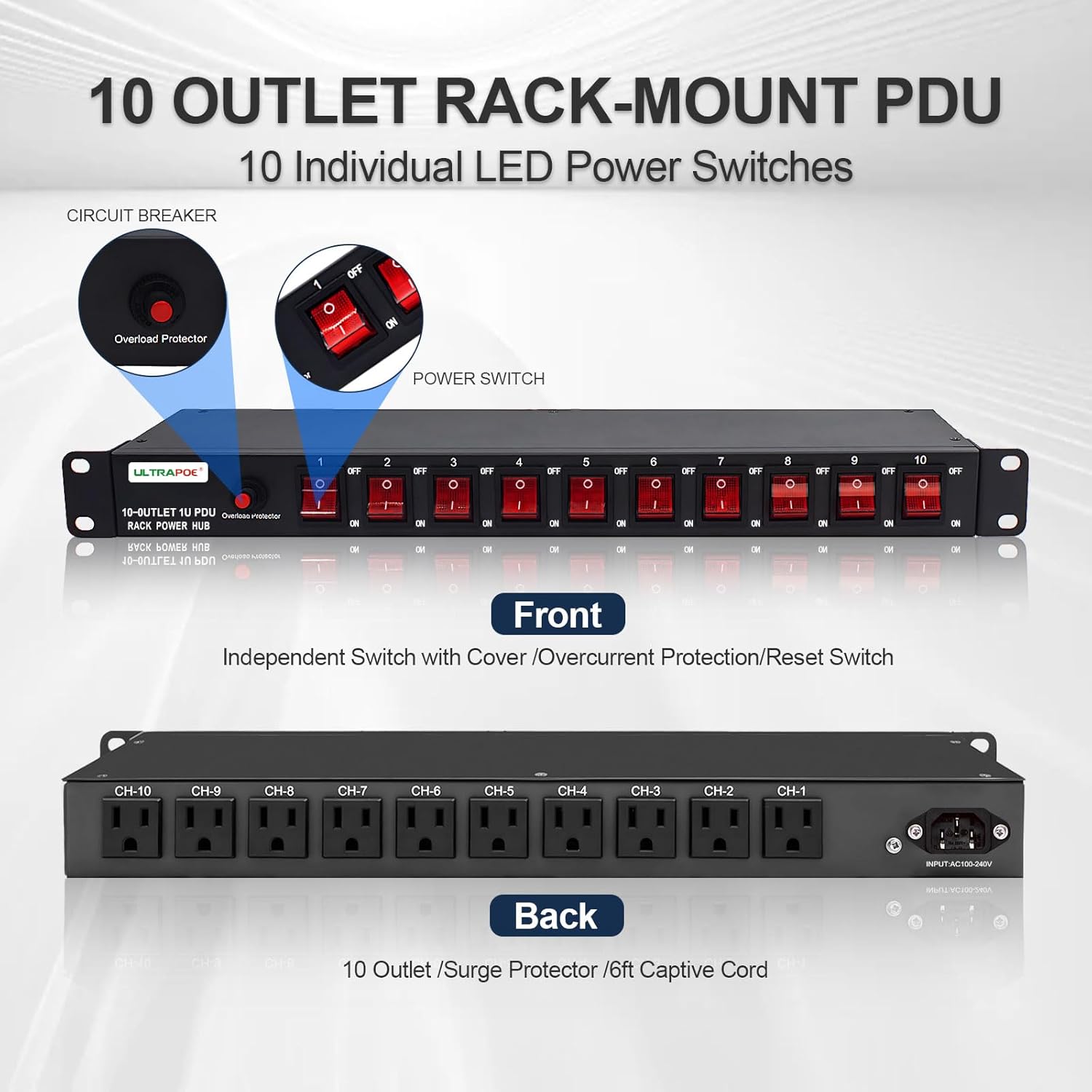
그림 2.1: 전면 및 후면 View of the CT-PDU10 PDU

Figure 2.2: Versatile Applications for the CT-PDU10 PDU
Video 2.1: Official UltraPoE overview of the 1U PDU Rack Mount Power Strip Surge Protector, highlighting its features and design.
3. 설정
The CT-PDU10 is designed for easy installation in standard 19-inch racks or can be mounted in various other configurations.
3.1 랙 마운팅
The PDU occupies 1U of rack space. Use the provided mounting screws to secure the PDU to the front or rear rails of your 19-inch rack cabinet. Ensure the mounting ears are properly aligned with the rack unit markings.

Figure 3.1: PDU installed in a 19-inch rack.
3.2 다양한 장착 옵션
The 180-degree rotatable mounting brackets allow for flexible installation. You can mount the PDU vertically or horizontally, including wall-mount or under-desk configurations.
- 벽걸이 : Attach the PDU directly to a wall using appropriate fasteners.
- Under Desk Mount: Install the mounting ears upwards or downwards to secure the PDU beneath a desk or workbench.

그림 3.2: 다양한 장착 옵션
3.3 전원 연결
Connect the PDU's 6 ft power cord to a standard 100-240V AC wall outlet. Ensure the outlet is properly grounded and can support the total power draw of all connected devices.
4. 사용 설명서
The CT-PDU10 is designed for straightforward operation.
4.1 Individual Outlet Control
Each of the 10 outlets has an independent ON/OFF switch. To power on a device, plug it into an available outlet and press the corresponding switch to the 'ON' position. The switch will illuminate when the outlet is active.

Figure 4.1: Individual ON/OFF Switch
4.2 과부하 보호 장치
The PDU is equipped with an overload protector. In case of an electrical overload, the protector will trip, cutting power to all connected devices to prevent damage. To reset the overload protector:
- Identify and disconnect the device(s) causing the overload.
- Press the red reset button located near the main power switch.
- Reconnect devices one by one, ensuring not to exceed the PDU's maximum load capacity.
5. 유지관리
Regular maintenance ensures optimal performance and longevity of your PDU.
- 청소: Disconnect the PDU from the power source before cleaning. Use a dry, soft cloth to wipe the exterior. Do not use liquid cleaners or aerosols.
- 점검: Periodically inspect the power cord, outlets, and switches for any signs of damage, wear, or loose connections. If any damage is found, discontinue use and contact support.
- 케이블 관리 : Ensure cables connected to the PDU are neatly organized and not under strain to prevent accidental disconnections or damage.
6. 문제 해결
If you encounter issues with your UltraPoE CT-PDU10, refer to the following common troubleshooting steps:
6.1 No Power to Outlets
- Check Main Power: Ensure the PDU's main power cord is securely plugged into a working wall outlet.
- Check Overload Protector: Verify if the red overload protector button has popped out. If so, follow the reset procedure described in Section 4.2.
- 개별 스위치: Confirm that the individual switch for the desired outlet is in the 'ON' position and illuminated.
- Test Wall Outlet: Plug another device directly into the wall outlet to confirm it is supplying power.
6.2 Devices Not Functioning Correctly
- 장치 호환성: Ensure the connected device is compatible with the PDU's voltag전자 및 현재 사양.
- 케이블 무결성: Check the power cable of the connected device for any damage or loose connections.
- Outlet Polarity: In rare cases, incorrect wiring in the PDU or wall outlet can lead to polarity issues. If you suspect this, consult a qualified electrician or use an outlet tester to verify correct wiring.
7. 사양
Detailed technical specifications for the UltraPoE CT-PDU10 PDU.
| 특징 | 사양 |
|---|---|
| 모델 번호 | CT-PDU10 |
| 제품 치수 | 17 x 4 x 1.8인치(433 x 101 x 45mm) |
| 품목 무게 | 3.43파운드 |
| 총 전원 콘센트 | 10 |
| 정격 볼륨tage | 100-240V AC |
| 최대 전류 | 15A |
| 서지 보호 | 1800 줄 |
| 빈도 | 50~60Hz |
| 전원 코드 길이 | 6 피트 |
| 장착 유형 | 1U Rack Mount, Wall Mount, Under Desk Mount |
| 재료 | 견고한 강철 섀시 |

Figure 7.1: PDU Dimensions

Figure 7.2: Standard 19-inch Rack Cabinet Dimensions
8. 보증 및 지원
For warranty information, technical support, or any product-related inquiries, please contact UltraPoE customer service. Refer to the product packaging or the UltraPoE official web최신 연락처 정보는 사이트에서 확인하세요.
온라인 리소스: Visit the UltraPoE store on Amazon for additional product information and support resources.
제조업체: UltraPoE