
1. Introduction to the ESP32-WROVER-IE Module
The EBYTE ESP32-WROVER-IE is a versatile Wi-Fi module designed for a wide range of applications, including low-power sensor networks, wearable electronic devices, and demanding tasks such as speech encoding, audio streaming, and MP3 decoding. It integrates the powerful ESP32-D0WD-V3 chip, featuring an Xtensa dual-core 32-bit LX6 microprocessor.
This module offers robust connectivity with IEEE802.11b/g/n protocol support, operating in the 2.4~2.5GHz frequency band. It boasts a transmission distance of up to 400 meters and an antenna output power of 20dBm, ensuring broad wireless communication range. Its low sleep current, less than 5 µA, makes it highly suitable for battery-powered applications.

Figure 1: Physical dimensions of the ESP32-WROVER-IE module, showing its compact size of approximately 31.4mm by 18mm.
주요 특징:
- 칩 솔루션: ESP32-D0WD-V3 with Xtensa dual-core 32-bit LX6 microprocessor.
- 메모리: 448 KB ROM, 520 KB SRAM, 16 KB RTC SRAM.
- 클록 주파수: Supports up to 240 MHz.
- 무선 표준 : IEEE802.11b/g/n (2.4~2.5GHz).
- 통신 인터페이스: UART I/O.
- 안테나: Ipex antenna for flexible integration.
- 낮은 전력 소모: Sleep current less than 5 µA, ideal for battery-powered devices.
- 높은 통합성: Excellent performance in wireless transmission distance and network connectivity.

Figure 2: Illustration highlighting the ultra-low power consumption capabilities of the ESP32 module, featuring an ultra-low power RF architecture and power-saving patents for extended battery life.
2. 기술 사양
The following table provides detailed technical specifications for the ESP32-WROVER-IE module.
| 사양 | 값 |
|---|---|
| 상표 | 이바이트 |
| 모델 번호 | ESP32-WROVER-IE |
| 연결 기술 | 와이파이 |
| 무선 통신 표준 | 802.11b/g/n |
| 프로세서 수 | 2 (Dual-core LX6) |
| 빈도 | 2.4~2.5GHz |
| 전송 거리 | 최대 400m |
| 안테나 유형 | 아이펙스 |
| 인터페이스 | UART I/O |
| 집시 남자 | 448킬로바이트 |
| 에스램 | 520킬로바이트 |
| RTC 스램 | 16킬로바이트 |
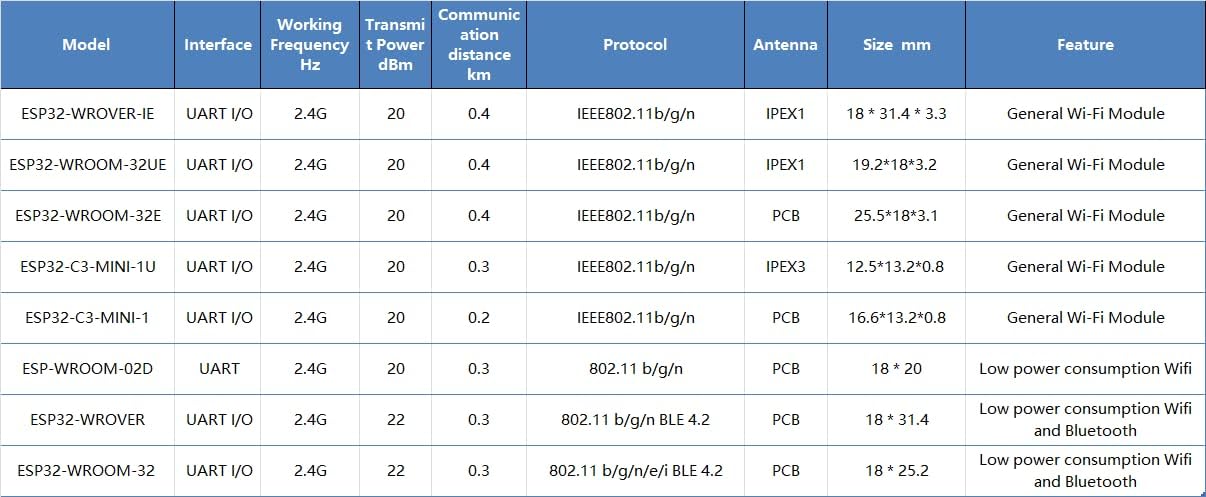
Figure 3: Detailed comparison table showing various EBYTE ESP32 modules, including their interfaces, frequencies, transmit power, communication distances, protocols, antenna types, sizes, and features.
3. 설정 및 통합
The ESP32-WROVER-IE module is designed for integration into custom hardware or development boards. Proper setup is crucial for optimal performance.
3.1 하드웨어 연결
- 전원 공급 장치: 모듈을 지정된 전압 범위 내의 안정적인 전원 공급 장치에 연결하십시오.tage range. Refer to the datasheet for exact voltag요구사항
- UART 인터페이스: Connect the module's UART (Universal Asynchronous Receiver/Transmitter) pins (TX, RX, GND) to your host microcontroller or development board. Ensure correct voltage levels (e.g., 3.3V).
- 안테나 연결: Attach a compatible Ipex antenna to the module's Ipex connector. Ensure the connection is secure to achieve the specified communication range.
- GPIO 핀: Utilize the available General Purpose Input/Output (GPIO) pins for connecting sensors, actuators, or other peripherals as required by your application.
3.2 소프트웨어 구성
- 개발 환경: Install the ESP-IDF (Espressif IoT Development Framework) or a compatible Arduino IDE environment with ESP32 board support.
- 펌웨어 업로드: Use the chosen development environment to compile and upload your application firmware to the ESP32-WROVER-IE module via the UART interface.
- 초기 테스트: After uploading, perform basic tests to verify Wi-Fi connectivity and communication with your host system.
4. 모듈 작동 방법
Once the ESP32-WROVER-IE module is integrated and programmed, its operation depends on the specific application firmware.
4.1 Wi-Fi 연결
- 스테이션 모드: The module can connect to an existing Wi-Fi network (router) to access the internet or communicate with other devices on the local network.
- 액세스 포인트(AP) 모드: The module can create its own Wi-Fi network, allowing other devices to connect directly to it.
- 결합 모드: The module can operate as both a station and an access point simultaneously.
4.2 데이터 통신
The module supports various communication protocols over Wi-Fi, including TCP/IP, UDP, HTTP, MQTT, and more, enabling data exchange with cloud services, local servers, or other IoT devices.

그림 4: 예ample of the ESP32 module's application in smart home environments, enabling wireless connectivity for various devices and systems.

그림 5: 예ample of the ESP32 module's application in industrial automation, contributing to reliable and efficient control systems.
5. 유지보수 및 취급
To ensure the longevity and reliable operation of your ESP32-WROVER-IE module, follow these guidelines:
- 정전기 : Handle the module with care, preferably in an ESD-safe environment, to prevent damage from static discharge.
- 환경 조건: Operate and store the module within its specified temperature and humidity ranges. Avoid extreme conditions.
- 물리적 보호: Protect the module from physical impact, excessive bending, or pressure, especially on the antenna connector and pins.
- 청소: If necessary, clean the module gently with a dry, soft brush or compressed air. Avoid liquids or harsh chemicals.
- 펌웨어 업데이트: Regularly check for and apply firmware updates from Espressif or EBYTE to benefit from performance improvements, bug fixes, and security enhancements.
6. 문제 해결
If you encounter issues with your ESP32-WROVER-IE module, consider the following troubleshooting steps:
- 전원 없음:
- 전원 공급 볼륨을 확인하세요tage 및 현재 용량.
- Check all power connections for proper contact.
- Wi-Fi 연결 문제:
- 안테나가 제대로 연결되어 있는지 확인하십시오.
- Check Wi-Fi credentials (SSID, password) in your firmware.
- Verify that the Wi-Fi network is within range and operating on the 2.4GHz band.
- Confirm that the module's firmware includes Wi-Fi functionality and is correctly initialized.
- UART Communication Problems:
- Check TX/RX connections (ensure TX of one device connects to RX of the other).
- Verify baud rate settings match between the module and the host.
- 볼륨 확인tage levels are compatible (e.g., 3.3V).
- 모듈이 응답하지 않음:
- 전원을 껐다 켜는 방식으로 하드 리셋을 시도해 보세요.
- Re-upload the firmware to ensure it's not corrupted.
- PCB에 단락이나 잘못된 배선이 있는지 확인하십시오.
7. 보증 및 지원
For specific warranty information and technical support, please refer to the official EBYTE web사이트를 방문하거나 고객 서비스에 직접 문의하세요. 보증 청구를 위해 구매 영수증을 보관하세요.
제조업체: 이바이트
모델: ESP32-WROVER-IE