
1. 서론
Thank you for choosing the Hoco GA08 Smart Sports Bracelet. This device is designed to help you monitor your fitness activities and health metrics, providing convenient notifications and smart features directly on your wrist. Please read this manual carefully before using the product to ensure proper operation and to maximize its potential.
2. 패키지 내용
다음 항목에 대한 상자를 체크해 주세요.
- Hoco GA08 Smart Sports Bracelet (main unit and strap)
- USB 충전 케이블
- 사용자 설명서
3. 제품 오버view
Familiarize yourself with the components of your Hoco GA08 Smart Sports Bracelet.

Figure 3.1: Hoco GA08 Smart Sports Bracelet and its retail packaging.
3.1 Main Unit and Strap
The main unit houses the display, sensors, and internal electronics. It is designed to be detachable from the strap for charging and maintenance.
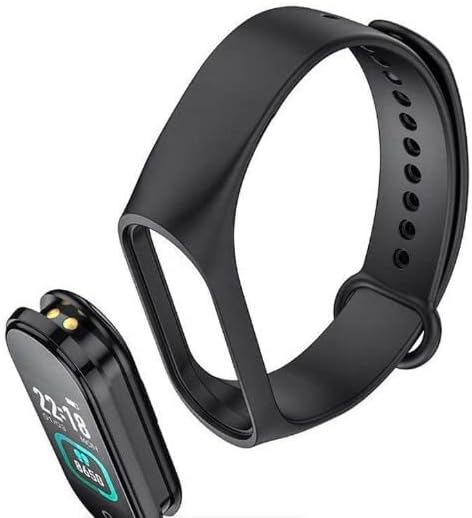
Figure 3.2: The main unit of the Hoco GA08 Smart Sports Bracelet detached from its silicone strap.
3.2 센서 및 충전 접점
On the underside of the main unit, you will find the optical sensors for heart rate and blood pressure monitoring, along with the charging contacts.

그림 3.3: 후면 view of the Hoco GA08 Smart Sports Bracelet, highlighting the health sensors and charging pins.
4. 설정
4.1 장치 충전
- Gently detach the main unit from the strap.
- Connect the main unit to the USB charging cable, ensuring the charging contacts align correctly.
- 케이블의 USB 끝을 표준 USB 전원 어댑터(권장 5V/1A)나 컴퓨터의 USB 포트에 꽂습니다.
- The bracelet display will show a charging indicator. A full charge typically takes 1-2 hours.
4.2 컴패니언 앱 다운로드
To unlock all features and synchronize data, download the dedicated companion app on your smartphone. 검색 the app name (usually mentioned in the quick start guide or on the product packaging) in your device's app store (Google Play Store for Android or Apple App Store for iOS).
4.3 스마트폰과 페어링
- 스마트폰의 Bluetooth가 활성화되어 있는지 확인하세요.
- 스마트폰에서 동반 앱을 엽니다.
- Follow the in-app instructions to search for and connect to your Hoco GA08 bracelet. The bracelet's name will typically appear as 'GA08' or 'Hoco GA08'.
- Confirm the pairing request on both your smartphone and the bracelet if prompted.
5. 사용 설명서
The Hoco GA08 Smart Sports Bracelet features a touch-sensitive button or area for navigation. Tap to cycle through functions, or long-press to select/activate.
5.1 기본 탐색
- 수도꼭지: Short press the touch area to switch between different display screens (time, steps, heart rate, etc.) or to navigate within a menu.
- 길게 누르기 : Press and hold the touch area for a few seconds to enter a function, confirm a selection, or start/stop an activity.
5.2 상태 모니터링
- 심박수 모니터링 : Navigate to the heart rate screen. The bracelet will automatically begin measuring your heart rate. Ensure the bracelet is snug on your wrist for accurate readings.
- 혈압 측정 : Navigate to the blood pressure screen. Remain still and relaxed during the measurement.
- 온도 표시 : Navigate to the temperature screen to view your current body temperature.
5.3가지 스포츠 모드
The bracelet supports 6가지 스포츠 모드. Navigate to the sports mode section and long-press to select your desired activity. The bracelet will track relevant metrics such as duration, steps, and calories burned during your workout.
5.4 스마트 기능
- Clock, Stopwatch, Alarm, Timer, Calendar: Access these time-keeping functions directly from the bracelet. Alarms and timers can often be set via the companion app.
- Incoming Message and Call Notifications: Once paired with your smartphone, the bracelet will vibrate and display notifications for incoming calls and messages.
- 전화 검색 : 이 기능을 사용하면 연결된 스마트폰에서 벨소리가 울려 위치를 쉽게 찾을 수 있습니다.
- 알림 기능: Set custom reminders through the app for hydration, movement, or other tasks.
- 날씨 표시: View current weather conditions after synchronizing with the companion app and your phone's location services.
- 원격 사진 촬영: Use the bracelet as a remote shutter button for your smartphone camera. Open the camera in the app, then shake the bracelet or tap its touch area to take a photo.
6. 유지관리
- 청소: Regularly clean the bracelet, especially the sensors and charging contacts, with a soft, dry cloth. If necessary, use a slightly damp 천과 순한 비누를 바른 후 완전히 말리십시오.
- 화학 물질을 피하세요: Do not use harsh chemicals, cleaning solvents, or strong detergents, as these can damage the device.
- 방수 기능: The bracelet typically has a certain level of water resistance (e.g., IP67). Avoid prolonged submersion or use in hot water/steam. Refer to product specifications for exact water resistance ratings.
- 저장: 팔찌를 사용하지 않을 때는 서늘하고 건조한 곳에 보관하십시오.
- 배터리 관리 : Avoid completely draining the battery frequently. Charge the device regularly to maintain battery health.
7. 문제 해결
If you encounter issues with your Hoco GA08 Smart Sports Bracelet, try the following solutions:
- 장치가 켜지지 않음: 기기가 완전히 충전되었는지 확인하세요. 충전기에 최소 30분 이상 연결해 두세요.
- 스마트폰과 페어링할 수 없습니다:
- 휴대폰에서 Bluetooth가 활성화되어 있는지 확인하십시오.
- Make sure the bracelet is charged and within Bluetooth range of your phone.
- 휴대폰과 팔찌를 모두 재시작하세요.
- 앱을 통해 기기의 페어링을 해제하고 다시 페어링해보세요.
- 부정확한 건강 측정값:
- Ensure the bracelet is worn snugly on your wrist, about one finger's width above the wrist bone.
- 측정하는 동안 움직이지 마십시오.
- Clean the sensor area on the back of the bracelet.
- 알림이 나타나지 않음:
- Check app permissions on your smartphone to ensure the companion app has access to notifications.
- Verify that notification settings are enabled within the companion app.
- 팔찌가 블루투스로 연결되어 있는지 확인하십시오.
8. 사양
| 특징 | 설명 |
|---|---|
| 브랜드 이름 | 호코 |
| 모델 | GA08 |
| 운영 체제(앱 호환성) | 기계적 인조 인간 |
| 특별 기능 | Heart Rate Monitor, Blood Pressure Measurement, 6 Sports Modes, Notifications, Remote Camera Control, Weather Display, Temperature Display |
| 아이템 모양 | 타원형 |
| 스타일 | 모든 계절에 적합 |
| 색상 | 검은색 |
| 대상 청중 | Adults (Unisex) |
| 호환 장치 | 스마트폰 |
| 밴드 색상 | 검은색 |
| 케이스 재질 종류 | 수지 |
9. 안전 정보
- 이 기기는 의료기기가 아니며 어떠한 질병의 진단이나 치료에도 사용해서는 안 됩니다. 의학적 조언이 필요하시면 의료 전문가와 상담하십시오.
- 기기를 극한 온도, 직사광선, 화염에 가까이 두지 마세요.
- 기기를 분해하거나 개조하지 마십시오. 이는 보증을 무효화하고 손상이나 부상을 초래할 수 있습니다.
- 어린이의 손이 닿지 않는 곳에 보관하세요.
- 피부 자극이나 불편함을 느낄 경우 사용을 중단하고 의사와 상담하세요.
10. 보증 및 지원
For warranty information and customer support, please refer to the warranty card included in your product packaging or visit the official Hoco website. Typically, warranty covers manufacturing defects for a specified period from the date of purchase.
If you require technical assistance or have questions not covered in this manual, please contact Hoco customer service through their official channels.