
소개
구매해주셔서 감사합니다asing the Polarlander 9602G 1 Din Car Stereo. This manual provides detailed instructions for the installation, operation, and maintenance of your new multimedia player. Please read this manual thoroughly before use to ensure proper functionality and to prevent damage.
The Polarlander 9602G features a 7-inch retractable HD touchscreen, GPS navigation, Bluetooth connectivity, FM radio, USB/TF/AUX input, Mirror Link for Android/iOS devices, steering wheel control compatibility, and support for DVR and rear view 카메라.
설정 및 설치
1. 패키지 내용
설치하기 전에 모든 구성 요소가 있는지 확인하세요.
- 본체 (차량용 스테레오)
- 사용자 설명서
- Installation Keys (2)
- 전원코드(3)
- 원격 제어
- GPS 안테나
- 뒤쪽 View 카메라
- DVR
2. 배선도view
The unit requires a 12V DC power supply. Ensure all connections are secure and correctly matched to your vehicle's wiring harness. Incorrect wiring can cause damage to the unit or vehicle electrical system.
- 힘: Connect the yellow wire to the constant 12V supply, the red wire to the accessory 12V supply (switched with ignition), and the black wire to ground.
- 스피커: Connect the speaker wires to your vehicle's speakers. Ensure correct polarity for optimal sound.
- GPS 안테나 : Connect the GPS antenna to the dedicated port on the rear of the unit and mount it in a location with a clear view 하늘의.
- 뒤쪽 View 카메라: Connect the camera's video output to the 'CAM IN' port and its power to the reverse light circuit for automatic activation.
- DVR : Connect the DVR to the designated USB port or input.
- 스티어링 휠 제어: Connect the steering wheel control wires to your vehicle's steering wheel control interface, if applicable.
3. 물리적 설치
Install the 1 Din unit into your vehicle's dashboard opening. Secure it using the provided installation keys or mounting hardware. Ensure the retractable screen mechanism has sufficient clearance to operate freely.

Image: Unit dimensions for installation reference. The unit measures approximately 18.8cm (width) x 5cm (height) x 16.5cm (depth) with the screen retracted, and the screen extends to 7 inches.
작동 지침
1. 기본 제어
- 전원 켜기/끄기: 전원 버튼을 눌러 장치를 켜거나 끌 수 있습니다.
- 용량: 볼륨을 조절하려면 회전식 노브 또는 터치스크린 컨트롤을 사용하십시오.
- 화면 후퇴: The 7-inch screen is retractable. Use the dedicated button or touchscreen option to extend or retract the display.
- 터치스크린: Navigate menus and control functions by touching the screen.
2. GPS 내비게이션
The unit comes with built-in GPS functionality. Access the navigation application from the main menu. Ensure the GPS antenna is properly installed for accurate positioning.

Image: The car stereo displaying GPS navigation, showing a map with route guidance and traffic information.
3. 블루투스 연결
블루투스를 통해 휴대폰을 연결하면 핸즈프리 통화 및 오디오 스트리밍을 이용할 수 있습니다.
- 차량용 스테레오의 블루투스 메뉴로 이동하세요.
- 휴대폰에서 Bluetooth를 활성화하고 사용 가능한 기기를 검색하세요.
- Select 'Topway(3A30)' or similar device name from your phone's list.
- Enter the PIN '0000' if prompted.
- 페어링이 완료되면 무선으로 전화를 걸거나 받고, 음악을 재생할 수 있습니다.
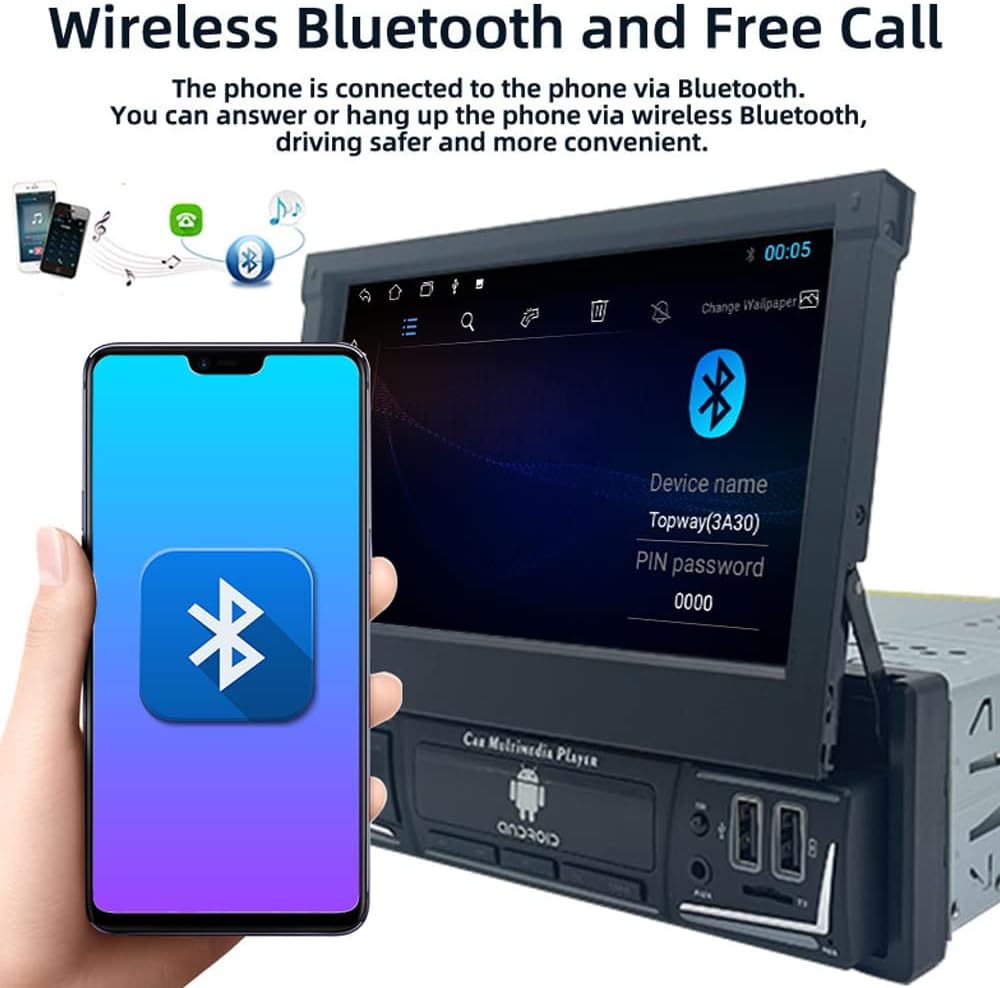
Image: The car stereo displaying the Bluetooth pairing screen, indicating a device name and PIN for connection.
4. FM 라디오
FM 라디오 기능을 이용하여 좋아하는 방송을 청취하세요.
- 자동 스캔: Use the 'AS' button to automatically search and store available stations.
- 수동 조정 : Use the arrow buttons to manually tune to frequencies.
- 사전 설정 : Store up to 18 FM stations across three bands (FM1, FM2, FM3).

Image: The car stereo displaying the FM radio interface, showing the current frequency and preset options.
5. 미디어 재생 (USB/SD/AUX)
The unit supports various media sources for audio and video playback.
- USB: Insert a USB flash drive into the USB port. The unit will automatically detect and play compatible media files.
- TF 카드: Insert a TF (microSD) card into the TF card slot.
- 보조 입력: Connect external audio devices using a 3.5mm audio cable to the AUX-in port.

Image: The car stereo displaying music playback, with icons representing USB, SD card, and AUX input options.
6. 미러링크 기능
Mirror Link allows you to display your smartphone's screen on the car stereo's display and control it from the stereo.
- Connect your Android or iOS phone to the unit via a USB cable.
- Follow the on-screen prompts to enable Mirror Link.
- For Android, you may need to enable USB debugging in developer options.

Image: The car stereo screen mirroring a smartphone, demonstrating the Mirror Link feature.
7. 스티어링 휠 제어
차량에 스티어링 휠 컨트롤 기능이 있다면, 해당 기능을 사용하여 차량용 스테레오를 조작할 수 있습니다.
- 기기 메뉴에서 '스티어링 휠 컨트롤' 설정을 이용하세요.
- Follow the on-screen instructions to program each button on your steering wheel to a corresponding function on the stereo.

Image: The car stereo displaying its main menu with app icons, illustrating the use of steering wheel controls to navigate functions.
8. Backlight Button Colors
본체 물리 버튼의 백라이트 색상을 사용자 지정할 수 있습니다.
- Navigate to the 'Settings' menu and find 'Button Backlight' or similar option.
- Choose from 7 available colors or set it to cycle automatically.

Image: The car stereo unit showcasing its buttons illuminated in various colors, demonstrating the 7-color backlight feature.
9. 후면 View Camera and DVR
이 장치는 후면을 지원합니다. view camera and DVR for enhanced safety and recording.
- 뒤쪽 View 카메라: 차량을 후진 기어로 넣으면 화면에 자동으로 후방 영상이 표시됩니다. view 카메라 피드.
- DVR : If a DVR is connected, access its functions through the dedicated app on the stereo's interface to record and manage footage.
유지
- 화면 청소: 부드럽고 보풀이 없는 천을 사용하여 터치스크린을 부드럽게 닦으세요. 연마성 세척제나 용제는 사용하지 마세요.
- 소프트웨어 업데이트: 정기적으로 제조업체를 확인하십시오 web최적의 성능과 새로운 기능 이용을 보장하기 위해 사용 가능한 소프트웨어 또는 펌웨어 업데이트를 확인하려면 해당 사이트를 방문하십시오.
- 일반 관리 : 본 제품을 극한의 온도, 장시간 직사광선 또는 과도한 습기에 노출시키지 마십시오.
문제 해결
문제가 발생하면 다음의 일반적인 문제와 해결 방법을 참조하세요.
- 전원 없음:
- Check all power connections (yellow, red, black wires) for proper contact and voltage.
- 차량의 스테레오 퓨즈가 제대로 작동하는지 확인하십시오.
- 소리 없음:
- 스피커 선이 올바르게 연결되어 있고 단락되지 않았는지 확인하십시오.
- 볼륨 레벨과 음소거 설정을 확인하세요.
- 오디오 소스 선택을 확인하십시오.
- 블루투스가 연결되지 않음:
- 스테레오와 휴대폰 모두에서 Bluetooth가 활성화되어 있는지 확인하세요.
- 이전 페어링을 삭제하고 다시 페어링을 시도하세요.
- 두 장치를 모두 다시 시작하십시오.
- GPS가 작동하지 않거나 정확하지 않습니다.
- GPS 안테나가 제대로 연결되었고 깨끗한지 확인하십시오. view 하늘의.
- Check GPS settings in the unit's menu.
- 화면이 응답하지 않음:
- Perform a soft reset by pressing the reset button (if available) or turning the unit off and on.
- 화면이 깨끗하고 이물질이 없는지 확인하세요.
If problems persist, consult a qualified technician or contact customer support.
명세서
| 모델 번호 | 9602G |
| 화면 크기 | 7 Inch Retractable HD Touch Screen |
| 전원 공급 장치 | 12V 직류 |
| 연결성 | Bluetooth, Wi-Fi, USB, Auxiliary |
| 컨트롤러 유형 | Android, iOS (via Mirror Link) |
| 특별 기능 | Touchscreen, GPS Navigation, FM Radio, Mirror Link, Steering Wheel Control, DVR & Rear View 카메라 지원 |
| 고주파 | FM 87.5MHz - 108MHz |
| 오디오 출력 모드 | 스테레오 재생 |
| 지원되는 형식 | MPEG, WAV, WMA (and others via MP5 player) |
| 크기(대략) | 18.8cm x 5cm x 16.5cm (unit body) |
보증 정보
This product is covered by a manufacturer's warranty against defects in materials and workmanship. The specific terms and duration of the warranty may vary. Please retain your proof of purchase for warranty claims. For detailed warranty information, refer to the documentation included with your purchase or contact the seller.
고객 지원
If you require further assistance, have questions not covered in this manual, or need technical support, please contact the seller or manufacturer directly. Provide your product model number (9602G) and purchase details when seeking support.
일반 문의 사항은 다음을 방문하세요. Polarlander brand page on Amazon.