
소개
This manual provides comprehensive instructions for the installation, operation, maintenance, and troubleshooting of your Amazon Basics Keyless Entry Door Lock Deadbolt. Designed for convenience and security, this electronic keypad deadbolt offers keyless access with customizable security codes and an automatic locking feature. Please read this manual thoroughly before installation and use to ensure proper functionality and safety.
패키지 내용
설치를 시작하기 전에 모든 구성 요소가 있는지 확인하세요.
- Electronic Keypad Deadbolt Assembly (Exterior and Interior Units)
- 래치 메커니즘
- 스트라이크 플레이트
- 스크류 팩
- Keys (for traditional key option)
- 설치 템플릿

The image above displays the complete set of parts you should find in your product package, including the electronic keypad unit, the interior deadbolt assembly, the latch, strike plate, screws, and traditional keys.
설정
설치 전
- Ensure your door thickness is between 1-3/8 to 1-3/4 inches (35mm to 44mm).
- Verify the backset (distance from door edge to center of bore hole) is either 2-3/8 inches (60mm) or 2-3/4 inches (70mm).
- Prepare the necessary tools: Phillips head screwdriver, tape measure, pencil.
- The lock requires 4 AA batteries (not included). Install fresh batteries before final assembly.
설치 단계
Follow these general steps for installation. For detailed, step-by-step instructions, refer to the included printed manual or the official 보증(PDF) document which often contains installation guides.
- 문 준비: Use the provided installation template to mark and drill holes if your door is not pre-drilled. Ensure the correct backset is selected.
- 래치를 설치하십시오: Insert the latch into the door edge, ensuring the correct orientation for your door swing. Secure it with screws.
- 외부 어셈블리 설치: 외부 키패드 어셈블리를 문에 놓고 스핀들을 래치에 맞춰 정렬합니다.
- 내부 장착판을 설치하십시오: Secure the interior mounting plate to the exterior assembly using screws, ensuring it is flush against the door.
- 내부 조립 설치: Connect the cable from the exterior assembly to the interior assembly. Attach the interior assembly to the mounting plate.
- 배터리 설치: Remove the battery cover on the interior assembly and insert 4 new AA batteries, observing polarity. Replace the cover.
- 도어 핸딩 프로세스 수행: This step calibrates the lock to your door's orientation. Follow the specific instructions in your printed manual for this crucial step.

The template provides clear markings for drilling holes, ensuring proper alignment for the deadbolt mechanism and keypad. It supports both 60mm and 70mm backsets.
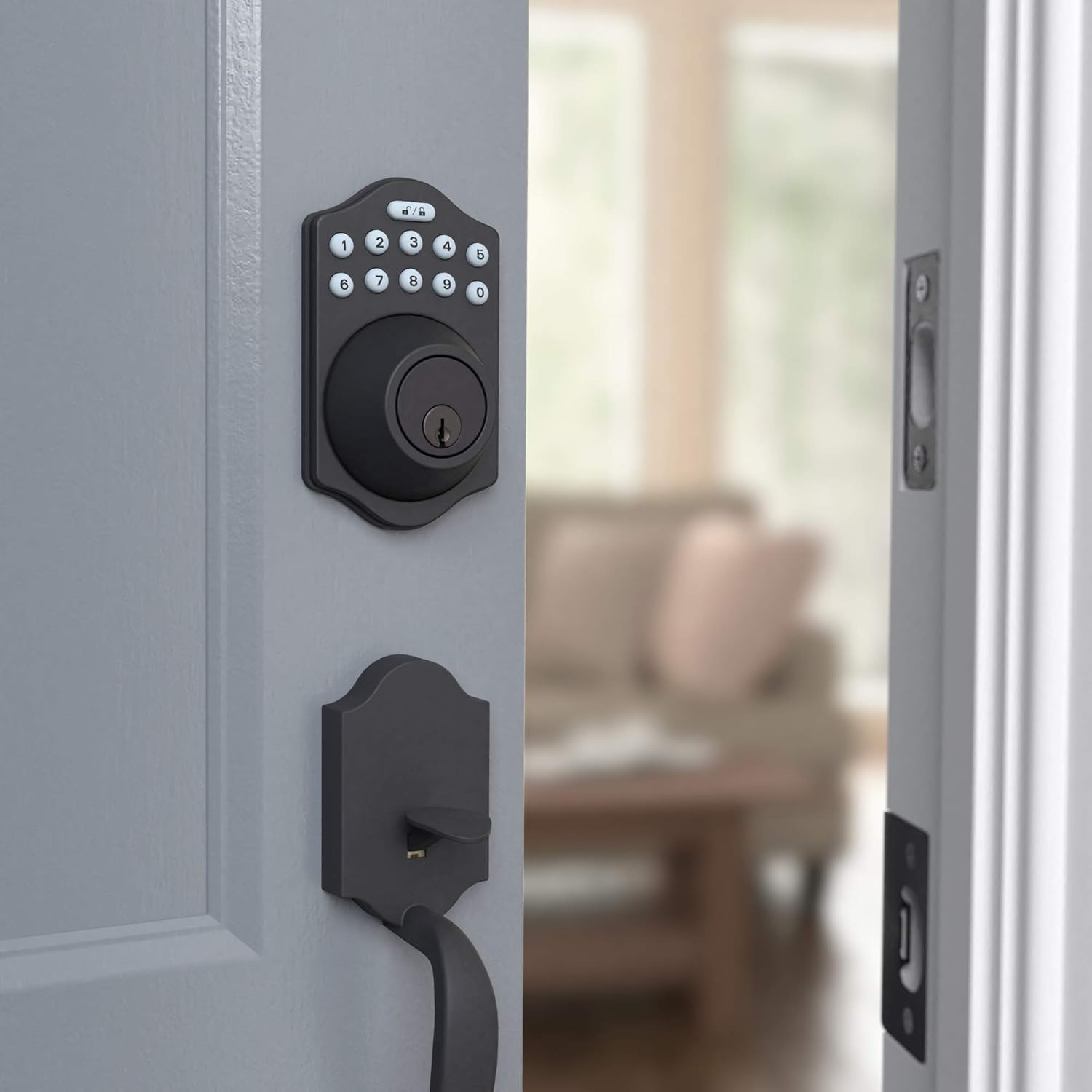
This image shows the electronic keypad deadbolt installed on the exterior side of a door, ready for operation. The matte black finish blends seamlessly with the door.

측면 view illustrates how the deadbolt integrates with the door frame, providing a secure locking mechanism. The internal components are neatly concealed.
작동 지침
사용자 코드 프로그래밍
Your deadbolt comes with a default programming code. You will use this code to set up to 6 unique user codes for family members or temporary single-use codes for guests. Refer to your printed manual for the exact sequence of button presses to add, delete, or modify user codes.
잠금 및 잠금 해제
The lock can be operated using the keypad or a traditional key.
- 잠그려면: 를 누르세요 잠그다 button (top right button with lock icon) on the keypad. The deadbolt will extend.
- 잠금 해제하려면: Enter your valid user code, then press the 터놓다 button (top left button with unlock icon). The deadbolt will retract.
- 자동 잠금: The deadbolt features an automatic locking function, which can be set to engage 10 to 99 seconds after entry. This provides added peace of mind, ensuring your door is always secured.
- 수동 조작: From the interior, the deadbolt can be manually locked or unlocked using the thumb turn. From the exterior, a traditional key can be used as a backup.

The keypad features illuminated numbers for easy visibility in low light conditions, along with dedicated lock and unlock buttons at the top. The traditional keyhole is located below the keypad.
유지
배터리 교체
The electronic deadbolt is powered by 4 AA batteries. When the batteries are low, the lock may emit a warning sound or the keypad lights may flash. To replace the batteries:
- Remove the battery cover located on the interior side of the deadbolt assembly. This cover typically slides upwards or detaches with a gentle pull.
- 오래된 배터리를 조심스럽게 제거하십시오.
- 올바른 극성(+/-)을 확인하여 새 AA 배터리 4개를 삽입합니다.
- Replace the battery cover, making sure it clicks securely into place.
Regularly check battery levels to ensure uninterrupted operation. High usage may require more frequent battery changes.
청소
키패드와 잠금장치 본체를 부드러운 천으로 닦으세요.amp 천. 연마성 세척제나 용제는 마감재와 전자 부품을 손상시킬 수 있으므로 사용하지 마십시오.
문제 해결
If you encounter issues with your Amazon Basics Keyless Entry Door Lock Deadbolt, refer to the following common problems and solutions:
| 문제 | 가능한 원인 / 해결책 |
|---|---|
| 잠금 장치가 키패드 입력에 반응하지 않습니다. |
|
| 데드볼트가 완전히 확장되거나 수축되지 않습니다. |
|
| 새 사용자 코드를 프로그래밍할 수 없습니다. |
|
| Automatic locking feature not working. |
|
If these solutions do not resolve the issue, please contact Amazon Basics customer support for further assistance.
명세서
| 특징 | 세부 사항 |
|---|---|
| 상표 | 아마존 기본 정보 |
| 모델명 | PL14910_6B |
| 부품 번호 | PL14910 |
| 한국어: | 840095890281 |
| 잠금 유형 | Key Lock, Keypad |
| 특징 | 키리스 |
| 색상 | 매트블랙 |
| 스타일 | Traditional Electronic Keypad Deadbolt (Pack of 6) |
| 조각 수 | 6 |
| 마무리 유형 | 공단 |
| 품목 무게 | 2.71 파운드 |
| 제어 방법 | 만지다 |
| 추천 용도 | Residential door locking, commercial door locking |
| 도어 두께 호환성 | 1-3/8 ~ 1-3/4인치 |
| 필요한 배터리 | 네 (AA 배터리 4개) |
| 원산지 | 대만 |
보증 및 지원
For warranty information regarding your Amazon Basics Keyless Entry Door Lock Deadbolt, please refer to the official warranty document provided with your product or available online:
For additional support, troubleshooting assistance, or to inquire about replacement parts, please visit the 아마존 베이직스 스토어 또는 Amazon 고객 서비스에 직접 문의하세요.