
1. 서론
This manual provides essential instructions for the installation, operation, and maintenance of your PowMr MPPT 60A Solar Charge Controller. This controller is designed to efficiently manage power flow from your solar panels to your battery bank, ensuring optimal charging and system protection. Please read this manual thoroughly before installation and use to ensure safe and correct operation.
패키지 내용:
- 1 x PowMr MPPT 60A Solar Charge Controller
- 1 x 사용자 매뉴얼(영어)
2. 안전 지침
Always observe the following safety precautions to prevent personal injury and damage to the controller or other components:
- 전원을 공급하기 전에 모든 연결이 올바르고 단단히 고정되었는지 확인하십시오.
- The correct connection sequence for the solar controller is to connect the battery first, then the solar panel. Always adhere to this specific order. When disconnecting, follow the reverse order: disconnect solar panel, then battery.
- 컨트롤러를 직접 분해하거나 수리하려고 시도하지 마십시오. 자격을 갖춘 전문가에게 서비스를 의뢰하십시오.
- 컨트롤러는 통풍이 잘 되는 곳에 설치하고, 가연성 물질과 직사광선을 피하세요.
- The solar charge controller is equipped with electronic protections against overcharge, over-discharge, overload, and short circuit. It also features battery temperature compensation, enhancing overall operational safety.
- Use appropriate circuit breakers or fuses for all connections to prevent damage from overcurrent.
3. 제품 특징
- 고급 MPPT 기술: The 60A MPPT solar charge controller features automatic battery voltage detection for 12V, 24V, 36V, and 48V systems. It utilizes advanced Maximum Power Point Tracking (MPPT) technology, ensuring a tracking efficiency of no less than 99.5% and a maximum conversion efficiency of up to 97%.
- 범용 배터리 호환성: Supports various battery types for charging, including sealed, gel, flooded, LiFePO4, and Li(NiCoMn)O2 cells. User-defined battery parameters are available for custom battery types.
- 포괄적인 보호 조치: Equipped with electronic protections against overcharge, over-discharge, overload, and short circuit. Includes battery temperature compensation for enhanced safety and battery longevity.
- 다기능 LCD 디스플레이: Provides real-time system information, including solar panel voltage/power, charging current, battery voltage 및 부하 상태.
- 효율적인 냉각: Features forced air cooling with an aluminum alloy construction for effective heat dissipation, maintaining optimal performance even under high temperatures.
- Dual PV and Battery Connection: Designed for straightforward connection of both photovoltaic arrays and battery banks.
- Multiple Load Working Modes: Offers various load control options, including Load OFF, Load always ON, and Time Control.
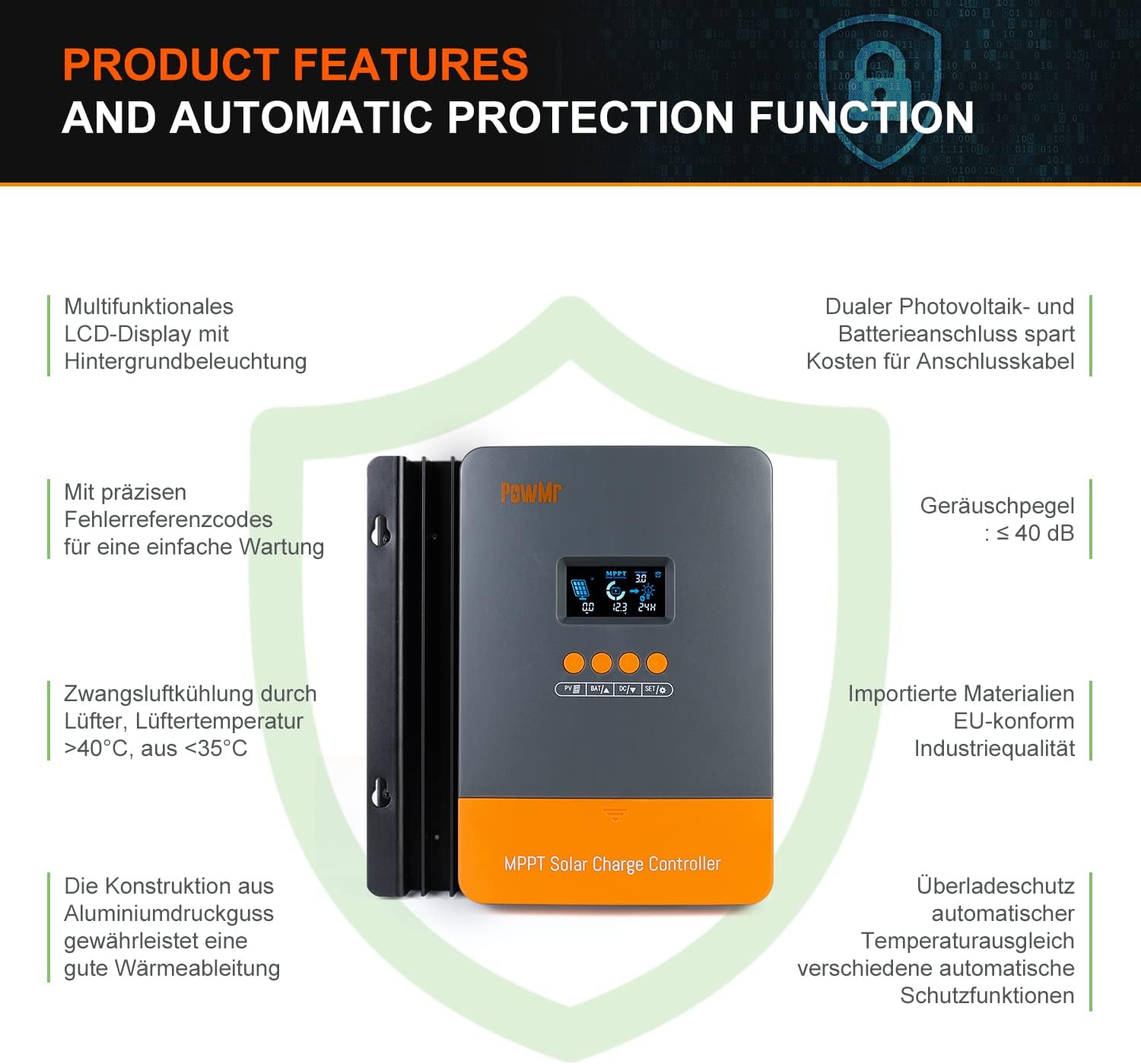
Image: Product features and automatic protection functions. Highlights include a multifunctional LCD display, dual PV and battery connection, precise error codes, forced air cooling, aluminum alloy construction for heat dissipation, and electronic protections.
4. 제품 오버view

Image: PowMr MPPT 60A Solar Charge Controller dimensions (165mm x 230mm x 72mm) and its LCD display interface. The display shows solar panel voltage/power, charging current, battery voltage, and load information. Key buttons for PV, Battery, DC Load, and Settings are also visible.
The controller features an intuitive LCD display and control buttons for easy monitoring and configuration. The display provides real-time data on solar input, battery status, and load output.
- 낮이나 밤을 나타내는 아이콘
- Battery icon and SOC (State of Charge)
- 작업 모드
- State and Warning indication
- 태양 전지판 voltage/power/current
- Charging power/charging current/battery voltage
- Load working Mode / Load power / Load current / Load voltage
5. 설치 및 설정
5.1 컨트롤러 장착
- Choose a dry, well-ventilated location, protected from direct sunlight, high temperatures, and water.
- Ensure there is sufficient airflow around the controller for proper cooling.
- Mount the controller vertically on a wall or suitable surface using appropriate fasteners.
5.2 배선 연결
중요한: 항상 배터리를 먼저 연결하고, 그 다음 태양광 패널을 연결한 후, 마지막으로 부하를 연결하세요. 분리는 역순으로 하세요.
- 배터리를 연결하십시오: Connect the positive and negative terminals of your battery bank to the corresponding battery terminals on the controller. Ensure correct polarity. The controller will automatically detect the battery voltage (12V/24V/36V/48V).
- 태양광 패널 연결: Connect the positive and negative terminals of your solar panel array to the corresponding PV input terminals on the controller. Ensure correct polarity. The maximum open circuit voltage (Voc) from the PV array should not exceed 160V.
- DC 부하 연결(선택 사항): If using a DC load directly from the controller, connect its positive and negative terminals to the load terminals on the controller.

Image: Diagram illustrating recommended wiring configurations for 12V, 24V, 36V, and 48V battery systems, including corresponding input solar power and voltage ranges. Also shows the three load working modes (Load OFF, Load always ON, Time control).
5.3 배터리 유형 선택
The controller supports various battery types. You can select the appropriate type through the controller's settings menu. For lithium batteries (LiFePO4, Li(NiCoMn)O2), it is essential to set the specific start and end charging voltages according to the battery manufacturer's specifications. Refer to the detailed instructions in the user manual for proper configuration.

Image: Illustration detailing the supported battery types (Sealed, GEL, Flooded, AGM, Lithium, User Custom Battery) and a graph depicting the four-stage battery charging process: Bulk Charge, Constant Charging (Boost/Equalize), and Float Charge.
6. 사용 설명서
6.1 LCD 디스플레이 및 버튼
The LCD display provides real-time system status. Use the buttons (PV, BAT, DC, SET) to navigate through menus and adjust parameters. Refer to the detailed manual for specific button functions and menu navigation.
6.2 충전 Stages
컨트롤러는 멀티-s를 사용합니다.tage charging algorithm to optimize battery life and performance:
- 대량 청구 : 배터리 용량이 최대치에 도달할 때까지 최대 전류로 충전합니다.tage는 흡수 수준까지 상승합니다.
- Constant Charging (Boost/Equalize): 일정한 볼륨을 유지합니다tage, allowing the current to gradually decrease. Equalization is a controlled overcharge for flooded batteries to balance cell voltag에스.
- 플로트 충전 : 볼륨을 줄입니다tage to a lower level once the battery is fully charged, maintaining it at a safe level to prevent self-discharge.
6.3 부하 작동 모드
The DC load output can be configured with different working modes:
- Load OFF: The load output is always off.
- Load Always ON: The load output is continuously on.
- 시간 제어: The load output operates for a specified duration after sunset.
7. 유지관리
정기적인 유지관리를 통해 태양광 충전 컨트롤러의 최적의 성능과 수명을 확보할 수 있습니다.
- 모든 배선 연결부의 조임 상태와 부식 여부를 주기적으로 점검하십시오.
- Clean the controller's exterior with a dry cloth. Do not use liquids or solvents.
- Ensure the ventilation openings are clear of dust and debris to allow for proper heat dissipation.
- LCD 디스플레이에 오류 코드나 비정상적인 수치가 표시되는지 확인하십시오.
8. 문제 해결
If you encounter issues, refer to the following common problems and solutions. For more complex issues, contact customer support.
| 문제 | 가능한 원인 | 해결책 |
|---|---|---|
| 디스플레이 없음/전원 없음 | 배터리가 연결되지 않았거나 전압이 낮습니다.tage; 극성 반전. | 배터리 연결 및 용량 확인tage. 극성이 올바른지 확인하십시오. |
| 배터리가 충전되지 않음 | Solar panel not connected; low solar input; PV reversed polarity; battery type misconfigured. | Check solar panel connections and polarity. Verify sufficient sunlight. Confirm correct battery type settings. |
| 로딩이 작동하지 않습니다 | Load mode set to OFF; overload; short circuit; low battery voltage. | Check load mode settings. Reduce load. Inspect for short circuits. Charge battery. |
| 오류 코드가 표시됨 | 특정 시스템 오류. | 오류 코드 목록과 해당 해결 방법은 전체 사용 설명서를 참조하세요. |
9. 사양
| 매개변수 | 값 |
|---|---|
| 모델 번호 | POW-M60-프로 |
| 상표 | 파워미스터 |
| 정격 충전 전류 | 60A |
| 시스템 볼륨tage | 12V/24V/36V/48V Auto-Identify |
| 최대 PV 입력 Voltag전자 (Voc) | 160V 직류 |
| Max. Solar Panel Power (for 48V system) | 2880W (12V: 720W, 24V: 1440W, 36V: 2160W) |
| 추적 효율성 | ≥99.5% |
| 변환 효율성 | 최대 97% |
| 지원되는 배터리 유형 | Sealed, Gel, Flooded, LiFePO4, Li(NiCoMn)O2, User-defined |
| 디스플레이 유형 | 백라이트가 있는 LCD |
| 제품 크기(L x W x H) | 16.5cm x 7.1cm x 23.1cm |
| 제품 무게 | 1.3kg |
| 작동 온도 | -20°C to +50°C (Max. 60°C ambient) |

Image: Universal compatibility of the PowMr 60A MPPT controller compared to other controllers. It highlights higher maximum input solar power and voltage for 12V, 24V, 36V, and 48V systems, supporting SLA, SLD, GEL, AGM, and LiFePO4 battery types.
10. 보증 및 지원
For warranty information, technical support, or any questions regarding your PowMr MPPT 60A Solar Charge Controller, please contact PowMr customer service. Refer to the product packaging or the official PowMr web연락처 정보 사이트.