
MICROWARE EZCAP-241
MICROWARE EZCAP241 MP3 Digital Music Digitizer User Manual
Model: EZCAP-241
1. 서론
The MICROWARE EZCAP241 MP3 Digital Music Digitizer is a standalone device designed to convert analog audio signals into digital MP3 files. This device allows you to record audio from various sources, such as vinyl record players, cassette players, CD players, DVD players, game consoles, and TV boxes, directly onto a USB flash drive or SD card without the need for a computer. It also features a playback function, enabling you to review recorded audio file기기에서 직접 실행하세요.
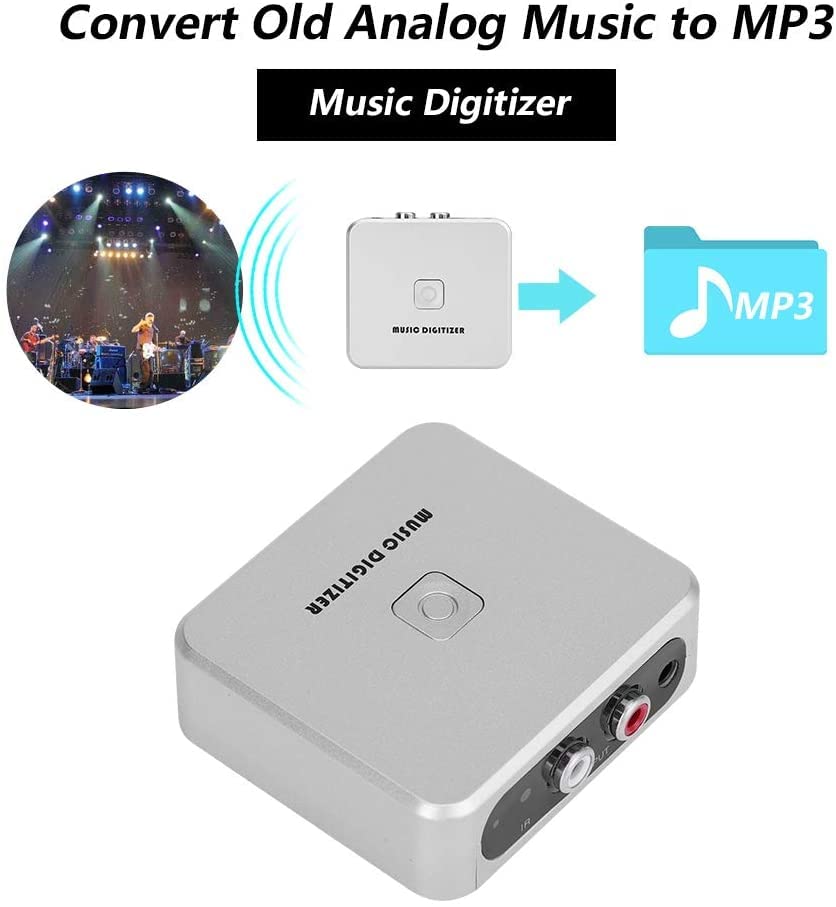
Image 1.1: The EZCAP241 Music Digitizer illustrating its function of converting analog music to MP3 format.
2. 제품 오버view
The EZCAP241 features a compact design with clearly labeled ports and controls for ease of use.
2.1 장치 구성 요소
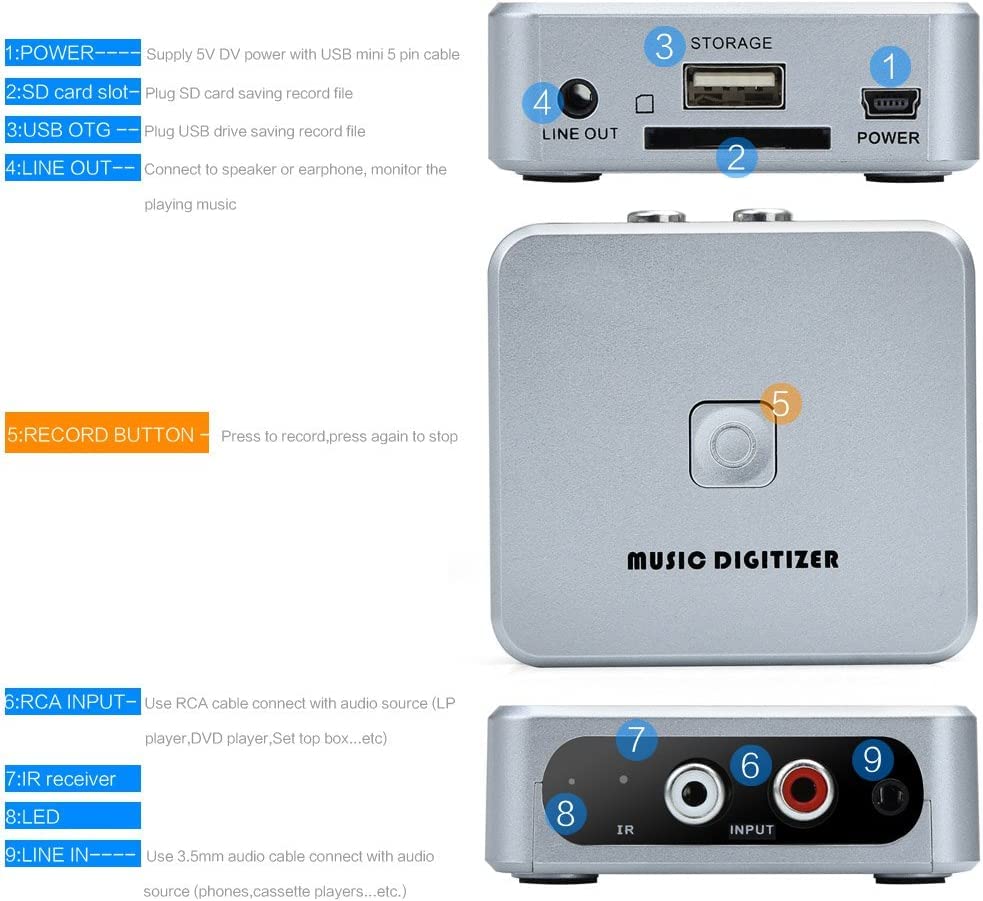
이미지 2.1: 상세 view of the EZCAP241 device, highlighting its various ports and controls.
- POWER (Mini USB): Connects to a 5V DC power supply using a USB mini 5-pin cable.
- SD 카드 슬롯: Insert an SD card for saving recorded audio files.
- USB OTG Port: Connect a USB flash drive for saving recorded audio files.
- 라인 아웃(3.5mm): Connect to headphones or speakers to monitor audio during recording or for playback.
- 녹음 버튼: Press to start recording; press again to stop recording.
- RCA INPUT (Red/White): Connects to audio sources (e.g., LP player, DVD player, set-top box) using an RCA cable.
- IR 수신기 : 리모콘에서 신호를 수신합니다.
- LED 표시등: Displays device status (Green LED for manual mode, standby, quick flash for recording, slow flash for playback).
- 3.5mm Audio IN: Connects to audio sources (e.g., phones, cassette players) using a 3.5mm audio cable.

이미지 2.2: 클로즈업 view of the EZCAP241's input and output ports with their respective labels.
3. 설정
Follow these steps to set up your EZCAP241 for recording:
- 전원 연결: Connect the EZCAP241 to a 5V DC power source using the provided USB mini 5-pin cable. The power port is labeled 'POWER'.
- 저장 장치: Insert a USB flash drive into the 'USB OTG' port or an SD card into the 'SD card slot'. Ensure the storage device has sufficient free space for your recordings.
- 오디오 소스 연결:
- For devices with RCA output (e.g., LP players, DVD players), connect them to the 'RCA INPUT' ports (red for right, white for left) on the EZCAP241 using an RCA cable.
- For devices with 3.5mm audio output (e.g., phones, cassette players), connect them to the '3.5mm Audio IN' port on the EZCAP241 using a 3.5mm audio cable.
- Monitoring (Optional): Connect headphones or speakers to the 'LINE OUT' (3.5mm) port to monitor the audio during recording or playback.

Image 3.1: Connection diagram illustrating how to connect the EZCAP241 to different audio sources and storage devices.
4. 사용 설명서
4.1 오디오 녹음
- Ensure the EZCAP241 is properly set up with power, a storage device, and an audio source as described in Section 3.
- Start playing the audio from your source device (e.g., cassette player, record player).
- Press the 'RECORD' button on the EZCAP241. The LED indicator will typically flash quickly to indicate recording is in progress.
- To stop recording, press the 'RECORD' button again. The LED indicator will change to reflect standby or playback mode.

Image 4.1: The 'RECORD' button on the EZCAP241, used to initiate and terminate audio recording.
4.2 오디오 재생
The EZCAP241 allows you to play back recorded MP3 files directly from the connected USB flash drive or SD card.
- Ensure headphones or speakers are connected to the 'LINE OUT' port.
- Use the remote control (if included) to navigate and select files for playback. Refer to the remote control's specific instructions for navigation.
- The LED indicator will typically flash slowly during playback.

Image 4.2: The EZCAP241 connected to earphones, demonstrating its playback capability.
5. 유지관리
- 기기를 깨끗하고 청결하게 유지하려면 부드럽고 마른 천으로 닦아주세요. 액체 세척제나 용제 사용은 피해주세요.
- 본 기기는 직사광선과 극한의 온도를 피해 시원하고 건조한 곳에 보관하세요.
- 장치를 떨어뜨리거나 강한 충격을 가하지 마십시오.
- Ensure all cables are connected securely but do not force them into ports.
6. 문제 해결
| 문제 | 가능한 원인 | 해결책 |
|---|---|---|
| 장치의 전원이 켜지지 않습니다. | 전원 공급이 안 되거나 케이블에 문제가 있습니다. | Ensure the 5V DC power supply is connected correctly and functioning. Try a different USB cable or power adapter. |
| 오디오가 녹음되지 않았습니다. | Incorrect audio input connection, audio source not playing, or storage device issue. | Verify audio input cables are securely connected to the correct ports (RCA or 3.5mm). Ensure the audio source is playing. Check if the USB flash drive or SD card is properly inserted and has free space. |
| 녹음 품질이 좋지 않습니다. | Low input volume from source, interference, or dirty connections. | Increase the volume on your audio source device. Ensure cables are not near sources of electrical interference. Clean audio connectors if necessary. |
| Cannot play back recorded files. | No headphones/speakers connected, corrupted files, or incorrect remote operation. | Connect headphones or speakers to the 'LINE OUT' port. Ensure files are valid MP3 format. Refer to remote control instructions for proper playback navigation. |
7. 사양
| 특징 | 세부 사항 |
|---|---|
| 모델 | EZCAP-241 |
| 상표 | 마이크로웨어 |
| 인터페이스 유형 | RCA, USB |
| 입력 오디오 | RCA L/R, 3.5mm Audio In |
| 출력 오디오 | 3.5mm 라인아웃 |
| 저장 매체 | USB 플래시 드라이브, SD 카드(FAT32 형식 권장) |
| 기록 형식 | MP3 |
| 전원 공급 장치 | 5V DC (via Mini USB) |
| 품목 무게 | 140g |
| 패키지 크기 | 15 x 11.3 x 4.2cm |
| 원산지 | 중국 |
8. 보증 및 지원
For warranty information and technical support, please refer to the documentation provided at the time of purchase or contact MICROWARE customer service directly. Keep your proof of purchase for warranty claims.
Ask a question about this manual
Ask about setup, troubleshooting, compatibility, parts, safety, or missing instructions. Manuals+ will review the question and use this page’s manual context to help answer it.