
소개
This manual provides detailed instructions for the setup, operation, and maintenance of your Amazon Basics Projection Alarm Clock. Please read this manual thoroughly before using the product to ensure proper function and to prevent damage.

Image: The Amazon Basics Projection Alarm Clock, showing its digital display and projection lens.
안전 지침
- 기기를 극한의 온도, 직사광선, 먼지 또는 습기에 노출시키지 마십시오.
- 전원 어댑터가 해당 지역의 전원 공급 장치와 호환되는지 확인하세요.
- 본 제품을 물이나 기타 액체로부터 멀리 두십시오.
- 제품을 분해하거나 개조하지 마십시오. 그렇게 할 경우 보증이 무효화됩니다.
- Clean the unit only with a soft, dry cloth. Do not use liquid cleaners.
- 배터리는 현지 규정에 따라 올바르게 폐기하세요.
패키지 내용
- Amazon Basics Projection Alarm Clock
- AC 전원 어댑터
- 사용자 설명서
제품 특징
- Projection of time onto a wall or ceiling.
- FM Radio with automatic/manual scan and up to 15 preset stations.
- USB port for charging mobile phones or tablets.
- 7-inch high-definition LED display with adjustable brightness.
- Dual alarms for separate wake-up times.
- Snooze function with adjustable duration (2 to 60 minutes).
- Sleep timer for automatic radio shut-off (5 to 90 minutes).
- DST button for Daylight Saving Time adjustment.
- Battery backup (requires 2 AAA batteries, not included) to maintain time settings during power outag에스.

이미지: 이상view of key features including sleep timer, radio presets, and snooze function.
컨트롤 및 디스플레이
Familiarize yourself with the buttons and ports on your alarm clock for optimal use.

이미지: 측면 view illustrating the location of controls, USB charging port, and projection lens.
- 시간 설정 버튼: 현재 시간을 설정하는 데 사용됩니다.
- 알람 1/2 버튼: 알람 1과 알람 2를 설정하고 활성화하는 데 사용됩니다.
- 스누즈/밝기 조절 버튼: Activates snooze during an alarm; adjusts display brightness when not alarming.
- Radio/Sleep Button: Turns FM radio on/off; sets sleep timer.
- Volume/Tune Dial: Adjusts radio volume and tunes FM frequencies.
- Projection On/Off/Flip Button: Controls the projection feature and flips the projected time.
- Projection Focus Wheel: Adjusts the clarity of the projected time.
- Projection Angle Adjuster: Changes the angle of the projected time.
- USB 충전 포트 : 외부 장치를 충전하는 데 사용됩니다.
- 일광 절약 시간 버튼: Toggles Daylight Saving Time.
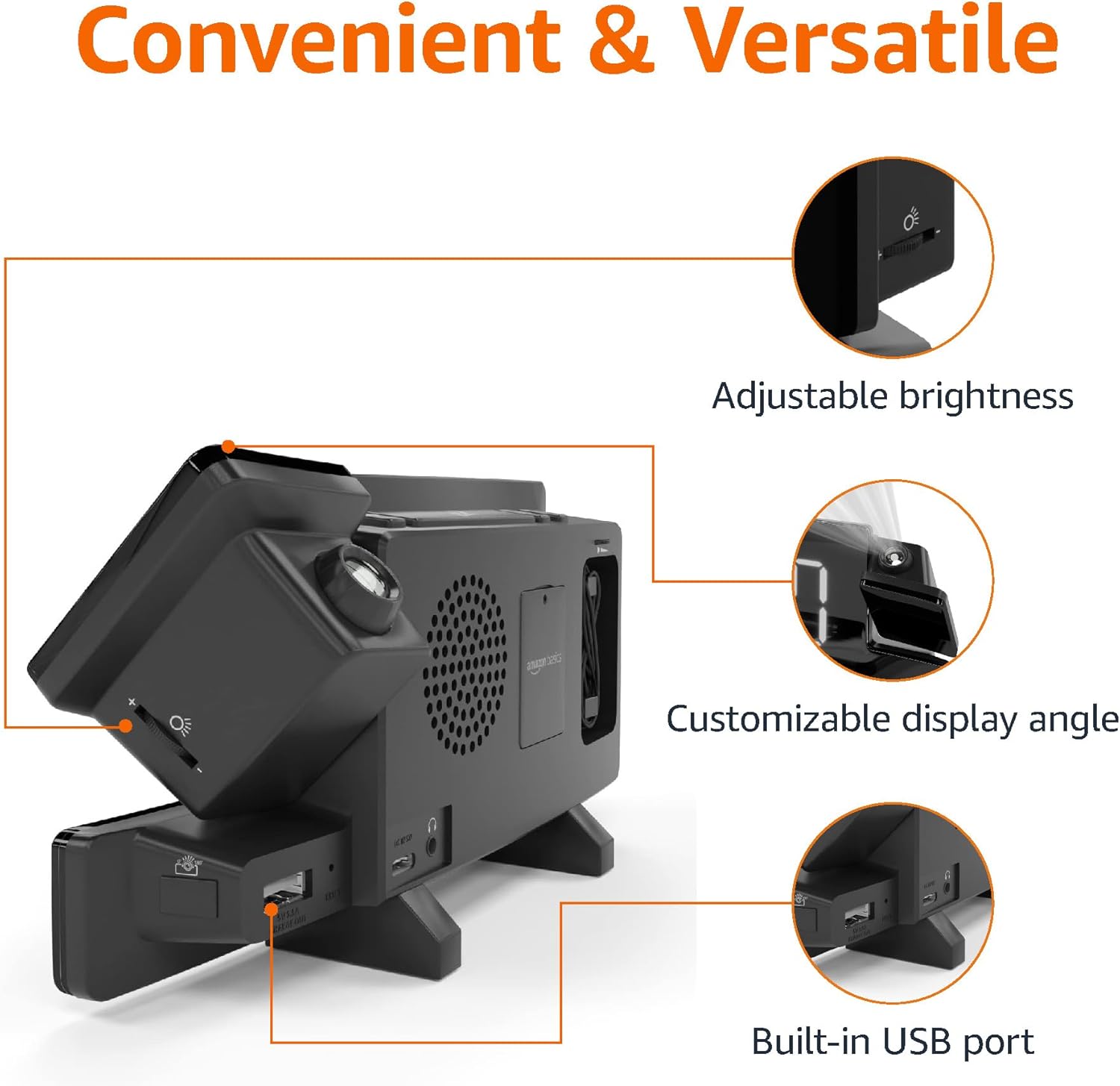
Image: Diagram highlighting the adjustable brightness, customizable projection angle, and USB charging port.
설정
1. 전원 연결
Connect the AC power adapter to the DC IN port on the back of the alarm clock and plug it into a standard wall outlet. The display will light up.
2. 배터리 백업 설치
For battery backup, open the battery compartment on the bottom of the unit. Insert 2 AAA batteries (not included), ensuring correct polarity (+/-). Close the compartment. The battery backup maintains time settings during power outages but does not power the display or alarm functions.
3. 초기 시간 설정
- 를 누르고 계세요 시간 설정 단추. 시간 숫자가 깜박입니다.
- 사용하세요 Volume/Tune Dial 시간을 조정합니다. 프레스 시간 설정 다시 확인합니다.
- 분 숫자가 깜박입니다. 사용하세요 Volume/Tune Dial 분을 조정합니다. 프레스 시간 설정 다시 확인합니다.
- The time format (12H/24H) will flash. Use the Volume/Tune Dial to select your preferred format. Press 시간 설정 시간 설정 모드를 확인하고 종료하려면 클릭하세요.
4. 일광 절약 시간제(DST)
를 누르세요 일광 절약 시간제 button to toggle Daylight Saving Time on or off. The DST indicator will appear or disappear on the display.
작동 지침
1. 알람 설정(알람 1 및 알람 2)
- 를 누르고 계세요 알람 1 or 알람 2 버튼을 누릅니다. 알람 시간 숫자가 깜빡입니다.
- 사용하세요 Volume/Tune Dial to adjust the alarm hour. Press the respective 경보 확인하려면 다시 버튼을 누르세요.
- 알람이 울리면 분 단위 숫자가 깜빡입니다. Volume/Tune Dial to adjust the alarm minutes. Press the respective 경보 확인하려면 다시 버튼을 누르세요.
- The alarm source (FM radio or buzzer) will flash. Use the Volume/Tune Dial to select your preference. Press the respective 경보 버튼을 눌러 알람을 확인하고 활성화하세요. 디스플레이에 알람 아이콘이 나타납니다.
- To deactivate an alarm, press the respective 경보 버튼을 한 번 누르세요. 알람 아이콘이 사라집니다.
2. Using Snooze
알람이 울리면 누르세요 스누즈/디머 button to temporarily silence the alarm. The alarm will sound again after the set snooze duration. The default snooze duration is 9 minutes. To adjust the snooze duration, press and hold the 스누즈/디머 버튼을 누른 다음 Volume/Tune Dial to select a duration between 2 and 60 minutes. Press 스누즈/디머 다시 확인합니다.
3. FM 라디오 작동
- 켜기/끄기: 를 누르세요 Radio/Sleep FM 라디오를 켜거나 끄는 버튼입니다.
- 튜닝 스테이션: 사용하세요 Volume/Tune Dial to manually tune to a desired FM frequency.
- 자동 스캔: 를 누르고 계세요 Radio/Sleep 사용 가능한 FM 방송국을 자동으로 검색하고 프리셋으로 저장하는 버튼입니다.
- 사전 설정 선택: Once stations are saved, short press the Radio/Sleep button to cycle through the preset stations.
- 볼륨 조절: 회전하다 Volume/Tune Dial 라디오 볼륨을 조절합니다.
4. 취침 타이머
While the FM radio is playing, press the Radio/Sleep button repeatedly to set the sleep timer. Options typically range from 5 to 90 minutes. The radio will automatically turn off after the selected duration.
5. 프로젝션 기능

Image: The alarm clock projecting the time onto a bedroom ceiling.
- 활성화/비활성화: 를 누르세요 Projection On/Off/Flip 시간 투영 기능을 켜거나 끄는 버튼입니다.
- 각도 조정: Manually adjust the projection arm to direct the time onto your desired surface (wall or ceiling).
- 집중하다: 회전하다 Projection Focus Wheel to achieve a clear image.
- Flip Display: 를 누르세요 Projection On/Off/Flip button repeatedly to rotate the projected time 180 degrees, ensuring correct orientation.

Image: The alarm clock on a nightstand, projecting the time onto a wall, demonstrating its use in a bedroom setting.
6. USB 충전
Connect your mobile phone or tablet's USB charging cable to the USB 충전 포트 on the back of the alarm clock. The device will begin charging. This port is for charging only and does not support data transfer.
7. 디스플레이 밝기 조정
를 누르세요 스누즈/디머 button (when no alarm is sounding) to cycle through different brightness levels for the main LED display.
유지
1. 청소
Wipe the unit with a soft, dry, lint-free cloth. Do not use abrasive cleaners, waxes, or solvents as they may damage the surface.
2. 배터리 교체
If the battery backup is not functioning correctly (e.g., time resets after a power outage), replace the 2 AAA batteries in the battery compartment, ensuring correct polarity.
문제 해결
| 문제 | 가능한 원인 | 해결책 |
|---|---|---|
| 디스플레이가 비어 있습니다. | 전원이 연결되지 않았습니다. | AC 어댑터가 장치에 단단히 꽂혀 있고 벽면 콘센트에 잘 연결되어 있는지 확인하세요. |
| 알람이 울리지 않습니다. | 알람이 활성화되지 않았거나 볼륨이 너무 낮습니다. | Check if the alarm icon is visible on the display. Re-set the alarm if necessary. Increase radio volume if FM is selected as alarm source. |
| 예상 시간이 모호합니다. | Projection focus is not adjusted. | 회전하다 Projection Focus Wheel 이미지가 선명해질 때까지 |
| Projected time is not visible. | Projection is off or room is too bright. | 를 누르세요 Projection On/Off/Flip button to activate. The projection is best viewed in a dark room. |
| 라디오 수신 상태가 좋지 않습니다. | Antenna position or interference. | Adjust the position of the FM antenna wire. Move the unit away from other electronic devices that may cause interference. |
| USB 충전이 작동하지 않습니다. | 케이블 문제 또는 장치 호환성 문제. | Ensure the USB cable is functional and properly connected. Try a different cable or device. |
명세서
- 모델: MET8831-US
- 전원 입력: AC 어댑터(포함)
- 배터리 백업 : AAA 배터리 2개 (포함되지 않음)
- 표시하다: 7 인치 LED
- 무선 주파수 : FM
- USB 출력: 5V, 1A (for charging)
- 치수(길이 x 너비 x 높이): 7.1 x 1.6 x 3.7인치(18.03 x 4.06 x 9.4cm)
- 무게: 약 0.59파운드(267.62g)

Image: Product dimensions for the Amazon Basics Projection Alarm Clock.
보증 정보
This product is covered by the Amazon Basics warranty. For detailed information regarding warranty terms and conditions, please refer to the official Amazon Basics web사이트를 방문하거나 고객 지원팀에 문의하세요.
고객 지원
For further assistance, troubleshooting, or product inquiries, please contact Amazon Basics customer support through the Amazon website or your purchase platform. Have your product model number (MET8831-US) and purchase details ready.