
1. 서론
Thank you for choosing the COMAOGO T002-W Mini Projector. This manual provides essential information for setting up, operating, and maintaining your projector to ensure optimal performance and longevity. The T002-W is a versatile projector featuring 9500 Lumens brightness, 1080P support, 5G WiFi, and Bluetooth 5.1 connectivity, designed for an immersive view최대 220인치까지 경험할 수 있습니다.
2. 패키지 내용
다음 품목이 패키지에 포함되어 있는지 확인하세요.
- 1 x COMAOGO T002-W Mini Projector
- 1 x 원격 제어
- 1 x 전원 케이블
- 1 x HDMI 케이블
- 1 x AV 케이블
- 1 x 사용자 설명서
3. 제품 오버view
프로젝터의 구성 요소와 인터페이스를 숙지하십시오.

Image: COMAOGO T002-W Projector with 5G and 2.4G WiFi capabilities, showing wireless screen synchronization with a tablet and smartphone.
The projector features various ports for connectivity, including HDMI, USB, VGA, AV, and a TF card slot, along with a 3.5mm audio output. It also supports dual-band 5G and 2.4G WiFi for stable wireless connections and Bluetooth 5.1 for audio devices.

Image: COMAOGO T002-W Projector connected to various devices including a laptop, game console, and streaming stick, highlighting its multiple input ports (AV, HDMI, USB, TF, VGA).
4. 설정
4.1 배치
Position the projector on a stable, flat surface or mount it on a tripod. Ensure there are no obstructions to the ventilation vents. For optimal viewing, the projection distance should be between 1.5 meters and 5.5 meters, yielding a screen size from 45 inches to 220 inches.
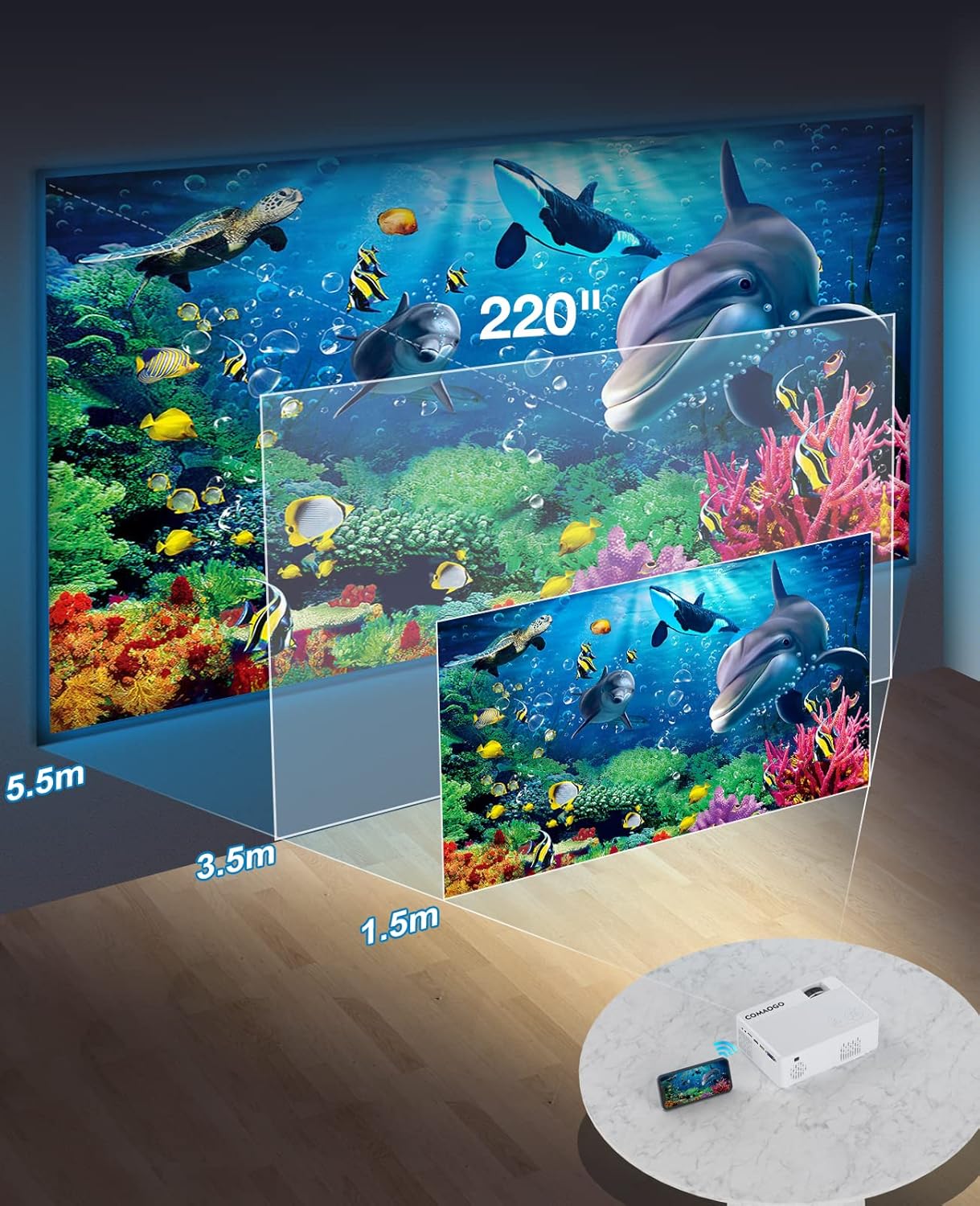
Image: Diagram illustrating the projection distances (1.5m to 5.5m) and corresponding screen sizes (45 to 220 inches) for the COMAOGO T002-W Projector.
4.2 전원 연결
Connect the power cable to the projector's power input and then plug it into a power outlet (AC 220V).
4.3 초점 및 키스톤 보정
선명하고 직사각형 모양의 이미지를 얻으려면:
- 초점 조정: 프로젝터 렌즈의 초점 링을 돌려 이미지가 선명하게 보이도록 하십시오.
- 키스톤 보정: Adjust the keystone correction dial (if available, or via menu settings) to correct trapezoidal distortion, ensuring the image is rectangular. The projector supports ±15° keystone correction.

Image: Illustration of keystone correction and focus adjustment for the COMAOGO T002-W Projector, showing how to achieve a clear, rectangular image.
5. 사용 설명서
5.1 전원 켜기/끄기
- 전원 켜기: 프로젝터나 리모컨의 전원 버튼을 누르세요.
- 전원 끄기 : 프로젝터를 끄려면 전원 버튼을 다시 누르세요.
5.2 입력 소스 선택
Use the "Source" button on the remote control or the projector's control panel to select the desired input source (e.g., HDMI, USB, VGA, AV).
5.3 무선 연결(WiFi)
The projector supports dual-band 5G and 2.4G WiFi for stable screen mirroring.
- Navigate to the WiFi settings on the projector's menu.
- Select your desired WiFi network (5G for faster, more stable connection; 2.4G for longer range and better penetration).
- 연결하려면 암호를 입력하십시오.
- For screen mirroring, select the appropriate option (e.g., "iOS Cast" or "Android Cast") on the projector and follow the on-screen instructions to connect your smartphone or tablet.
5.4 블루투스 연결
Connect external Bluetooth audio devices like speakers or headphones.

Image: COMAOGO T002-W Projector demonstrating Bluetooth 5.1 connection with a speaker and headphones.
- Go to the Bluetooth settings in the projector's menu.
- Bluetooth 장치가 페어링 모드인지 확인하세요.
- 목록에서 페어링할 기기를 선택하세요.
- Note: The projector's Bluetooth function is for connecting output devices (speakers, headphones) only.
5.5 유선 연결
사용 가능한 포트를 이용하여 다양한 장치를 연결하십시오.
- HDMI : Connect laptops, PCs, game consoles (Xbox), TV sticks (Roku, Chromecast), DVD players.
- USB: 미디어 재생 fileUSB 드라이브에서 직접 가져옵니다.
- VGA : 구형 컴퓨터나 노트북을 연결하세요.
- 유명인 : 기존 비디오 장치를 연결하세요.
- TF 카드: Insert a TF card to play media files.
- Important: Copyright-protected content from services like Netflix or Disney+ is not directly supported via screen mirroring. For these services, use an HDMI connection with a compatible adapter (e.g., Lightning Digital AV Adapter for iOS devices) or a streaming stick.
6. 유지관리
6.1 렌즈 청소
Use a soft, lint-free cloth or lens cleaning paper to gently wipe the projector lens. Avoid using abrasive materials or harsh chemicals that could damage the lens coating.
6.2 냉각 시스템
The projector features an updated cooling system designed to reduce noise and maintain optimal operating temperature. Ensure the ventilation vents are clear of dust and obstructions to prevent overheating. Regular cleaning of the vents with a soft brush or compressed air is recommended.
7. 문제 해결
프로젝터 사용 중 문제가 발생하면 다음의 일반적인 해결 방법을 참조하십시오.
- 사진 없음:
- 전원 연결을 확인하고 프로젝터가 켜져 있는지 확인하십시오.
- Verify the input source selection matches your connected device.
- Ensure all cables (HDMI, VGA, etc.) are securely connected.
- 초점과 키스톤 보정을 조정하세요.
- 소리 없음:
- Adjust the projector's volume.
- 외부 스피커를 사용하는 경우 스피커가 제대로 연결되고 전원이 켜져 있는지 확인하세요.
- Check Bluetooth connection for external audio devices.
- Ensure the audio output from your source device is enabled.
- WiFi/Screen Mirroring Issues:
- 프로젝터와 기기가 동일한 Wi-Fi 네트워크에 연결되어 있는지 확인하십시오.
- Check for strong WiFi signal.
- Restart both the projector and your source device.
- For Android devices, ensure "Wireless Projection" or "Screen Mirroring" is enabled. For iOS, use "Screen Mirroring" from Control Center.
- 이미지가 흐릿합니다.
- 렌즈의 초점링을 조정합니다.
- 투사 거리가 권장 범위 내에 있는지 확인하십시오.
- 이미지의 형태는 사다리꼴입니다.
- Adjust the keystone correction dial or setting.
For further assistance or software updates, please contact COMAOGO customer support.
8. 사양
| 특징 | 사양 |
|---|---|
| 상표 | 코마오고 |
| 모델 | T002-W |
| 명도 | 9500루멘(220ANSI) |
| 대비율 | 6000시 1분 |
| 네이티브 해상도 | 1280 x 720 |
| 지원되는 해상도 | 1080피 |
| 투사 크기 | 45인치 - 220인치 |
| 투사 거리 | 1.5m - 5.5m |
| 키스톤 보정 | ±15° |
| WiFi 연결 | Dual-band (5G + 2.4G) |
| 블루투스 | 블루투스 5.1 |
| 하드웨어 인터페이스 | 3.5mm Audio, TF Card, USB 2.0, VGA, HDMI |
| 내장 스피커 | 예 |
| 소음 수준 | 45데시벨 |
| 전력 소비 | 48 와트 |
| 치수 | 20.32 x 15.24 x 7.62cm |
| 무게 | 1킬로그램 |
9. 공식 제품 영상
Watch this video for a visual guide on the COMAOGO T002-W Mini Projector's features and operation.
Video: An official product video demonstrating the features and usage of the COMAOGO T002-W Mini Projector, including connectivity and display capabilities.
10. 보증 및 지원
The COMAOGO T002-W Mini Projector comes with a standard manufacturer's warranty. For warranty claims, technical support, or inquiries regarding software updates, please contact COMAOGO customer service through the retailer where you purchased the product or visit the official COMAOGO web대지.
SOFTWARE UPDATES can be provided; please contact us if needed.