
1. 서론
This manual provides essential information for the proper installation, operation, and maintenance of your SUNMI T2s Lite 15.6-inch Android Point of Sale (POS) system. Please read this manual thoroughly before using the device to ensure optimal performance and safety. Keep this manual for future reference.
2. 안전 정보
- 장치를 극한의 온도, 습도 또는 직사광선에 노출시키지 마십시오.
- 장치를 떨어뜨리거나 강한 충격을 가하지 마십시오.
- 제품과 함께 제공된 전원 어댑터만 사용하세요. 잘못된 어댑터를 사용하면 손상이나 화재가 발생할 수 있습니다.
- 직접 기기를 분해하거나 수리하지 마십시오. 자격을 갖춘 서비스 담당자에게 문의하십시오.
- 장치를 물이나 기타 액체에서 멀리 두십시오.
- 작동 중에는 장치 주변에 적절한 환기가 이루어지도록 하세요.
3. 패키지 내용
패키지에 모든 품목이 들어 있는지 확인하세요.
- SUNMI T2s Lite POS Terminal
- 전원 어댑터
- 전원 케이블
- 빠른 시작 가이드(해당되는 경우)
- 보증 카드(해당되는 경우)
품목이 누락되었거나 손상된 경우 즉시 판매자에게 문의하세요.
4. 제품 오버view
The SUNMI T2s Lite is an integrated Android-based POS system designed for retail environments. It features a 15.6-inch capacitive touchscreen display and various connectivity options.
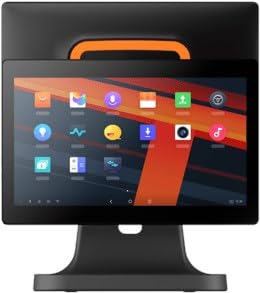
그림 4.1: 앞쪽 view of the SUNMI T2s Lite POS system. This image displays the main 15.6-inch touchscreen, which is the primary interface for operating the device. The design is compact and suitable for various retail settings.
4.1 주요 구성 요소
- 15.6인치 터치스크린 디스플레이: High-resolution (1920x1080) capacitive touch interface.
- 전원 버튼: Located typically on the side or rear for turning the device on/off.
- USB 포트: For connecting peripherals such as barcode scanners, external printers, or cash drawers.
- 이더넷 포트 : 유선 네트워크 연결을 위해.
- 전원 입력: 전원 어댑터를 연결합니다.
- 전면 카메라: For specific applications requiring image capture.
5. 설정
5.1 포장 풀기 및 배치
- 제품 및 모든 부속품을 포장에서 조심스럽게 꺼내십시오.
- Place the POS terminal on a stable, flat surface in a well-ventilated area.
- Ensure there is sufficient space around the device for cable connections and heat dissipation.
5.2 전원 연결
- 전원 케이블을 전원 어댑터에 연결합니다.
- Plug the power adapter into the power input port on the back of the SUNMI T2s Lite.
- 전원 케이블의 다른 쪽 끝을 접지된 전기 콘센트에 꽂습니다.
5.3 Initial Boot and Network Connection
- Press and hold the power button until the screen lights up. The device will boot into the Android operating system.
- 언어 선택, 시간대 등 초기 설정을 위해 화면의 안내를 따르세요.
- Wi-Fi 연결: 이동하다 설정 > 네트워크 및 인터넷 > Wi-Fi, 네트워크를 선택하고 비밀번호를 입력하세요.
- 이더넷 연결: Connect an Ethernet cable from your router/switch to the Ethernet port on the device. The device should automatically connect to the wired network.
5.4 주변기기 연결하기
- USB 장치: Plug USB peripherals (e.g., barcode scanner, external printer, cash drawer) into the available USB ports. The system will typically recognize them automatically.
- 블루투스 장치: 이동하다 설정 > 연결된 기기 > 블루투스, enable Bluetooth, and pair with your desired device.
6. 사용 설명서
6.1 전원 켜기/끄기
- 전원을 켜려면: 화면이 켜질 때까지 전원 버튼을 길게 누릅니다.
- 전원을 끄려면: Press and hold the power button until a power menu appears. Select "Power off" and confirm. Alternatively, a short press of the power button will put the device to sleep.
6.2 터치스크린 사용
- 수도꼭지: 항목을 선택하거나 버튼을 활성화하려면.
- 길게 누르기 : 상황별 메뉴를 열거나 항목을 드래그하려면.
- 강타: 목록을 스크롤하거나 화면 간에 이동하려면.
- 핀치 투 줌: 이미지를 확대하거나 축소하려면 web 페이지.
6.3 안드로이드 OS 탐색
- 홈 화면: The central hub for your applications and widgets.
- 앱 서랍: 설치된 모든 애플리케이션에 접근합니다.
- 알림 패널: 화면 상단에서 아래로 스와이프하여 view 알림 및 빠른 설정.
- 설정: Configure Wi-Fi, Bluetooth, display, sound, and other system options.
6.4 Basic POS Functions
The specific POS functions will depend on the software application installed on your device. Refer to the documentation provided with your POS software for detailed instructions. Generally, you will:
- Launch your POS application from the home screen or app drawer.
- 사용자 자격 증명으로 로그인합니다.
- Process transactions using the touchscreen and connected peripherals (e.g., scanning items, accepting payments).
- Print receipts if an external or integrated printer is configured.
7. 유지관리
7.1 장치 청소
- 청소하기 전에는 항상 장치의 전원을 끄고 플러그를 뽑으세요.
- 부드럽고 털이 없는 천을 살짝 사용하세요.amp화면과 외부 표면을 물이나 순하고 마모성이 없는 세제로 닦으십시오.
- 장치에 액체를 직접 뿌리지 마십시오.
- 강한 화학 물질, 용매 또는 연마재의 사용을 피하세요.
7.2 소프트웨어 업데이트
Regularly check for and install system and application updates to ensure optimal performance, security, and access to new features. You can usually find system updates in 설정 > 시스템 > 시스템 업데이트.
7.3 보관
When not in use for extended periods, store the device in a cool, dry place, away from direct sunlight and extreme temperatures. If storing for a long time, ensure the battery is charged to about 50% to prolong its lifespan.
8. 문제 해결
이 섹션에서는 발생할 수 있는 일반적인 문제를 다룹니다. 더 복잡한 문제는 고객 지원에 문의하세요.
- 장치가 켜지지 않습니다:
- 전원 어댑터가 장치에 안전하게 연결되어 있고 전원 콘센트가 제대로 작동하는지 확인하세요.
- 전원 콘센트가 작동하는지 확인하세요.
- Try holding the power button for 10-15 seconds to force a restart.
- 터치스크린이 작동하지 않습니다.
- 장치를 다시 시작합니다.
- Ensure the screen is clean and free of debris or liquids.
- Network connection issues (Wi-Fi/Ethernet):
- Check if the Wi-Fi is enabled and you are connected to the correct network with the right password.
- For Ethernet, ensure the cable is properly connected and your router/switch is working.
- 라우터/모뎀을 다시 시작하세요.
- Peripherals (e.g., printer, scanner) not working:
- 주변기기가 올바른 포트에 제대로 연결되었는지 확인하십시오.
- Check if the peripheral has its own power supply and is turned on.
- Verify that the necessary drivers or software for the peripheral are installed and configured within your POS application.
9. 사양
The following are key technical specifications for the SUNMI T2s Lite:
| 특징 | 사양 |
|---|---|
| 상표 | 선미 |
| 제조업체 | 선미 |
| 네이티브 디스플레이 해상도 | 1920x1080 픽셀 |
| 연결 기술 | Bluetooth, Ethernet, USB, WLAN |
| 카메라 설명 | 정면 |
| ASIN | B0B53FLFT8 |
10. 보증 및 지원
The SUNMI T2s Lite POS system comes with a standard manufacturer's warranty. Please refer to the warranty card included in your package for specific terms and conditions, including warranty period and coverage details.
For technical support, service, or warranty claims, please contact your authorized SUNMI dealer or the customer support channel specified in your purchase documentation. Ensure you have your product model number (T2s Lite) and ASIN (B0B53FLFT8) ready when contacting support.