
pelsee P12
펠시 P12 1440P 미러형 블랙박스 사용 설명서
모델: P12
1. 서론
The Pelsee P12 Mirror Dash Cam is an advanced automotive recording system designed to enhance driving safety and provide reliable evidence in case of incidents. This device integrates a 12-inch full touch display, dual cameras (front 1440P and rear), GPS tracking, voice control, and various driver assistance features. This manual provides detailed instructions for installation, operation, maintenance, and troubleshooting to ensure optimal performance of your Pelsee P12 dash cam.
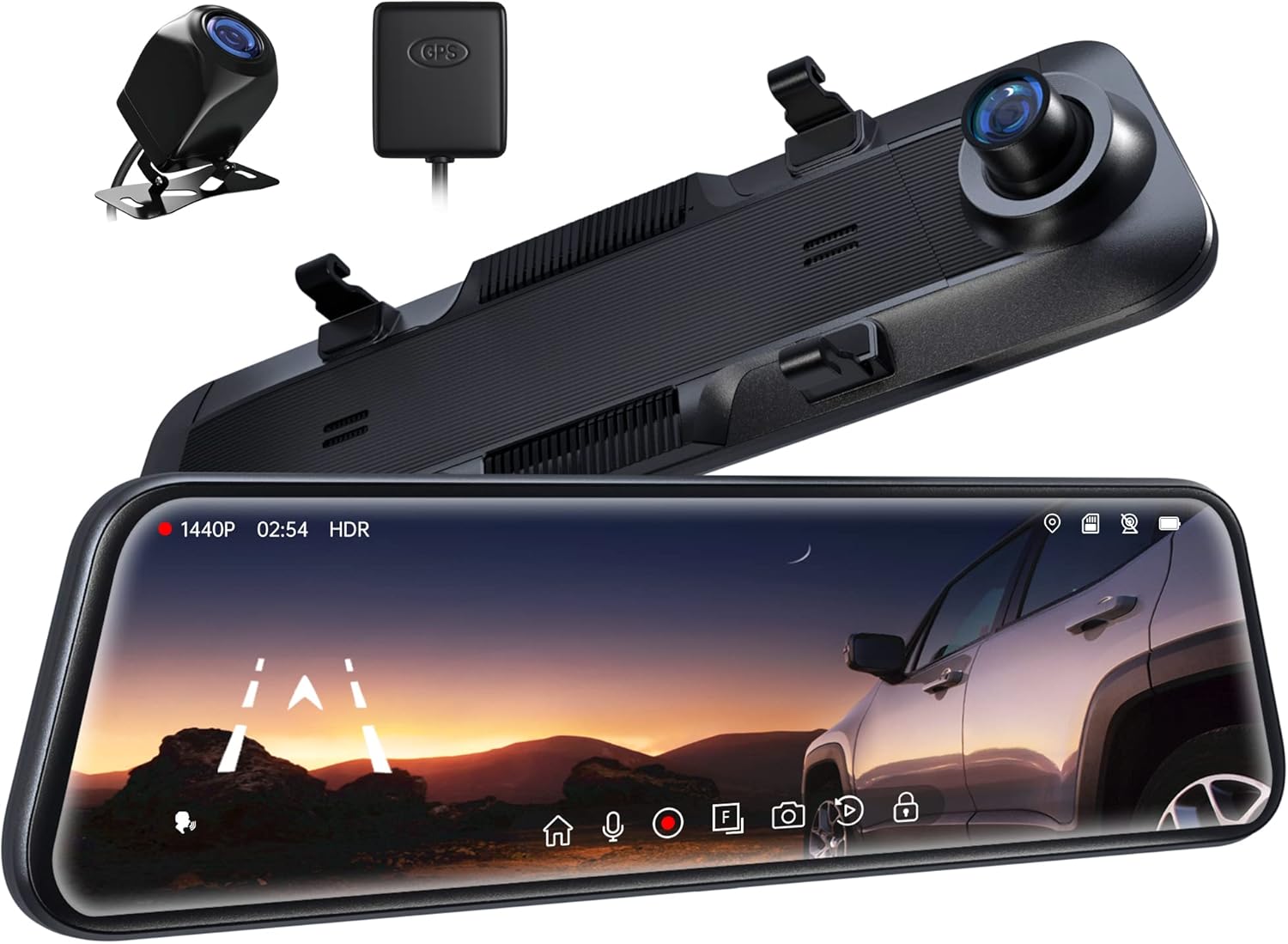
Figure 1.1: Pelsee P12 Mirror Dash Cam components including the main mirror unit, rear camera, and GPS module.
2. 제품 오버view
2.1 패키지 내용
- Pelsee P12 Mirror Dash Cam Unit
- 후방 카메라
- GPS 모듈
- 전원 케이블(Type-C)
- 후방 카메라 연장 케이블
- 장착 스트랩/밴드
- 사용자 설명서
2.2 장치 레이아웃
Familiarize yourself with the various ports and components of the Pelsee P12 dash cam.
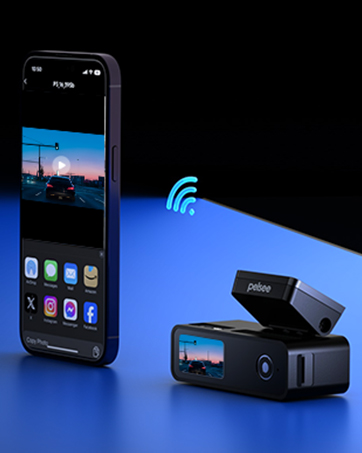
Figure 2.1: Main unit ports including Type-C power input, TF (MicroSD) card slot, GPS interface, and AV-IN for the rear camera.
- C 형 포트 : For power input and data transfer.
- TF 카드 슬롯 : Insert MicroSD card for video storage.
- GPS 인터페이스: Connect the external GPS module.
- AV-IN: 후방 카메라 케이블을 연결합니다.
3. 설정 및 설치
3.1 미러 대시캠 장착
- Secure the Pelsee P12 unit over your vehicle's existing rearview mirror using the provided rubber mounting straps/bands. Ensure the unit is firmly attached and does not obstruct your view or the vehicle's original mirror buttons.
- Adjust the dash cam's front lens to ensure it captures the road ahead clearly without obstruction from the vehicle's original mirror or sun visor.
3.2 후방 카메라 설치
- Determine the optimal mounting location for the rear camera, typically above the license plate or inside the rear window. Ensure the camera has a clear, unobstructed view.
- Route the rear camera cable from the mounting location to the main dash cam unit. Carefully tuck the cable along the vehicle's headliner, A-pillar, and dashboard to conceal it.
- 후방 카메라 케이블을 본체의 AV-IN 포트에 연결하십시오.
- For reversing assistance, connect the red wire from the rear camera cable to your vehicle's reverse light power wire. This enables automatic display of the rear view with parking guidelines when shifting into reverse.
3.3 GPS 모듈 연결하기
- Attach the GPS module to the vehicle's windshield, ideally in an area with a clear view 최적의 신호 수신을 위해 하늘을 살펴봅니다.
- Connect the GPS module cable to the GPS Interface port on the main unit.
3.4 Power Connection and MicroSD Card
- Connect the provided Type-C power cable to the dash cam's Type-C port and plug the other end into your vehicle's 12V power outlet (cigarette lighter socket).
- Insert a high-speed MicroSD card (Class 10 or higher, up to 256GB recommended) into the TF Card slot. Ensure the card is inserted correctly until it clicks into place.
- Upon first use, or if experiencing recording issues, format the MicroSD card directly on the dash cam unit via the settings menu.
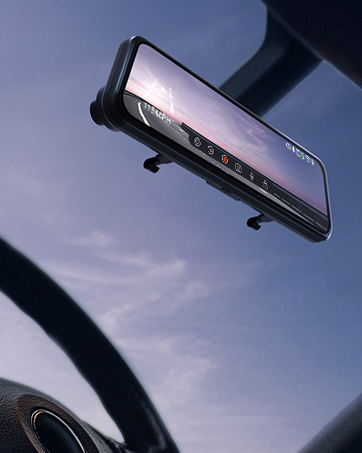
Figure 3.1: The Pelsee P12 mirror dash cam installed in a vehicle, providing a wide view 도로의.
4. 사용 설명서
4.1 기본 작업
- 전원 켜기/끄기: The device automatically powers on and begins recording when the vehicle's ignition is turned on. It powers off automatically when the ignition is turned off.
- 화면 켜기/끄기: Tap the screen to turn it on or off. You can also set an automatic screen-off timer in the settings to use the device as a traditional rearview 거울.
- 터치스크린 인터페이스: The 12-inch full touch display allows for intuitive navigation through menus and settings. Swipe gestures can be used to adjust camera views (front, rear, split screen) and screen brightness.

Figure 4.1: The 12-inch full touch display offers 1440P resolution with HDR for clear image capture.
4.2 녹음 모드
- 루프 녹음: 블랙박스는 짧은 시간 간격(예: 1분, 3분 또는 5분)으로 영상을 연속 녹화합니다. 메모리 카드가 가득 차면 가장 오래된 영상부터 잠금 해제되어 저장됩니다. files are automatically overwritten to ensure continuous recording.
- G-Sensor (Emergency Capture): 내장된 G 센서는 갑작스러운 충격이나 충돌을 감지합니다. 센서가 작동하면 현재 비디오 세그먼트를 자동으로 잠가 루프 녹화로 인해 덮어쓰기되는 것을 방지합니다. 이렇게 잠긴 비디오 세그먼트는... files는 별도의 폴더에 저장됩니다.
- 저속 촬영 : This feature compresses long periods of recording into short, viewable videos, saving storage space and allowing for quick review of extended events.

Figure 4.2: The G-sensor automatically detects collisions and locks video footage.

Figure 4.3: Loop recording ensures continuous operation by overwriting the oldest files.
4.3 고급 기능
- 음성 제어: Command the dash cam hands-free for safer driving. Common commands include:
- "녹화 시작"
- "Stop Recording"
- "사진 찍기"

Figure 4.4: AI Voice Control allows hands-free operation for increased safety.
- GPS 추적 : The external GPS module accurately records your vehicle's location, speed, and driving route. This data can be viewed using a dedicated GPS player on a computer, providing crucial information in case of an accident.

Figure 4.5: GPS tracking provides detailed route and speed information.
- 24시간 주차 모니터: With an optional ACC hardwire kit (sold separately), the dash cam can monitor your vehicle for impacts even when parked. If a collision is detected, it will automatically record a short, locked video.

Figure 4.6: The 24H Parking Monitor provides surveillance when your vehicle is parked.
- ADAS Collision Avoidance Technology: The Advanced Driver-Assistance System detects nearby obstacles and provides alerts for safer driving. This includes:
- 전방 충돌 경고
- 보행자 충돌 경고
- 차선 이탈 경고
- Headway Monitoring
- Forward Movement Detection
- BSD Algorithm (Blind Spot Detection): Intelligent blind spot detection warns of potential collisions by monitoring dangerous blind spot areas, particularly when changing lanes or reversing.
- Reverse Parking Assistance: 차량이 후진할 때 대시캠은 후방 카메라 영상을 표시합니다. view with adjustable parking guidelines, assisting with precise parking maneuvers. The screen can be swiped to adjust the view.

Figure 4.7: Reverse parking assistance with guidelines for easier maneuvering.
- HDR 기술: High Dynamic Range technology minimizes glare and overexposure from bright lights (e.g., headlights, sunlight), ensuring clear video capture in various lighting conditions, especially at night.

Figure 4.8: Ultra Clear Night Vision with anti-glare technology for enhanced visibility.

Figure 4.9: HDR technology optimizes image quality in varying light conditions.
5. 유지관리
- 청소: 부드럽고 마른 천으로 블랙박스 화면과 렌즈를 닦으십시오. 표면을 손상시킬 수 있는 연마성 세척제나 용제 사용은 피하십시오.
- MicroSD 카드 관리: Regularly format the MicroSD card (at least once a month) through the dash cam's settings menu. This helps prevent data corruption and ensures optimal recording performance. Back up any important files를 포맷하기 전에.
- 펌웨어 업데이트: Check the official Pelsee website periodically for firmware updates. Updates can improve performance, add new features, or resolve known issues. Follow the provided instructions carefully when updating firmware.
- 온도 고려 사항: Avoid exposing the dash cam to extreme temperatures for prolonged periods. If the vehicle is parked in direct sunlight, consider removing the dash cam or using a sunshade to prevent overheating.
6. 문제 해결
This section addresses common issues you might encounter with your Pelsee P12 dash cam.
- 대시캠 전원이 켜지지 않음:
- 전원 케이블이 블랙박스와 차량의 12V 전원 소켓에 제대로 연결되어 있는지 확인하십시오.
- Check the vehicle's 12V power outlet for functionality.
- Verify the vehicle's ignition is on (if not hardwired for constant power).
- 녹화 관련 문제 (예: 녹화 안 됨, 화면 멈춤):
- Ensure a high-speed (Class 10 or higher) MicroSD card is inserted correctly.
- Format the MicroSD card via the dash cam's settings.
- 카드 고장 여부를 확인하기 위해 다른 MicroSD 카드를 사용해 보세요.
- Check if loop recording is enabled.
- Poor Video Quality (blurry, dark, overexposed):
- 카메라 렌즈를 청소하세요.
- 렌즈에서 보호 필름을 제거했는지 확인하세요.
- Adjust exposure settings in the menu if available.
- Verify HDR is enabled for challenging lighting conditions.
- GPS Signal Not Found:
- Ensure the GPS module is connected and mounted in an area with a clear view 하늘의 (예: 대시보드, 앞유리).
- 차량을 높은 건물이나 울창한 수풀이 없는 열린 공간으로 옮기세요.
- 음성 제어가 응답하지 않음:
- 차량용 블랙박스를 향해 또렷하고 직접적으로 말하세요.
- 차량 내 배경 소음을 줄이세요.
- 설정에서 음성 제어 기능이 활성화되어 있는지 확인하십시오.
- Original Mirror Buttons Blocked by Mounting Bands:
- Adjust the position of the rubber mounting bands to avoid obstructing critical buttons on your vehicle's original rearview 거울.
- 후방 카메라 View Appears Zoomed In or Narrow:
- Ensure the rear camera is mounted correctly and not upside down, as image flipping may not be supported.
- 그만큼 viewing angle is fixed; ensure the camera is positioned to capture the desired area.
- Screen On/Off Button Malfunction:
- Utilize the automatic screen-off timer feature in the settings to minimize manual button presses.
- Potential Car Battery Drain (when parked):
- If using the 24H Parking Monitor, an ACC hardwire kit is required to prevent draining the car battery. Without it, unplug the dash cam when the vehicle is off for extended periods.
7. 사양
| 상표 | 펠시 |
| 모델명 | 피12 |
| 제품 치수 | 30.5 x 2 x 7.4 cm; 256g |
| 비디오 캡처 해상도 | 1440p (전면) |
| 정위 | 전면 및 후면 |
| 차량 서비스 유형 | 자동차, 트럭 |
| 연결 기술 | USB |
| 특별 기능 | Built-In GPS, Night Vision, Real 1440P + HDR, Voice Control, ADAS, BSD, Loop Recording, G-sensor, 24H Parking Monitor |
| 포함된 구성 요소 | P12 Pro mirror dash cam, Rear Camera, GPS Module, Power Cable, Mounting Straps |
| 장착 유형 | 뒤쪽view 미러 마운트 |
| 색상 | 검은색 |
| 배터리 | 1개의 리튬 금속 배터리(포함) |
8. 보증 및 지원
Pelsee is committed to providing high-quality products and customer satisfaction.
- 무료 반품: 30일
- 환불 보장: 30일
- 보증: 18개월
기술 지원, 보증 청구 또는 기타 문의 사항은 당사로 연락해 주십시오.
이메일: support@pelsee.com

Figure 8.1: Pelsee's customer assurance and service information.
Ask a question about this manual
Ask about setup, troubleshooting, compatibility, parts, safety, or missing instructions. Manuals+ will review the question and use this page’s manual context to help answer it.