
소개
This manual provides detailed instructions for the proper setup, operation, and maintenance of your TOMLOV DM04 Digital Microscope. Please read this manual thoroughly before using the device to ensure optimal performance and longevity.
The TOMLOV DM04 is a versatile digital microscope featuring a 9-inch LCD screen, 16MP camera, and up to 1300X digital magnification. It is designed for various applications including coin inspection, circuit board repair, and general observation of small objects. It is compatible with Windows and Mac OS for advanced functions.
패키지 내용
아래 나열된 모든 품목이 패키지에 포함되어 있는지 확인하세요.
- 9인치 현미경 유닛
- 베이스 플레이트
- 10-inch Stand Pole
- 원격 제어
- USB Cable for Microscope (Micro USB)
- USB Cable for Base (USB-C)
- 라이트 배리어
- 사용자 설명서
- 32GB SD 카드 (사전 설치됨 또는 별도 구매)

Image: All components included in the TOMLOV DM04 Digital Microscope package, including the microscope unit, stand, base, cables, remote, and manual.
설치 지침
- 스탠드 조립: Attach the 10-inch stand pole to the base plate. Ensure it is securely fastened.
- 현미경을 설치하세요: Slide the microscope unit onto the stand pole and tighten the securing screw at the desired height.
- 전원 연결:
- Connect the Micro USB cable to the microscope unit and a power source (e.g., USB adapter, computer USB port).
- Connect the USB-C cable to the base plate (for auxiliary lights) and a separate power source.
- SD 카드 삽입: If not pre-installed, insert the provided 32GB SD card into the slot on the back of the microscope unit.
- Position Auxiliary Lights: Adjust the flexible auxiliary lights on the base to illuminate your observation area as needed.
- 전원 켜기: Press and hold the power button on the microscope unit to turn it on.
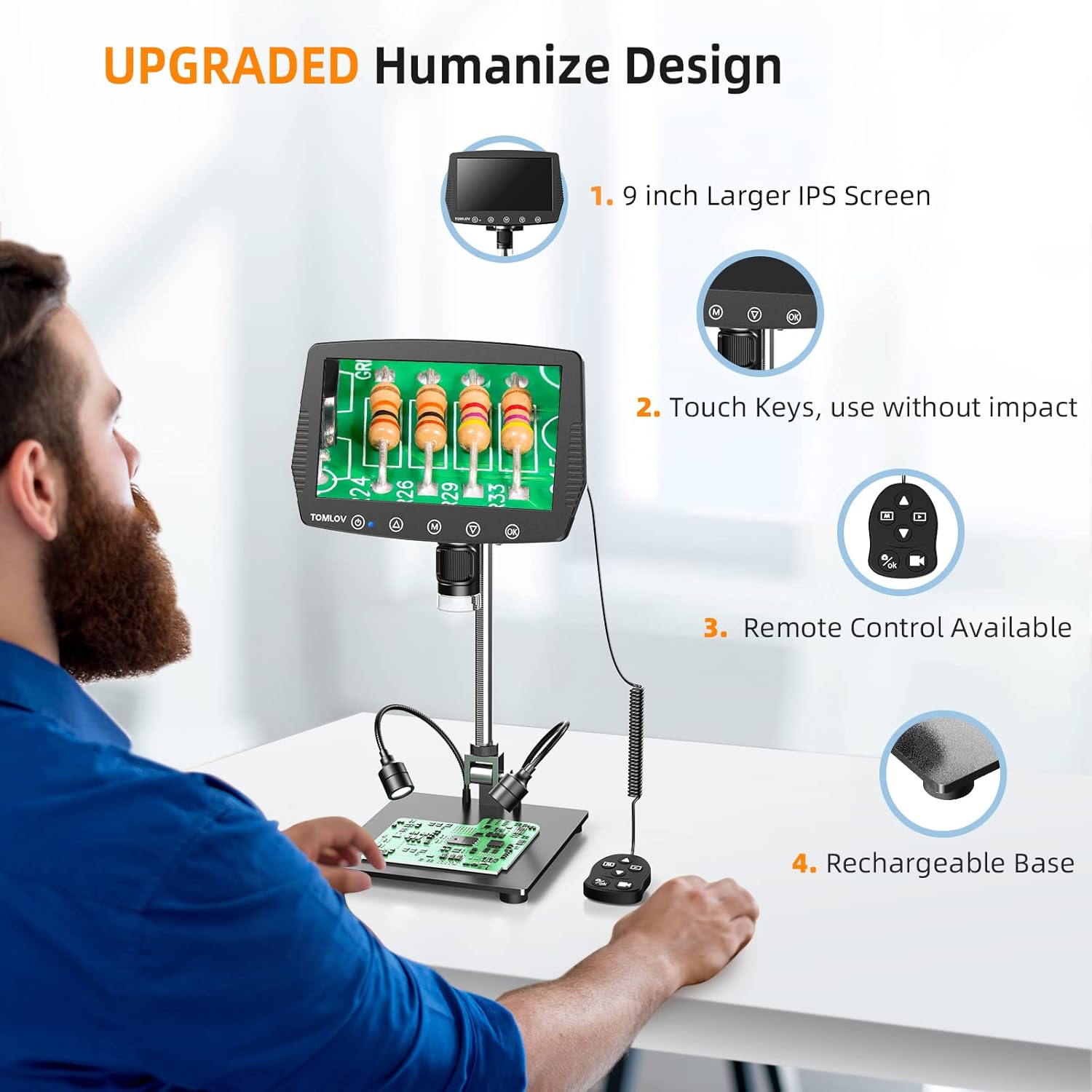
Image: A user setting up the TOMLOV DM04 microscope, demonstrating the assembly of the stand and placement of the microscope unit.
작동 지침
기본 동작
- 전원 켜기/끄기: 전원 버튼을 길게 누르세요.⑂) 장치를 켜거나 끕니다.
- 초점 조정: Rotate the focus wheel on the microscope unit to achieve a clear image on the 9-inch LCD screen.
- 확대: The microscope offers digital magnification up to 1300X. Adjust the height of the microscope on the stand and use the digital zoom functions (if available via menu) to change magnification.
- 조명:
- 내장 LED 조명: The microscope head has built-in LED lights. These can be adjusted via the menu or dedicated buttons.
- Auxiliary Base Lights: The two flexible lights on the base can be adjusted independently using their respective controllers to provide additional illumination.
- 이미지/비디오 캡처:
- 를 누르세요 OK button on the microscope or remote control to take a picture.
- 를 누르고 계세요 OK 동영상 녹화를 시작/정지하는 버튼입니다.
- Captured images and videos are saved to the inserted SD card.
고급 기능
- 메뉴 탐색: 사용하세요 M (Menu) button and arrow buttons (▲, ▼) to navigate through settings and options on the LCD screen.
- 원격 제어: The included remote control allows for stable operation, reducing image shake during capture.
- Rotatable Screen & Bracket Pole: The screen can be rotated up to 80 degrees and the bracket pole up to 180 degrees for flexible view각도를 나타냅니다.
- PC Connection (Windows/Mac OS):
- Connect the microscope to your computer using the appropriate USB cable.
- Select "PC Camera" mode on the microscope's screen.
- Install the dedicated software (refer to the included software CD or manufacturer's website for download) to enable measurement and marking functions, and to view the live feed on your computer.
- Files can be transferred directly from the SD card when connected to a PC.

Image: The TOMLOV DM04 microscope connected to a laptop, showing the "PC Camera" function and measurement capabilities on the computer screen.

이미지: 클로즈업 view of the TOMLOV DM04 microscope's dual auxiliary lighting system, highlighting the built-in LED ring light and the two flexible base lights.
Video: A demonstration of the TOMLOV DM04 digital microscope's capabilities, showing a detailed view of a fly. This video illustrates the clarity and magnification achievable with the device.
유지
- 청소:
- Use a soft, dry cloth to clean the exterior of the microscope and screen.
- 렌즈를 닦을 때는 렌즈 전용 세척용 천과 세척액을 사용하십시오. 연마성 재질은 사용하지 마십시오.
- Do not use liquid cleaners directly on the screen or lens.
- 저장: 현미경은 직사광선과 극한 온도 변화를 피해 깨끗하고 건조한 곳에 보관하십시오.
- 배터리 관리 : For optimal battery life, charge the microscope regularly and avoid fully discharging it for extended periods.
- 소프트웨어 업데이트: TOMLOV 공식 웹사이트를 주기적으로 확인하세요. website for any available software or firmware updates for your DM04 model.
문제 해결
| 문제 | 가능한 원인 | 해결책 |
|---|---|---|
| 화면에 이미지가 없습니다. | 기기 전원이 켜져 있지 않음; 렌즈 캡이 씌워져 있음; 초점이 조정되지 않음. | Ensure device is powered on. Remove lens cap. Adjust focus wheel. |
| 이미지가 흐릿함 | Improper focus; insufficient lighting; dirty lens. | Adjust focus wheel. Increase illumination using built-in or auxiliary lights. Clean the lens. |
| 이미지/동영상을 저장할 수 없습니다 | SD 카드가 삽입되지 않았습니다. SD 카드가 가득 찼거나 손상되었습니다. file 형식 설정. | 호환되는 SD 카드를 삽입하세요. 불필요한 파일을 삭제하세요. files or replace SD card. Check menu settings for file 체재. |
| PC connection not working | Incorrect USB cable; "PC Camera" mode not selected; driver issues. | Ensure correct USB cable is used. Select "PC Camera" mode on microscope. Install necessary drivers/software. |
명세서
- 모델: DM04
- 화면 크기: 9인치 LCD
- 카메라 해상도: 16메가픽셀
- 비디오 해상도: 1080피
- Digital Magnification: 최대 1300배
- Stand Length: 10인치
- 초점 범위: Up to 8 inches (with enhanced stand)
- 조명: Built-in 8-LED fill lights, Rechargeable base lights (2)
- 제어: Touch buttons, Remote control
- 저장: 마이크로 SD 카드 지원 (32GB 포함)
- PC 호환성: 윈도우, 맥 OS
- 전원: 배터리 구동(5볼트)
- 재료: 10'' Metal Stand + 9'' LCD Screen + Large Metal Base
보증 정보
TOMLOV products typically come with a standard manufacturer's warranty. Please refer to the warranty card included in your product packaging or visit the official TOMLOV web보증 기간 및 청구 절차를 포함한 자세한 보증 약관은 해당 사이트를 참조하십시오.
고객 지원
For technical assistance, troubleshooting not covered in this manual, or warranty inquiries, please contact TOMLOV customer support:
- Web대지: www.tomlov.com (참고: 이것은 플레이스홀더입니다. URL자세한 내용은 제품 설명서를 참조하여 공식적인 지원을 받으시기 바랍니다. web대지.)
- 이메일: 제품 설명서를 참조하십시오.
- 핸드폰: 제품 설명서를 참조하십시오.
When contacting support, please have your product model (DM04) and purchase information ready.