
1. 이상view
The Hoco ES61 Manner Sports Wireless Bluetooth Headset is designed for active lifestyles, offering a blend of comfort, long battery life, and versatile connectivity. This manual provides detailed instructions to help you get the most out of your headset.
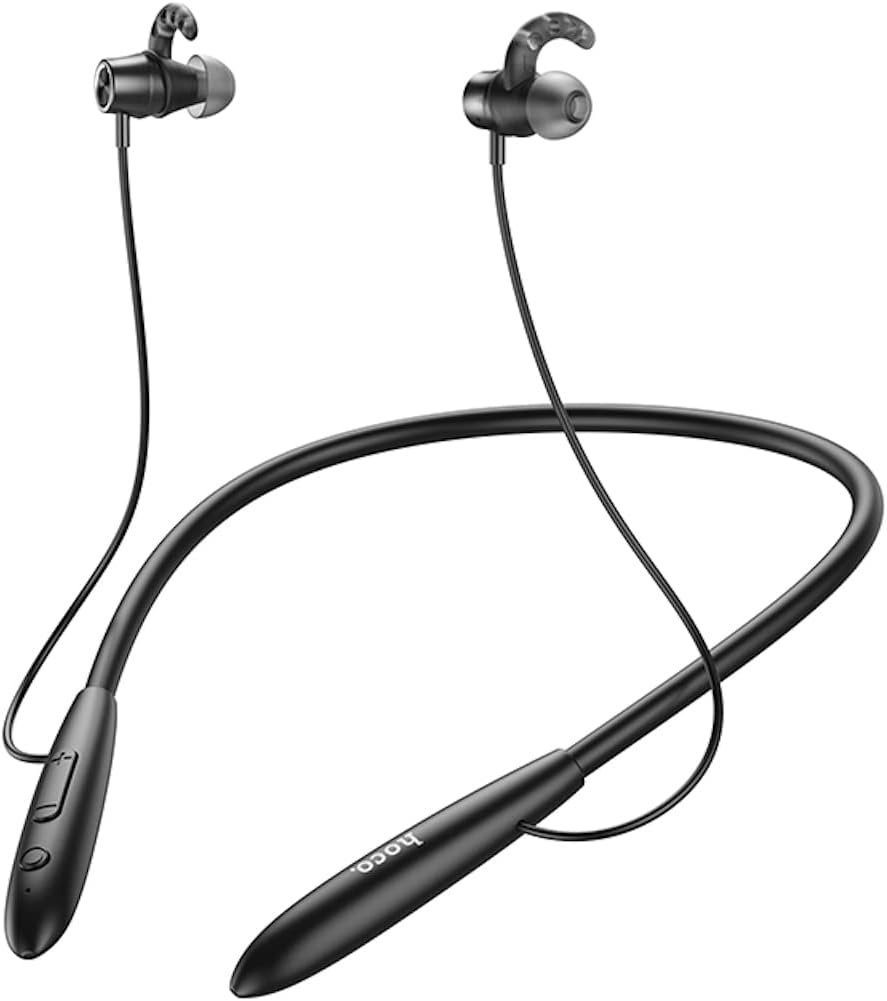
이미지: 앞면 view of the Hoco ES61 headset, showcasing its neckband design and in-ear earbuds.
2. 제품 특징
- 블루투스 5.1 연결: Equipped with JL AC7006 chip for stable and efficient wireless connection.
- 배터리 수명 연장: Features a 200mAh battery, providing up to 20 hours of music/talk time and an impressive 330 hours of standby time.
- 빠른 충전: 약 2시간 안에 완전히 충전됩니다.
- 가볍고 편안한 디자인: The earphone cord measures 85cm in length, and the headset weighs only 22g, ensuring comfort during extended wear.
- 다양한 재생 옵션: Supports Bluetooth audio streaming and TF card playback (up to 32GB) for direct music listening.
- 다국어 음성 안내: Offers voice prompts in both Chinese and English for user convenience.
- 폭넓은 호환성: Compatible with a broad range of devices including iPhone, Samsung, OnePlus, Huawei, Xiaomi, and Oppo smartphones.

이미지: 클로즈업 view of the Hoco ES61 headset, highlighting the integrated TF card slot for direct music playback.
비디오: 공식 제품 소개 영상asing the Hoco ES61 Bluetooth Headset's features, including its 20-hour battery life, voice prompts, and compatibility with iOS and Android devices.
3. 설정 가이드
3.1 헤드셋 충전
Before first use, fully charge the headset. Use a standard USB charger (not included) to connect the charging port on the headset to a power source.
- 충전 중에는 일반적으로 LED 표시등이 빨간색으로 켜집니다.
- Once fully charged (approximately 2 hours), the LED indicator will turn blue or off.
3.2 블루투스 페어링
To connect your Hoco ES61 headset to a Bluetooth-enabled device:
- 헤드셋이 꺼져 있는지 확인하십시오.
- Press and hold the multi-function button (usually the power button) for approximately 3-5 seconds until the LED indicator flashes red and blue alternately. This indicates pairing mode.
- 기기(스마트폰, 태블릿 등)에서 Bluetooth를 활성화하고 사용 가능한 기기를 검색하세요.
- Select "Hoco ES61" from the list of found devices.
- Once connected, the LED indicator on the headset will typically flash blue slowly or turn off, and you will hear a voice prompt confirming the connection.
3.3 TF 카드 재생
The Hoco ES61 supports direct music playback from a TF (MicroSD) card.
- Carefully insert a TF card (up to 32GB) with your music files into the designated TF card slot on the headset.
- The headset will automatically switch to TF card playback mode if a card is detected and contains playable audio files.
- Use the headset controls to manage playback (play, pause, skip tracks).
4. 사용 설명서
4.1 기본 컨트롤
| 버튼/액션 | 기능 |
|---|---|
| 다기능 버튼(MFB) | 전원 켜기/끄기, 재생/일시정지, 통화 받기/끊기 |
| 볼륨 업(+) | 볼륨 높이기, 다음 트랙 (길게 누르기) |
| 볼륨 작게 (-) | 볼륨 줄이기, 이전 트랙 (길게 누르기) |
4.2 음악 재생
- 재생/일시 중지: MFB를 짧게 누릅니다.
- 다음 트랙: 볼륨 높이기(+) 버튼을 길게 누릅니다.
- 이전 트랙 : 볼륨 낮추기(-) 버튼을 길게 누릅니다.
- 볼륨 조절: 볼륨 높이기(+) 또는 볼륨 낮추기(-) 버튼을 짧게 누르세요.
4.3 통화 관리
- 전화 받기/종료: Short press the MFB during an incoming call.
- 전화 거부: 수신 전화 중에 MFB 버튼을 길게 누르세요.
- 마지막 번호 재다이얼: Double-click the MFB when not on a call.

Image: The Hoco ES61 headset resting on a smartphone, illustrating its use with mobile devices for music and calls.
5. 유지관리 및 관리
- 헤드셋을 건조하게 유지하십시오. 극한의 온도나 습도에 노출시키지 마십시오.
- Clean the earbuds and charging port regularly with a soft, dry cloth to prevent dust and debris buildup.
- 강한 화학물질이나 연마성 세척제의 사용은 피하세요.
- 사용하지 않을 때는 헤드셋을 시원하고 건조한 곳에 보관하세요.
- 헤드셋을 분해하거나 개조하려고 하지 마십시오. 그럴 경우 보증이 무효화되고 손상이 발생할 수 있습니다.

Image: The Hoco ES61 headset shown with different sizes of silicone ear tips, emphasizing the importance of proper fit for comfort and sound quality.
6. 문제 해결
6.1 Headset Not Turning On
- Ensure the headset is fully charged. Connect it to a charger and check the LED indicator.
- Press and hold the multi-function button for a few seconds to power on.
6.2 기기와 페어링할 수 없습니다
- Make sure the headset is in pairing mode (LED flashing red and blue alternately).
- 기기에서 Bluetooth가 활성화되어 있고, 범위 내(일반적으로 10m)에 있는지 확인하세요.
- Forget/delete "Hoco ES61" from your device's Bluetooth list and try pairing again.
- 헤드셋과 기기를 다시 시작하세요.
6.3 소리가 나지 않거나 볼륨이 낮음
- 헤드셋과 연결된 기기의 볼륨을 높이세요.
- 헤드셋이 장치에 제대로 연결되었는지 확인하세요.
- TF 카드를 사용하는 경우, 카드가 올바르게 삽입되었는지, 재생 가능한 오디오 파일이 있는지 확인하십시오. files.
- Check for any obstructions in the earbud nozzles and clean if necessary.
6.4 짧은 배터리 수명
- 사용하기 전에 헤드셋이 완전히 충전되었는지 확인하십시오.
- 배터리 수명은 음량 수준 및 사용 패턴에 따라 달라질 수 있습니다.
- 배터리를 극한의 온도에 노출시키지 마십시오.
7. 사양
| 특징 | 세부 사항 |
|---|---|
| 블루투스 버전 | 5.1 |
| 블루투스 칩 | JL AC7006 |
| 배터리 용량 | 200mAh |
| 충전 시간 | 약 2시간 |
| 음악 / 토크 시간 | 최대 20시간 |
| 대기 시간 | 최대 330시간 |
| Earphone Cord Length | 85cm |
| 무게 | 22g |
| TF 카드 지원 | 네, 최대 32GB |
| 음성 프롬프트 | 중국어와 영어 |
| 호환성 | iPhone, Samsung, OnePlus, Huawei, Xiaomi, Oppo |
8. 보증 및 지원
For warranty information and customer support, please refer to the product packaging or contact your retailer. Keep your purchase receipt as proof of purchase for any warranty claims.