
MINLOVE 108S
MINLOVE 108S 5G WiFi 블루투스 프로젝터 사용 설명서
모델 : 108S
1. 제품 오버view
The MINLOVE 108S is a high-definition projector designed for both home theater and business presentations. It features native 1080p resolution, 5G and 2.4G WiFi connectivity for seamless screen mirroring, and Bluetooth 5.0 for audio output. With a brightness of 9800 lumens and a 10000:1 contrast ratio, it delivers clear and vibrant images up to 450 inches. This package includes a 100-inch projector screen for immediate use.
패키지 내용:
- MINLOVE 108S Projector x1
- HDMI 케이블 x1
- Remote Control x1 (Batteries not included)
- 3-in-1 AV 케이블 1개
- 사용 설명서 x1
- 전원 코드 x1
- 100-inch Projector Screen x1
- 렌즈 캡 x1

Image 1.1: The MINLOVE 108S Projector, showcasing its compact design and the included 100-inch screen, along with icons representing various streaming services and connectivity options.
2. 설정 가이드
2.1 배치
Position the projector on a stable, flat surface or mount it to the ceiling. Ensure there is adequate ventilation around the unit. The optimal projection distance will vary based on desired screen size, with a maximum display size of 450 inches.
2.2 전원 연결
- 전원 코드를 프로젝터의 전원 입력 단자에 연결합니다.
- Plug the other end of the power cord into a standard electrical outlet (240 Volts).
2.3 초기 전원 켜기
프로젝터 또는 리모컨의 전원 버튼을 눌러 기기를 켜세요. 표시등이 켜집니다.
2.4 초점 및 키스톤 조정
- 집중하다: 프로젝터 렌즈의 초점 링을 돌려 투사된 이미지가 선명하고 깨끗하게 보일 때까지 조정하십시오.
- 키스톤 보정: Use the manual keystone correction dial (typically ±15°) to adjust the image shape if it appears trapezoidal. This corrects for projection angles that are not perfectly perpendicular to the screen.
3. 사용 설명서
3.1 연결 옵션
3.1.1 WiFi Connection (5G/2.4G) for Screen Mirroring
The projector supports dual-band 2.4G and 5G WiFi for wireless screen mirroring from iOS, Android, and Windows devices. Ensure both the projector and your device are connected to the same local WiFi network.
- Navigate to the 'Screen Mirroring' or 'WiFi Display' option in the projector's menu.
- Select your device's operating system (iOS/Android/Windows).
- 모바일 기기 또는 컴퓨터에서 화면 미러링/캐스팅을 활성화하고 사용 가능한 장치 목록에서 프로젝터를 선택하세요.
메모: Wired screen mirroring is also supported for iOS devices using a USB cable or an HDMI conversion cable.

Image 3.1: Visual representation of 5G and 2.4G WiFi connectivity, demonstrating wireless screen mirroring from laptops, tablets, and smartphones to the projector.
3.1.2 블루투스 5.0 연결
Connect the projector to external Bluetooth speakers, headphones, or other Bluetooth audio devices for an enhanced audio experience. Bluetooth connection is for audio output only.
- Go to the 'Bluetooth Settings' in the projector's menu.
- Bluetooth를 활성화하고 사용 가능한 장치를 검색합니다.
- Select your Bluetooth audio device from the list to pair.

Image 3.2: The MINLOVE projector highlighting its built-in HiFi stereo speakers and its ability to connect to external Bluetooth devices like headphones and speakers.
3.1.3 유선 연결
The projector offers multiple wired input ports for various devices:
- HDMI(x2): Connect TV boxes, gaming consoles (PS5, Xbox), laptops, PCs, Blu-ray players.
- USB(x1): USB 드라이브에서 미디어를 직접 재생하세요.
- 유명인 : Connect older devices using the included 3-in-1 AV cable.
- VGA : Connect to computers.
- 마이크로 SD: Play media from Micro SD cards.

Image 3.3: An illustration of the MINLOVE projector's universal connectivity, showing its compatibility with a wide range of devices through HDMI, USB, and other ports.
3.2 입력 소스 선택
Use the 'Source' button on the remote control or the projector's control panel to cycle through available input sources (HDMI1, HDMI2, USB, AV, Screen Mirroring).
3.3 메뉴 탐색
Use the arrow keys and 'OK' button on the remote control to navigate the projector's on-screen menu. Adjust settings such as picture mode, sound mode, aspect ratio, and network settings.

Image 3.4: The projector's home interface, showing various applications and examples of its use in different settings, such as watching movies, exercising, and outdoor entertainment.
4. 유지관리
4.1 렌즈 세척
Gently clean the projector lens with a soft, lint-free cloth or a lens cleaning brush. Avoid using abrasive cleaners or excessive force, which can scratch the lens.
4.2 먼지 필터 청소
Regularly check and clean the dust filter (if accessible) to ensure proper airflow and prevent overheating. Refer to the specific location of the filter in the product diagram if available.
4.3리터amp 삶
The LED light source in the MINLOVE 108S projector has an estimated lifespan of up to 60,000 hours, providing long-term performance without frequent lamp 대사.
4.4 보관
사용하지 않을 때는 프로젝터를 직사광선과 극한 온도 변화를 피해 서늘하고 건조한 곳에 보관하십시오. 렌즈 캡을 사용하여 렌즈에 먼지와 흠집이 생기지 않도록 보호하십시오.
5. 문제 해결
- 전원 없음: Ensure the power cord is securely connected to both the projector and the electrical outlet. Check if the outlet is functional.
- 이미지 없음:
- 올바른 입력 소스가 선택되었는지 확인하세요.
- Check all connected cables (HDMI, AV, etc.) for secure connections.
- 초점 링을 조정하십시오.
- 이미지 품질이 좋지 않음:
- Adjust the focus and keystone correction.
- Ensure the projection surface is flat and clean.
- Check the resolution settings on your source device.
- If a browning or multicolored spot appears, this may indicate overheating. Turn off the unit to cool down or ensure adequate ventilation.
- 소리 없음:
- 프로젝터와 소스 장치의 볼륨을 모두 높이세요.
- If using Bluetooth, ensure the device is properly paired and selected as the audio output. Note that Bluetooth audio may experience slight latency.
- Check audio cable connections for wired setups.
- 원격 제어가 작동하지 않음: Replace the batteries in the remote control. Ensure there are no obstructions between the remote and the projector's IR receiver.
6. 사양
| 특징 | 사양 |
|---|---|
| 모델 번호 | 108S |
| 표준 해상도 | Native 1920 x 1080 Pixels |
| 명도 | 9800루멘 |
| 대비율 | 10000시 1분 |
| 줌 기능 | 100% - 75% |
| 키스톤 보정 | ±15° 수동 |
| 최대 화면 크기 | 450 인치 |
| LED 수명 | 60,000시간 |
| 무선 기능 | 5G/2.4G WiFi & Bluetooth 5.0 |
| 종횡비 | 4:3 / 16:9 / 자동 |
| 호환성 | iOS, Android, PC, Xbox, PS4/PS5, TV Stick, HDMI, USB |
| 연결 유형 | Wi-Fi, HDMI (x2), USB (x1), AV, VGA, Micro SD |
| 제품 치수 | 29.97 x 19.99 x 10.01cm |
| 품목 무게 | 3.68 킬로그램 |
| 권tage | 240 볼트 |
| 왓tage | 50 와트 |

Image 6.1: Visual comparison illustrating the superior brightness, sharpness, and wider color gamut of the MINLOVE projector compared to traditional models.
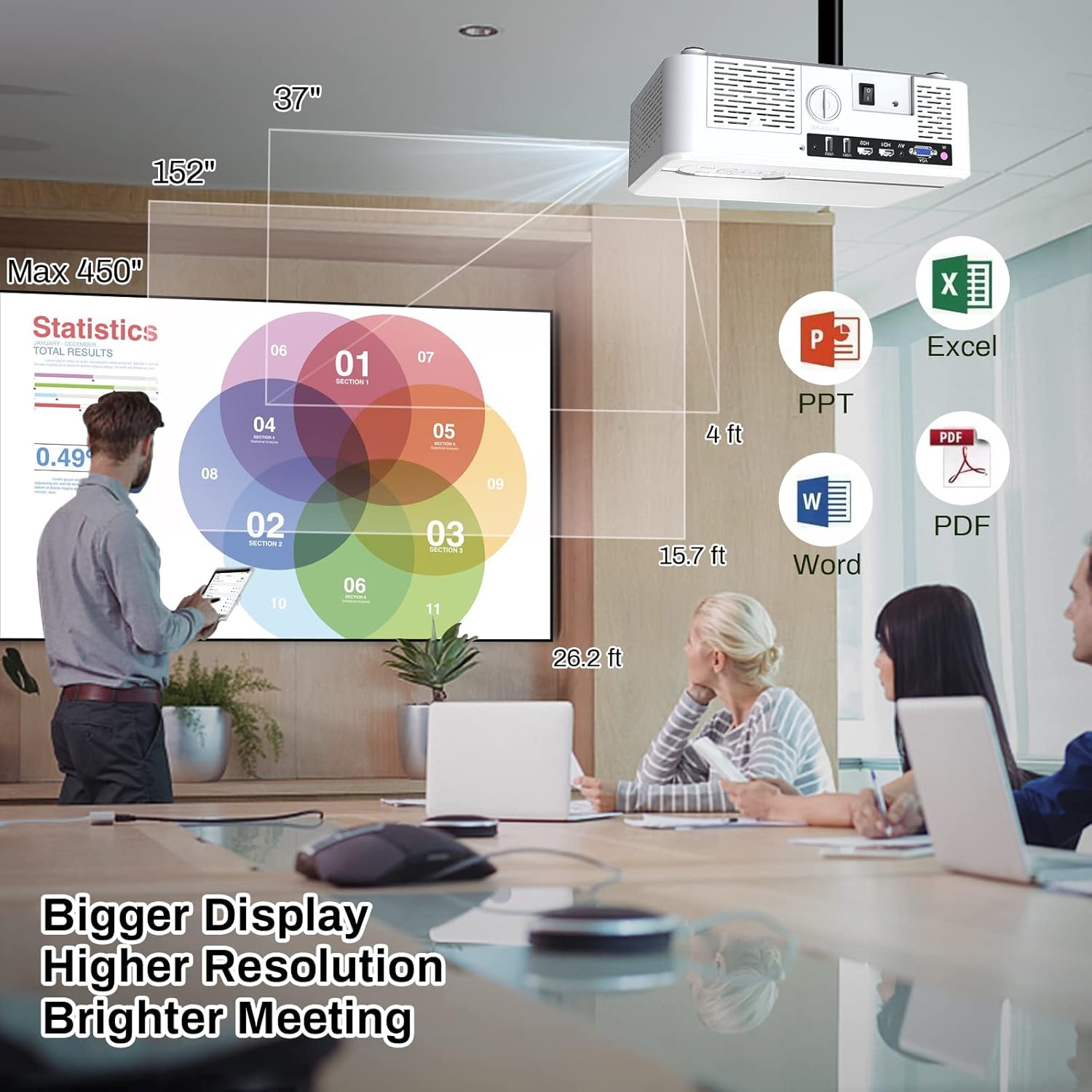
Image 6.2: The MINLOVE projector in a business environment, demonstrating its capability to project large, high-resolution displays for meetings and presentations.
7. 보증 및 지원
The MINLOVE 108S projector comes with a 1-year warranty. For any questions, technical assistance, or after-sales service, please contact MINLOVE customer support. Our customer service team is available 24/7 to provide satisfactory solutions.
Ask a question about this manual
Ask about setup, troubleshooting, compatibility, parts, safety, or missing instructions. Manuals+ will review the question and use this page’s manual context to help answer it.