
1. 서론
This instruction manual provides essential information for the installation, operation, maintenance, and troubleshooting of the HP 17-by and 17T-by series laptop motherboards. These motherboards are compatible replacement parts for specific HP laptop models and feature an integrated Intel Core i5-1035G1 processor.
Please read this manual thoroughly before attempting any installation or repair to ensure proper handling and to prevent damage to the component or your system.
2. 제품 오버view
The HP laptop motherboard models L87451-001, L87451-501, and L87451-601 are designed as direct replacements for HP 17-by and 17T-by series laptops. These boards come equipped with an Intel Core i5-1035G1 processor, offering a base clock speed of 1.0GHz and a Max Turbo frequency of 3.60GHz. They support up to 16GB of DDR4 SDRAM across two memory slots.
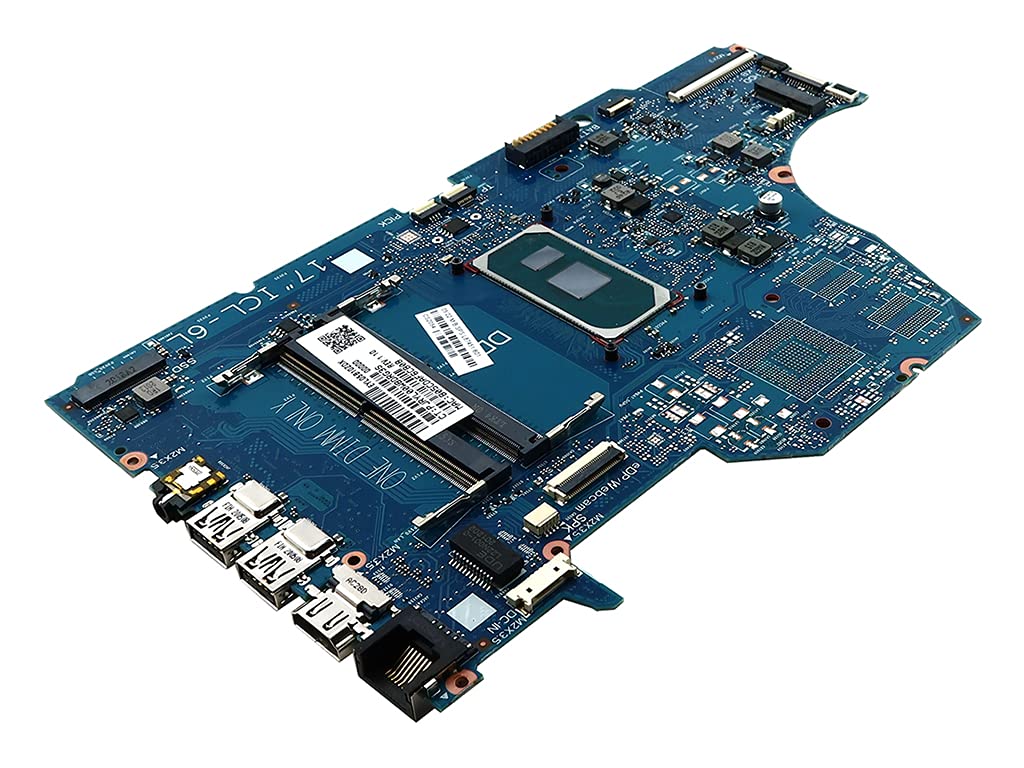
그림 1: 오버헤드 view of the HP laptop motherboard, model L87451-001, showing its various components and connectors. The board is blue with silver and copper traces.
호환 모델: HP 17-BY (e.g., 17-BY3001CY, 17-BY3002CY, 17-BY3003CA, 17-BY3005CY, 17-BY3006CY, 17-BY3007CY, 17-BY3008CA, 17-BY3051CL, 17-BY3053CL, 17-BY3056CL, 17-BY3065ST, 17-BY3613DX, 17-BY3652CL), 17T-BY (e.g., 17T-BY300).
주요 특징:
- Integrated Intel Core i5-1035G1 Processor (SRGKG)
- Two DDR4 SDRAM Memory Slots
- Compatible with HP 17-by and 17T-by series laptops
3. 안전 정보
Working with electronic components requires careful attention to safety. Failure to follow these guidelines may result in personal injury or damage to your equipment.
- 정전기 : Always use an anti-static wrist strap and work on an anti-static mat to prevent electrostatic discharge (ESD), which can damage sensitive components.
- 전원 차단: Ensure the laptop is completely powered off and disconnected from all power sources (AC adapter and battery) before beginning any work.
- 도구 사용법: Use appropriate tools for the task. Avoid using excessive force.
- 구성 요소 처리: Handle the motherboard by its edges. Avoid touching integrated circuits or connectors directly.
- 전문적인 설치: If you are not comfortable performing the installation, seek assistance from a qualified technician.
4. 설정 및 설치
Replacing a laptop motherboard is a complex procedure. The following steps are general guidelines. Refer to your specific HP laptop's service manual for detailed, model-specific instructions.
- 준비: Power off the laptop, disconnect the AC adapter, and remove the battery. Discharge any residual power by holding the power button for 15-20 seconds.
- 분해 : 노트북을 조심스럽게 여세요asing. This typically involves removing screws from the bottom cover, keyboard, palm rest, and other components. Document screw locations and types.
- 구성 요소 제거: Disconnect all cables (display, keyboard, touchpad, speakers, Wi-Fi, etc.) and remove components such as RAM, SSD/HDD, Wi-Fi card, and cooling assembly from the old motherboard.
- Old Motherboard Removal: Unscrew the old motherboard from the laptop chassis. Carefully lift it out, ensuring no cables or components are still attached.
- New Motherboard Installation: Place the new motherboard into the chassis, aligning it with the screw posts. Secure it with the appropriate screws.
- Component Reinstallation: Reinstall all previously removed components (RAM, SSD/HDD, Wi-Fi card, cooling assembly) onto the new motherboard. Reconnect all cables, ensuring they are properly seated and secured.
- 재조립: 노트북을 다시 조립하세요asing, ensuring all screws are tightened and components are correctly aligned.
- 초기 전원 켜기: Reconnect the AC adapter and battery. Power on the laptop. The system may take a moment to recognize new hardware.

그림 2: 자세한 view of the left side of the HP laptop motherboard, highlighting the USB ports, audio jack, and other peripheral connectors. This area is crucial for external device connectivity.
5. 운영 고려 사항
Once the motherboard is installed and the system is reassembled, the laptop should power on normally. The operating system should detect the new hardware. If a new operating system installation is required, follow standard procedures.
- BIOS/UEFI 액세스: To access the system's BIOS/UEFI settings, typically press F10, F2, 또는 에스케이프 immediately after powering on the laptop.
- 드라이버 설치: Ensure all necessary drivers for the new motherboard and integrated components are installed. These can usually be found on the official HP support web사용하시는 노트북 모델에 맞는 웹사이트입니다.
6. 유지관리
Proper maintenance can extend the lifespan of your laptop and its components.
- 먼지 제거: Periodically clean the laptop's cooling system (fans and heatsinks) to prevent dust buildup, which can lead to overheating. Use compressed air for this purpose.
- 열전도 페이스트: If the cooling assembly was removed during installation, ensure fresh thermal paste is applied to the CPU and GPU (if applicable) before reattaching the heatsink.
- 소프트웨어 업데이트: Keep your operating system and drivers updated to ensure optimal performance and compatibility.
7. 문제 해결
새 마더보드를 설치한 후 문제가 발생하면 다음 문제 해결 단계를 고려하십시오.
- 전원 없음/부팅 불가:
- Verify AC adapter and battery connections.
- 전원 버튼 케이블이 마더보드에 올바르게 연결되어 있는지 확인하십시오.
- Try booting with only essential components (CPU, one RAM stick, display).
- 디스플레이 없음:
- Check the display cable (e.g., eDP cable) connection to both the motherboard and the display panel.
- RAM 모듈이 슬롯에 제대로 끼워졌는지 확인하세요.
- 시스템 불안정/충돌:
- Run memory diagnostics to check RAM integrity.
- Verify that the cooling system is functioning correctly and the CPU is not overheating.
- 모든 드라이버가 올바르게 설치되고 업데이트되었는지 확인하십시오.
- 주변 장치 오작동:
- Check cable connections for affected components (keyboard, touchpad, USB ports).
- Reinstall or update drivers for the specific peripheral.
If issues persist, consult the official HP support resources or a professional technician.
8. 사양
| 특징 | 세부 사항 |
|---|---|
| 모델명 | L87451-001 (Compatible with L87451-501, L87451-601) |
| 호환 부품 번호 | TPN-I133, SNAPE01-6050A3168901-MBN-A02, ICL-6L, SNAPE01-6050A3168901-MB-A0 |
| 호환되는 노트북 시리즈 | HP 17-BY, HP 17T-BY |
| 프로세서/CPU | Intel Core i5-1035G1 (SRGKG) |
| Processor/CPU Speed | 1.00GHz(기본 클럭), 3.60GHz(최대 터보 클럭) |
| 최대 지원 메모리 | 16GB |
| 메모리 슬롯 수 | 2 |
| 메모리 유형 | DDR4 SD램 |
| 메모리 클럭 속도 | 3200MHz |
| 칩셋 유형 | 시스템온칩(SoC) |
| CPU 소켓 | 통합 |
| 품목 무게 | 2파운드 |
| 플랫폼 | No Operating System (Motherboard only) |
9. 보증 및 지원
Warranty coverage for this replacement motherboard is typically provided by the seller or manufacturer at the time of purchase. Please retain your proof of purchase for any warranty claims.
For technical support, driver downloads, or further assistance with your HP laptop, please visit the official HP 지원 web대지 and search for your specific laptop model.


