
BOOMBOOST JSD520
BOOMBOOST JSD520 Car MP3 Stereo Player User Manual
모델: JSD520
1. 서론
구매해주셔서 감사합니다asing the BOOMBOOST JSD520 Car MP3 Stereo Player. This manual provides detailed instructions for installation, operation, and maintenance of your new car audio system. Please read this manual thoroughly before use to ensure proper functionality and safety.

이미지 1.1: 앞면 view of the BOOMBOOST JSD520 Car MP3 Stereo Player, showing the display, control knob, and USB/AUX ports.
2. 주요 특징
- Smart Bluetooth Calls: Integrated Bluetooth for hands-free calling, enhancing driving safety and convenience.
- 전원 끄기 메모리 기능: Retains frequency, track, and volume settings after power-off, resuming playback from the last point.
- Folder Playback Support: Organize and play songs from different folders on your memory card (SD/USB).
- High-Quality LED Display: Bright yet soft car-gauge LED screen for clear visibility without glare.
- FM 라디오 튜너: Built-in FM radio with automatic search and 18 preset stations (87.5 ~ 108 MHz).
- 다양한 미디어 재생: Supports MP3/WMA audio formats via USB, SD card, and AUX input.
- Electronic Audio Control: Adjustable treble, bass, balance, and fader.
- Four-Channel Output: Provides robust audio output for a comprehensive sound experience.
3. 패키지 내용
패키지를 열 때 아래 나열된 모든 품목이 들어 있고 상태가 양호한지 확인하세요.
- 1 x BOOMBOOST JSD520 Car MP3 Stereo Player
- 1 x 리모콘(배터리는 포함되지 않음)
- 배선 하네스 2개
- 2 x Installation Tool Sets
- 1 x 사용자 설명서

Image 3.1: Contents of the BOOMBOOST JSD520 package, showing the main unit, remote control, wiring harnesses, and user manual.
4. 설정 및 설치
최적의 성능과 안전을 위해 전문가 설치를 권장합니다. 설치를 시작하기 전에 차량의 전원을 차단하십시오.
4.1 배선도
Connect the provided wiring harnesses according to your vehicle's wiring specifications. Refer to the detailed wiring diagram in the included paper manual for specific connections (power, ground, speaker outputs, antenna, etc.).
4.2 장치 장착
- 금속 장착 슬리브를 차량 대시보드 개구부에 삽입합니다.
- Bend the tabs on the sleeve outwards to secure it in place.
- Slide the JSD520 unit into the mounting sleeve until it clicks into position.
5. 사용 설명서
5.1 전원 켜기/끄기 및 볼륨 제어
- 를 누르세요 힘 버튼(일반적으로 다음과 같이 표시됨) ) 기기를 켜거나 끌 수 있습니다.
- 큰 것을 회전시키다 볼륨 노브 to adjust the audio level.
5.2 모드 선택
를 누르세요 방법 button to cycle through available audio sources: FM Radio, Bluetooth, USB, SD, and AUX.
5.3 FM 라디오 기능
- FM 모드에서는 밴드 FM 밴드(FM1, FM2, FM3)를 전환하는 버튼입니다.
- 를 누르세요 구하다 buttons (<< / >>) to automatically search for the next strong station.
- 를 누르고 계세요 구하다 수동 튜닝을 위한 버튼.
- 방송국을 저장하려면 원하는 주파수에 맞춘 다음, 신호음이 들릴 때까지 프리셋 번호 버튼(1~6) 중 하나를 길게 누르십시오.
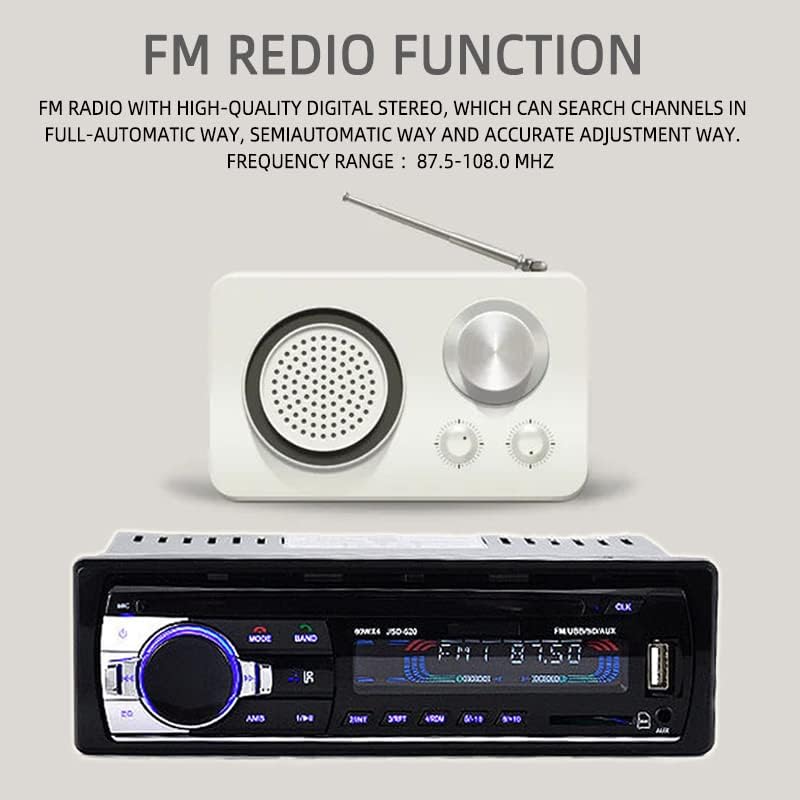
Image 5.1: Illustration of the FM Radio function, highlighting the frequency range and automatic search capability.
5.4 블루투스 작동
- 단위를 전환하세요 BT mode. The display will show "BT" or a Bluetooth icon.
- On your mobile device, enable Bluetooth and search for available devices. Select "JSD520" to pair.
- Once paired, you can play audio from your device or make/receive hands-free calls.
- 사용하세요 전화 받기/종료하기 buttons on the unit or remote for call management.

Image 5.2: Visual representation of the Bluetooth function, emphasizing hands-free mobile phone operation for safe driving.
5.5 USB/SD 카드 재생
- USB 포트에 USB 드라이브를 삽입하거나 SD 카드 슬롯에 SD 카드를 삽입하십시오. 기기가 자동으로 USB/SD 모드로 전환되어 재생을 시작합니다.
- 사용하세요 다음/이전 트랙 곡을 탐색하는 버튼입니다.
- 를 누르세요 접는 사람 button (if available) to browse folders on the storage device.
5.6 AUX 입력
- Connect an external audio device (e.g., smartphone, MP3 player) to the 3.5mm AUX input jack on the front panel using an audio cable.
- 단위를 전환하세요 보조 mode. Audio from the connected device will now play through the car speakers.

Image 5.3: Demonstration of AUX audio input, allowing external devices to play sound through the car's high-power speakers.
5.7 원격 제어 작동
The included remote control provides convenient access to most functions. Ensure the battery is inserted correctly (CR2025, not included).

Image 5.4: Quick operation using the remote control for volume and music selection in SD or USB mode.
6. 유지관리
- 청소: 부드럽고 마른 천을 사용하여 기기 표면을 닦으세요. 연마성 세제나 용제는 사용하지 마세요.
- 온도: 장시간 극한의 온도나 직사광선에 장치를 노출시키지 마십시오.
- 수분: 제품을 건조하게 유지하십시오. 습기는 내부 부품을 손상시킬 수 있습니다.
- 퓨즈 교체: If the unit does not power on, check the fuse located at the rear of the unit. Replace with a fuse of the same rating if necessary.
7. 문제 해결
| 문제 | 가능한 원인 | 해결책 |
|---|---|---|
| 전원이 없습니다 | 퓨즈 단선; 배선 오류; 차량 배터리 방전 | Check/replace fuse; Verify wiring connections; Charge vehicle battery |
| 소리가 나지 않습니다 | 볼륨이 너무 작습니다; 음소거가 활성화되었습니다; 스피커 선이 분리되었습니다 | 볼륨 높이기; 음소거 해제; 스피커 연결 상태 확인하기 |
| 블루투스가 연결되지 않습니다 | Bluetooth not enabled on device; Unit not in BT mode; Device too far | Enable Bluetooth on device; Switch unit to BT mode; Move device closer |
| USB/SD 카드가 재생되지 않습니다 | 지원되지 않음 file 형식; 손상됨 files; Improperly inserted device | Ensure MP3/WMA format; Reformat/check files; Reinsert USB/SD card |
| FM 수신 불량 | 안테나가 연결되지 않았습니다. 신호가 약한 지역입니다. 간섭이 있습니다. | Check antenna connection; Move to stronger signal area; Reduce interference sources |
8. 사양
| 특징 | 사양 |
|---|---|
| 모델명 | JSD520 |
| 권tage | 24볼트 |
| 화면 크기 | 2.5인치 |
| 해결 | 240 x 320 픽셀 |
| 재료 유형 | 금속 + 플라스틱 |
| 품목 무게 | 0.43kg(380g) |
| 제품 치수 | 18.3 x 8 x 5.8cm(5.8 x 8 x 5.8cm) |
| 출력 전력 | 4 x 60W (총 240W) |
| 오디오 출력 모드 | 스테레오 재생 |
| 서라운드 사운드 채널 구성 | 4.0 |
| 지원되는 미디어 형식 | MP3, WMA |
| 연결 기술 | USB, Auxiliary, Bluetooth |
| FM 주파수 범위 | 87.5~108MHz |

Image 8.1: Product dimensions, indicating length, width, and height in centimeters.
9. 보증 및 지원
This product comes with a standard manufacturer's warranty. Please refer to the warranty card included in your package for specific terms and conditions. For technical support, troubleshooting assistance, or warranty claims, please contact your retailer or the BOOMBOOST customer service department. Keep your purchase receipt as proof of purchase.
Ask a question about this manual
Ask about setup, troubleshooting, compatibility, parts, safety, or missing instructions. Manuals+ will review the question and use this page’s manual context to help answer it.