
오모톤 WK003
OMOTON 2.4GHz Wireless AZERTY Keyboard Instruction Manual
모델: WK003
브랜드: 오모톤
1. 서론
Thank you for choosing the OMOTON 2.4GHz Wireless AZERTY Keyboard. This ultra-slim, silent keyboard is designed for comfortable and efficient typing across various Windows operating systems. This manual provides detailed instructions for setting up, operating, maintaining, and troubleshooting your new keyboard to ensure optimal performance.
2. 패키지 내용
Please check the package contents carefully. If any items are missing or damaged, please contact OMOTON customer support.
- 1 x OMOTON 2.4GHz Wireless AZERTY Keyboard
- 1 x USB 수신기
- 1 x 사용자 설명서
3. 설정 가이드
OMOTON 무선 키보드를 설정하려면 다음 단계를 따르세요.
- 배터리 설치: Open the battery compartment on the back of the keyboard. Insert two AAA batteries (not included), ensuring correct polarity. Close the compartment.
- USB 수신기 삽입: Locate the USB receiver, which is magnetically stored in the battery compartment. Plug the USB receiver into an available USB port on your computer.

Image: Battery compartment with USB receiver and AAA batteries.
- 전원 켜기: Slide the ON/OFF switch located on the top right side of the keyboard to the "ON" position.
- 연결하다: Your computer should automatically detect and install the necessary drivers for the keyboard. No additional software is required.

Image: Plug & Play setup with USB receiver.
이제 키보드를 사용할 준비가 되었습니다.
4. 사용 설명서
4.1 기본 타이핑
Simply begin typing. The keyboard features a standard AZERTY layout for familiar use.
4.2 Fn Lock Function
The keyboard includes a convenient Fn Lock function. By default, the F1-F12 keys perform their standard function. To access the multimedia shortcuts directly without pressing the Fn key, activate the Fn Lock.
- Activate/Deactivate Fn Lock: 누르다 Fn + Échap simultaneously. When activated, the multimedia functions (e.g., volume control, home page) will be directly accessible by pressing F1-F12. When deactivated, F1-F12 will perform their standard functions, and multimedia actions will require pressing Fn + Fx.

Image: Fn Lock function and multimedia keys.
4.3 멀티미디어 바로 가기
The keyboard provides 12 multimedia shortcuts for quick access to common functions. These can be used directly when Fn Lock is active, or by pressing Fn in combination with the respective F-key when Fn Lock is inactive.
| 열쇠 | 기능 |
|---|---|
| F1 | 무음 |
| F2 | 볼륨 낮추기 |
| F3 | 볼륨을 높이다 |
| F4 | 이전 트랙 |
| F5 | 재생/일시정지 |
| F6 | 다음 트랙 |
| F7 | Brightness Down (System Dependent) |
| F8 | Brightness Up (System Dependent) |
| F9 | 검색 |
| F10 | 홈페이지 |
| F11 | 복사 |
| F12 | 반죽 |
4.4 호환성
This keyboard is compatible with Windows 11, 10, 8, 7, XP, and Vista, making it suitable for a wide range of desktop and laptop computers.
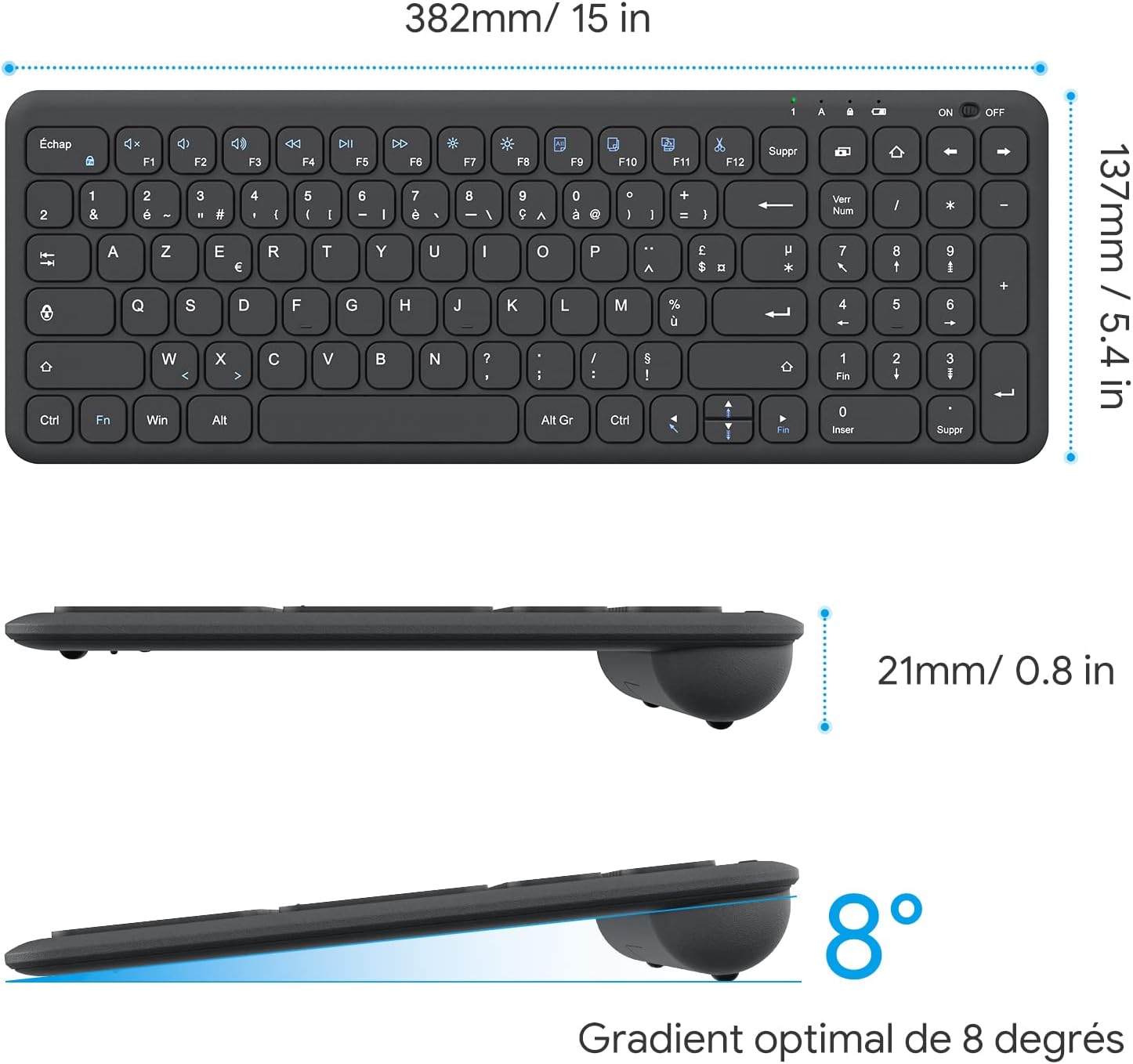
Image: Keyboard compatibility with Windows systems.
5. 유지관리
5.1 배터리 교체
When the keyboard's performance degrades or the indicator light flashes, it's time to replace the batteries. Open the battery compartment on the back and replace the two AAA batteries with new ones, observing polarity.
5.2 청소
키보드를 청소하려면 부드러운 천으로 표면을 살짝 닦으세요.amp cloth. Avoid using harsh chemicals or abrasive materials. Ensure the keyboard is turned off before cleaning.
5.3 USB Receiver Storage
For convenience and to prevent loss, the USB receiver can be magnetically stored inside the keyboard's battery compartment when not in use or during transport.
6. 문제 해결
키보드 사용에 문제가 발생하면 다음의 일반적인 해결 방법을 참조하십시오.
- 키보드가 응답하지 않습니다:
- Ensure the keyboard is turned ON.
- 배터리가 올바르게 설치되었고 충전량이 충분한지 확인하세요. 필요하면 교체하세요.
- USB 수신기가 컴퓨터의 정상 작동하는 USB 포트에 제대로 꽂혀 있는지 확인하세요. 다른 USB 포트에 연결해 보세요.
- 컴퓨터를 다시 시작하세요.
- 입력 지연 또는 간헐적 입력:
- Ensure the keyboard is within the effective operating range (up to 10 meters) of the USB receiver.
- Reduce potential interference by moving the keyboard closer to the receiver or away from other wireless devices (e.g., Wi-Fi routers, cordless phones).
- Check battery level. Low batteries can affect wireless performance.
- 작동하지 않는 특정 키:
- 해당 키 주변을 부드럽게 청소하여 이물질을 제거하십시오.
- If the issue persists, contact OMOTON customer support for further assistance.
7. 사양
Detailed technical specifications for the OMOTON Wireless AZERTY Keyboard:
| 특징 | 세부 사항 |
|---|---|
| 상표 | 오모톤 |
| 모델 | WK003 |
| 연결 기술 | 2.4GHz 무선(USB 수신기) |
| 키보드 레이아웃 | 아제르티 |
| 호환 장치 | PC, Desktop, Laptop |
| 호환되는 운영 체제 | Windows 11/10/8/7/XP/Vista |
| 특별 기능 | 12 Multimedia Shortcuts, Fn Lock, Silent Keys, Ultra-Slim Design, Magnetic USB Receiver Storage |
| 색상 | 검은색 |
| 전원 | AAA 배터리 2개(포함되지 않음) |
| 치수(길이 x 너비 x 높이) | 38.1 x 13.7 x 2cm(15 x 5.4 x 0.8인치) |
| 키의 개수 | 99 |
| 키 스위치 유형 | Tactile (Scissor-mechanism) |
| Optimal Gradient | 8도 |

Image: Keyboard dimensions and ergonomic design.

Image: Scissor-mechanism key design.
8. 보증 정보
OMOTON products typically come with a manufacturer's warranty. Please refer to the warranty card included with your product or visit the official OMOTON web자세한 보증 약관은 해당 웹사이트를 참조하십시오. 보증 청구를 위해서는 구매 영수증을 증빙 자료로 보관하십시오.
9. 고객 지원
If you have any questions, require technical assistance, or experience issues not covered in this manual, please do not hesitate to contact OMOTON customer support. You can usually find contact information on the OMOTON official web해당 사이트를 통해서나 제품을 구매한 소매업체를 통해서도 구매가 가능합니다.
Ask a question about this manual
Ask about setup, troubleshooting, compatibility, parts, safety, or missing instructions. Manuals+ will review the question and use this page’s manual context to help answer it.