
Comfee PAC 12000
컴피 이동식 에어컨 PAC 12000 사용 설명서
Model: PAC 12000 | Brand: Comfee
1. 소개 및 이상view
Thank you for choosing the Comfee PAC 12000 Mobile Air Conditioner. This versatile 3-in-1 unit provides cooling, dehumidifying, and fan functions, designed to create a comfortable indoor environment. With a powerful 12000 BTU (3.5 kW) cooling capacity, it is suitable for rooms up to 43m . This manual provides essential information for safe operation, installation, maintenance, and troubleshooting.

이미지: 앞면 view of the Comfee PAC 12000 Mobile Air Conditioner.
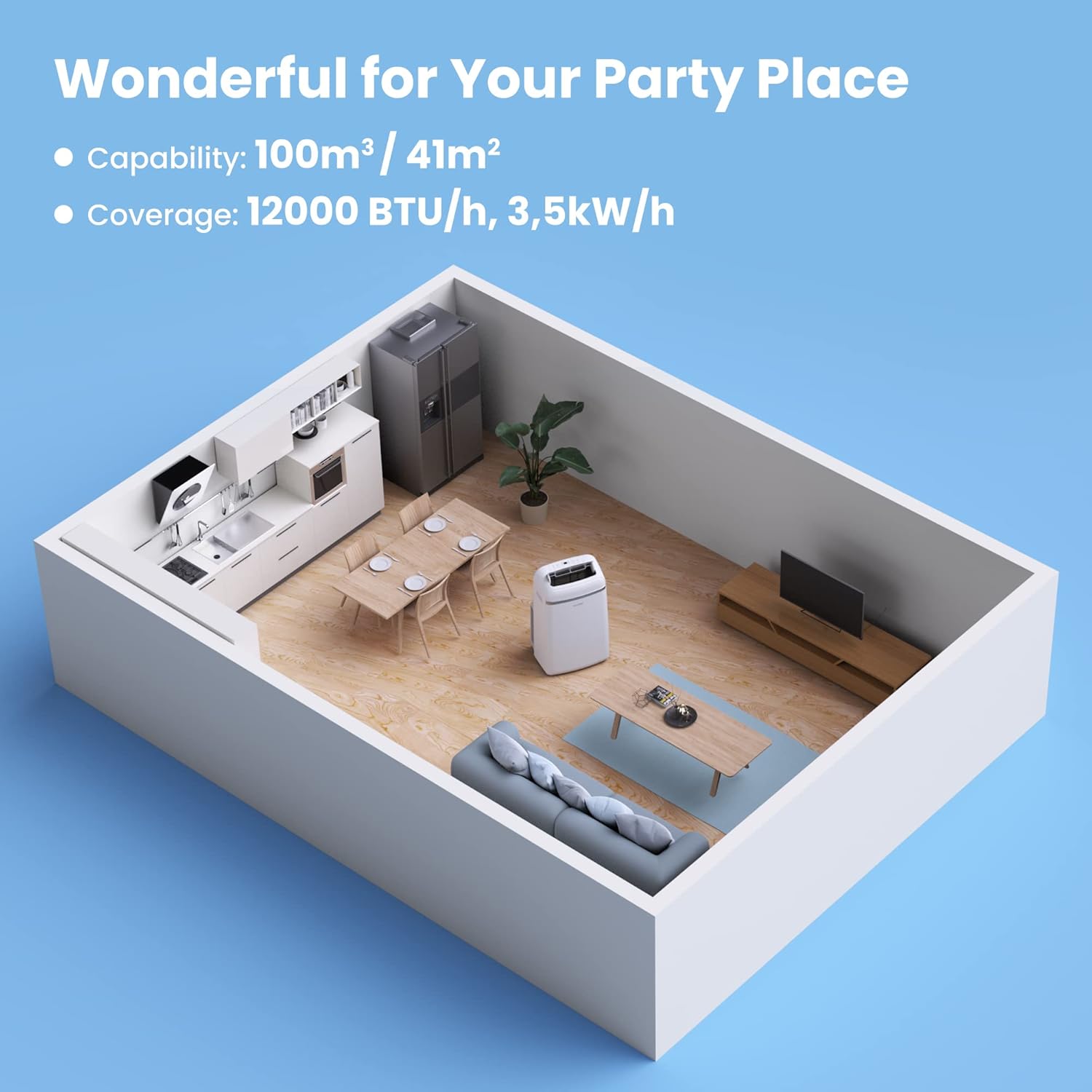
Image: The Comfee PAC 12000 Mobile Air Conditioner providing comfort in a living room setting.
2. 안전 정보
Before operating the appliance, please read all safety instructions carefully to prevent injury or damage. This appliance uses R290 refrigerant, which is environmentally friendly but flammable. Do not attempt to repair or modify the unit yourself. Always consult a qualified professional for service.
- 장치가 안정적이고 평평한 표면에 놓여 있는지 확인하십시오.
- 공기 흡입구나 배출구를 막지 마십시오.
- 장치를 열원과 직사광선에서 멀리 두십시오.
- 청소 또는 유지 관리 전에 장치의 플러그를 뽑으십시오.
- 손상된 전원 코드나 플러그로 작동하지 마십시오.

Image: Certifications for the Comfee PAC 12000, highlighting its R290 Eco Friendly refrigerant, GS, and TÜV SÜD safety marks.

Image: The Comfee PAC 12000 uses R290, an eco-friendly refrigerant, reducing global warming potential by 98% compared to previous generations.
3. 제품 구성품 및 액세서리
The Comfee PAC 12000 comes with all necessary components for quick setup and operation.

Image: Diagram showing all included accessories for the Comfee PAC 12000.
포함된 액세서리:
- 장치 어댑터
- 배기 호스 어댑터
- 창 슬라이더 어댑터
- 배기 호스
- Holder for Wire Winding
- Self-adhesive Foam Seal
- Screws, Bolts, Dowels
- Non-adhesive Foam Seal
- Wall Outlet Adapter
- 원격 제어
- 창 슬라이더
- 배수 호스
4. 설정 및 설치
The Comfee PAC 12000 is designed for easy installation, adapting to various window shapes to efficiently exhaust hot air.
설치 단계:
- 창문을 준비하세요: Install the window slider adapter in your window opening.
- 배기 호스를 연결하세요: Attach the exhaust hose to the unit's exhaust port and then to the window slider adapter.
- 틈새를 봉쇄하세요: Use the provided foam seals to seal any gaps around the window opening to prevent hot air from re-entering the room.
- 단위 위치: Place the unit on a flat, stable surface, ensuring there is adequate space around it for proper airflow. The integrated casters allow for flexible positioning.

Image: The Comfee PAC 12000 is easy to install and adapts to various window shapes.

Image: Step-by-step guide for installing the exhaust hose with the window slider adapter.

Image: The four casters on the underside allow for flexible positioning of the unit.
5. 사용 설명서
The Comfee PAC 12000 offers multiple operating modes and convenient controls for optimal comfort.
제어판 및 원격 제어:

이미지: 이상view of the remote control and the unit's top control panel for easy operation.
작동 모드:
- 냉각 모드: 방을 강력하게 냉각합니다.
- 제습 모드: Reduces humidity levels, ideal for damp 환경.
- 팬 모드: Circulates air with 3 adjustable fan speeds.
- 지능형 모드: Automatically adjusts settings to maintain optimal room climate and save energy.
- 수면 모드 : Operates quietly with adjusted settings for comfortable sleep.

Image: Visual representation of the four main operating modes: Intelligent, Cooling, 3 Speeds Fan, and Dehumidification.

Image: Intelligent Mode automatically maintains desired room climate and saves energy, while Cooling Mode provides rapid cooling with 12000 BTU/h.

Image: Fan Mode refreshes room air with desired fan speed, and Dehumidification Mode offers effective dehumidifying with 84L/24h capacity.
추가 기능:
- 24시간 타이머: Set the desired operating time in advance, so you can enjoy a comfortable and dry environment upon your return.
- 팔로우 미 기능: The remote control acts as a thermostat, sensing the temperature around you and optimizing the unit's operation to maintain your comfort.
- 자동 스윙: The adjustable air outlet grille ensures optimal air distribution.

Image: Illustration of the 24-hour timer function, allowing pre-setting of operation times.

Image: The 'Follow Me' function on the remote control optimizes temperature around you for smart comfort.
6. 유지관리
Regular maintenance ensures the longevity and efficient operation of your Comfee PAC 12000.
필터 청소:
The removable filter on the back of the unit should be cleaned regularly to maintain air quality and unit efficiency. Wash the filter with water and mild detergent, then allow it to dry completely before reinserting.

Image: Cleaning the removable filter on the back of the unit helps maintain clean and fresh air.
일반 관리 :
- 부드러운 천으로 외부를 닦아주세요.amp 옷감. 강한 화학 물질이나 연마성 세제를 사용하지 마십시오.
- 청소하기 전에 반드시 제품의 전원 플러그를 뽑으십시오.
- For long-term storage, drain any accumulated water, clean the filter, and store the unit in a dry place.

Image: The automatic restart feature ensures the unit resumes operation with previous settings after a power outage.
7. 문제 해결
If you encounter issues with your Comfee PAC 12000, refer to the following common troubleshooting tips. For more detailed information, please consult the full product manual or contact customer support.
| 문제 | 가능한 원인 | 해결책 |
|---|---|---|
| 장치가 켜지지 않습니다 | No power supply; Power cord not plugged in; Unit is in standby mode. | Check power outlet; Ensure power cord is securely plugged in; Press the power button. |
| 냉각이 부족합니다 | Air filter is dirty; Exhaust hose is not properly installed or sealed; Room size is too large; Doors/windows are open. | Clean the air filter; Check exhaust hose installation and seal all gaps; Ensure unit is appropriate for room size; Close all doors and windows. |
| 장치가 시끄럽다 | Unit is not on a level surface; Air filter is dirty; Fan speed is too high. | Place unit on a level surface; Clean the air filter; Reduce fan speed. |
| 물 누출 | Drain plug is open or loose; Water tank is full (in dehumidifying mode). | Ensure drain plug is securely closed; Empty the water tank. |
8. 사양
Detailed technical specifications for the Comfee PAC 12000 Mobile Air Conditioner.

이미지: 이상view of key features including larger capacity, energy efficiency, 24h timer, sleep mode, intelligent mode, and dehumidification mode, along with dimensions.
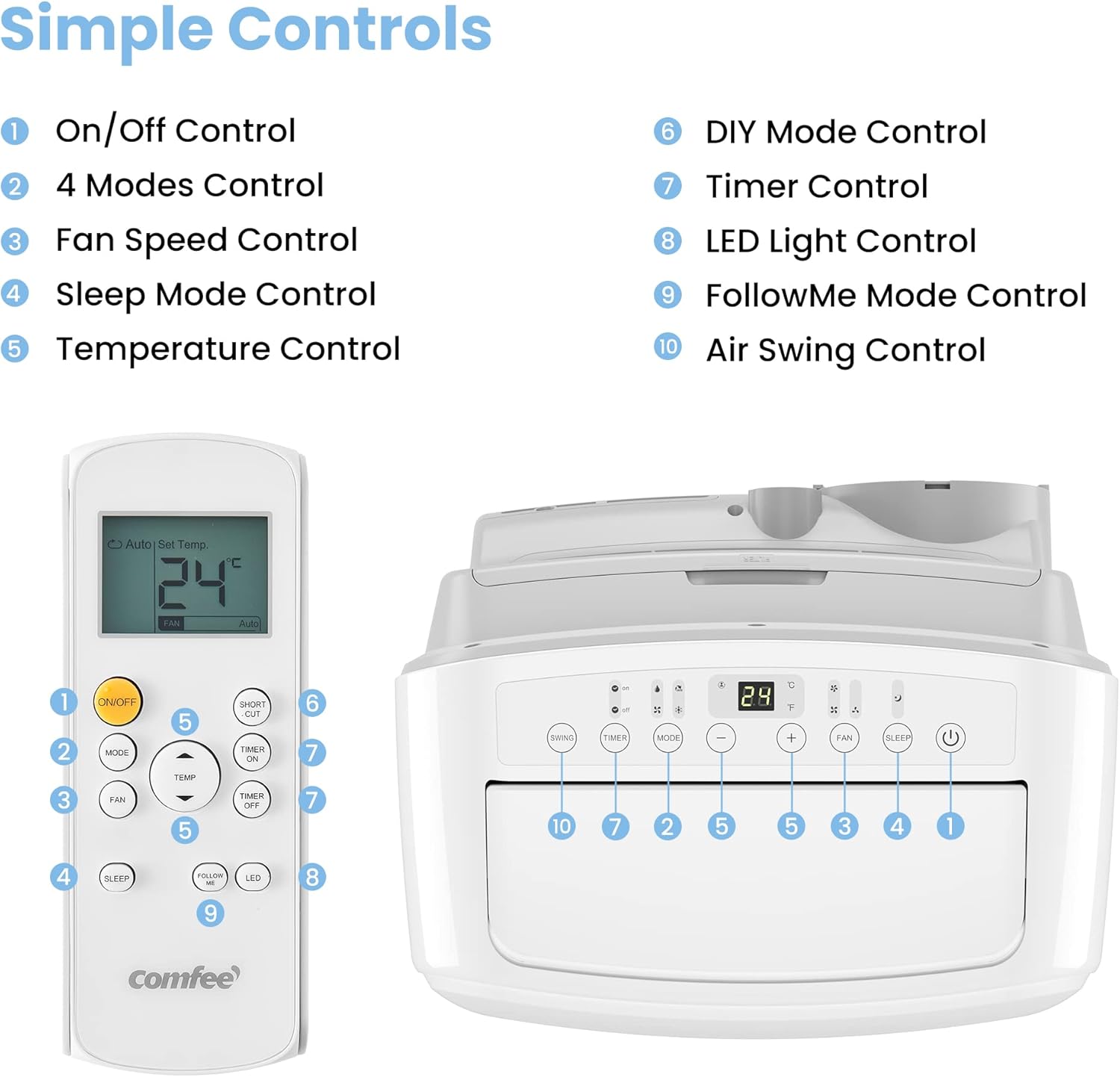
Image: Diagram illustrating the recommended room coverage for the Comfee PAC 12000.
| 사양 | 값 |
|---|---|
| 모델 번호 | 팩 12000 |
| 냉각 용량 | 12000 BTU / 3.5 kW |
| 추천 객실 크기 | Up to 43m (117m ) |
| 기능 | 냉방, 제습, 팬 |
| 전력 소비 | 1350 와트 |
| 권tage | 230 볼트 |
| 소음 수준 | 63데시벨 |
| 냉각제 | R290 (친환경) |
| 제품 크기(L x W x H) | 46.7 x 39.7 x 76.5cm |
| 품목 무게 | 33 킬로그램 |
| 에너지 효율 비율(EER) | 2.6 |
| 에너지 클래스 | A |

Image: Detailed dimensions of the Comfee PAC 12000 unit.
9. 보증 및 지원
The Comfee PAC 12000 Mobile Air Conditioner comes with a 3년 보증귀하의 구매와 관련하여 마음의 평화를 보장합니다.
For technical support, warranty claims, or any questions not covered in this manual, please contact Comfee customer service. Refer to your purchase documentation for specific contact details or visit the official Comfee web대지.
보증을 위해 구매 증빙서류를 보관하세요.
Ask a question about this manual
Ask about setup, troubleshooting, compatibility, parts, safety, or missing instructions. Manuals+ will review the question and use this page’s manual context to help answer it.