
1. 서론
The SteelSeries Arctis Nova 1X Gaming Headset delivers an immersive audio experience across multiple platforms. Designed for comfort and clarity, it features the Signature Arctis Sound and a ClearCast Gen 2 Microphone, making it ideal for Xbox Series X|S, PC, PlayStation, Switch, and mobile gaming.
This manual provides detailed instructions for setting up, operating, and maintaining your Arctis Nova 1X headset to ensure optimal performance and longevity.
2. 상자 안에 무엇이 들어있나요?
Upon unboxing your SteelSeries Arctis Nova 1X Gaming Headset, you should find the following components:
- Arctis Nova 1X 헤드셋
- 메인 헤드셋 케이블(3.5mm)
- Headband (pre-installed or separate, as per packaging)
- 제품 정보 가이드

이미지: 앞면 view of the SteelSeries Arctis Nova 1X Gaming Headset, showcasing its sleek design and microphone.
3. 설정
3.1 헤드셋 연결
The Arctis Nova 1X is a wired headset designed for universal compatibility. To connect your headset:
- Locate the 3.5mm main headset cable.
- Plug one end of the 3.5mm cable into the audio jack on the left earcup of your Arctis Nova 1X headset.
- Plug the other end of the 3.5mm cable into the corresponding audio port on your gaming device (Xbox Series X|S controller, PC, PlayStation controller, Nintendo Switch, or mobile device).
Note: Ensure the cable is securely connected to both the headset and your device for optimal audio and microphone performance.

Image: Diagram illustrating the multi-platform compatibility of the Arctis Nova 1X headset, showing connections to various gaming devices.
4. 헤드셋 작동
4.1 볼륨 조절
Adjust the audio volume directly from the headset:
- Locate the volume wheel on the left earcup.
- Roll the wheel up to increase the volume or down to decrease it.
4.2 마이크 음소거
To mute or unmute your microphone:
- Find the microphone mute button on the left earcup, adjacent to the volume wheel.
- Press the button to toggle the microphone on or off. A red indicator will typically show when the microphone is muted.
4.3 Retractable ClearCast Gen 2 Microphone
The ClearCast Gen 2 microphone is retractable for convenience:
- To use the microphone, gently pull it out from the left earcup until it reaches your desired position.
- To store the microphone, push it back into the earcup until it is fully retracted.
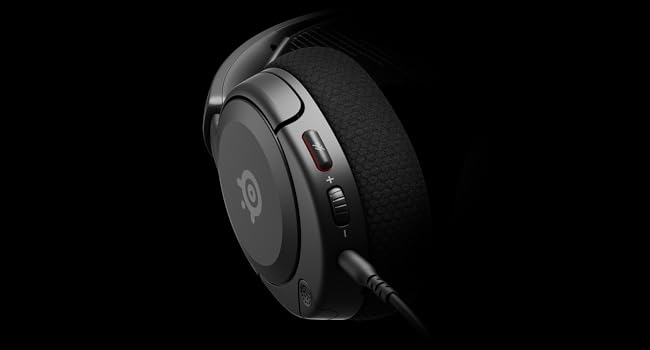
이미지: 클로즈업 view of the left earcup of the Arctis Nova 1X, highlighting the volume wheel and microphone mute button for easy access during gameplay.
Video: Official SteelSeries video demonstrating the features of the Arctis Nova 1 headset, including its audio capabilities and microphone design.
5. 편안함과 착용감
The Arctis Nova 1X is designed for extended gaming sessions with its ComfortMAX System:
- 초경량 디자인: Weighing only 236g, the headset minimizes pressure during long use.
- 높이 조절 가능한 이어컵: The earcups can be adjusted vertically to fit various head sizes comfortably.
- Flexible Suspension Headband: The elastic headband conforms to your head for a secure yet gentle fit.

Image: The Arctis Nova 1X headset highlighting its ultra-lightweight and slim profile, designed for comfort.

Image: The Arctis Nova 1X headset demonstrating its height-adjustable earcups for a personalized and comfortable fit.
6. 오디오 기능
Experience superior sound with the Arctis Nova 1X:
- 전능한 오디오: The Nova Acoustic System with High Fidelity Drivers delivers crystal-clear highs, precise mids, and deep bass.
- 360° 공간 오디오: Immerse yourself in the game with surround sound that allows you to pinpoint enemy positions and environmental cues.
- Pro-grade Parametric EQ: 사운드를 전문가처럼 맞춤 설정하세요file with the SteelSeries Sonar Audio Software Suite for a competitive edge.

Image: The Arctis Nova 1X headset highlighting its "Almighty Audio" capabilities for a rich sound experience.
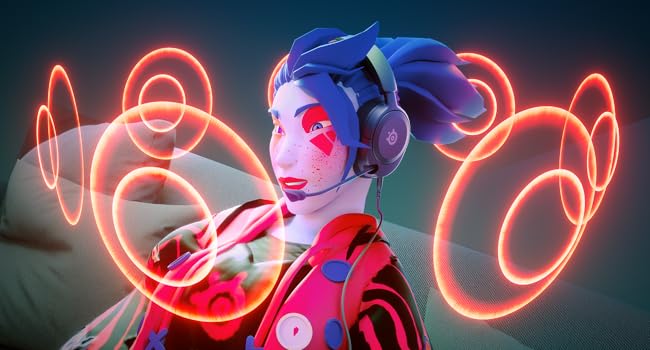
Image: Visual representation of 360° Spatial Audio, showing sound waves surrounding a gamer wearing the Arctis Nova 1X headset.

Image: Graphic illustrating the Pro-grade Parametric EQ, suggesting advanced audio customization options available with the headset.
7. Microphone Features
The ClearCast Gen 2 Mic ensures clear communication:
- AI 노이즈 제거: Advanced AI algorithms filter out background noise, ensuring your voice is heard clearly by teammates.
- 접이식 디자인: The microphone can be fully retracted into the earcup when not in use, maintaining a sleek profile.

Image: The Nova 1 AI Microphone, emphasizing its noise-cancelling capabilities for clear voice communication.
8. 유지관리
To ensure the longevity and optimal performance of your Arctis Nova 1X headset, follow these maintenance guidelines:
- 청소: 이어컵과 헤드밴드는 부드럽고 마른 천으로 닦아주세요. 더 깨끗하게 청소하려면 약간 거친 천을 사용하세요.amp 순한 비누를 묻힌 천을 사용하면 스피커 그릴이나 포트에 습기가 들어가지 않도록 할 수 있습니다.
- 케이블 관리: Avoid sharp bends or excessive pulling on the headset cable to prevent internal damage. Store the cable neatly when not in use.
- 저장: 헤드셋은 직사광선과 극한의 온도를 피해 서늘하고 건조한 곳에 보관하세요.
- 이어폰 팁: If applicable, ensure earbud tips (if using with mobile) fit snugly. Replace worn-out earbud tips to maintain sound quality and comfort.
9. 문제 해결
If you encounter issues with your Arctis Nova 1X headset, try the following solutions:
- 소리가 안 나거나 소리가 작음:
- Ensure the 3.5mm cable is fully inserted into both the headset and your device.
- 헤드셋의 볼륨 조절 휠과 기기의 시스템 볼륨을 확인하세요.
- 헤드셋을 다른 기기에 연결하여 테스트하고 기기별 문제인지 확인해 보세요.
- 마이크가 작동하지 않음:
- Ensure the microphone mute button is not activated (red indicator off).
- Verify the microphone is fully extended and positioned correctly.
- Check your device's audio settings to ensure the correct microphone input is selected and its volume is not muted.
- 나쁜 음질:
- Ensure the 3.5mm cable is not damaged and is securely connected.
- Adjust your device's audio settings or equalizer settings.
10. 사양
| 특징 | 세부 사항 |
|---|---|
| 상표 | 스틸시리즈 |
| 모델명 | 아크티스 노바 1X |
| 모델 번호 | 61616 |
| 연결 기술 | 유선(3.5mm 잭) |
| 귀 위치 | 귀 위 |
| 소음 제어 | 능동 소음 제거(마이크) |
| 오디오 드라이버 유형 | 동적 드라이버 |
| 주파수 범위 | 20Hz - 20,000Hz |
| 마이크로폰 | ClearCast Gen 2 (Retractable, AI Noise Cancelling) |
| 호환 장치 | Xbox Series X|S, PC, PlayStation, Switch, Mobile |
| 품목 무게 | 1.1파운드(약 500g) |
| 색상 | 검은색 |
| 한국어: | 850014119737 |
비디오: 360도 view of the SteelSeries Arctis Nova 1X headset in black, showcasin모든 각도에서 디자인을 살펴보세요.
11. 보증 및 지원
11.1 보증 정보
The SteelSeries Arctis Nova 1X Gaming Headset comes with a 1년 제한 보증 구매일로부터 적용됩니다. 본 보증은 제조상의 결함을 보증하며, 정상적인 사용 환경에서 제품이 의도한 대로 작동함을 보장합니다. 보증 청구를 위해 구매 증빙 자료를 보관해 주십시오.
For detailed warranty terms and conditions, please refer to the official SteelSeries web사이트 또는 제품 포장에 포함된 보증 카드를 참조하세요.
11.2 고객 지원
For further assistance, technical support, or warranty claims, please contact SteelSeries customer support through their official web대지:
You may also find additional resources, FAQs, and software downloads on their support page.