
Opticis LHM2-NT80
Opticis LHM2-NT80 액티브 광 HDMI 2.0 케이블 사용 설명서
Model: LHM2-NT80
1. 서론
This user manual provides comprehensive instructions for the installation, operation, and maintenance of your Opticis LHM2-NT80 Active Optical HDMI 2.0 Cable. This high-performance cable is designed to transmit HDMI 2.0 signals over long distances, up to 80 meters (262 feet) or 100 meters (328 feet) depending on the specific model variant, utilizing hybrid fiber optic and copper technology. Please read this manual thoroughly before using the product to ensure proper functionality and safety.
2. 안전 정보
제품 손상이나 부상을 방지하기 위해 항상 다음 안전 수칙을 준수하십시오.
- Do not expose the cable to excessive force, bending, or crushing, as this can damage the internal optical fibers.
- Avoid exposing the cable to extreme temperatures or high humidity.
- 케이블을 분해하거나 개조하지 마십시오. 그렇게 하면 보증이 무효화되고 손상이 발생할 수 있습니다.
- Ensure proper grounding for all connected devices.
- 커넥터를 깨끗하게 유지하고 먼지나 이물질이 없도록 하십시오.
3. 패키지 내용
패키지에 모든 품목이 들어 있는지 확인하세요.
- Opticis LHM2-NT80 Active Optical HDMI 2.0 Cable (1 unit)
- This User Manual (1 unit)
4. 제품 오버view
The Opticis LHM2-NT80 is an active optical HDMI 2.0 cable designed for reliable long-distance transmission of high-bandwidth video and audio signals. It supports HDMI 2.0 standards, including 4K@60Hz (4:4:4) and 18Gbps data rates. The cable features a durable TPU jacket, making it suitable for various installation environments.
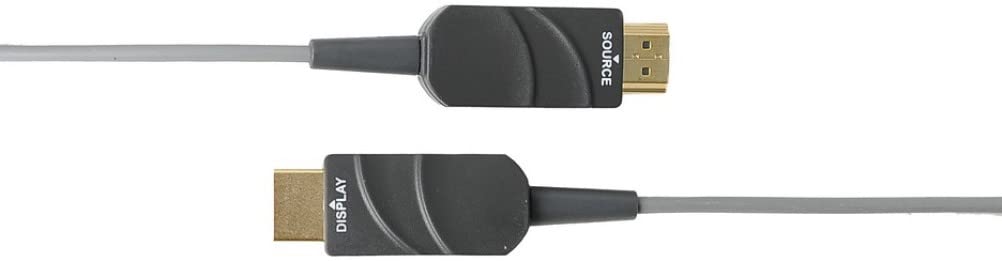
Figure 4.1: The Opticis LHM2-NT80 Active Optical HDMI Cable, showing the distinct 'SOURCE' and 'DISPLAY' labeled connectors. The 'SOURCE' end connects to the video source (e.g., PC, Blu-ray player), and the 'DISPLAY' end connects to the display device (e.g., TV, projector).
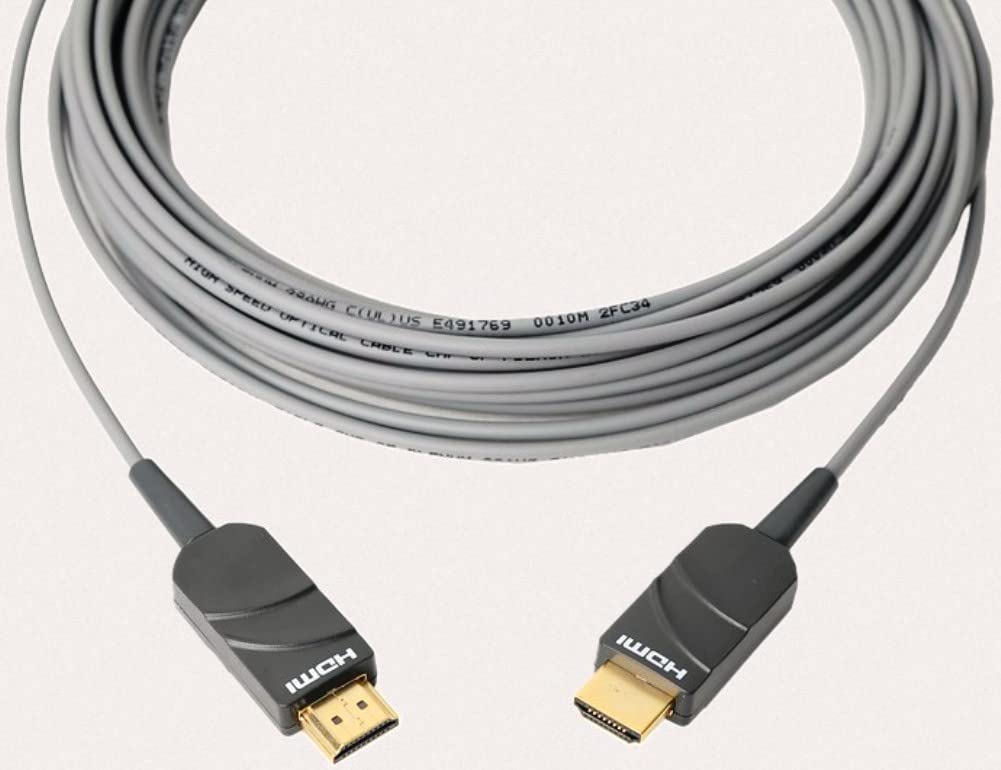
Figure 4.2: The Opticis LHM2-NT80 HDMI cable shown coiled, highlighting its flexible yet durable TPU jacket. The cable is designed for long-distance signal transmission.
주요 특징:
- Supports HDMI 2.0 standards (18Gbps bandwidth).
- Transmits 4K UHD (3840x2160) at 60Hz (4:4:4) up to 80m/100m.
- Hybrid fiber optic and copper construction for reliable long-distance transmission.
- Durable TPU jacket for enhanced flexibility and protection.
- Plug & Play operation, no external power required for most applications.
- Supports HDR, HDCP 2.2, EDID, and CEC.
치수:
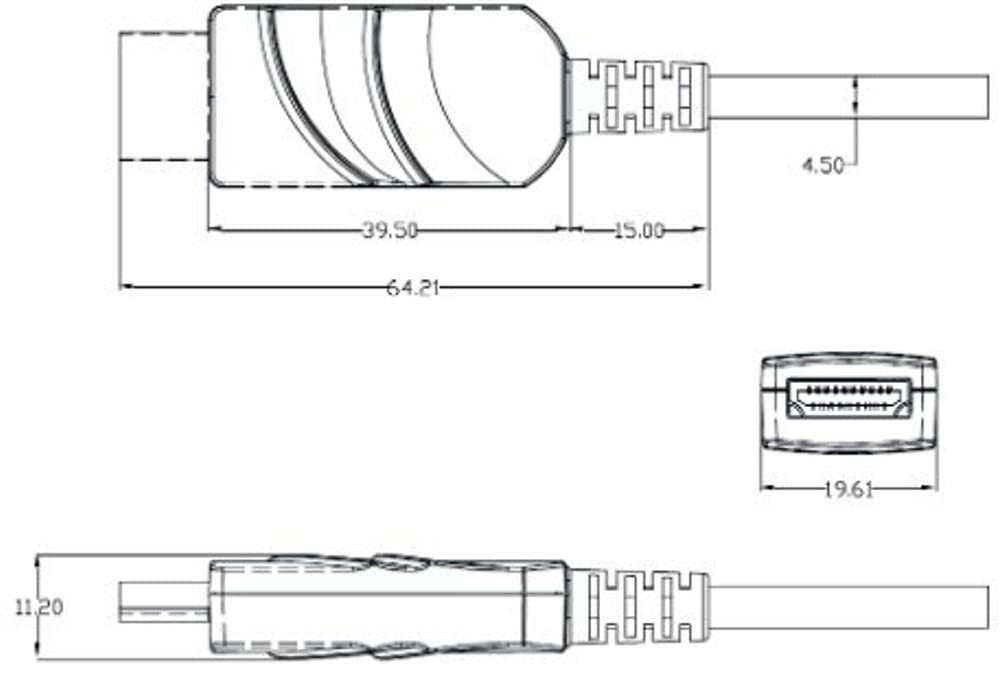
Figure 4.3: Technical drawing illustrating the dimensions of the HDMI connector housing. All measurements are in millimeters (mm).
5. 설정 및 설치
The Opticis LHM2-NT80 cable is designed for simple plug-and-play installation. It is crucial to connect the cable in the correct orientation.
- 케이블 끝 식별: The cable connectors are clearly labeled. One end is marked "SOURCE" and the other is marked "DISPLAY".
- 소스에 연결: Plug the HDMI connector labeled "SOURCE" into the HDMI output port of your source device (e.g., computer, Blu-ray player, game console).
- 디스플레이에 연결: Plug the HDMI connector labeled "DISPLAY" into the HDMI input port of your display device (e.g., TV, monitor, projector).
- 전원 켜기 장치: Ensure both the source and display devices are powered on. The cable will draw power from the HDMI ports.

Figure 5.1: Connection diagram illustrating the proper setup of the LHM2-N series cable. The 'Tx' (Transmitter/Source) end connects to the HDMI source, and the 'Rx' (Receiver/Display) end connects to the HDMI display. This ensures correct signal flow.
중요 참고 사항: The cable is directional. Connecting the "SOURCE" end to the display or the "DISPLAY" end to the source will result in no signal. Always ensure correct orientation.
6. 사용 설명서
Once the Opticis LHM2-NT80 cable is correctly connected between your source and display devices, operation is automatic. The cable functions as a transparent extension of your HDMI connection.
- Ensure your source device is outputting a compatible HDMI signal.
- 디스플레이 장치에서 올바른 HDMI 입력을 선택하십시오.
- The cable will automatically transmit the video and audio signals. No additional software or drivers are required.
7. 유지관리
The Opticis LHM2-NT80 Active Optical HDMI Cable requires minimal maintenance. Follow these guidelines to ensure its longevity:
- 청소: 부드럽고 마른 천을 사용하여 케이블과 커넥터를 부드럽게 닦으세요. 액체 세척제나 연마재를 사용하지 마세요.
- 저장: When not in use, store the cable in a cool, dry place, away from direct sunlight and extreme temperatures. Avoid sharp bends or kinks.
- 손질: 케이블을 연결하거나 분리할 때는 항상 커넥터 하우징 부분을 잡으십시오. 케이블 자체를 잡아당기지 마십시오.
8. 문제 해결
If you encounter issues with your Opticis LHM2-NT80 cable, refer to the following troubleshooting steps:
| 문제 | 가능한 원인 | 해결책 |
|---|---|---|
| 비디오/오디오 신호 없음 | Incorrect cable orientation (SOURCE/DISPLAY ends reversed). Source/display devices not powered on. 화면에 잘못된 입력값이 표시되었습니다. 케이블 손상. | Ensure "SOURCE" end is connected to source and "DISPLAY" end to display. Verify both devices are powered on. 디스플레이에서 올바른 HDMI 입력을 선택하세요. Inspect cable for visible damage. Try a different HDMI cable if available to isolate the issue. |
| 간헐적인 신호 또는 깜빡임 | 연결이 느슨함. Signal compatibility issue. Cable length exceeding limits for specific resolution. | Ensure connectors are firmly seated. Check if source and display support the same HDMI version and features. Reduce resolution or refresh rate to see if signal stabilizes. |
| Poor picture quality (e.g., static, color distortion) | 케이블 손상. 간섭. Source/display settings. | Inspect cable for damage. Ensure it's not near strong electromagnetic interference sources. Check video output settings on your source device and input settings on your display. |
9. 사양
| 특징 | 설명 |
|---|---|
| 모델 | LHM2-NT80 (LHM2-N Series) |
| 상표 | Opticis |
| 케이블 유형 | Active Optical HDMI Cable |
| HDMI 표준 | HDMI 2.0 |
| 데이터 전송 속도 | 초당 18기가비트(Gbps) |
| 지원되는 해상도 | Up to 4K UHD (3840x2160) @ 60Hz (4:4:4) |
| 케이블 길이 | 80 Meters (LHM2-NT80) / Up to 100m (328 feet) for LHM2-N series |
| 재킷 소재 | TPU(열가소성 폴리우레탄) |
| 커넥터 성별 | 남성 대 남성 |
| 색상 | Transparent (Cable Jacket) |
| 힘 | No external power required (draws power from HDMI port) |
| 규정 준수 | HDCP 2.2, EDID, CEC, HDR |
10. 보증 및 지원
For information regarding product warranty, please refer to the official Opticis website or contact your authorized Opticis dealer. Standard manufacturer's warranty terms and conditions apply.
For technical support or further inquiries, please visit the Opticis support page or contact their customer service department. Contact details can typically be found on the manufacturer's official web대지: www.opticis.com
Ask a question about this manual
Ask about setup, troubleshooting, compatibility, parts, safety, or missing instructions. Manuals+ will review the question and use this page’s manual context to help answer it.