
1. 서론
Thank you for choosing the Ctronics RBX-F20 2.5K 4MP Solar WiFi PTZ Outdoor Security Camera. This advanced security camera offers high-resolution surveillance, flexible pan and tilt capabilities, and sustainable solar power. This manual will guide you through the installation, setup, and operation of your camera to ensure optimal performance and security for your property.

Image: The Ctronics RBX-F20 camera with its integrated solar panel, designed for outdoor use.
2. 주요 특징
- 2.5K 4MP Resolution & Color Night Vision: Experience clear 2560x1440 resolution. Equipped with 10 built-in spotlights, the camera provides full-color night vision up to 30 meters, illuminating a wider area.
- 100% 무선 및 태양열 구동: Features a 7800mAh rechargeable battery for extended operation. The integrated solar panel continuously recharges the battery, ensuring uninterrupted power and true wireless functionality.
- PIR Sensor & Human Detection: Utilizes a PIR sensor for accurate human shape detection with a rapid 0.2-second wake-up time. Adjustable alarm sensitivity (low, medium, high) sends precise real-time notifications to your smartphone upon human motion detection.
- 355° 회전 및 95° 기울기: Control the camera's rotation remotely via your smartphone, covering a wide area with 355° horizontal pan and 95° vertical tilt.
- 양방향 오디오 : Built-in microphone and speaker allow for real-time communication with family, visitors, or to deter intruders from anywhere.
- IP66 방수: Designed with a robust IP66-certified weatherproof casing, ensuring reliable operation in various extreme weather conditions.

Image: Comparison of day and color night vision footage from the 2.5K 4MP camera, showing clarity and detail.
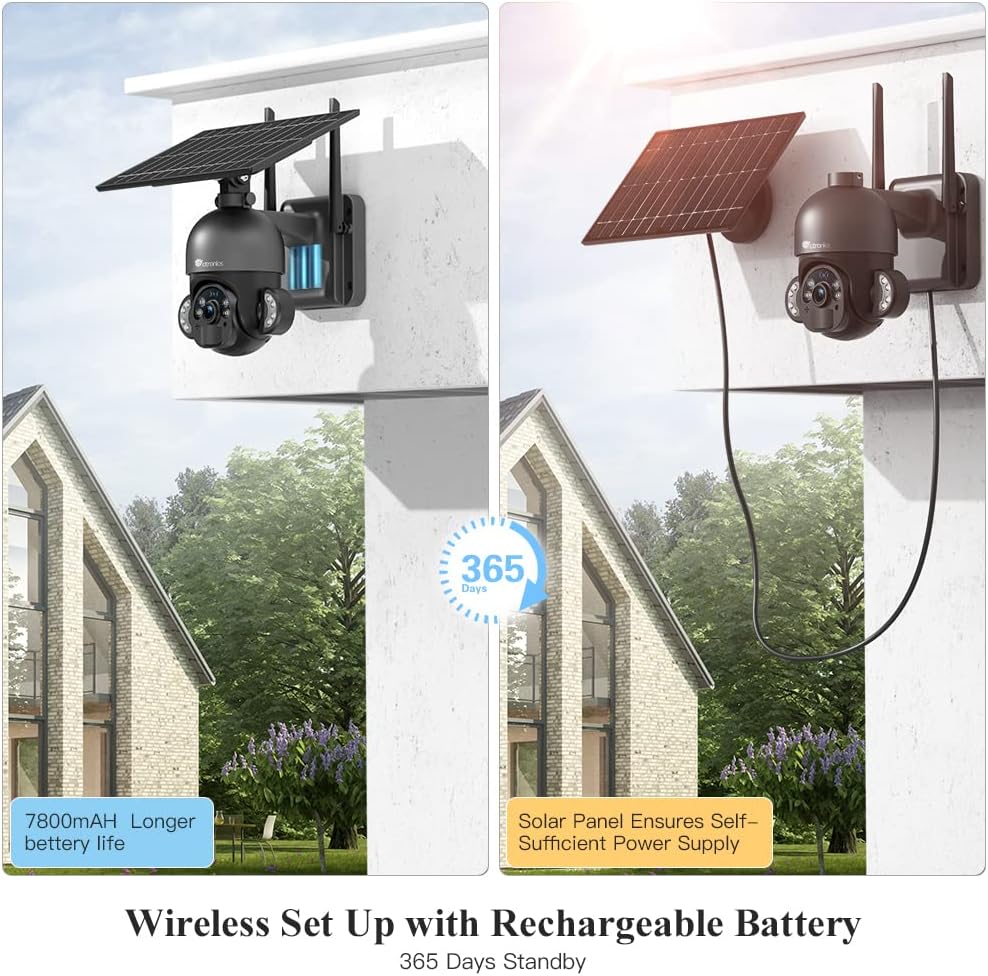
Image: The camera highlighting its 7800mAh battery and the solar panel providing continuous power, indicating 365 days of standby.

Image: A person and a dog in the camera's view, demonstrating the human detection feature distinguishing between human and non-human movement.

Image: The camera mounted on a wall, illustrating its 355-degree pan and 95-degree tilt capabilities for comprehensive coverage.

Image: A person interacting with a delivery driver via the camera's two-way audio feature, shown on a smartphone screen.

Image: The camera mounted outdoors, with rain and clouds indicating its IP66 weatherproof design.
3. 패키지 내용
수령 시 포장 내용물을 확인해 주세요. 누락되었거나 손상된 품목이 있는 경우 고객 지원팀에 문의해 주세요.
- Ctronics RBX-F20 PTZ Camera with Solar Panel
- 장착 브래킷
- 장착 나사 및 벽면 플러그
- USB 충전 케이블
- 사용자 설명서
- 빠른 시작 가이드
4. 설정 및 설치
4.1 초기 충전
Before installation, fully charge the camera's built-in 7800mAh battery using the provided USB cable. Connect the cable to a 5V/2A power adapter (not included) and the camera's charging port. The charging indicator will show the status.
4.2 앱 설치 및 계정 생성
- Download the "Ctronics" app from the App Store (iOS) or Google Play Store (Android).
- Open the app and register a new account, or log in if you already have one.
4.3 Camera Pairing with App
- Ensure your smartphone is connected to a 2.4GHz Wi-Fi network. (5GHz Wi-Fi is not supported).
- 카메라의 전원을 켭니다.
- In the Ctronics app, tap the "+" icon to add a new device.
- 화면의 지시에 따라 카메라로 QR 코드를 스캔하거나 기기 ID를 수동으로 입력하세요.
- Wi-Fi 네트워크를 선택하고 비밀번호를 입력하세요.
- The camera will attempt to connect. Once connected, you can name your camera and complete the setup.
4.4 카메라 장착
The camera offers two installation methods: all-in-one (camera and solar panel together) or separated (solar panel mounted separately for optimal sunlight exposure).
- 위치를 선택하세요: Select a location with good Wi-Fi signal and sufficient sunlight exposure for the solar panel. Ensure the camera has a clear view 모니터링하려는 영역의
- 드릴 구멍 표시: 벽에 드릴로 뚫을 구멍 위치를 표시하려면 장착 브래킷을 본떠서 사용하세요.
- 드릴 구멍: 표시된 위치에 구멍을 뚫고 벽 플러그를 삽입하십시오.
- 브래킷을 고정합니다: 제공된 나사를 사용하여 벽에 장착 브래킷을 부착합니다.
- Attach Camera/Solar Panel:
- 올인원: Attach the camera unit (with the solar panel already connected) to the mounting bracket.
- 분리됨: Mount the solar panel in a location with maximum sunlight, then connect it to the camera using the extension cable (if needed, not included). Attach the camera to its mounting bracket.
- 각도 조정: 최적의 촬영 범위와 충전 효율을 위해 카메라와 태양광 패널의 각도를 조정하십시오.

Image: Illustrates two installation methods for the camera: integrated solar panel and separate solar panel for flexible placement.
5. 운영
5.1 라이브 View 및 PTZ 제어
Ctronics 앱을 열고 카메라를 선택하여 실시간 영상을 확인하세요. view. Use the on-screen controls to pan (355° horizontally) and tilt (95° vertically) the camera lens to monitor different areas.
5.2 양방향 오디오
라이브에서 view interface, tap the microphone icon to speak through the camera's speaker. Tap the speaker icon to listen to audio from the camera's surroundings.
5.3 동작 감지 및 알림
The camera uses a PIR sensor for human detection. You can adjust the sensitivity (low, medium, high) in the app settings. When motion is detected, the camera will record and send a push notification to your smartphone.
5.4 야간 투시 모드
The camera supports color night vision up to 30 meters using its built-in spotlights. You can configure night vision settings (e.g., automatic, black & white, color) within the app.
5.5 녹음 및 재생
The camera supports local storage via a Micro TF card (not included). Recorded footage can be accessed and played back through the Ctronics app. The camera also supports saving to an FTP server.
6. 유지관리
- 청소: 카메라 렌즈와 태양광 패널을 부드러운 천으로 정기적으로 청소하세요.amp cloth to ensure clear images and efficient solar charging. Do not use harsh chemicals.
- 배터리 관리 : While the solar panel provides continuous charging, ensure the camera receives adequate sunlight. If the camera is installed in a shaded area or during prolonged cloudy periods, occasional manual charging via USB may be necessary.
- 펌웨어 업데이트: Check the Ctronics app periodically for firmware updates. Keeping your camera's firmware up-to-date ensures optimal performance and security.
- 환경 보호: The IP66 rating protects against dust and water jets. Avoid submerging the camera in water or exposing it to extreme physical impact.
7. 문제 해결
| 문제 | 가능한 원인 | 해결책 |
|---|---|---|
| 카메라가 Wi-Fi에 연결되지 않습니다. | Incorrect Wi-Fi password, 5GHz network, weak signal, or MAC address filtering on router. |
|
| False alarms or too many notifications. | High PIR sensitivity, environmental factors (e.g., moving branches, pets). |
|
| Battery not charging or low battery. | Insufficient sunlight, dirty solar panel, faulty connection. |
|
| 이미지 품질이 좋지 않습니다. | 렌즈 오염, 저조도 환경, 네트워크 대역폭 문제. |
|
8. 사양
| 모델명 | RBX-F20 |
| 상표 | 트로닉스 |
| 해결 | 2.5K 4MP (2560x1440) |
| 연결 기술 | Wireless (Wi-Fi 2.4GHz), Wired (Ethernet, ONVIF, RTSP) |
| 전원 | Solar Powered / Rechargeable Battery (7800mAh) |
| 팬 / 틸트 각도 | 팬 355 °, 틸트 95 ° |
| 나이트 비전 | Color Night Vision up to 30 meters (with 10 spotlights) |
| 인간 감지 | PIR Sensor with adjustable sensitivity |
| 오디오 | 양방향 오디오(내장 마이크 및 스피커) |
| 내후성 | IP66 인증 |
| 저장 | Micro TF Card Slot (up to 128GB, not included), FTP Storage |
| 호환 장치 | 스마트폰 (안드로이드/iOS) |
| 권장 사용 | 야외 보안 |
9. 보증 및 지원
Ctronics 제품에는 표준 보증이 제공됩니다. 자세한 보증 정보는 제품 패키지에 포함된 보증 카드를 참조하거나 Ctronics 공식 웹사이트를 방문하십시오. website. If you encounter any issues or have questions regarding your camera, please contact Ctronics customer support. Our team is dedicated to providing prompt and helpful assistance.
연락처 정보: Please refer to the contact details provided on the Ctronics official web최신 지원 채널 정보는 웹사이트 또는 제품 포장에서 확인하실 수 있습니다.