
소개
구매해주셔서 감사합니다asing the Max Power MPD15EQ Portable Rechargeable PA Speaker. This manual provides important information regarding the setup, operation, and maintenance of your speaker. Please read it thoroughly before using the product to ensure proper function and to maximize its lifespan.
안전 지침
- 화재나 감전 위험을 방지하려면 장치를 비나 습기에 노출시키지 마십시오.
- Do not open the speaker cabinet. There are no user-serviceable parts inside. Refer all servicing to qualified personnel.
- 적절한 환기를 유지하세요. 환기구를 막지 마세요.
- 장치와 함께 제공된 전원 어댑터만 사용하십시오.
- Keep the speaker away from heat sources, direct sunlight, and strong magnetic fields.
- 마른 천으로만 닦으십시오.
패키지 내용
- Max Power MPD15EQ PA Speaker
- 유선 마이크
- 원격 제어
- 전원 어댑터
- 사용 설명서 (본 문서)
제품 끝view
Familiarize yourself with the various parts of your MPD15EQ speaker.
전면 패널
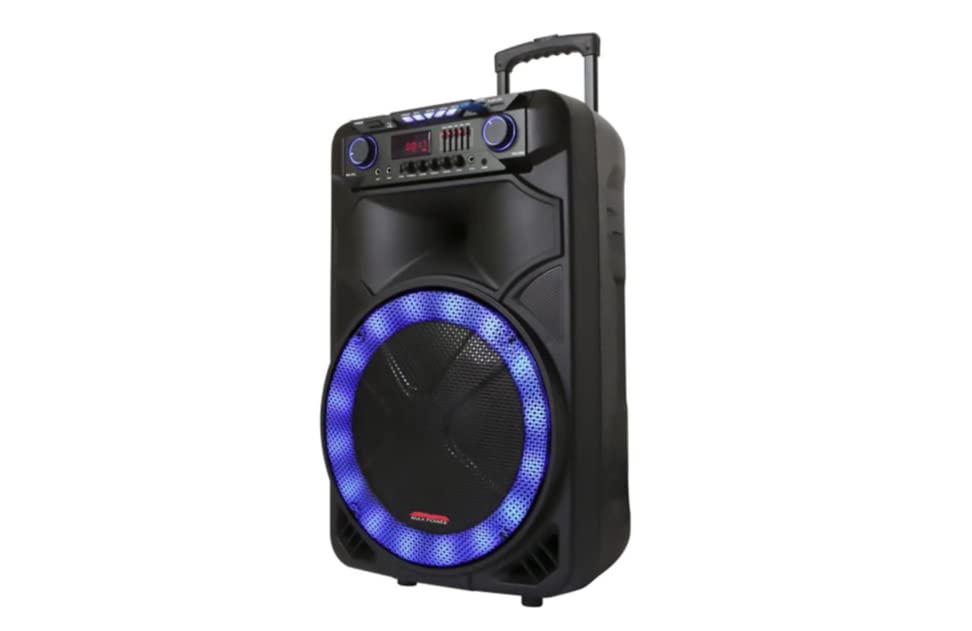
이미지 설명: This image displays the front of the Max Power MPD15EQ speaker. It features a large 15-inch woofer at the bottom, a 5-inch horn tweeter above it, and a control panel with an LED display screen. The speaker grille covers the woofer and tweeter, and the overall design is robust and portable.
- 15" Woofer: Provides powerful bass frequencies.
- 5" Horn Tweeter: Delivers clear high frequencies.
- 발광 다이오드 표시 스크린: 현재 모드, 트랙 정보 및 설정을 표시합니다.
- 제어판: Buttons and knobs for various functions (volume, EQ, mode, etc.).
- LED Light On/Off Switch: 내장형 LED 조명을 제어합니다.
후면 패널(예:ample - specific details not provided in source)
The rear panel typically includes input/output ports and the power connection.
- 전원 입력: 배터리를 충전하거나 기기를 작동시키기 위해 전원 어댑터를 연결하십시오.
- USB 포트: USB 드라이브에서 오디오를 재생하는 데 사용합니다.
- SD 카드 슬롯: SD 카드에서 오디오를 재생하기 위한 용도입니다.
- 마이크 입력: 유선 마이크 연결용입니다.
- 보조 입력: 3.5mm 또는 RCA 케이블을 통해 외부 오디오 장치를 연결합니다.
설정
배터리 충전
The MPD15EQ features a built-in rechargeable battery. Before first use, fully charge the speaker for approximately 6-8 hours.
- Connect the supplied power adapter to the speaker's power input port.
- 전원 어댑터를 표준 벽면 콘센트에 꽂습니다.
- The LED display or an indicator light will show the charging status.
- 완전히 충전되면 전원 어댑터를 분리하세요.
초기 전원 켜기
- Ensure the speaker is fully charged or connected to power.
- Locate the power switch (usually on the rear or control panel) and turn it to the "ON" position.
- The LED display will illuminate, indicating the speaker is ready for use.
작동 지침
블루투스 연결
- Turn on the MPD15EQ speaker.
- Press the "MODE" button on the control panel until "BLUETOOTH" or "BT" appears on the LED display.
- 스마트폰, 태블릿 또는 기타 오디오 장치에서 Bluetooth를 활성화하세요.
- 검색 available devices and select "MPD15EQ" from the list.
- 페어링이 완료되면 확인음이 들리고, 이제 무선으로 오디오를 재생할 수 있습니다.
유선 마이크 사용
- Connect the supplied wired microphone to the "MIC IN" port on the speaker.
- Adjust the microphone volume knob (if available) on the control panel to your desired level.
- 마이크에 대고 말하세요.
USB/SD 카드 재생
- MP3 오디오가 미리 저장된 USB 플래시 드라이브 또는 SD 카드를 삽입하세요. files) 해당 포트로.
- The speaker should automatically switch to USB/SD mode and begin playing. If not, press the "MODE" button.
- Use the playback controls (Play/Pause, Next, Previous) on the control panel or remote control.
5-Band Graphic EQ Adjustment
The MPD15EQ features a 5-band graphic equalizer to fine-tune your audio output.
- Locate the EQ sliders on the control panel.
- Each slider corresponds to a specific frequency band. Adjust them up or down to boost or cut those frequencies.
- Experiment with the settings to achieve your preferred sound profile.
LED 조명
The speaker includes integrated LED lights. Use the "LED Light On/Off Switch" to activate or deactivate them.
원격 제어 사용
The included remote control allows for convenient operation from a distance. It typically includes buttons for power, mode selection, volume, track control, and EQ presets.
유지
청소
- 청소하기 전에는 항상 스피커의 전원을 끄고 플러그를 뽑으십시오.
- 부드럽고 마른 천으로 외부 표면을 닦으세요.
- 액체 세척제, 에어로졸 또는 연마성 화학 물질을 사용하지 마십시오.
저장
- 스피커는 직사광선과 극한의 온도를 피해 시원하고 건조한 곳에 보관하세요.
- If storing for extended periods, charge the battery periodically (e.g., every 3 months) to maintain battery health.
문제 해결
| 문제 | 가능한 원인 | 해결책 |
|---|---|---|
| 전원이 없습니다 | 배터리 방전됨; 전원 케이블이 연결되지 않음; 전원 스위치 꺼짐. | Charge the battery; Check power cable connection; Turn power switch ON. |
| 소리가 나지 않습니다 | 볼륨이 너무 낮습니다. 입력 모드가 올바르지 않습니다. 기기가 페어링되지 않았습니다(블루투스). | Increase master volume; Select correct input mode (Bluetooth, USB, AUX); Re-pair Bluetooth device. |
| 마이크가 작동하지 않습니다 | Microphone not connected; Microphone volume low; Microphone switch off. | Ensure microphone is securely plugged in; Increase microphone volume; Check microphone's ON/OFF switch. |
| 블루투스 연결이 불안정합니다 | 기기가 너무 멀리 떨어져 있음; 간섭 발생; 배터리 부족. | Move device closer to speaker; Avoid obstacles; Ensure speaker battery is charged. |
명세서
- 우퍼 : Single 15"
- 트위터 : Single 5" Horn
- 주파수 응답: 40Hz-20kHz
- 임피던스: 4옴
- 감광도: 93데시벨
- 치수(폭 x 깊이 x 높이): 19인치 x 16.75인치 x 32인치
- 무게: 약 38파운드
- 배터리: 내장형 충전식
- 연결성: Bluetooth, USB, SD Card, Microphone Input, Auxiliary Input
- EQ : 5 밴드 그래픽 EQ
- 표시하다: LED 디스플레이 화면
- 포함된 액세서리: Wired Microphone, Remote Control
보증 및 지원
Max Power products are designed for reliability and performance. For warranty information or technical support, please refer to the warranty card included with your purchase or visit the official Max Power web사이트. 보증 청구를 위해 구매 증빙 자료를 보관하세요.
연락처 정보: Please refer to the packaging or official website for the most up-to-date contact details for customer service.
공식 제품 영상
No official product videos from the seller were available for embedding at this time. If available, they would appear here with detailed descriptions.