
1. 서론
Thank you for choosing the DIHOOM Wireless Outdoor Security Camera expansion unit. This camera is designed to be added to an existing DIHOOM wireless security camera system (ASIN: B09YRCF943). It features 5-megapixel (2K) resolution, advanced AI face and human detection, full-color night vision, two-way audio communication, and an IP66 weatherproof rating for reliable outdoor surveillance. Please read this manual carefully before installation and operation to ensure proper use and optimal performance.
2. 안전 정보
- Ensure the power adapter (sold separately) is compatible with the camera's power requirements and local electrical standards.
- 카메라를 작동 범위를 벗어난 극한 온도에 노출시키지 마십시오.
- 카메라를 강한 전자기장 근처에 두지 마십시오.
- 카메라를 분해하거나 개조하지 마십시오. 그렇게 하면 보증이 무효화됩니다.
- Mount the camera securely to prevent accidental falls.
- 카메라와 액세서리를 어린이의 손이 닿지 않는 곳에 보관하세요.
3. 패키지 내용
다음 품목이 패키지에 포함되어 있는지 확인하세요.
- DIHOOM Wireless Outdoor Security Camera Unit
- 장착 나사 및 벽면 플러그
- Waterproof Cap for Network Cable (if applicable)
- 빠른 시작 가이드
메모: A power adapter is not included and must be purchased separately. This camera is an expansion unit and requires an existing DIHOOM wireless security camera system (ASIN: B09YRCF943) to function.
4. 제품 오버view
The DIHOOM Wireless Outdoor Security Camera features a robust design suitable for outdoor environments. Key components include the camera lens, infrared LEDs, white LED lights for full-color night vision, a microphone, a speaker for two-way audio, and an antenna for wireless connectivity.

Image: DIHOOM Wireless Outdoor Security Camera showing its main body and white LED lights. The camera is white with a black lens area and two prominent white LED lights on the front. An antenna extends from the top.
5. 설정
5.1. 카메라 장착
- 원하는 조건을 충족하는 적절한 야외 장소를 선택하세요. viewing angle and is within range of your DIHOOM NVR/system's Wi-Fi signal.
- Use the included mounting screws and wall plugs to securely attach the camera bracket to a wall or ceiling. Ensure the camera is stable.
- Adjust the camera's angle for optimal coverage. The antenna is foldable for flexible positioning.

Image: A diagram illustrating the simple installation process, showing the camera mounted on a wall and its foldable antenna being adjusted. Another part of the image shows a multi-camera setup connected to a monitor.
5.2. 전원 연결
Connect a compatible 12V DC power adapter (not included) to the camera's power input. Ensure the connection is secure and protected from moisture, especially for outdoor installations.
5.3. Adding to Your DIHOOM System
This camera is designed to be an expansion unit for the DIHOOM wireless security camera set (ASIN: B09YRCF943). Refer to your main DIHOOM NVR system's manual for specific instructions on how to add new cameras. Generally, this involves:
- Power on the new camera.
- Access the NVR's camera management interface.
- Initiate the 'Add Camera' or 'Pair Camera' function. The NVR will automatically search for and connect to the new camera.
- Once connected, the camera's live feed should appear on your NVR monitor or linked mobile application.
6. 사용 설명서
6.1. 라이브 View 그리고 녹음
Access the live video feed through your DIHOOM NVR or the dedicated smartphone application. The system supports various recording modes:
- 연속 녹화 : 24시간 내내 기록합니다.
- 모션 감지 녹화: 움직임이 감지될 때만 녹화합니다.
- 예약 녹화 : 특정 기간 동안의 기록.

Image: A smartphone screen displaying the DIHOOM app interface, showing options for recording modes (continuous, motion detection, alarm recording) and user management settings.
6.2. 야간 투시 모드
카메라는 두 가지 야간 시야 모드를 제공합니다.
- 적외선 나이트 비전: 적외선 LED를 사용하여 완전한 어둠 속에서도 선명한 흑백 이미지를 제공합니다.
- 풀컬러 야간 투시경: Utilizes built-in white LED lights to illuminate the area, providing vivid full-color video even in low-light conditions. This mode can be activated automatically upon detection of an intruder. The night vision range is up to 20 meters.
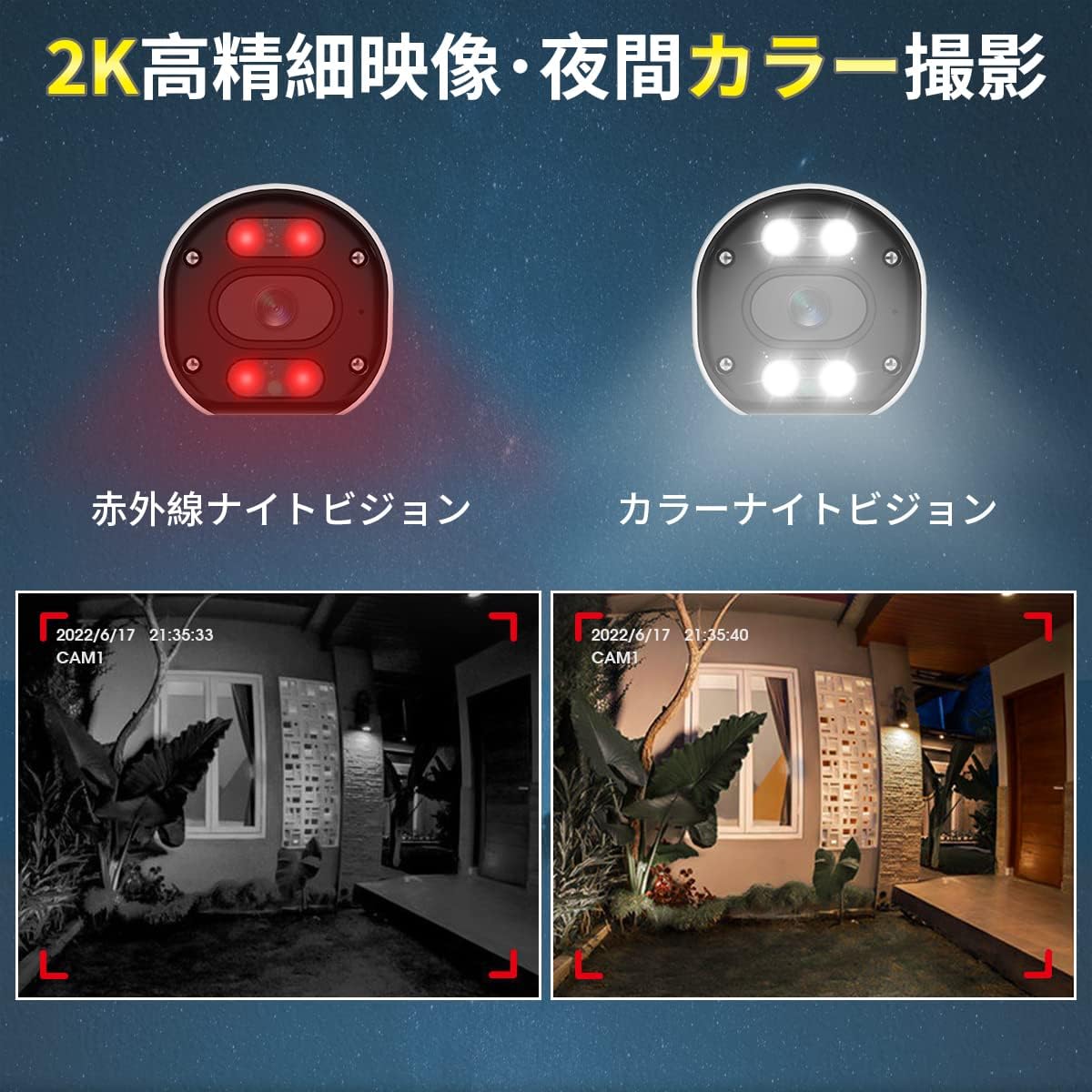
Image: A split image comparing infrared night vision (monochrome) and full-color night vision footage from the camera, demonstrating the clarity and color retention of the latter.
6.3. 양방향 오디오
The camera is equipped with a built-in microphone and speaker, enabling two-way audio communication. Through the mobile app, you can listen to the camera's surroundings and speak through the camera's speaker. This feature is useful for deterring intruders or communicating with visitors.

Image: An illustration showing a person at a door communicating with someone via the camera's two-way audio feature. Another section highlights the camera's IP66 waterproof design under rain.
6.4. AI 탐지 기능
The camera integrates advanced AI for enhanced security:
- AI 인간 감지: Accurately identifies human movement, significantly reducing false alarms triggered by animals, insects, or swaying trees (up to 99% false alarm reduction). When a human is detected, you will receive instant app notifications.
- AI 얼굴 인식: The system can detect and identify faces from recorded footage. You can register up to 10,000 faces and search for specific individuals' video clips. Up to 8 faces can be detected simultaneously.
- 소리와 빛 알람: Upon detecting an intruder, the camera can activate a 110dB siren and flash its 200LM white LED lights to deter unwanted visitors. This feature is configurable via the app.

Image: A diagram illustrating AI human detection, where a person entering a monitored area triggers an app notification, a sound siren, and flashing white lights from the camera.

Image: An illustration demonstrating AI face recognition, showing a face being detected and highlighted, with a note indicating simultaneous detection of up to 8 people and registration of up to 10,000 faces.
6.5. Detection Area and Sensitivity
You can customize the detection area and adjust the sensitivity of motion detection to suit your specific surveillance needs. This helps to focus monitoring on critical zones and further reduce unwanted alerts.

Image: A diagram showing a person walking into a defined 'alert area' with a 'warning line'. Below, a slider indicates 6 levels of detection sensitivity, allowing users to fine-tune the camera's responsiveness.
7. 유지관리
- 청소: 깨끗한 화질을 유지하려면 부드럽고 마른 천으로 카메라 렌즈를 정기적으로 닦으세요. 독한 화학 약품을 사용하지 마세요.
- 펌웨어 업데이트: Check the DIHOOM app or website periodically for firmware updates. Keeping your camera's firmware up-to-date ensures optimal performance and access to new features.
- 케이블 검사: Periodically inspect power and network cables for any signs of wear or damage, especially in outdoor installations.
8. 문제 해결
- 이미지 없음/오프라인:
- Ensure the camera is properly powered on.
- Check the Wi-Fi connection between the camera and the NVR.
- Verify the camera is correctly added to your DIHOOM NVR system.
- 카메라와 NVR을 재시작하세요.
- 이미지 품질이 좋지 않음:
- 카메라 렌즈를 청소하세요.
- 렌즈 앞에 장애물이 없는지 확인하세요.
- Check for strong light sources directly facing the camera.
- Verify the camera's resolution settings in the app/NVR.
- 잦은 오경보:
- 동작 감지 감도를 낮추세요.
- Define a specific detection area to exclude irrelevant zones (e.g., swaying trees, busy roads).
- Ensure AI human detection is enabled.
- 양방향 오디오 문제:
- 앱에서 마이크 및 스피커 볼륨 설정을 확인하세요.
- Ensure there are no physical obstructions blocking the microphone or speaker.
- 실시간 오디오 전송을 위한 네트워크 안정성을 확인하십시오.
9. 사양
| 특징 | 사양 |
|---|---|
| 모델 번호 | B09YYB1261 |
| 상표 | 디훔 |
| 비디오 해상도 | Up to 5 Megapixel (2K / 1440p) |
| 이미지 센서 | SONY CMOS Sensor |
| 연결성 | 무선(Wi-Fi) |
| 나이트 비전 | Infrared Night Vision, Full-Color Night Vision (20m range) |
| 오디오 | 양방향 통화 (내장 마이크 및 스피커) |
| 탐지 기능 | AI Human Detection, AI Face Recognition, Motion Sensor |
| 경보 | 110dB Siren, 200LM White Light Alarm |
| 비바람에 견디는 등급 | IP66 방진 및 방수 |
| 번개 보호 | 4KV |
| 호환 장치 | Smartphone (via app), DIHOOM NVR System (ASIN: B09YRCF943) |
| 치수 | 19.6 x 10.9 x 9.7cm |
| 무게 | 430g |
10. 보증 및 지원
DIHOOM products come with a standard manufacturer's warranty. For specific warranty terms and conditions, please refer to the warranty card included with your original DIHOOM NVR system or visit the official DIHOOM website. For technical support, troubleshooting assistance, or any inquiries, please contact DIHOOM customer service through the contact information provided on the official web사이트 또는 제품 포장 내부에 넣어 두세요.