
소개
Thank you for choosing the BOBLOV W3 WiFi Body Camera. This manual provides detailed instructions for the proper setup, operation, and maintenance of your device. Please read this manual thoroughly before using the camera to ensure optimal performance and to prevent damage.
패키지 내용
아래 나열된 모든 품목이 패키지에 포함되어 있는지 확인하세요.
- 보블로프 W1 바디 카메라 3대
- 1x 64GB Micro SD Card (pre-installed in camera)
- 1x USB-C 충전 케이블
- 1x 드라이버
- 1x 사용자 매뉴얼(이 문서)
- 1x Back Magnets Clip
- 1x Brooch
제품 끝view
카메라의 구성 요소와 조작법을 숙지하세요.

영상: BOBLOV W3 Body Camera with labels indicating the Power/Video Button, Audio/WiFi Button, Microphone, Reset button, Brooch attachment point, Back Magnetic Clip, and USB-C Charging Interface. The image also shows the dimensions of the camera.
- Power/Video Button: Used to power on/off the device and start/stop video recording.
- Audio/WiFi Button: Used to start/stop audio recording and activate/deactivate WiFi function.
- 마이크 : 오디오 캡처를 위한 마이크.
- 재설정 : 기기를 초기화하는 작은 버튼입니다(핀 번호 필요).
- Brooch: Attachment point for the included brooch clip.
- Back Magnetic Clip: Removable clip for magnetic attachment.
- 충전 인터페이스: 충전 및 데이터 전송을 위한 USB-C 포트.
설정
1. 카메라 충전
Before initial use, fully charge the camera. The built-in 1450mAh battery takes approximately 3 hours to fully charge.
- Connect the provided USB-C charging cable to the camera's charging interface.
- 케이블의 다른 쪽 끝을 USB 전원 어댑터(포함되지 않음)나 컴퓨터의 USB 포트에 연결합니다.
- 충전 중에는 충전 표시등이 켜지고, 완전히 충전되면 꺼집니다.
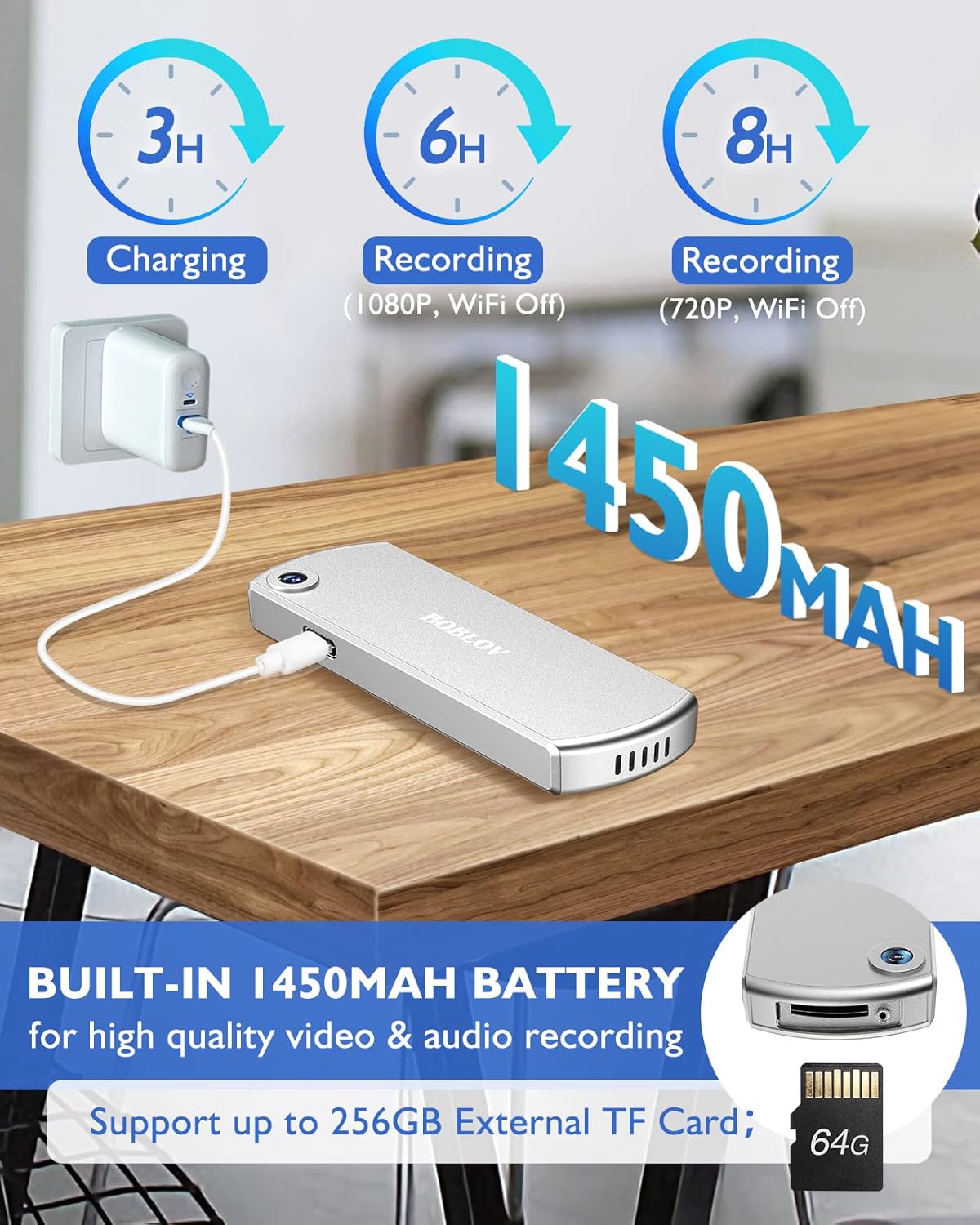
영상: The BOBLOV W3 Body Camera being charged via a USB-C cable, highlighting the 1450mAh battery and charging times: 3 hours for full charge, 6 hours recording (1080P, WiFi Off), and 8 hours recording (720P, WiFi Off).
2. Inserting/Expanding Memory Card
The W3 Body Camera uses an external Micro SD card. A 64GB card is included and pre-installed.
- 카메라에서 메모리 카드 슬롯을 찾으세요.
- Use the included screwdriver to carefully unscrew the cover of the card slot.
- Insert or replace the Micro SD card (up to 256GB) into the slot with the contacts facing down.
- Securely fasten the card slot cover with the screwdriver.
3. 카메라 부착
The camera offers two attachment options: a back magnetic clip and a brooch.
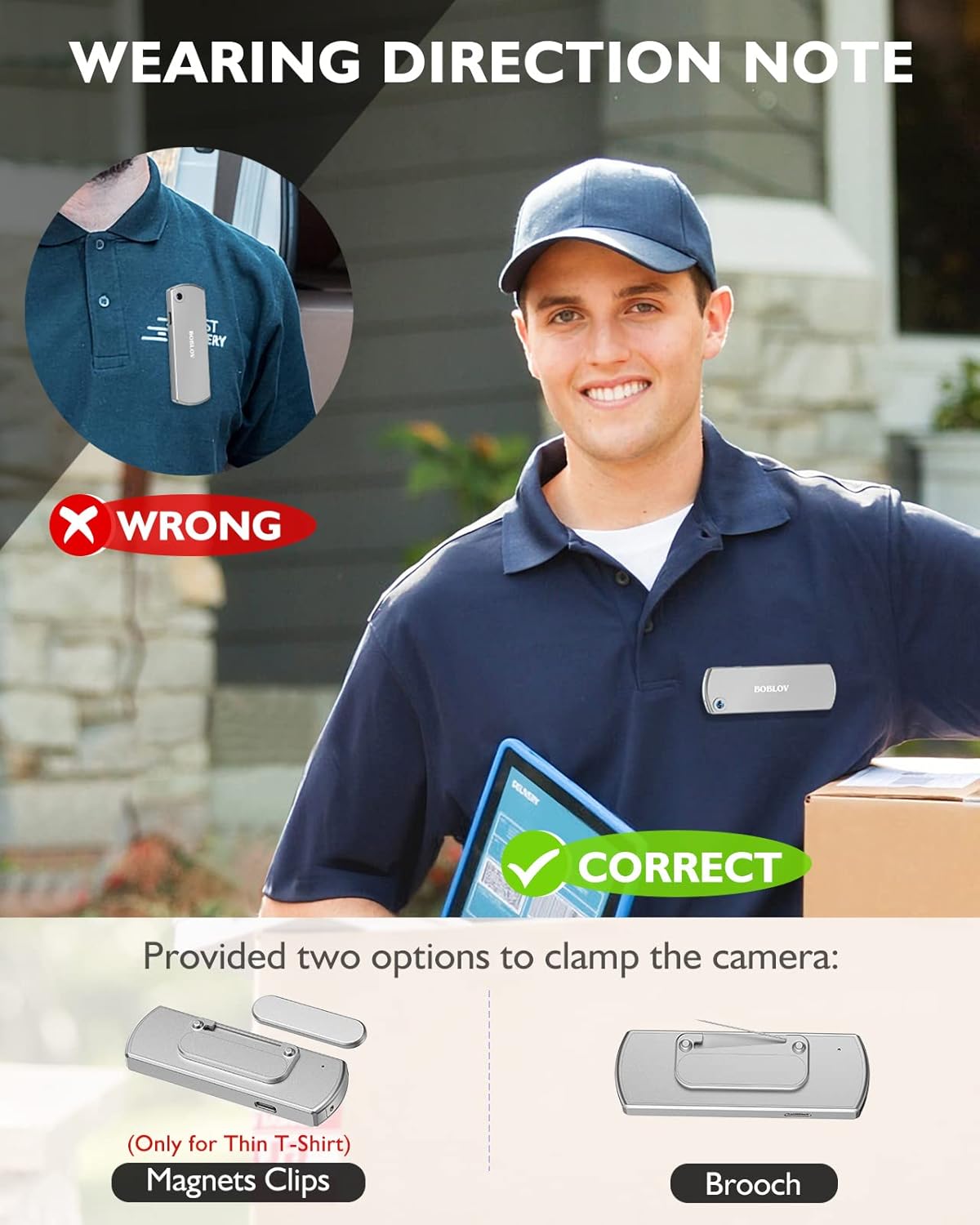
영상: Illustration demonstrating correct and incorrect ways to wear the BOBLOV W3 Body Camera. It shows that magnetic clips are suitable for thin T-shirts, while a brooch provides a more secure attachment for other clothing types.
- 자석 클립: Attach the magnetic clip to the back of the camera. This is suitable for thin fabrics like T-shirts. Ensure the camera is securely held.
- Brooch: For more secure attachment or thicker clothing, use the provided brooch. Attach it to the camera's designated brooch point and then pin it to your clothing.
작동 지침
1. 전원 켜기/끄기
- 전원 켜기: 를 누르고 계세요 Power/Video Button for a few seconds until the indicator light illuminates.
- 전원 끄기 : 를 누르고 계세요 Power/Video Button again for a few seconds until the indicator light turns off.
2. 비디오 녹화
- While the camera is powered on, press the Power/Video Button once to start video recording. The indicator light will flash to indicate recording is in progress.
- 를 누르세요 Power/Video Button again to stop video recording. The indicator light will return to a steady state.
- The camera supports 1080P and 720P video recording. With WiFi off, it can record for approximately 6 hours at 1080P or 8 hours at 720P on a full charge.
- Videos are saved in 5-minute fragments by default. The camera supports loop recording, overwriting older files 메모리 카드가 가득 찼을 때.
3. 오디오 녹음
- While the camera is powered on, press the Audio/WiFi Button once to start audio recording.
- 를 누르세요 Audio/WiFi Button 다시 오디오 녹음을 중지합니다.
4. WiFi Function and App Connectivity
The BOBLOV W3 features WiFi connectivity, allowing you to manage files and change settings via a smartphone app.
- 와이파이를 활성화하세요: 를 누르고 계세요 Audio/WiFi Button for a few seconds to turn on the WiFi function. The WiFi indicator light will flash.
- 앱 다운로드 :
- For Android devices, download the DHiHZ 앱.
- iOS 기기의 경우 다운로드 Mini-XRcam 앱.
- 카메라에 연결: On your smartphone, go to WiFi settings and connect to the camera's WiFi network (usually named "BOBLOV_W3_XXXX"). The default password is typically "12345678".
- 앱 사용 방법: Open the downloaded app to view 라이브 푸tag예, 재생 녹음, 다운로드 files를 입력하고 카메라 설정을 조정하세요.
- Deactivate WiFi: 를 누르고 계세요 Audio/WiFi Button 다시 한번 WiFi를 끕니다.

영상: The BOBLOV W3 Body Camera wirelessly connected to a smartphone, illustrating the WiFi function for managing files, changing settings, and accessing features like video, audio, preview, playback, and download through the dedicated Android (DHiHZ) and iOS (Mini-XRcam) applications.
5. PC에 연결
You can connect the camera to a computer to manage recorded files 및 설정 변경.
- Ensure the camera is powered ON before connecting to the PC.
- 제공된 USB-C 케이블을 사용하여 카메라를 컴퓨터에 연결하십시오.
- 카메라는 컴퓨터에서 이동식 디스크 드라이브로 나타납니다.
- You can then access, copy, delete, or upload recorded files. Some settings may also be configurable via a configuration file on the camera's storage.

영상: The BOBLOV W3 Body Camera connected to a laptop via a USB-C cable, demonstrating how to manage recorded files and change settings. Icons for Playback, Delete, Upload, and Settings are shown, with a note to ensure the camera is powered ON for connection.
유지
- 청소: Use a soft, dry cloth to clean the camera body. Do not use liquid cleaners or solvents.
- 저장: 카메라는 직사광선과 극한의 온도를 피해 시원하고 건조한 곳에 보관하세요.
- 배터리 관리 : 배터리 수명을 연장하려면 배터리를 자주 완전히 방전하지 마십시오. 장시간 사용하지 않더라도 카메라를 정기적으로 충전하십시오.
- 메모리 카드: Periodically back up important recordings from the Micro SD card to a computer. Format the Micro SD card regularly (e.g., once a month) to maintain optimal performance and prevent data corruption.
- 방수 기능: The camera has an IP65 waterproof rating, meaning it is protected against dust and low-pressure water jets. It is not designed for submersion.
문제 해결
| 문제 | 가능한 원인 / 해결책 |
|---|---|
| 카메라의 전원이 켜지지 않습니다. | Battery may be depleted. Charge the camera for at least 3 hours. If the issue persists, try resetting the camera using a pin in the reset hole. |
| Camera gets hot when WiFi is on. | This is normal behavior for the camera when the WiFi function is active due to increased power consumption. |
| Cannot connect to WiFi via smartphone app. | Ensure WiFi is enabled on the camera. Check if you have downloaded the correct app (DHiHZ for Android, Mini-XRcam for iOS). Verify the WiFi password (default is "12345678"). Try restarting both the camera and your phone. |
| Camera stops recording unexpectedly. | The memory card may be full. The camera supports loop recording, but if the card is corrupted or too slow, it might cause issues. Try formatting the card or using a different high-speed Micro SD card. Battery may be low. |
| 접근할 수 없습니다 filePC에서. | Ensure the camera is powered ON before connecting to the PC. Try a different USB-C cable or USB port. |
명세서
| 특징 | 세부 사항 |
|---|---|
| 상표 | 보 블로 프 |
| 모델명 | W3 |
| 모델 번호 | 비-W3 |
| 연결 기술 | 와이파이 |
| 특별 기능 | 가벼움 |
| 호환 장치 | Android/iOS Phone |
| 전원 | 배터리 구동 |
| 비디오 캡처 해상도 | 1080p |
| 색상 | 은 |
| 장착 유형 | 표면 실장 |
| 폼 팩터 | 콤팩트 |
| 인클로저 재료 | 금속 |
| 경고 유형 | 모션 전용 |
| 광원 | 적외선 |
| 방수 등급 | IP65 |
| 제어 방법 | 앱 |
| 왓tage | 3.7 와트시 |
| 나이트 비전 | 밤의 색깔 |
| 품목 치수 | 9 x 3 x 1.5 센티미터 |
| 배터리 용량 | 1450mAh (내장) |
| Recording Time (1080P, WiFi Off) | 약 6시간 |
| Recording Time (720P, WiFi Off) | 약 8시간 |
| 충전 시간 | 약 3시간 |
| 외부 메모리 | Micro SD Card, up to 256GB (64GB included) |
| 순중량 | 60g / 2온스 |
보증 및 지원
BOBLOV provides a two-year warranty for high-value products, including the W3 Body Camera. For any technical assistance, troubleshooting, or warranty claims, please contact BOBLOV customer service.
Please refer to the official BOBLOV web최신 연락처 정보와 보증 세부 사항은 해당 사이트나 구매 문서를 참조하세요.