
LiNKFOR ULKVC613us-US
LiNKFOR UHF 휴대용 충전식 마이크 시스템 사용 설명서
Model: ULKVC613us-US (S-105)
브랜드: 링크포
1. 서론
This user manual provides detailed instructions for the LiNKFOR UHF Handheld Rechargeable Microphone System. This all-metal dual cordless microphone system is designed for various applications including karaoke, conferences, parties, and public speaking, offering clear sound and reliable wireless performance.

Figure 1: LiNKFOR UHF Handheld Rechargeable Microphone System
2. 패키지 내용
모든 품목이 들어 있고 양호한 상태인지 확인하기 위해 패키지를 주의 깊게 확인하세요.
- 1 x 수신기
- 2 x 무선 마이크
- 1 x 6.35mm 오디오 케이블
- RCA 케이블 2개
- 1 x 6.35mm - 3.5mm 어댑터
- 2-in-1 충전 케이블 1개
- 1 x 전원 어댑터
- 1 x 사용자 설명서
- 2 x Microphone Sponges
- 2 x Microphones Anti-Rolling Rings
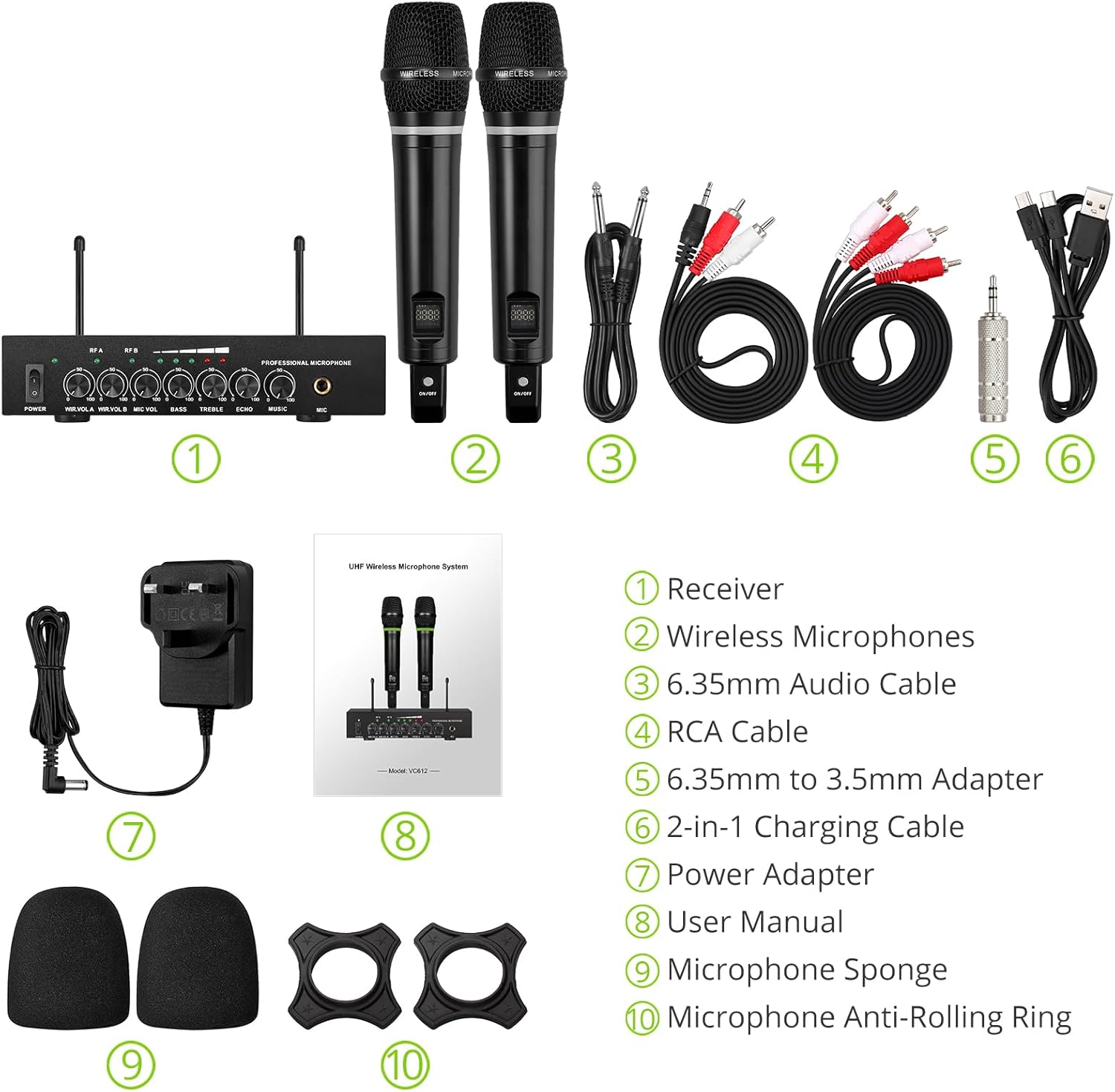
그림 2: 전체 패키지 내용
3. 설정 지침
3.1 수신기 연결
- 전원 연결: Connect the included power adapter to the DC 12V INPUT port on the receiver and plug it into a power outlet.
- 오디오 출력:
- For RCA connection: Use the provided RCA cables to connect the "OUTPUT" ports (L/R) on the receiver to the audio input (e.g., AUX, PC) of your sound system (soundbar, amplifier, mixer, or speakers).
- For 6.35mm connection: Use the 6.35mm audio cable to connect the "6.35mm MIC Output" on the receiver to a 6.35mm microphone input on your sound system.
- 외부 오디오 입력(선택 사항):
- For RCA input: Use RCA cables to connect external audio sources (e.g., DVD player, TV) to the "INPUT" ports (L/R) on the receiver.
- For Bluetooth input: Enable Bluetooth on your mobile device (smartphone, tablet) and search for "X168" to pair and connect.

Figure 3: Receiver Connections (RCA Input/Output, 6.35mm MIC Output)

그림 4: 블루투스 연결 설정
3.2 Preparing the Microphones
- 충전 중: The microphones are rechargeable. Use the provided 2-in-1 charging cable to charge both microphones simultaneously. The LED light ring on the microphone will turn red when charging and green when fully charged or in use. A full charge takes approximately 3-4 hours and provides up to 10 hours of play time.
- 전원 켜기/끄기: Locate the ON/OFF switch on each microphone and slide it to the "ON" position to power on. The display screen on the microphone will light up.
- Anti-Rolling Rings & Sponges: Attach the anti-rolling rings to the base of the microphones and place the microphone sponges over the mesh heads for protection and improved sound quality.

Figure 5: Charging the Microphones
4. 사용 설명서
- 전원 켜기 시스템: Ensure the receiver is powered on (POWER switch on the front panel). The indicator lights for RF A and RF B should illuminate when the corresponding microphone is turned on and connected.
- 볼륨 조절: Use the "WIR.VOL A" and "WIR.VOL B" knobs on the receiver to adjust the individual volume levels of Microphone A and Microphone B.
- 사운드 컨트롤 : The receiver features independent controls for BASS, TREBLE, and ECHO to customize the sound output. Adjust these knobs to achieve your desired audio effect.
- 음악 볼륨: The "MUSIC" knob controls the volume of the external audio input (e.g., Bluetooth, RCA input).
- 무선 범위: The UHF wireless range for the microphones is approximately 165 feet (50 meters). The Bluetooth range for audio input is approximately 32 feet (10 meters).

Figure 6: Wireless Range Overview

Figure 7: Sound Control Features
4.1 공식 제품 영상
Video 1: LiNKFOR Rechargeable UHF Wireless Microphone System Overview. This video demonstrates the setup, features, and usage of the microphone system, including connections and sound adjustments.
5. 유지관리
- Keep the receiver and microphones clean by wiping them with a soft, dry cloth.
- 기기를 극한의 온도, 습도 또는 직사광선에 노출시키지 마세요.
- 사용하지 않을 때는 시스템을 건조하고 서늘한 곳에 보관하십시오.
- Ensure microphones are fully charged before extended use to maximize battery life.
6. 문제 해결
| 문제 | 가능한 원인 | 해결책 |
|---|---|---|
| 소리가 출력되지 않습니다. |
|
|
| 마이크가 충전되지 않습니다. |
|
|
| 블루투스 연결 문제. |
|
|

Figure 8: Compatibility and Common Questions
7. 사양
| 특징 | 세부 사항 |
|---|---|
| 상표 | 링크포 |
| 모델명 | 에스-105 |
| 품목 모델 번호 | ULKVC613us-US |
| 연결 기술 | UHF Wireless, Bluetooth 5.0 |
| 마이크 폼 팩터 | 핸드헬드 |
| 재료 | 금속 |
| 전원 | 배터리 구동(충전식 리튬 이온) |
| 플레이 타임 | 최대 10시간 (3~4시간 충전 후) |
| UHF Wireless Range | 대략. 165m(50피트) |
| 블루투스 범위 | 대략. 32m(10피트) |
| 신호 대 잡음 비율 | 95데시벨 |
| 임피던스 | 600옴 |
| 주파수 응답 | 1 KHz (Min/Max) |
| 채널 수 | 2 |
| 품목 치수(L x W x H) | 16.54 x 12.99 x 3.31 인치 |
| 품목 무게 | 4.84파운드(2.2킬로그램) |
| 호환 장치 | Amplifier, Audio Mixer, Karaoke Machine, TV, Laptop, Smartphones (not Bluetooth Speakers) |

그림 9: 제품 치수
8. 보증 및 지원
For warranty information or technical support, please refer to the contact details provided in your product packaging or visit the official LiNKFOR web대지. 보증 청구를 위해 구매 영수증을 보관하십시오.
LiNKFOR is committed to providing innovative products and reliable connectivity solutions. For further assistance, please contact customer service.
Ask a question about this manual
Ask about setup, troubleshooting, compatibility, parts, safety, or missing instructions. Manuals+ will review the question and use this page’s manual context to help answer it.