
1. 서론
The Owlet Dream Duo Gen 1 is an FDA-cleared smart baby monitoring system designed to provide caregivers with insights into their infant's well-being. This system includes the Dream Sock and the Owlet Cam 1, working together to offer real-time health readings, video monitoring, and timely notifications. It is intended for use with healthy infants between 1-18 months, weighing 6-30 lbs.
2. 포함 사항
Your Owlet Dream Duo Gen 1 package contains the following components:
- 올빼미 캠 1
- 드림 양말 센서
- 4 Fabric Socks (designed to fit babies 0-18 months, 5-30 lbs)
- 기지국
- 캠 마운팅 키트
- Access to the Dream App with Predictive Sleep Technology

Figure 2.1: All components included in the Owlet Dream Duo Gen 1 package.
3. 설정 가이드
3.1 Owlet Cam 1 Setup
- Unpack the Cam: Carefully remove the Owlet Cam 1 from its packaging.
- Mount the Cam: Use the provided Cam Mounting Kit to securely install the camera in your baby's nursery. Ensure the camera has a clear view 아기 침대의.
- 전원 연결: Plug the camera into a power outlet using the provided power adapter.
- 앱 다운로드 : Download the Owlet Dream App from your device's app store.
- 앱과 페어링: Follow the in-app instructions to pair the Owlet Cam 1 with your smartphone or tablet. The camera requires a 2.4 GHz Wi-Fi connection.
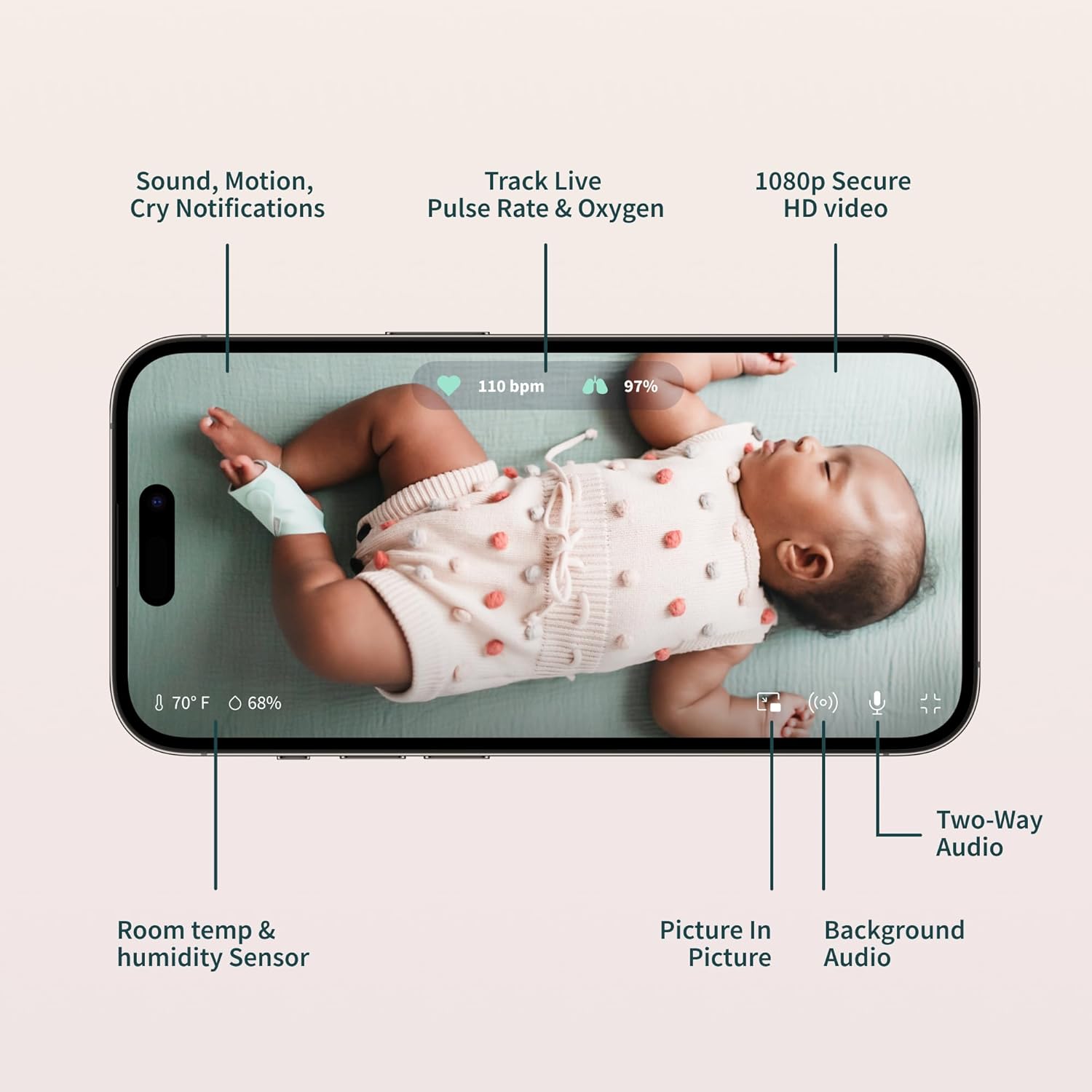
Figure 3.1: The Owlet Cam 1.
비디오 3.1: 오버view and unboxing of the Owlet product, demonstrating the components and initial setup steps.
3.2 Dream Sock Setup
- Charge the Sock: Place the Dream Sock sensor onto the Base Station to charge. The Base Station uses wireless charging for the sock.
- Select Fabric Sock: Choose the appropriate fabric sock size for your baby (0-18 months, 5-30 lbs). The package includes multiple sizes.
- 센서 삽입: Carefully insert the Dream Sock sensor into the designated pocket on the fabric sock.
- Apply to Baby's Foot: Securely wrap the Dream Sock around your baby's foot, ensuring the sensor is positioned correctly (e.g., behind the pinky toe, as indicated on the sock).
- 앱과 페어링: Follow the in-app instructions to pair the Dream Sock with your Owlet Dream App.
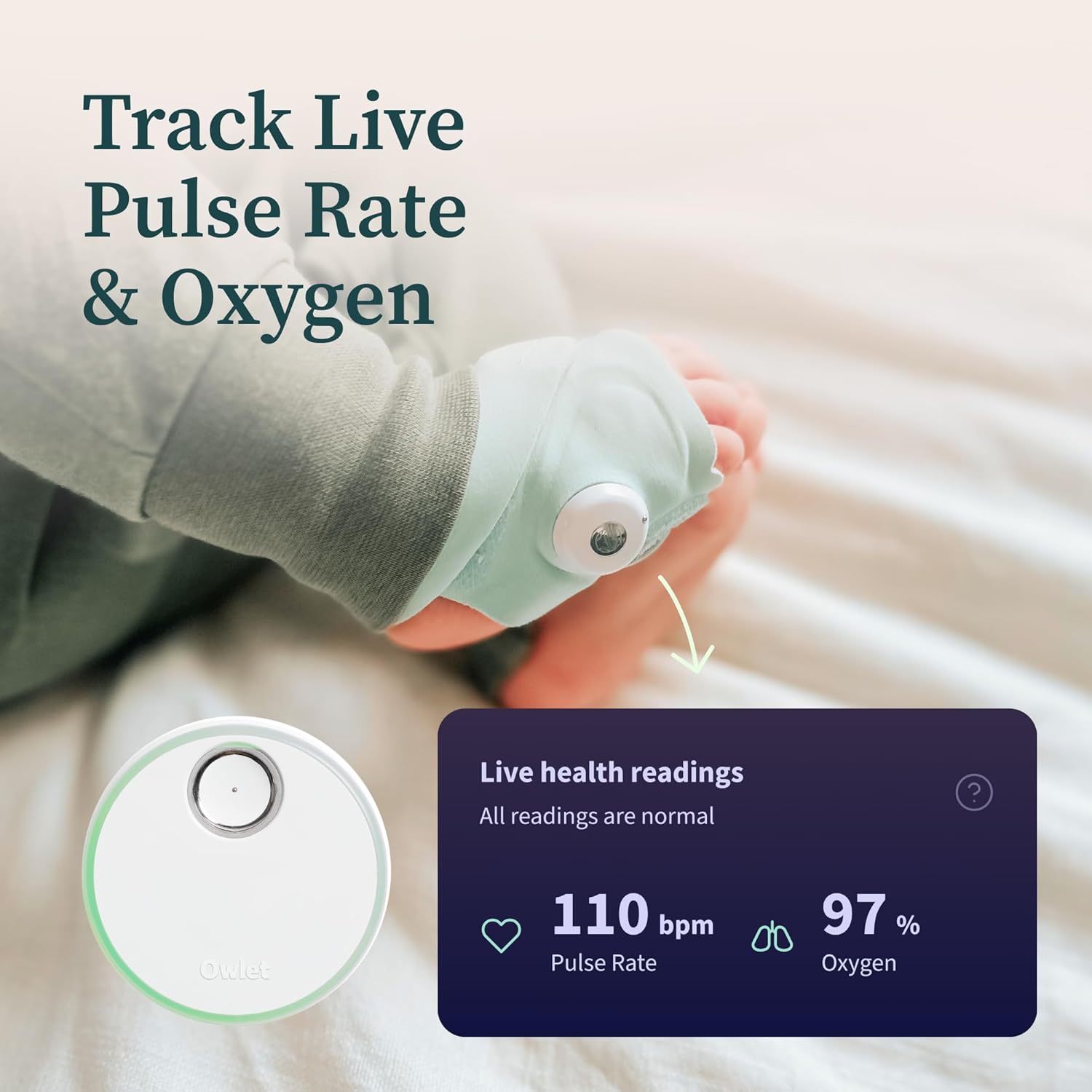
Figure 3.2: Proper placement of the Dream Sock on a baby's foot.
Video 3.2: An unboxing video of the Owlet Dream Sock, showing how to assemble and prepare the sock for use.
3.3 Owlet Dream App Setup
- 다운로드: 검색 "Owlet Dream" in the Apple App Store (iOS OS 14+) or Google Play Store (Android OS 7+).
- 계정 생성: Open the app and create an Owlet account or log in if you already have one.
- 프롬프트를 따르십시오: The app will guide you through connecting your Dream Sock and Owlet Cam 1 to your home Wi-Fi network (2.4 GHz required).

Figure 3.3: The Owlet Dream App displaying real-time monitoring data.
4. 사용 설명서
4.1 실시간 모니터링
- Pulse Rate & Oxygen: The Dream Sock continuously tracks your baby’s pulse rate and oxygen levels. These readings are displayed in real-time on the Owlet Dream App.
- Sleep Trends: The app provides insights into your baby's sleep patterns, including wakings and sleep quality indicators.
- 방 환경: The Owlet Cam 1 monitors room temperature and humidity, visible within the app.

Figure 4.1: Live health readings from the Dream Sock.
Video 4.1: An official Owlet video demonstrating the FDA-cleared features of the Dream Sock, including live health readings and notifications.
4.2 알림 및 경고
- Base Station Alerts: The included Base Station provides light and sound notifications if your infant’s health readings fall outside preset ranges.
- In-App Notifications: Receive real-time alerts directly on your smartphone via the Owlet Dream App for critical health readings or other events like motion or sound detection.

그림 4.2: 예ample of a 'Low Oxygen' alert on the Owlet Dream App.
4.3 Video Monitoring Features
- 2K HD 비디오: View high-definition video of your baby through the Owlet Cam 1.
- HD 나이트 비전: The camera provides clear video even in low-light conditions.
- 양방향 오디오 : Speak to your baby or listen to sounds from the nursery through the app.
- Background Audio & Picture-in-Picture: Keep an ear on your baby while using other apps or view the video feed in a small window.
- Cry & Motion Alerts: Receive notifications for detected sound and motion in the nursery.

Figure 4.3: Owlet Cam 1 night vision view 앱에서.
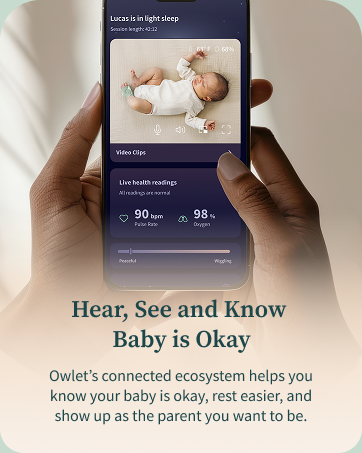
Figure 4.4: Motion and sound notifications from the Owlet Dream App.
5. 유지관리
- Cleaning the Fabric Socks: Hand wash the fabric socks regularly to maintain hygiene and prevent odors. Allow them to air dry completely before reuse.
- 센서 청소: Gently wipe the Dream Sock sensor with a dry, soft cloth. Avoid using harsh chemicals or abrasive materials.
- Cleaning the Cam: Wipe the camera lens and body with a soft, dry cloth. Do not use liquid cleaners directly on the camera.
- 충전 중: Ensure the Dream Sock sensor is placed on the Base Station for charging when not in use. The Base Station should remain plugged in.
6. 문제 해결
- 연결 문제: Ensure your Wi-Fi network is 2.4 GHz. If experiencing frequent disconnections, check your router's signal strength in the nursery. Restarting the camera, Base Station, and your Wi-Fi router may resolve some issues.
- App Glitches: If the app is not displaying real-time data or video correctly, try closing and reopening the app. Ensure your app is updated to the latest version.
- Sock Placement Alerts: If you receive alerts about incorrect sock placement or poor connection, re-adjust the sock on your baby's foot, ensuring it is snug but not too tight, and the sensor is correctly positioned.
- Geographical Restrictions: This U.S. version of the Dream Duo is designed for use within the United States. Functionality may be limited or unavailable outside of the U.S.
7. 사양
| 상표 | 새끼 올빼미 |
| 모델명 | Owlet Dream Duo |
| 모델 번호 | PS0DN67SBK |
| 한국어: | 850038861261 |
| 재료 | Plastic, Spandex |
| 색상 | Gen 1 Blue |
| 호환 장치 | 2.4 Ghz Wifi, Android OS 7+, iOS OS 14+ |
| 제품 치수 | 2.4인치 길이 x 2.4인치 너비 x 4.4인치 높이 |
| 품목 무게 | 2.1 파운드 |
| Battery Life (Sock) | 7 days (sensor charge) |
| 센서 유형 | Auditory, Optical |
| 배터리 설명 | 리튬이온 |
8. 보증 및 지원
8.1 보증 정보
The Owlet Dream Duo Gen 1 comes with a 1년 한정 보증 구매일로부터. 본 보증은 정상적인 사용 중 발생한 제조상의 결함 및 고장에 적용됩니다. 보증 청구를 위해 구매 증빙 자료를 보관해 주십시오.
8.2 고객 지원
For technical assistance, troubleshooting, or warranty inquiries, please visit the official Owlet website or contact their customer support team. Detailed contact information can typically be found in the product packaging or on the Owlet web대지.