
Ysametp M10
Ysametp Mini Projector M10 User Manual
1080P Full HD Supported Portable Video Projector
소개
구매해주셔서 감사합니다asing the Ysametp Mini Projector M10. This portable video projector is designed to provide a high-quality home theater experience with its 1080P Full HD support and 10000 Lux LED light source. It features dual built-in stereo speakers with an SRS sound system for immersive audio. Its compact size and multi-connection capabilities make it ideal for various entertainment and presentation needs. Please read this manual thoroughly before operating the projector to ensure proper use and maintenance.
안전 정보
To ensure safe operation and prolong the lifespan of your projector, please observe the following safety precautions:
- 통풍구를 막지 마십시오. 프로젝터의 과열을 방지하기 위해 적절한 공기 흐름을 확보하십시오.
- 감전이나 화재를 방지하기 위해 프로젝터를 비나 습기에 노출시키지 마십시오.
- 프로젝터를 열지 마십시오asing. 모든 서비스는 자격을 갖춘 서비스 담당자에게 의뢰하세요.
- 프로젝터와 함께 제공된 전원 어댑터만 사용하세요.
- 프로젝터가 떨어지지 않도록 안정적이고 평평한 표면에 놓으세요.
- 프로젝터 렌즈에 눈이 직접 닿지 않도록 주의하세요.amp 켜져있습니다.
- 천둥번개가 칠 때나 장기간 사용하지 않을 때는 프로젝터의 전원 플러그를 콘센트에서 뽑아 두십시오.
패키지 내용
상자를 푼 후 패키지 내용물을 확인하세요.
- 1 x Ysametp Mini Projector M10
- 1 x HDMI 케이블
- 1 x 3-in-1 AV Line
- 1 X 전원 코드
- 1 x 삼각대
- 1 x Drawstring Backpack
- 1 x 리모컨(배터리는 포함되지 않음)
- 1 x 사용자 설명서

제품 끝view
Familiarize yourself with the projector's components and connection ports.

입력/출력 포트:
- HDMI 포트 : Connect to devices like TV sticks, laptops, gaming consoles.
- USB 포트: 미디어 재생을 위해 USB 드라이브를 연결하세요.
- TF 카드 슬롯 : Insert TF cards for media playback.
- VGA 포트: Connect to computers or laptops.
- AV 포트: Connect to older devices like DVD players using the 3-in-1 AV cable.
- 3.5mm 오디오 잭: 외부 헤드폰이나 스피커를 연결하세요.
설정
1. 배치 및 화면 크기
Position the projector on a flat, stable surface. The projection size can range from 32 inches to 200 inches, with an optimal projection distance between 3.6 feet and 16.4 feet.

2. 전원 연결
Connect the supplied power cord to the projector's power input and then plug it into a power outlet.
3. 초점 및 키스톤 조정
After powering on, adjust the focus and keystone knobs located on top of the projector to achieve a clear and rectangular image. The focus ring adjusts image sharpness, while the keystone correction corrects trapezoidal distortion if the projector is not perfectly perpendicular to the screen.
작동 지침
1. 켜기/끄기
- 켜려면: 프로젝터나 리모컨의 전원 버튼을 누르세요.
- 끄기: Press the power button again. The projector will go through a shutdown sequence.
2. 입력 소스 선택
Use the "Source" button on the remote control or the projector's control panel to select the desired input source (HDMI, USB, TF, VGA, AV).
3. 장치 연결
- HDMI : Connect an HDMI cable from your device (e.g., TV Stick, laptop, game console) to the projector's HDMI port.
- USB/TF 카드: Insert a USB drive or TF card into the respective port. The projector will automatically detect the media or prompt you to select it.
- VGA : Connect a VGA cable from your PC/laptop to the projector's VGA port.
- 유명인 : Use the provided 3-in-1 AV cable to connect to devices with AV output.
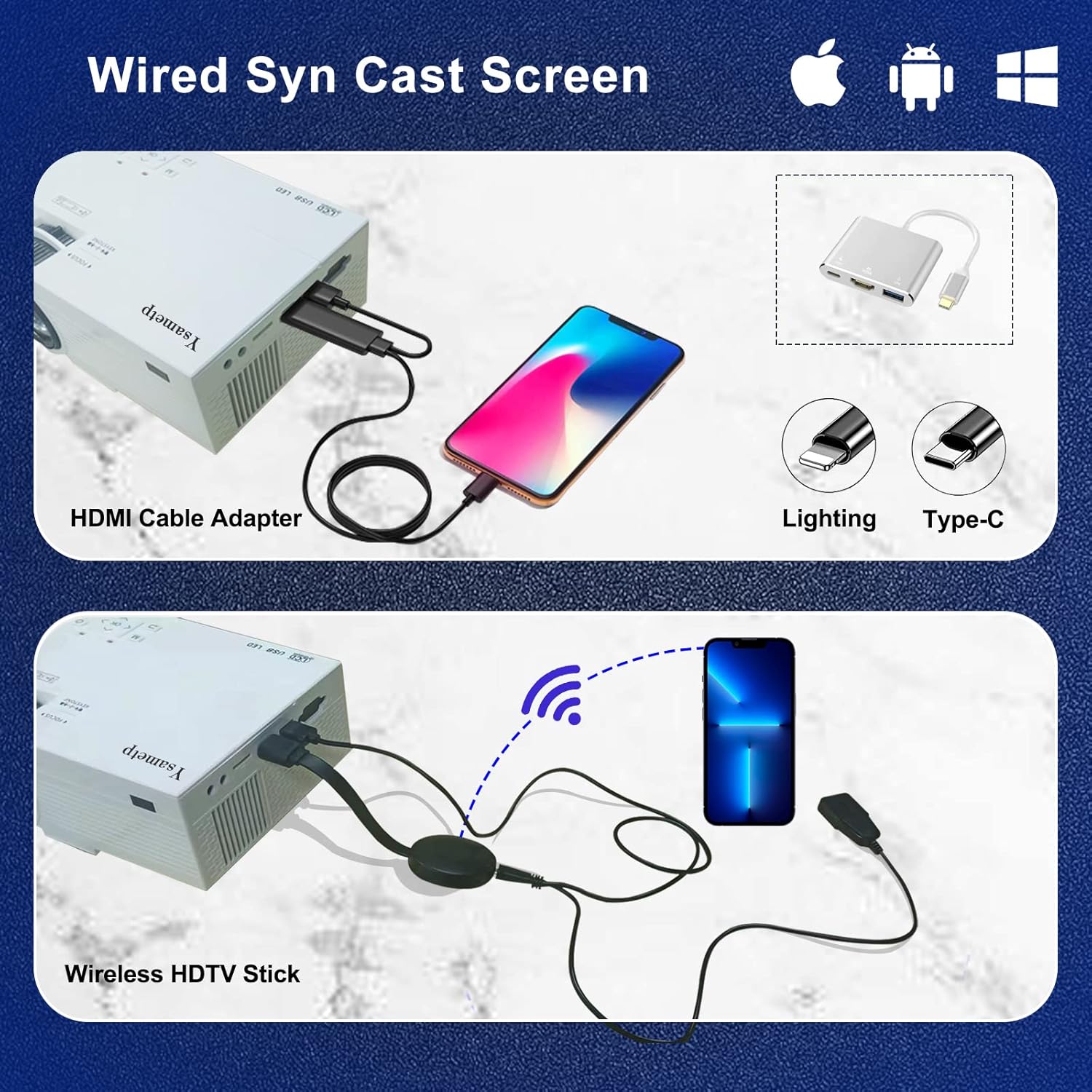
4. Wired Screen Mirroring (for Smartphones)
To mirror your smartphone screen, you will need an HDMI adapter (e.g., Lightning to HDMI for iPhone, USB-C to HDMI for Android) or a Miracast dongle/TV stick (like Roku, Fire TV Stick).

5. 오디오 출력
The projector has dual built-in stereo speakers. For external audio, connect headphones or external speakers to the 3.5mm audio jack.

유지
1. 청소
- 렌즈: 부드럽고 보풀이 없는 광학 렌즈용 천을 사용하세요. 연마성 세척제는 사용하지 마세요.
- Casing: Wipe the projector's exterior with a soft, dry cloth. Do not use liquid or aerosol cleaners.
- 통풍: Regularly check and clean the ventilation openings to prevent dust buildup, which can affect cooling performance.
2. 보관
When not in use, store the projector in a cool, dry place, away from direct sunlight and extreme temperatures. Use the provided drawstring backpack for protection during storage or transport.
3. LED Lifespan
The built-in LED light source is designed to support up to 55,000 hours of use, providing long-lasting performance.
문제 해결
| 문제 | 가능한 원인 / 해결책 |
|---|---|
| 화면에 이미지가 나오지 않습니다. |
|
| 이미지가 흐릿합니다. |
|
| 이미지는 사다리꼴입니다. |
|
| 소리가 나지 않습니다. |
|
| 리모컨이 작동하지 않습니다. |
|
명세서
| 특징 | 세부 사항 |
|---|---|
| 상표 | 이사멧프 |
| 모델 | M10 |
| 디스플레이 기술 | 액정표시장치 |
| 네이티브 해상도 | 1920 x 1080 Pixels (Full HD Supported) |
| 이미지 밝기 | 11000 럭스 |
| 이미지 명암비 | 10000시 1분 |
| 종횡비 | 4시 3분 |
| 투사 크기 | 32 - 200인치 |
| 투사 거리 | 3.6피트 - 16.4피트 |
| LED 수명 | 55,000시간 |
| 소음 수준 | 31데시벨 |
| 왓tage | 60 와트 |
| 하드웨어 인터페이스 | VGA, USB, HDMI, 3.5mm Audio, TF Card |
| 치수(길이 x 너비 x 높이) | 23.88 x 15.49 x 8.13cm |
| 무게 | 975.22g(약 2.15파운드) |
보증 및 지원
Ysametp provides a 3년 제품 보증 for the Mini Projector M10.
If you encounter any problems or have questions regarding your projector, please do not hesitate to contact our customer support. Refer to the contact information provided on the product packaging or the official Ysametp web도움이 필요한 경우 사이트를 방문하세요.
Ask a question about this manual
Ask about setup, troubleshooting, compatibility, parts, safety, or missing instructions. Manuals+ will review the question and use this page’s manual context to help answer it.