
Shargeek STM2E-1
샤르긱 스톰2 슬림 휴대용 충전기 사용 설명서
모델: STM2E-1
소개
This manual provides comprehensive instructions for the safe and efficient use of your Shargeek STORM2 Slim Portable Charger. Please read this manual thoroughly before operating the device and retain it for future reference.
The Shargeek STORM2 Slim is a high-capacity portable power bank featuring a unique transparent design and an IPS display screen. It offers 130W max output with 100W USB-C and 30W USB-A ports, suitable for charging various devices including laptops, tablets, and smartphones.

Image: The Shargeek STORM2 Slim portable charger, showcasing its transparent design that reveals internal components and the included yellow USB-C to USB-C cables.
제품 특징
- 투명한 디자인: The see-through casing reveals the internal battery and circuit layout, highlighting the device's engineering.
- IPS Display Screen: A clear screen provides real-time information on battery life, output distribution, temperature, operation hours, and active ports.
- 대용량: 20000mAh battery capacity, capable of multiple charges for various devices.
- 빠른 충전: Features a 100W USB-C PD port and a 30W USB-A port, supporting 130W max output for rapid charging.
- 보편적 인 호환성 : Charges laptops, phones, tablets, and other devices with USB-C or USB ports.

이미지: 자세한 view of the Shargeek STORM2 Slim's IPS LCD screen, showing various data points such as input/output wattag전자, 권tage, current, battery level, and temperatures.
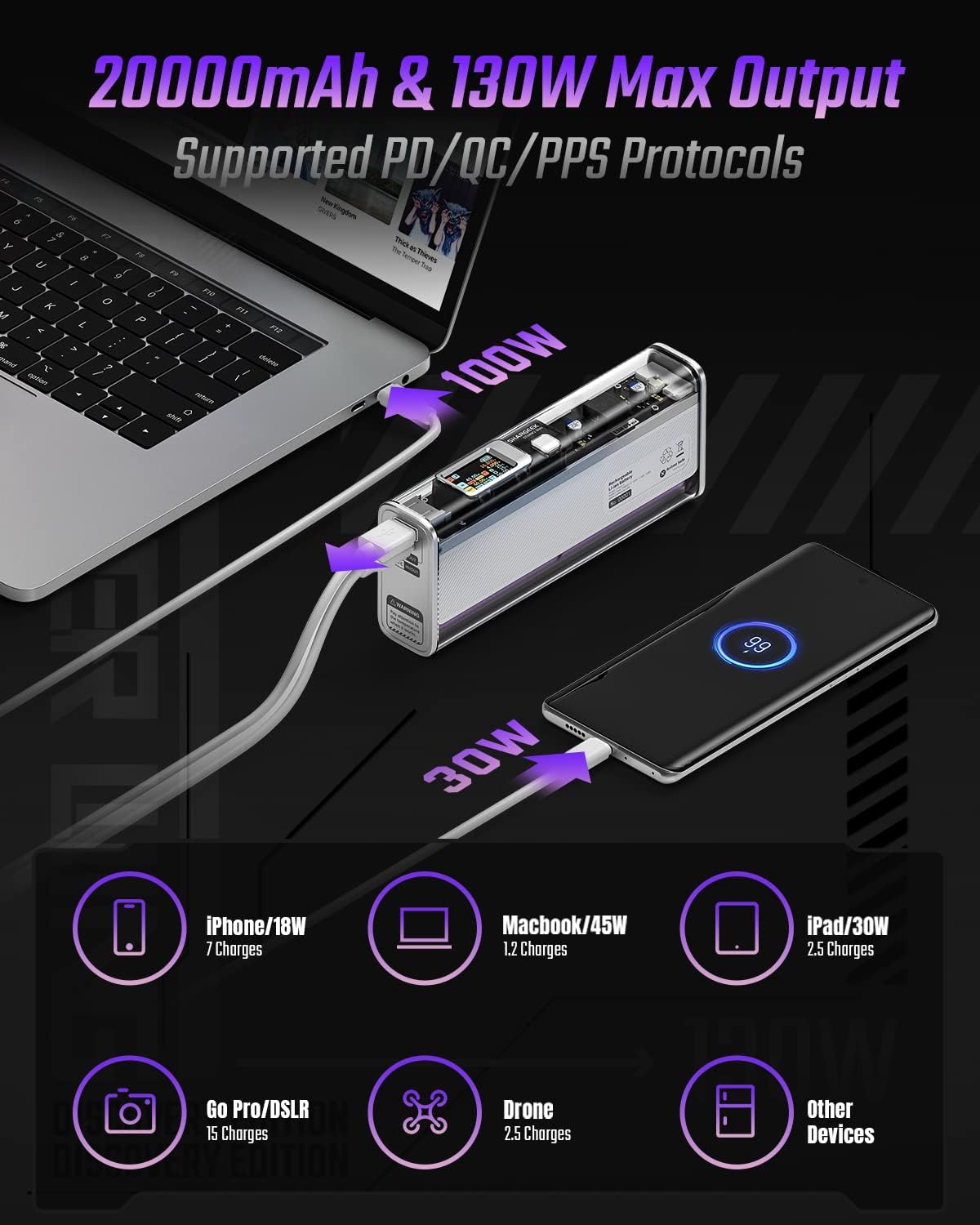
Image: The Shargeek STORM2 Slim connected via USB-C to a laptop for 100W charging and via USB-A to a smartphone for 30W charging, demonstrating its dual-port capability.
설정 및 첫 사용
패키지 내용:
- Shargeek STORM2 Slim Portable Charger
- USB-C to USB-C 케이블
- 사용 설명서 (본 문서)
초기 충전:
- Before first use, fully charge your STORM2 Slim.
- Connect the provided USB-C to USB-C cable to the USB-C port on the STORM2 Slim.
- Connect the other end of the cable to a compatible USB-C power adapter (not included) with a minimum of 100W output for fastest charging.
- The IPS screen will display charging status and battery percentage. The device is fully charged when the screen indicates 100%.
- A full recharge typically takes approximately 90 minutes with a 100W power adapter.
작동 지침
충전 장치 :
- Identify the appropriate charging cable for your device (USB-C to USB-C or USB-A to device-specific cable).
- Connect one end of the cable to your device and the other end to the corresponding port (USB-C or USB-A) on the STORM2 Slim.
- The IPS screen will automatically activate and display the charging output (watts, volts, amps) for the connected device(s).
- The STORM2 Slim can charge two devices simultaneously using both the USB-C and USB-A ports.
Understanding the IPS Screen:
The IPS screen provides detailed real-time information. Use the physical button on the side of the power bank to navigate through different display modes or access settings.
- Input/Output Dashboard: Shows power input (IN) when charging the power bank and power output (OUT) when charging devices, including wattag전자, 권tage와 각 포트의 전류입니다.
- 배터리 수준: 배터리 잔량 퍼센트 표시tage and a visual icon.
- 권tag전자 및 현재: Detailed readings for the internal battery cells.
- 온도: Shows the internal circuit board and battery temperatures.
- 러닝타임: A resettable timer indicating the duration of current operation.
To access menus: Long-press the button. 탐색하려면: Short-press. 선택하려면: Long-press.
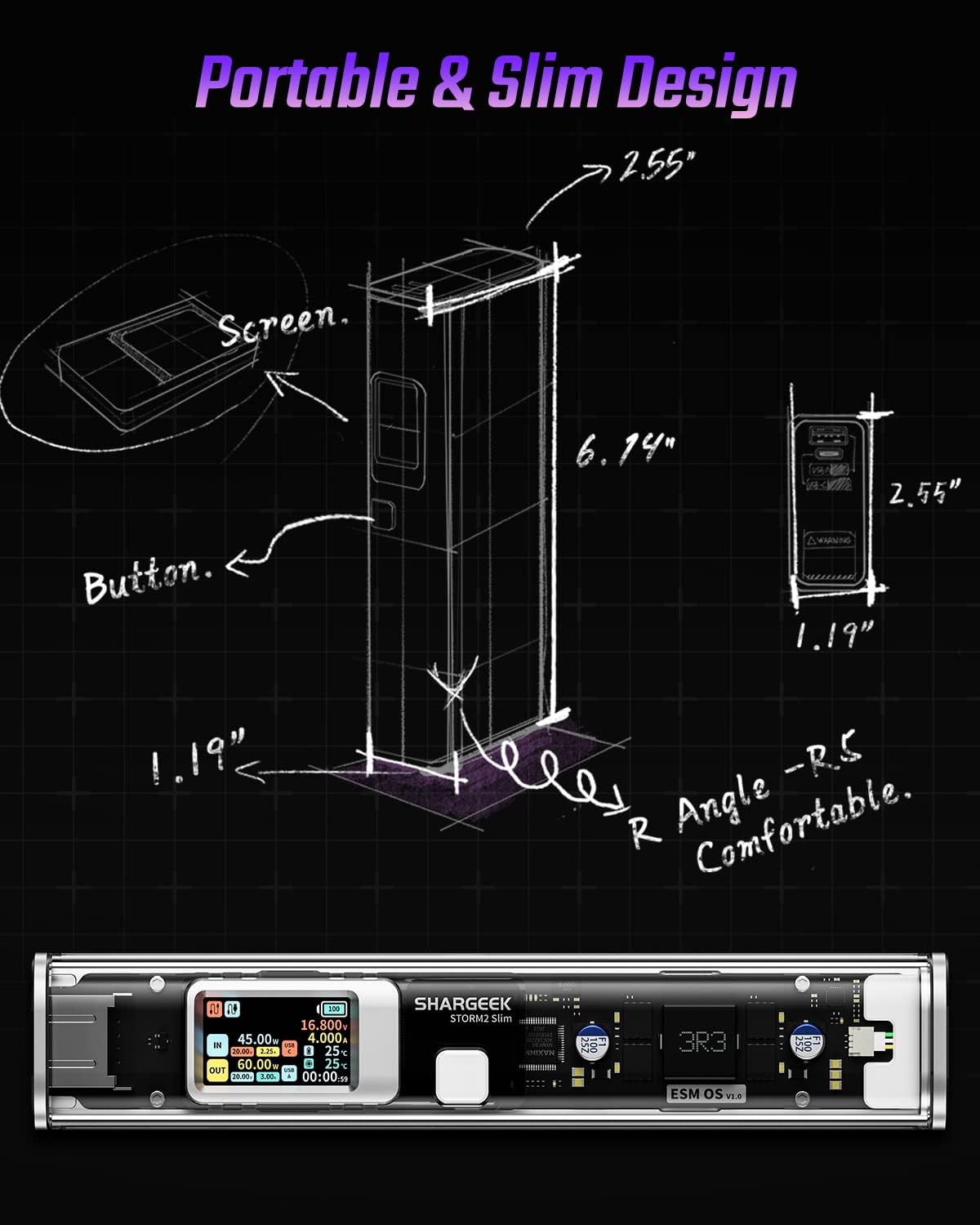
Image: A technical drawing illustrating the dimensions of the Shargeek STORM2 Slim and pointing out the screen and button locations.
유지
- 청소: 보조 배터리 외부를 닦을 때는 부드럽고 마른 천을 사용하십시오. 강한 화학 약품이나 연마성 재질은 사용하지 마십시오.
- 저장: 직사광선, 극한 온도 및 높은 습도를 피해 서늘하고 건조한 곳에 기기를 보관하십시오.
- 배터리 관리 : 배터리 수명을 연장하려면 보조 배터리를 자주 완전히 방전시키지 마십시오. 배터리 잔량이 부족할 때 충전하십시오. 장기간 보관할 경우 3~6개월마다 약 50~70%까지 충전하십시오.
- 낙하 방지: While designed with an aluminum alloy frame for durability, avoid dropping the device as it may damage internal components or the transparent casing.
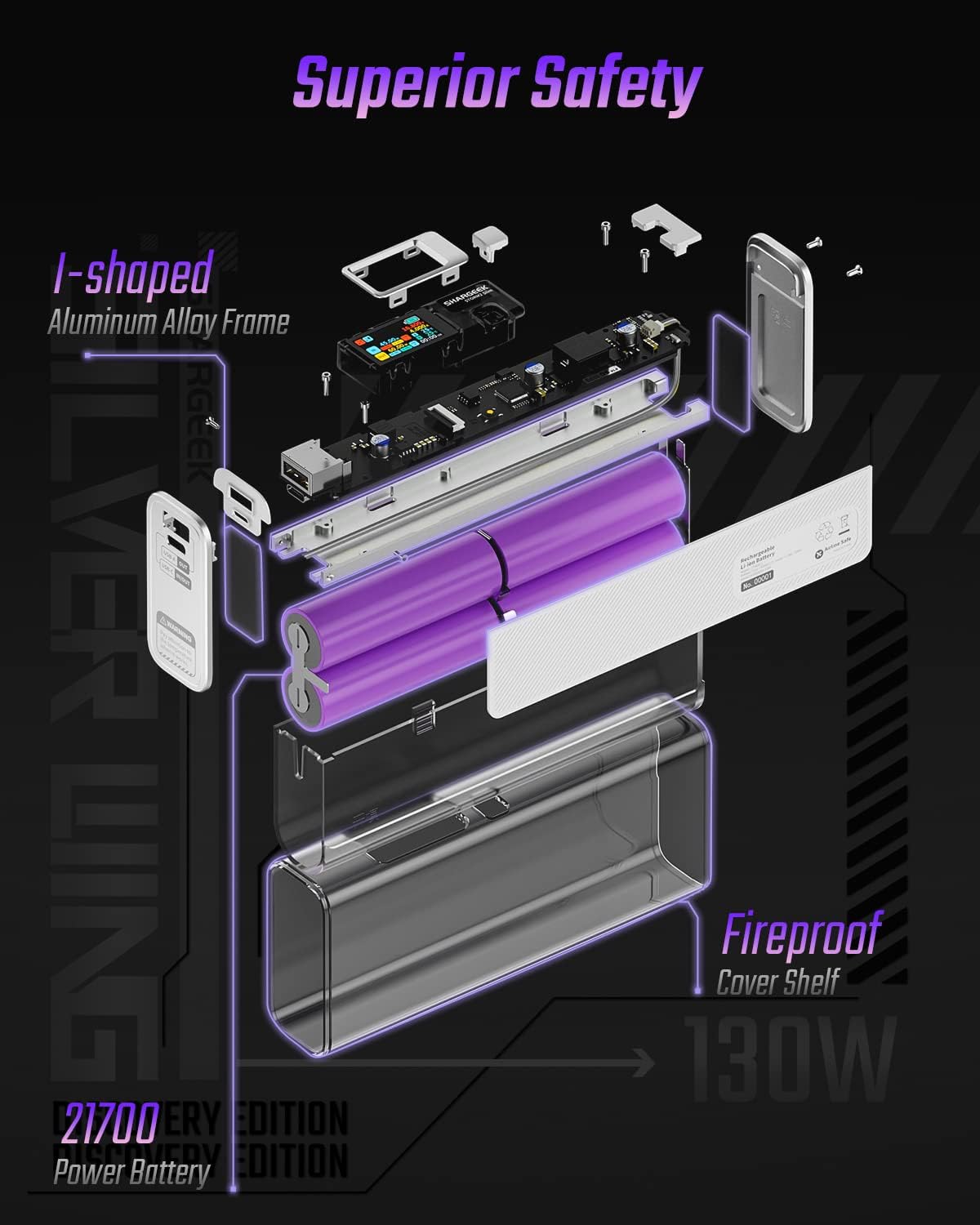
Image: An exploded diagram of the Shargeek STORM2 Slim, illustrating its internal structure including the I-shaped aluminum alloy frame, fireproof cover shelf, and 21700 power batteries, highlighting its robust construction.
문제 해결
| 문제 | 가능한 원인 | 해결책 |
|---|---|---|
| 전원 은행에서 기기를 충전할 수 없습니다. | Low power bank battery; incompatible cable; device not properly connected; device requires more power than available. | Recharge the STORM2 Slim. Ensure cable is fully inserted and compatible. Check device power requirements against power bank output. Try a different cable or port. |
| 모바일 기기가 충전되지 않습니다. | Charging cable or adapter faulty; power bank port damaged. | Try a different USB-C cable and power adapter. Ensure the adapter meets the recommended power output (e.g., 100W). If problem persists, contact support. |
| IPS screen is blank or unresponsive. | Power bank is off; temporary software glitch. | Press the button to activate the screen. If unresponsive, try connecting a device to charge or connecting the power bank to a charger to see if it activates. If problem persists, contact support. |
| 느린 충전. | 케이블이 빠른 충전을 지원하지 않음; 기기가 빠른 충전을 지원하지 않음; 여러 기기가 연결됨. | Ensure you are using a high-quality USB-C PD cable. Verify your device supports fast charging. Charging multiple devices simultaneously may reduce individual charging speeds. |
명세서
- 모델 번호: STM2E-1
- 배터리 용량: 20000mAh
- 최대 출력: 130와트
- USB-C 출력: 최대 100W 전력 공급(PD)
- USB-A 출력: 최대 30W
- 입력: USB-C (up to 100W PD)
- 표시하다: IPS 화면
- 치수: 3 x 6.5 x 15.59cm(약 1.18 x 2.56 x 6.14인치)
- 무게: 약 689g(1.52파운드)
- 배터리 유형: 리튬 이온
보증 및 지원
보증 정보:
Shargeek products are covered by a limited warranty against defects in materials and workmanship. Please refer to the warranty card included with your purchase or visit the official Shargeek web자세한 보증 약관은 해당 사이트에서 확인하세요.
고객 지원:
For technical assistance, troubleshooting, or warranty claims, please contact Shargeek customer support through their official web사이트 또는 제품 포장에 제공된 연락처 정보를 참조하세요.
Official Shargeek Store Link: Shargeek Official Store
안전 정보
- 기기를 물, 습기 또는 극한 온도에 노출시키지 마세요.
- 기기를 직접 분해, 개조 또는 수리하려고 하지 마십시오. 보증이 무효화되고 손상이나 부상을 입을 수 있습니다.
- 어린이의 손이 닿지 않는 곳에 보관하세요.
- 인증받고 호환되는 충전 케이블과 어댑터만 사용하십시오.
- 장치를 떨어뜨리거나 강한 충격을 가하지 마십시오.
- Dispose of the device responsibly according to local regulations for electronic waste.
Ask a question about this manual
Ask about setup, troubleshooting, compatibility, parts, safety, or missing instructions. Manuals+ will review the question and use this page’s manual context to help answer it.